Logitech MK540 Advanced Review: Worth It? (November 2026)
The Logitech MK540 Advanced is a full-size wireless keyboard and mouse combo for Windows and Chrome OS users who want a number pad, palm rest and receiver-based setup. Its main trade-offs are the need for a USB-A port and a mouse without a stated left- or right-hand-specific shape.
On this page (9 sections)
- Logitech MK540 Advanced at a glance
- Is the MK540 Advanced comfortable for daily typing?
- Does the Logitech MK540 Advanced have useful keys?
- How does the MK540 connect, and what computers does it support?
- How long do the MK540 batteries last?
- Is the MK540 keyboard spill-resistant?
- Which MK540 package should you choose?
- How does the MK540 compare with other combos?
- Logitech MK540 Advanced review: who should buy it?
The Logitech MK540 Advanced is a full-size wireless keyboard and mouse combo for people who want a number pad, palm rest and familiar receiver-based connection. It pairs a reduced-noise keyboard with an ambidextrous mouse and is compatible with Windows and Chrome OS.
Its strengths are practical desk features, including adjustable tilt legs, hotkeys and stated battery life of up to 36 months for the keyboard and 18 months for the mouse. The main fit checks are desk space, USB-A availability and whether you need just one set or a pack of four.
Logitech MK540 Advanced at a glance
The MK540 Advanced is best suited to everyday typing at a fixed desk, where a full-size layout and bundled mouse are useful. It is less suited to a compact setup or a computer without an available USB-A port.
Logitech MK540 Full Size Advanced Wireless Keyboard: Best for a familiar full-size layout
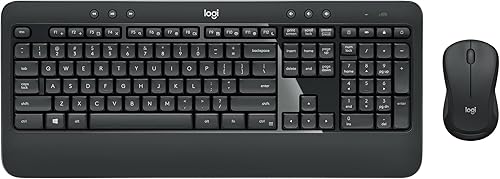
- 104-key QWERTY layout
- Integrated palm rest
- Ambidextrous mouse
- Unifying USB receiver
A full-size wireless set with an integrated palm rest, adjustable tilt legs and an ambidextrous mouse. The receiver-based connection suits a desk with an available USB-A port.
Pros
- Number pad and media hotkeys
- Reduced-noise keys and palm rest
- Ambidextrous mouse with rubber side grips
- Spill-resistant keyboard design
Cons
- Requires a USB receiver
- Full-size layout takes more desk space
- Battery life varies with use
The keyboard has 104 keys, including a number pad, and an integrated palm rest. Its adjustable tilt legs let you choose among different typing angles.
The mouse is ambidextrous and has soft rubber side grips. Logitech describes its tracking as enhanced, with precise cursor control, while the keyboard is designed for reduced noise.
What the MK540 Advanced does well
The combo keeps a familiar layout without needing separate keyboard and mouse purchases. Media, calculator and battery-check hotkeys give you direct access to common functions.
The USB receiver makes the set a fit for a desktop or laptop where a receiver can stay plugged in. Logitech gives a wireless range of up to 33 ft, though desk layout, obstacles and nearby wireless devices can affect the connection in practice.
What to consider before buying
This is a full-size keyboard, so measure the desk area if you also use a mouse pad, notebook or other accessories. Its integrated palm rest adds to the keyboard's footprint.
The receiver-based connection also needs a compatible USB port. If you prefer Bluetooth or want to switch between multiple devices, compare alternatives in our best wireless keyboard and mouse combo guide.
Is the MK540 Advanced comfortable for daily typing?
The MK540's palm rest and adjustable tilt legs give you a few ways to position the keyboard for everyday typing. The full-size layout also keeps the number pad and familiar QWERTY keys together.
Reduced-noise keys may suit a shared room or home office where loud typing is distracting. Logitech describes the keys as optimized for accuracy and reduced noise, but the keyboard remains a conventional membrane design rather than a mechanical one.
The mouse's ambidextrous shape works for either hand, and its rubber side grips add contact on both sides. If you want a shaped mouse that supports a different grip style, look at alternatives designed around that preference.
A keyboard and vertical mouse combo guide can help if mouse shape is as important to you as the keyboard. For a broader layout comparison, see our best keyboard for computer guide.
Does the Logitech MK540 Advanced have useful keys?
The MK540 includes hotkeys for media, calculator and battery-check functions. Those dedicated controls can make common actions easier to reach during work or browsing.
The keyboard also has preset Fn keys that can be personalized with Logitech Options, according to Logitech's product description. If you don't plan to configure function keys, the standard hotkeys still provide direct access to the listed features.
A Caps Lock indicator helps show when the key is active. The layout is QWERTY with 104 keys, so it follows a familiar full-size arrangement rather than a compact or split design.
For a smaller Logitech option, read the MX Keys Mini review. For a Mac-focused alternative, read the Logitech MX Keys for Mac review.
People who want backlighting should compare the keyboard's features carefully before buying. The MK540's listed features focus on its palm rest, hotkeys and reduced-noise typing, while our best backlit keyboard and mouse combo guide focuses on illuminated keys.
How does the MK540 connect, and what computers does it support?
The MK540 connects through a Logitech Unifying USB receiver and supports Windows 7 or later and Chrome OS. You don't need to pair it through Bluetooth, but you do need a compatible USB port.
If you use an MX Master, check which Logitech USB receiver works with your model.
The receiver is small enough to leave in a computer during normal use. Logitech says the connection can reach up to 33 ft, which is more range than most desk setups need.
Some laptops have only USB-C ports. If yours doesn't have USB-A, check whether you already own a compatible adapter or hub before choosing a receiver-based set.
For a standard desktop, setup should be straightforward: connect the receiver, insert the batteries and switch on the keyboard and mouse. Keep the receiver somewhere easy to find if you move the set between computers.
How long do the MK540 batteries last?
Logitech estimates up to 36 months for the keyboard and 18 months for the mouse. These are maximum battery-life figures, not a promise that every setup will reach the same interval.
The keyboard uses 2 AAA batteries, while the mouse uses 1 AA battery, according to the product description. The package information says batteries are included for the keyboard and mouse.
Battery use can vary with how often you type, how long the devices stay active and other usage conditions. The keyboard's battery-check hotkey can help you monitor it without waiting for the keys to stop responding.
The on/off switches let you turn the devices off when they won't be used for a while. If battery convenience matters most, compare stated estimates across the best keyboard and mouse combo options.
Is the MK540 keyboard spill-resistant?
The keyboard is described as spill-resistant, which may help with minor accidents at a desk. It is not a reason to pour liquid over the keyboard or keep using it while wet.
Disconnect the receiver and follow Logitech's care guidance if a spill occurs. Avoid assuming a spill-resistant design means the keyboard is waterproof or safe to submerge.
The key printing is described as abrasion-resistant, and the keyboard has an on/off power switch. Those details support regular desk use, but they don't remove the need for basic care.
Which MK540 package should you choose?
Choose the single combo for one computer and the four-pack only if you need multiple sets. Both supplied options describe the same MK540 Advanced keyboard and mouse features, but one is packaged as a case of four.
Logitech MK540 Advanced Wireless Keyboard and Mouse: Best for a four-pack purchase
- Four keyboard and mouse sets
- Full-size QWERTY keyboard
- Unifying USB receiver
- Windows and Chrome OS compatibility
The MK540 Advanced features in a pack of 4, suited to outfitting several compatible computers. Confirm that you need four sets before choosing this pack.
Pros
- Four complete keyboard and mouse sets
- Full-size layout with number pad
- Media and calculator hotkeys
- Ambidextrous mouse
Cons
- Four sets may be more than a single desk needs
- Uses USB receivers
- Large keyboard needs desk space
A four-pack may make sense for a small office or several compatible workstations. For a single home computer, check the pack quantity carefully so you don't buy more sets than you need.
The two options share the full-size keyboard, palm rest, adjustable tilt legs, hotkeys and ambidextrous mouse. Their stated battery-life estimates are also the same.
How does the MK540 compare with other combos?
The MK540 stands out for a full-size layout, palm rest and ambidextrous mouse, while other combos may suit different desk needs. Compare the keyboard shape, connection type, lighting and mouse design before deciding.
If you want other Logitech options, our best Logitech keyboard mouse combo guide covers more sets from the same brand. For a quiet setup, see the best quiet keyboard and mouse combo guide.
A Dell bundle could be a better match if you prefer that brand or need to compare its available features. Our best Dell wireless keyboard and mouse guide covers those alternatives.
Logitech MK540 Advanced review: who should buy it?
The Logitech MK540 Advanced is a good fit for a Windows or Chrome OS desk that has room for a full-size keyboard and an open USB-A port. Its number pad, palm rest, hotkeys and ambidextrous mouse cover everyday work without adding a complicated setup.
Choose the single set for one computer, or the four-pack if you need several matching setups. If you need Bluetooth, backlighting, a compact layout or a vertical mouse, compare those specific features before settling on the MK540.
Our score weighs specs, features and buyer feedback against what you're shopping for.
Frequently asked questions
Is the Logitech MK540 Advanced a good keyboard and mouse combo?
The MK540 Advanced suits everyday computer work if you want a full-size 104-key keyboard, number pad, palm rest and an ambidextrous mouse. Its receiver-based wireless setup is straightforward, but you'll need a USB-A port and enough desk space for a full-size keyboard.
Does the Logitech MK540 Advanced work with Windows 11?
Yes. Logitech lists the MK540 as compatible with Windows 11, as well as Windows 10 or later, Windows 8, Windows 7 and Chrome OS.
It connects through a Unifying USB receiver, so check that your computer has a suitable USB-A port or adapter.
How long do MK540 keyboard and mouse batteries last?
Logitech gives battery life estimates of up to 36 months for the keyboard and up to 18 months for the mouse. Actual battery life can vary with use, so treat those figures as maximum estimates rather than a guaranteed replacement schedule.
Is the Logitech MK540 mouse ambidextrous?
Yes. The MK540 mouse has an ambidextrous shape and soft rubber side grips, so it is designed for either hand.
If you prefer a vertical mouse or a shape molded specifically for one hand, compare those options before choosing this conventional mouse.


