9 Best Logitech Keyboard and Mouse Combos (November 2026)
The best Logitech keyboard and mouse combos include the Logitech MK120 Full Size Wired Keyboard for simple wired setups, the Logitech MK270 Full Size Wireless Keyboard for basic wireless use, and the Logitech MK470 Slim Wireless Combo Compact Keyboard for a compact, quiet desk.
On this page (4 sections)
The best Logitech keyboard mouse combo for most desks is the MK540, thanks to its full-size layout, palm rest, hotkeys and ambidextrous mouse. For basic wired use, pick the MK120; for a compact desk, look at the MK470; and for multi-device work, consider the MK955 or MK850.
These Logitech bundles range from a simple USB pair to combos with palm support, quieter typing or device switching. Our score weighs specs, features and buyer feedback against what you're shopping for.
If you're still choosing a layout, start with our best keyboard for computer guide. For broader brand comparisons, see our best keyboard and mouse combo roundup.
Our picks at a glance
-
1
 Best for simple wired setups
Logitech MK120 Full Size Wired Keyboard
9.6/10 our score
See it on Amazon -
2
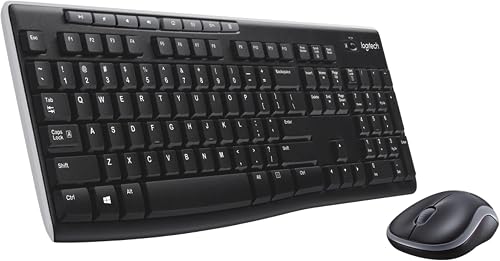 Best for basic wireless use
Logitech MK270 Full Size Wireless Keyboard
9.6/10 our score
See it on Amazon -
3
 Best for a compact, quiet desk
Logitech MK470 Slim Wireless Combo Compact Keyboard
9.5/10 our score
See it on Amazon
- 4
 Check it
Logitech Wave Keys MK670 Wireless Ergonomic Keyboard
Best for wavy keys and palm support - 5
 Check it
Logitech MK540 Full Size Advanced Wireless Keyboard
Best for full-size comfort and hotkeys - 6
 Check it
Logitech MK955 Signature Slim Wireless Keyboard Mouse
Best for switching between devices - 7
 Check it
Logitech MK850 Performance Wireless Keyboard and Mouse
Best for multi-device desk work - 8
 Check it
Logitech MX Keys Combo for Business Keyboard
Best for premium office features - 9
 Check it
Logitech Signature Comfort Plus MK880 Keyboard
Best for palm cushioning and meetings
Which Logitech keyboard and mouse combo fits your setup?
The MK540 is the balanced pick for a full-size home or office desk, while the MK120 is the simplest wired option. The remaining Logitech keyboard and mouse combos suit specific needs such as compact size, palm support or multi-device use.
We compared the stated features and connection options for each combo, then matched them to common desk needs. A Logitech MK540 Advanced review covers that model in more detail, including its full-size controls and comfort features.
Logitech MK120 Full Size Wired Keyboard: Best for simple wired setups
- Full-size wired keyboard and mouse
- USB plug-and-play setup
- Spill-resistant keyboard design
- Ambidextrous optical mouse
The MK120 keeps the setup simple with a full-size keyboard and optical mouse that plug into USB ports. Its familiar layout includes full-size F-keys and a number pad.
Pros
- No batteries or wireless receiver
- Full-size keyboard and mouse
- Keys are rated for up to 10 million keystrokes
Cons
- Keyboard and mouse use cables
- Compatible operating system family is Windows
Logitech MK270 Full Size Wireless Keyboard: Best for basic wireless use
- Full-size wireless keyboard
- USB receiver with up to 33 ft range
- 8 multimedia hotkeys
- Compact ambidextrous mouse
The MK270 adds wireless convenience while keeping a standard full-size layout. It also includes 8 multimedia hotkeys and a compact mouse shaped for either hand.
Pros
- Wireless range up to 33 ft
- Hotkeys for common media and web functions
- Long stated keyboard and mouse battery life
Cons
- Uses a USB receiver
- Mouse is compact rather than full size
Logitech MK470 Slim Wireless Combo Compact Keyboard: Best for a compact, quiet desk
- Compact slim keyboard with number pad
- Low-profile scissor keys
- Quiet keyboard and noise-reduced mouse
- Up to 36-month keyboard battery life
The MK470 pairs a slim keyboard with a quiet, ambidextrous mouse. Its compact design can suit a small desk while retaining a number pad.
Pros
- Quiet typing and mouse operation
- Compact keyboard includes a number pad
- Battery life stated up to 36 months for keyboard
Cons
- Windows-optimized layout
- Uses a USB receiver
Logitech Wave Keys MK670 Wireless Ergonomic Keyboard: Best for wavy keys and palm support
- Wave-shaped keyboard
- Cushioned memory foam palm rest
- Signature M550 L mouse
- Bluetooth or Logi Bolt keyboard connection
Wave Keys combines a wavy keyboard shape and cushioned palm rest with the Signature M550 L mouse. The keyboard can connect over Bluetooth or Logi Bolt.
Pros
- Palm rest has memory foam
- Keyboard supports Bluetooth and Logi Bolt
- Mouse includes a SmartWheel
Cons
- The mouse is sized for medium to large hands
- Keyboard layout is more compact than a standard full-size board
Logitech MK540 Full Size Advanced Wireless Keyboard: Best for full-size comfort and hotkeys
- Full-size keyboard with palm rest
- Spill-resistant design
- Ambidextrous mouse with rubber side grips
- Media, calculator and battery check hotkeys
The MK540 adds a palm rest, adjustable tilt legs and useful hotkeys to a familiar full-size layout. Its ambidextrous mouse has soft rubber side grips.
Pros
- Palm rest and adjustable tilt legs
- Direct hotkeys for media and calculator
- Long stated battery life
Cons
- Uses a USB receiver
- Designed around Windows and Chrome OS compatibility
Logitech MK955 Signature Slim Wireless Keyboard Mouse: Best for switching between devices
- Switch keyboard among three devices
- Bluetooth or Logi Bolt connection
- Customizable keys and shortcuts
- Quiet keyboard and mouse
The MK955 is a full-size slim combo for people who type across a computer, tablet and phone. The keyboard switches between three devices with a single tap.
Pros
- Works across several operating systems
- Customizable shortcuts through Logi Options+
- Quiet typing and mouse clicks
Cons
- Mouse is designed for larger hands
- Customization uses companion software
Logitech MK850 Performance Wireless Keyboard and Mouse: Best for multi-device desk work
- Full-size keyboard with cushioned palm rest
- Right-handed contoured mouse
- Hyper-fast scroll wheel
- Keyboard and mouse support multiple devices
The MK850 supports switching among a computer, tablet and phone. Its full-size keyboard has a cushioned palm rest, and the right-handed mouse has a hyper-fast scroll wheel.
Pros
- Keyboard and mouse support multiple devices
- Cushioned palm rest
- Mouse pairs with up to 3 devices
Cons
- Mouse shape is right-handed
- More features to configure than a basic combo
Logitech MX Keys Combo for Business Keyboard: Best for premium office features
- Full-size backlit keyboard
- MX Master 3S mouse with 8000 DPI sensor
- Logi Bolt encrypted wireless
- Quiet Click mouse technology
This business-oriented combo pairs a full-size backlit keyboard with an MX Master 3S mouse. It includes Logi Bolt wireless security and a keyboard wrist pad.
Pros
- Backlit keys adjust to the environment
- Mouse tracks on glass
- Includes a wrist pad and USB-C charging cable
Cons
- Mouse is designed for right-handed use
- Premium features may be more than a basic desk needs
Logitech Signature Comfort Plus MK880 Keyboard: Best for palm cushioning and meetings
- Curved dual-foam palm rest
- Right-handed mouse with palm cushion
- Dedicated meeting control keys
- Bluetooth switching among three devices
The MK880 centers on palm support, with a curved dual-foam keyboard rest and a right-handed mouse with a built-in palm cushion. It also has dedicated meeting controls.
Pros
- Keyboard and mouse switch among up to 3 devices
- Dedicated meeting control keys
- SmartWheel and quiet mouse clicks
Cons
- Mouse is right-handed
- Logi Bolt receiver is not included
| Product | Best for | Connection | Keyboard | Mouse | Our score |
|---|---|---|---|---|---|
| Logitech MK120 Full Size Wired Keyboard | simple wired setups | Wired USB | Full size with F-keys and number pad | Ambidextrous optical USB mouse | 9.6 |
| Logitech MK270 Full Size Wireless Keyboard | basic wireless use | Wireless USB receiver | Full size with F-keys, number pad and arrow keys | 9.6 | |
| Logitech MK470 Slim Wireless Combo Compact Keyboard | a compact, quiet desk | 2.4 GHz wireless USB receiver | Compact layout with number pad | Ambidextrous optical mouse | 9.5 |
| Logitech Wave Keys MK670 Wireless Ergonomic Keyboard | wavy keys and palm support | Bluetooth or Logi Bolt | Compact wavy design with cushioned palm rest | Signature M550 L for medium to large hands | 9.4 |
| Logitech MK540 Full Size Advanced Wireless Keyboard | full-size comfort and hotkeys | Wireless USB receiver | Full size with number pad and palm rest | 9.3 | |
| Logitech MK955 Signature Slim Wireless Keyboard Mouse | switching between devices | Bluetooth or Logi Bolt | Full-size laptop-style typing | 9.1 | |
| Logitech MK850 Performance Wireless Keyboard and Mouse | multi-device desk work | Bluetooth or USB receiver | Full size with cushioned palm rest | Right-handed with hyper-fast scroll wheel | 8.6 |
| Logitech MX Keys Combo for Business Keyboard | premium office features | Bluetooth or Logi Bolt | Full size with backlit scissor keys | MX Master 3S with MagSpeed scrolling | 8.3 |
| Logitech Signature Comfort Plus MK880 Keyboard | palm cushioning and meetings | Bluetooth | Full size with curved dual-foam palm rest | 8.2 |
How we chose these Logitech keyboard and mouse combos
We compared the keyboard layout, connection type, mouse shape and stated comfort features for each Logitech bundle. The scores reflect how well each set fits the needs described here, such as wired simplicity, a compact footprint, palm support or switching between devices.
A combo can reduce cable clutter, but it isn't the only practical setup. If a separate wired keyboard and wireless mouse would suit your desk, our guide to a wired keyboard and wireless mouse explains that arrangement.
Logitech MK120 Full Size Wired Keyboard: Best for simple wired setups
- Full-size wired keyboard and mouse
- USB plug-and-play setup
- Spill-resistant keyboard design
- Ambidextrous optical mouse
The MK120 keeps the setup simple with a full-size keyboard and optical mouse that plug into USB ports. Its familiar layout includes full-size F-keys and a number pad.
Pros
- No batteries or wireless receiver
- Full-size keyboard and mouse
- Keys are rated for up to 10 million keystrokes
Cons
- Keyboard and mouse use cables
- Compatible operating system family is Windows
The MK120 is the straightforward choice if you want a keyboard and mouse without batteries or a wireless receiver. Both connect to USB, and the keyboard has a standard layout with full-size F-keys and a number pad.
The keyboard includes a spill-resistant design, adjustable tilt legs and keys rated for up to 10 million keystrokes. Logitech describes the mouse as an ambidextrous optical model with smooth tracking.
Its cables are the main tradeoff. Choose it when the computer stays near the keyboard and you prefer a direct wired connection.
Logitech MK270 Full Size Wireless Keyboard: Best for basic wireless use
- Full-size wireless keyboard
- USB receiver with up to 33 ft range
- 8 multimedia hotkeys
- Compact ambidextrous mouse
The MK270 adds wireless convenience while keeping a standard full-size layout. It also includes 8 multimedia hotkeys and a compact mouse shaped for either hand.
Pros
- Wireless range up to 33 ft
- Hotkeys for common media and web functions
- Long stated keyboard and mouse battery life
Cons
- Uses a USB receiver
- Mouse is compact rather than full size
The MK270 adds wireless convenience without changing the familiar full-size layout. Its keyboard includes F-keys, arrow keys, a number pad and 8 multimedia hotkeys for functions such as email, volume and playback.
Logitech states battery life of up to 36 months for the keyboard and 12 months for the mouse. The compact mouse is shaped for either hand, and the included USB receiver provides a stated range up to 33 ft.
Choose it for everyday typing and basic media shortcuts. If comfort features matter more, compare it with the Logitech MK540 review.
Logitech MK470 Slim Wireless Combo Compact Keyboard: Best for a compact, quiet desk
- Compact slim keyboard with number pad
- Low-profile scissor keys
- Quiet keyboard and noise-reduced mouse
- Up to 36-month keyboard battery life
The MK470 pairs a slim keyboard with a quiet, ambidextrous mouse. Its compact design can suit a small desk while retaining a number pad.
Pros
- Quiet typing and mouse operation
- Compact keyboard includes a number pad
- Battery life stated up to 36 months for keyboard
Cons
- Windows-optimized layout
- Uses a USB receiver
The MK470 suits a desk where a standard keyboard feels too wide or noisy. Its slim keyboard keeps a number pad, while low-profile scissor keys and a noise-reduced mouse aim for quieter use.
The keyboard and mouse connect through a USB nano receiver. The stated battery life is up to 36 months for the keyboard and 18 months for the mouse, though actual battery life can vary with use.
This combo is optimized for Windows. If you are weighing a cable against a receiver, read our comparison of wired keyboard vs wireless keyboard.
Logitech Wave Keys MK670 Wireless Ergonomic Keyboard: Best for wavy keys and palm support
- Wave-shaped keyboard
- Cushioned memory foam palm rest
- Signature M550 L mouse
- Bluetooth or Logi Bolt keyboard connection
Wave Keys combines a wavy keyboard shape and cushioned palm rest with the Signature M550 L mouse. The keyboard can connect over Bluetooth or Logi Bolt.
Pros
- Palm rest has memory foam
- Keyboard supports Bluetooth and Logi Bolt
- Mouse includes a SmartWheel
Cons
- The mouse is sized for medium to large hands
- Keyboard layout is more compact than a standard full-size board
Wave Keys stands out for its wavy keyboard shape and cushioned palm rest with memory foam. Its compact design is intended to let you bring the mouse closer, and it comes with a Signature M550 L mouse sized for medium to large hands.
The keyboard connects through Bluetooth or Logi Bolt and can switch among a PC, tablet and phone. The mouse has a SmartWheel for line-by-line control or faster scrolling through long pages.
Choose it if the keyboard's shape and palm support match your preferences. For a smaller keyboard without the bundled mouse, see our Logitech MX Keys Mini review.
Logitech MK540 Full Size Advanced Wireless Keyboard: Best for full-size comfort and hotkeys
- Full-size keyboard with palm rest
- Spill-resistant design
- Ambidextrous mouse with rubber side grips
- Media, calculator and battery check hotkeys
The MK540 adds a palm rest, adjustable tilt legs and useful hotkeys to a familiar full-size layout. Its ambidextrous mouse has soft rubber side grips.
Pros
- Palm rest and adjustable tilt legs
- Direct hotkeys for media and calculator
- Long stated battery life
Cons
- Uses a USB receiver
- Designed around Windows and Chrome OS compatibility
The MK540 gives you a full-size keyboard with a palm rest, adjustable tilt legs and direct-access hotkeys. Its ambidextrous wireless mouse has soft rubber side grips, so the set can suit shared desks where users prefer different hands.
Logitech states up to 36 months of keyboard battery life and 18 months for the mouse. The combo connects through a mini Unifying USB receiver and is compatible with Windows and Chrome OS.
Choose it if you want familiar keys with a few comfort and control additions. It offers a fuller setup than the MK270 while keeping the layout straightforward.
Logitech MK955 Signature Slim Wireless Keyboard Mouse: Best for switching between devices
- Switch keyboard among three devices
- Bluetooth or Logi Bolt connection
- Customizable keys and shortcuts
- Quiet keyboard and mouse
The MK955 is a full-size slim combo for people who type across a computer, tablet and phone. The keyboard switches between three devices with a single tap.
Pros
- Works across several operating systems
- Customizable shortcuts through Logi Options+
- Quiet typing and mouse clicks
Cons
- Mouse is designed for larger hands
- Customization uses companion software
The MK955 is designed for people who type across several devices. Its full-size keyboard can switch among three devices with one tap, and the combo connects over Bluetooth or Logi Bolt.
The keyboard has laptop-style typing and customizable keys through Logi Options+. Its M750 L mouse is shaped for larger hands and includes a SmartWheel, with quiet clicks for shared or home offices.
Choose the MK955 if device switching and shortcut customization matter more than a simple one-computer setup. The keyboard supports Windows, macOS, Chrome OS, Linux, iPadOS, iOS and Android.
Logitech MK850 Performance Wireless Keyboard and Mouse: Best for multi-device desk work
- Full-size keyboard with cushioned palm rest
- Right-handed contoured mouse
- Hyper-fast scroll wheel
- Keyboard and mouse support multiple devices
The MK850 supports switching among a computer, tablet and phone. Its full-size keyboard has a cushioned palm rest, and the right-handed mouse has a hyper-fast scroll wheel.
Pros
- Keyboard and mouse support multiple devices
- Cushioned palm rest
- Mouse pairs with up to 3 devices
Cons
- Mouse shape is right-handed
- More features to configure than a basic combo
The MK850 pairs a full-size keyboard with a cushioned palm rest and a contoured right-handed mouse. Its hyper-fast scroll wheel is useful for long documents and web pages, and both keyboard and mouse support multi-device use.
You can type across a computer, tablet or phone, and pair the mouse with up to three devices. Bluetooth and USB receiver connectivity give you options for connecting the combo.
Choose it when switching devices and the shaped mouse are more useful than an ambidextrous design. For a simpler wireless set, the MK540 has a more basic configuration.
Logitech MX Keys Combo for Business Keyboard: Best for premium office features
- Full-size backlit keyboard
- MX Master 3S mouse with 8000 DPI sensor
- Logi Bolt encrypted wireless
- Quiet Click mouse technology
This business-oriented combo pairs a full-size backlit keyboard with an MX Master 3S mouse. It includes Logi Bolt wireless security and a keyboard wrist pad.
Pros
- Backlit keys adjust to the environment
- Mouse tracks on glass
- Includes a wrist pad and USB-C charging cable
Cons
- Mouse is designed for right-handed use
- Premium features may be more than a basic desk needs
The MX Keys Combo for Business is the premium choice for a work setup that benefits from a backlit keyboard, a wrist pad and a more advanced mouse. See our Logitech MX Keys S Combo review for another set in this keyboard family.
The MX Master 3S has a Darkfield sensor that tracks on glass and MagSpeed scrolling.
The keyboard adjusts its backlighting to the environment, and Logi Bolt is designed for encrypted wireless connections. The combo also supports Bluetooth and works with Windows, macOS, Chrome OS and Linux.
Mac users can also read our Logitech MX Keys for Mac review.
This set has more features than most everyday desks need. If your main concern is replacing a damaged key, see our Logitech MX Keys keycap replacement guide.
Logitech Signature Comfort Plus MK880 Keyboard: Best for palm cushioning and meetings
- Curved dual-foam palm rest
- Right-handed mouse with palm cushion
- Dedicated meeting control keys
- Bluetooth switching among three devices
The MK880 centers on palm support, with a curved dual-foam keyboard rest and a right-handed mouse with a built-in palm cushion. It also has dedicated meeting controls.
Pros
- Keyboard and mouse switch among up to 3 devices
- Dedicated meeting control keys
- SmartWheel and quiet mouse clicks
Cons
- Mouse is right-handed
- Logi Bolt receiver is not included
The MK880 is built around cushioned support and meeting controls. Its curved dual-foam palm rest pairs with a right-handed mouse that has a palm cushion and side grips.
The keyboard and mouse connect through Bluetooth and can switch among up to three devices. Dedicated meeting keys, an AI launch key and customizable buttons provide extra controls, while the mouse's SmartWheel supports both line-by-line and faster scrolling.
Choose it if palm support and quick meeting controls are high on your list. The Logi Bolt receiver is not included, so plan on Bluetooth unless you have a compatible receiver.
What should you compare before choosing a Logitech combo?
Compare the connection, layout and mouse shape first; these affect daily use more than extra shortcuts. Then decide whether you need wireless device switching, a palm rest or a compact keyboard.
Wired or wireless connection?
The MK120 is the only wired set here, with both devices connecting directly through USB. The other options use a wireless receiver, Bluetooth or both, so check which connection matches your computer and whether you want a receiver occupying a USB port.
If you're deciding between the two connection styles, our guide to a wired keyboard and wireless mouse covers using different connection types together. A separate wired keyboard and mouse combo may also fit if you want both devices cabled.
Full-size or compact keyboard?
A full-size layout gives you a number pad and familiar spacing, which can help if you enter numbers often. The MK120, MK270, MK540, MK850 and MX Keys Combo are full-size options, while the MK470 and Wave Keys have more compact designs.
For more help comparing layouts and key types, see our complete computer keyboard buying guide. If you use a compact board without a number pad, consider whether your regular work depends on one.
Does the mouse fit your hand and desk?
The MK120, MK270, MK470 and MK540 include ambidextrous mouse designs. The MK850, MX Keys Combo for Business and MK880 use right-handed designs, while the MK955 mouse is described for larger hands.
A mouse shape that feels awkward can outweigh extra keyboard shortcuts. Check which hand the mouse is made for and leave enough clear space to move it freely.
Do you need to switch among devices?
The MK955 keyboard switches among three devices, while the MK850 supports multi-device use for both keyboard and mouse. Wave Keys also supports keyboard switching among a PC, tablet and phone.
If you use only one computer, a simpler set such as the MK270 or MK540 may cover the basics. For multiple devices, check whether switching applies to both pieces of the combo or only the keyboard.
Which Logitech keyboard and mouse combo should you choose?
Pick the MK540 for a familiar full-size wireless setup with a palm rest, hotkeys and an ambidextrous mouse. Choose the MK120 for a wired pair, the MK470 for a compact quiet desk, or the MK955 and MK850 when switching devices is a priority.
For a wider set of brands and use cases, compare our best keyboard and mouse combo picks. If the choice comes down to how you connect, use the wired keyboard vs wireless keyboard guide to narrow it down.
Our top 3 picks at a glance
-
1
Best for simple wired setups
Logitech MK120 Full Size Wired Keyboard
9.6/10 our score
See it on Amazon -
2
Best for basic wireless use
Logitech MK270 Full Size Wireless Keyboard
9.6/10 our score
See it on Amazon -
3
Best for a compact, quiet desk
Logitech MK470 Slim Wireless Combo Compact Keyboard
9.5/10 our score
See it on Amazon
Frequently asked questions
What is the best Logitech keyboard mouse combo for most people?
The MK540 is a strong fit if you want a full-size keyboard with a palm rest, hotkeys and an ambidextrous mouse. For a wired setup, choose the MK120.
If you want wireless basics and multimedia shortcuts, the MK270 is another straightforward option.
Match the connection and keyboard shape to your desk before choosing.
Which Logitech combo is best for a small desk?
The MK470 is the compact option here, with a slim keyboard that keeps a number pad and a quiet mouse. Its wireless receiver helps avoid a keyboard cable across the desk.
Measure the space you have for both devices, including room to move the mouse.
Is the Logitech Wave Keys combo a full-size keyboard?
Wave Keys has a more compact, wavy shape than a standard full-size keyboard, which can bring the mouse closer to your body. It includes a cushioned palm rest and pairs with a Signature M550 L mouse.
Choose it for that shape and support, and compare its layout with your typing needs.
What is the difference between MK540 and MK850?
The MK540 is a full-size wireless combo with a palm rest, hotkeys and an ambidextrous mouse. The MK850 adds multi-device use for the keyboard and mouse, plus a right-handed contoured mouse with hyper-fast scrolling.
Choose MK540 for familiar desk use or MK850 if device switching matters.
Can a Logitech keyboard and mouse combo work with multiple devices?
Some can. The MK955 keyboard switches among three devices, while the MK850 supports switching the keyboard and mouse between a computer, tablet and phone.
Wave Keys can also connect the keyboard through Bluetooth or Logi Bolt.
Check which parts switch devices, since keyboard and mouse support can differ.


