9 Best Quiet Keyboard and Mouse Combos (November 2026)
The best quiet keyboard and mouse combos include the Logitech MK335 Full Size Quiet Wireless Keyboard for quiet everyday typing, the Logitech MK270 Full Size Wireless Keyboard for a full-size quiet layout, and the seenda Rechargeable Wireless Keyboard and Mouse Combo for avoiding disposable batteries.
On this page (4 sections)
The Logitech MK335 is the best quiet keyboard and mouse combo for most shared desks, with low-profile, whisper-quiet keys and an ambidextrous mouse. Choose EDJO for a palm rest and a stated 30 dB operation level, or seenda if you want rechargeable devices.
Quietness depends on both parts of the set. For typing options, see our quiet keyboards for office work guide.
A low-noise keyboard can still be paired with a clicky mouse, so check the key and mouse descriptions separately before you choose.
If you want broader advice on layout and size, start with our best keyboard for computer guide. For more paired options, see our best keyboard and mouse combo picks.
Our picks at a glance
-
1
 Best for quiet everyday typing
Logitech MK335 Full Size Quiet Wireless Keyboard
9.7/10 our score
See it on Amazon -
2
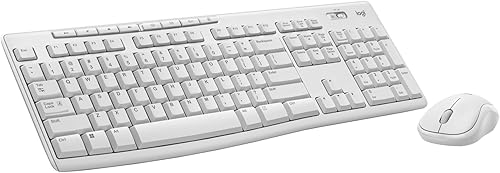 Best for a full-size quiet layout
Logitech MK270 Full Size Wireless Keyboard
9.6/10 our score
See it on Amazon -
3
 Best for avoiding disposable batteries
seenda Rechargeable Wireless Keyboard and Mouse Combo
9.5/10 our score
See it on Amazon
- 4
 Check it
Lovaky 2.4G Wireless Keyboard Mouse Combo
Best for quiet shared spaces - 5
 Check it
HP 230 Wireless Mouse and Keyboard Combo
Best for quiet chiclet keys - 6
 Check it
QUASIO Wireless Keyboard and Mouse Combo
Best for quiet typing and clicks - 7
 Check it
EDJO Full-Size Silent Wireless Keyboard and Mouse
Best for a palm rest and quiet calls - 8
 Check it
EDJO Wireless Keyboard and Mouse Combo
Best for low-light desks - 9
 Check it
SHUNJINRUN Slim Silent Full Size Wireless Keyboard
Best for a slim silent layout
How we chose quiet keyboard and mouse combos
The best quiet keyboard and mouse combo should address the sounds you want to reduce while keeping the layout and connection convenient for your desk. We compared stated keyboard noise features, mouse click descriptions, layout, receiver setup and power needs.
Quiet claims vary. Some sets call the keyboard quiet but give no detail about mouse clicks, while others describe both devices as quiet or muted.
Where a sound level is provided, we report it as a stated figure rather than a measured result.
The Logitech MK335 leads for its whisper-quiet keys, programmable F-keys and ambidextrous mouse. The QUASIO and Lovaky sets stand out for describing both keyboard and mouse noise, while the EDJO with palm rest gives a numeric sound level.
We also considered everyday fit. A number pad helps with spreadsheets and data entry, a shared receiver saves a USB port, and rechargeable devices reduce the need to replace batteries.
Our score weighs specs and features against what you're shopping for.
| Product | Best for | Keyboard | Wireless | Battery life | Our score |
|---|---|---|---|---|---|
| Logitech MK335 Full Size Quiet Wireless Keyboard | quiet everyday typing | Full size, low profile, quiet keys | 2.4 GHz with nano receiver | Up to 24 months keyboard, 12 months mouse | 9.7 |
| Logitech MK270 Full Size Wireless Keyboard | a full-size quiet layout | Full size with number pad and arrow keys | USB receiver, up to 33 ft | Up to 36 months keyboard, 12 months mouse | 9.6 |
| seenda Rechargeable Wireless Keyboard and Mouse Combo | avoiding disposable batteries | Slim full size with number pad | 2.4G USB receiver, up to 33 ft | 9.5 | |
| Lovaky 2.4G Wireless Keyboard Mouse Combo | quiet shared spaces | 104-key full size, low profile | 2.4G USB, up to 33 ft | 9.4 | |
| HP 230 Wireless Mouse and Keyboard Combo | quiet chiclet keys | Full size with numeric keypad | 2.4 GHz, one USB receiver | Up to 16 months keyboard, 12 months mouse | 9.3 |
| QUASIO Wireless Keyboard and Mouse Combo | quiet typing and clicks | Full size with numeric keypad | 2.4 GHz USB receiver, up to 33 ft | 8.8 | |
| EDJO Full-Size Silent Wireless Keyboard and Mouse | a palm rest and quiet calls | Full size with palm rest and number pad | 2.4 GHz USB receiver, up to 33 ft | 8.8 | |
| EDJO Wireless Keyboard and Mouse Combo | low-light desks | Wireless with backlighting and phone/tablet holder | 2.4 GHz, one USB receiver, up to 33 ft | 8.3 | |
| SHUNJINRUN Slim Silent Full Size Wireless Keyboard | a slim silent layout | Slim full size with 110 keys | 2.4G USB receiver, up to 33 ft | 8.1 |
Which quiet keyboard and mouse combo fits your desk?
The MK335 is the strongest general pick for quiet typing, while the right alternative depends on whether you prioritize a full-size layout, quiet clicks, a palm rest, or rechargeable power. Compare the specific details below before deciding.
Logitech MK335 Full Size Quiet Wireless Keyboard: Best for quiet everyday typing
- Low-profile, whisper-quiet keys
- Ambidextrous mouse
- 11 hot keys and 4 programmable F-keys
- Up to 24 months keyboard battery life and 12 months mouse battery life
Low-profile, whisper-quiet keys make this a strong fit when typing noise matters. The ambidextrous mouse and multimedia keys suit an everyday desk.
Pros
- Quiet, low-profile keys
- Ambidextrous mouse
- Multimedia controls and programmable F-keys
Cons
- Mouse clicking noise level is not specified
- Battery life varies with use and conditions
The Logitech MK335 combines a full-size, low-profile keyboard with whisper-quiet keys and an ambidextrous mouse. That makes it a good starting point for a home office or a shared desktop where typing sound is the main concern.
Its 11 hot keys and 4 programmable F-keys provide quick access to multimedia controls. Logitech gives battery life of up to 24 months for the keyboard and 12 months for the mouse, though actual life varies with use and conditions.
The mouse stores the nano receiver, which helps keep the small part with the set when you move it. Logitech describes its 2.4 GHz connection as encrypted and designed for reliable use.
Choose the MK335 when keyboard quietness and flexible media controls matter. The mouse's click noise level is not specified, so consider a set that explicitly describes quieter clicks if that sound is your main concern.
Logitech MK270 Full Size Wireless Keyboard: Best for a full-size quiet layout
- Low-profile, quiet keys
- Full-size F-keys, number pad and arrow keys
- Up to 36 months keyboard battery life
- Compact ambidextrous mouse
A full-size layout keeps the number pad and arrow keys, while quiet keys help reduce typing noise. Its compact mouse works for left- or right-handed users.
Pros
- Quiet keys and full-size layout
- Spill-resistant keyboard design
- Eight multimedia hotkeys
Cons
- Mouse click noise level is not specified
- Keyboard and mouse battery life varies with conditions
The Logitech MK270 is a practical option when you want quiet keys without giving up a familiar full-size layout. It has F-keys, a number pad and arrow keys, plus a compact mouse designed for left- or right-handed use.
Logitech describes the keys as low-profile and quiet. The keyboard is also spill-resistant and has adjustable-height tilt legs, which are useful everyday details for a work surface.
Its USB receiver provides a stated wireless range up to 33 ft, and eight multimedia hotkeys put common controls within reach. Logitech gives up to 36 months of keyboard battery life and 12 months for the mouse.
Pick this set if the number pad and a long stated keyboard battery life rank above a specific mouse noise rating. Mouse click quietness is not specified.
seenda Rechargeable Wireless Keyboard and Mouse Combo: Best for avoiding disposable batteries
- Quiet low-profile keys
- Rechargeable keyboard and mouse
- Full-size layout with number pad and media keys
- One USB receiver for both devices
The rechargeable keyboard and mouse suit a desk where you want to reduce battery changes. Low-profile keys are described as quieter, and the keyboard keeps a full-size number pad.
Pros
- Both devices recharge
- Quiet, low-profile keyboard
- One receiver serves both devices
Cons
- No Bluetooth connection
- Battery life depends on use
The seenda combo is the rechargeable choice in this group, with built-in batteries in both the keyboard and mouse. Its low-profile keys are described as quieter, and the keyboard retains a full-size layout with a number pad and media keys.
The two devices share one USB receiver, so the set uses a single USB-A port. It is a 2.4G connection rather than Bluetooth, so check your computer for a free port or plan for an adapter.
The white-and-silver design is slim and lightweight, and the mouse is ambidextrous. Seenda says a full charge can last up to 1–2 months depending on use.
Choose it to reduce battery changes while keeping a number pad. If you need Bluetooth, pick a different connection type.
Lovaky 2.4G Wireless Keyboard Mouse Combo: Best for quiet shared spaces
- Low-noise keyboard and silent mouse
- Full-size 104-key layout
- Adjustable-height tilt legs
- One shared 2.4 GHz USB receiver
Lovaky describes both the keyboard and mouse as quiet, which makes it a useful choice when clicks matter as much as typing. Adjustable tilt legs let you set the keyboard angle.
Pros
- Quiet keyboard and mouse
- Ambidextrous mouse
- Receiver stores inside the mouse
Cons
- Battery life is not specified
- The keyboard and mouse use different battery sizes
Lovaky describes both its keyboard and mouse as quiet, making it a strong pick for a shared room where clicking can interrupt calls or focused work. Its keyboard has 104 full-size keys and adjustable-height tilt legs.
The mouse has a symmetrical shape for either hand, and the shared USB receiver stores inside it. The set connects over 2.4 GHz wireless up to a stated 33 ft.
The keyboard uses one AAA battery and the mouse one AA battery. Lovaky also describes an auto-sleep function and a battery level indicator, though it does not specify a runtime.
Choose this combo when quiet clicks and typing matter more than rechargeable power. Its broad operating system compatibility includes Windows, Mac OS, Chrome OS and Linux.
HP 230 Wireless Mouse and Keyboard Combo: Best for quiet chiclet keys
- Low-profile chiclet keys
- Full-size keyboard with numeric keypad
- One 2.4 GHz connection for both devices
- 12 keyboard shortcuts
The full-size keyboard uses low-profile chiclet keys intended for quieter typing. Its 12 shortcut keys and adjustable mouse sensitivity suit a work desk.
Pros
- Low-noise keyboard design
- Numeric keypad and 12 shortcuts
- Mouse sensitivity adjusts up to 1600 DPI
Cons
- Mouse click noise level is not specified
- Check the keyboard layout before choosing
The HP 230 uses low-profile chiclet keys in a full-size layout with a numeric keypad. HP describes the keyboard as quieter, and the single 2.4 GHz connection handles both devices.
Twelve keyboard shortcuts provide quick access to popular functions. The mouse sensitivity adjusts up to 1600 DPI, which can help you tune pointer movement for desk tasks.
HP gives up to 16 months of keyboard use and up to 12 months for the mouse with one set of batteries. Actual battery life varies with use and environmental conditions.
Choose the HP when a chiclet keyboard and direct shortcuts fit your routine. Check the keyboard layout before ordering, since the details identify an AZERTY layout.
QUASIO Wireless Keyboard and Mouse Combo: Best for quiet typing and clicks
- Soft membrane keys
- Silent micro-motion mouse clicks
- Full-size keyboard with number pad
- One shared USB receiver
Soft membrane keys and a mouse with silent micro-motion technology address both typing and clicking noise. The full-size layout adds a number pad and 12 multimedia shortcuts.
Pros
- Quiet keys and near-silent clicks
- Shared receiver
- Compatible with Windows, macOS, ChromeOS and Linux
Cons
- Batteries are not included
- Battery life details are not consistent across the information
The QUASIO is one of the clearest picks for reducing both typing and clicking noise. Its soft membrane keys are described as quiet, and the mouse uses silent micro-motion technology for near-silent clicks.
The full-size keyboard includes a number pad and 12 multimedia shortcuts. Both devices use one USB receiver, which stores in the mouse's battery compartment.
The set supports Windows, Mac OS, Chrome OS and Linux. It uses one AAA battery in the keyboard and one AA in the mouse, and batteries are not included.
Choose QUASIO when quiet mouse clicks are as important as quiet keys. Its ergonomic keyboard has adjustable tilt legs, while the mouse is compact and contoured.
EDJO Full-Size Silent Wireless Keyboard and Mouse: Best for a palm rest and quiet calls
- Soft silicone membrane and muted mouse switches
- Stated operation level as quiet as 30 dB
- Extended palm rest
- One receiver and 12 shortcut keys
This set pairs a palm rest with a stated 30 dB operation level for quieter shared work. Its receiver connects both devices, and the keyboard has 12 shortcuts.
Pros
- Palm rest and foldable kickstands
- Quiet keyboard and muted mouse switches
- Receiver stores inside the mouse
Cons
- Requires three batteries total
- The 30 dB figure is a stated operating level
This EDJO combo pairs an extended palm rest with a keyboard and mouse designed for quieter operation. EDJO states operation as quiet as 30 dB, and describes the keyboard as a soft silicone membrane with muted mouse switches.
For separate support under both devices, compare keyboard and mouse wrist rest sets.
The full-size keyboard includes a number pad and 12 shortcuts for common tasks. Foldable kickstands raise the rear, and one 2.4 GHz USB receiver connects both devices.
EDJO gives up to 12 months of battery life with auto-sleep, using two AAA batteries for the keyboard and one AA for the mouse. The receiver stores inside the mouse compartment.
Choose this set if you want a palm rest and a stated sound figure. The 30 dB level is a manufacturer-stated figure, not a result from our own measurement.
EDJO Wireless Keyboard and Mouse Combo: Best for low-light desks
- Keyboard noise-reducing key stability
- Mouse clicks described as almost completely silent
- Seven switchable backlight effects
- Rechargeable keyboard and mouse
This rechargeable set adds backlighting for a dim workspace while aiming to keep keystrokes and mouse clicks quiet. The backlight can be turned off.
Pros
- Rechargeable devices
- Backlighting can be switched off
- One receiver serves both devices
Cons
- Multimedia keys may not fully work with Mac OS
- Charging is needed between uses
The EDJO backlit combo suits desks where you need to see the keys in low light without sacrificing a quieter setup. The keyboard is described as reducing key noise, while the mouse clicks are described as almost completely silent.
Its seven switchable backlight effects can be turned off. The set is rechargeable by USB-C and connects both devices through one USB receiver.
A built-in holder gives you a place for a phone or tablet, and the keyboard has foldable stands. The mouse has three DPI settings and forward/backward functions.
Choose this set if backlighting and rechargeable power are useful alongside quieter operation. The maker notes that multimedia keys may not fully work with Mac OS.
SHUNJINRUN Slim Silent Full Size Wireless Keyboard: Best for a slim silent layout
- Scissor-structure keyboard switches
- Silent keyboard and mouse design
- 110-key full-size layout
- One USB receiver for both devices
Scissor-structure switches and a slim full-size design make this a fit for buyers who want a quieter, compact-feeling keyboard. The mouse has three adjustable DPI levels.
Pros
- Slim full-size keyboard
- One receiver for both devices
- Calculator button and office shortcuts
Cons
- Batteries are not included
- Multimedia keys may not work properly on some systems
SHUNJINRUN pairs a slim, full-size keyboard with scissor-structure switches and a mouse described as silent. Its 110-key layout includes a calculator button, multimedia shortcuts and an Fn lock.
The keyboard and mouse share one USB receiver, with a stated range up to 33 ft. The mouse offers three DPI levels, and the keyboard angle tilts for typing.
This set uses two AA batteries in the keyboard and one AA in the mouse, which are not included. It is described as compatible with Windows, while some multimedia keys may not work properly on other systems.
Choose it for a slim keyboard and calculator access. If you want backlighting, compare our best backlit keyboard and mouse combo guide.
What should you check before choosing a quiet combo?
Check the mouse noise, keyboard layout and connection type before you decide. Those details can matter as much as a quiet-key description.
Does the mouse click quietly too?
A quiet keyboard does not automatically mean a quiet mouse. The QUASIO describes silent micro-motion clicks, Lovaky describes a silent mouse, and EDJO describes muted mouse switches.
The Logitech MK335, MK270 and HP 230 focus their quiet descriptions on the keyboard. If mouse clicks are the main distraction, prioritize a set that addresses them directly.
Will the layout work for your tasks?
A full-size keyboard with a number pad can help with spreadsheets and number entry, but it takes more desk space than a compact layout. Most picks here have a number pad, including the MK270, seenda and HP 230.
Check the keyboard layout before ordering. The HP 230 details identify an AZERTY layout, which may differ from the layout you expect.
Do you need a USB receiver or Bluetooth?
Many combos here use one USB receiver for both devices. That saves a port, but it occupies a USB-A connection and may require an adapter on a newer laptop.
The seenda is explicitly not Bluetooth. For more wireless options and connection trade-offs, see our best wireless keyboard and mouse combo guide.
Would ergonomic features help your setup?
Tilt legs, a palm rest and a mouse shape can affect how a set fits your desk routine. Lovaky and QUASIO have adjustable keyboard tilt, while the EDJO full-size set includes an extended palm rest.
If wrist support is a priority, compare our best keyboard wrist rest picks and best ergonomic keyboard and mouse combo guide. Gaming-focused layouts and controls are covered in our best gaming keyboard and mouse combo guide.
Which quiet keyboard and mouse combo should you choose?
Choose the Logitech MK335 if quiet typing, an ambidextrous mouse and media controls make the best fit for your desk. Pick the QUASIO or Lovaky if quieter mouse clicks are a priority, and choose EDJO with palm rest if you want a stated 30 dB operating level.
For wireless sets focused specifically on reduced noise, see our guide to best quiet keyboard and mouse wireless options. Check the keyboard layout, receiver connection and battery needs before choosing.
Our top 3 picks at a glance
-
1
Best for quiet everyday typing
Logitech MK335 Full Size Quiet Wireless Keyboard
9.7/10 our score
See it on Amazon -
2
Best for a full-size quiet layout
Logitech MK270 Full Size Wireless Keyboard
9.6/10 our score
See it on Amazon -
3
Best for avoiding disposable batteries
seenda Rechargeable Wireless Keyboard and Mouse Combo
9.5/10 our score
See it on Amazon
Frequently asked questions
What makes a keyboard and mouse combo quiet?
Look for low-profile or membrane keys described as quiet, plus a mouse with silent or muted switches. Quiet keyboard keys reduce typing sound, while quieter mouse switches address clicks.
Noise levels can vary by typing force, surface and room, so a product description alone cannot guarantee a silent desk.
Are quiet wireless keyboard and mouse combos good for shared offices?
They can help reduce noise from typing and clicking in a shared room. Models such as the Lovaky and QUASIO describe both keyboard and mouse operation as quiet.
If you need a number to compare, EDJO states operation as quiet as 30 dB for its full-size set.
Does a quiet keyboard and mouse combo need Bluetooth?
No. Several quiet wireless sets use a small USB receiver instead of Bluetooth.
The seenda combo, for example, connects through USB-A and does not support Bluetooth.
Check your computer's available ports and whether you need an adapter before choosing a receiver-based set.
Should I choose a rechargeable or battery-powered quiet combo?
Choose rechargeable devices if you want to avoid routine battery replacement, as with the seenda combo. Choose a battery-powered set if you prefer replaceable batteries and do not mind keeping spares nearby.
Check whether both devices use the same battery size and how long the maker says each lasts.


