Logitech MX Keys Mini Review: Worth It? (November 2026)
The Logitech MX Keys Mini suits compact typing without a separate number pad, with smart backlighting and Bluetooth pairing for up to 3 devices. Choose the Mac version for an Apple-focused layout or the MX Mechanical Mini for low-profile mechanical switches.
On this page (7 sections)
- What does the Logitech MX Keys Mini offer?
- How does the compact layout affect daily typing?
- Is the MX Keys Mini a good fit for multiple devices?
- How does the Mac version differ?
- Should you choose MX Keys Mini or MX Mechanical Mini?
- What should you know about backlighting and battery life?
- Is the Logitech MX Keys Mini worth choosing?
The Logitech MX Keys Mini is a compact wireless keyboard for people who want a smaller typing area without a separate numeric keypad. Its key features include smart backlighting, Bluetooth switching among up to 3 devices, and keys for dictation, microphone mute and emoji.
The trade-off is straightforward: if you enter numbers often, a separate keypad can be useful. If you mainly type text and want room for a mouse beside the keyboard, the Mini's layout may suit your desk.
What does the Logitech MX Keys Mini offer?
The MX Keys Mini combines a compact layout with membrane keys, smart illumination and multi-device Bluetooth pairing. It is the standard version to consider if your devices span different operating systems.
Logitech MX Keys Mini Minimalist Wireless Illuminated: Best for mixed-device desks
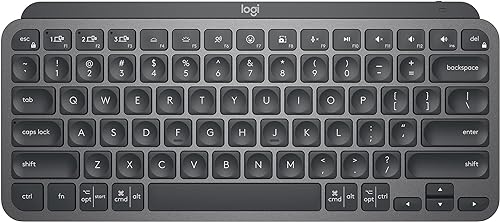
- Compact layout without a separate numeric keypad
- Pairs with up to 3 devices via Bluetooth Low Energy
- Smart backlighting
- USB-C rechargeable
A compact, backlit keyboard for switching among several computers or mobile devices. Its smaller layout leaves out a separate numeric keypad.
Pros
- Pairs with up to 3 devices
- Backlighting responds to hand proximity and room lighting
- Dictation, mic mute and emoji keys
- USB-C rechargeable
Cons
- No separate numeric keypad
- Not compatible with Logitech Unifying Receiver Technology
- Battery life varies with use and conditions
The keys are shaped for fingertips, and Logitech includes Dictation, Mic Mute/Unmute and Emoji keys. The backlighting responds when your hands approach and adjusts to changing light.
Logitech says the keyboard can run for up to 10 days on a full charge, or up to 5 months with backlighting off. It charges over USB-C, and battery life depends on use and computing conditions.
Who should choose the standard version?
Choose the standard model if you want a compact keyboard for a mix of computers and mobile devices. It pairs with up to 3 devices through Bluetooth Low Energy and supports a broad range of operating systems.
Its layout is QWERTY, and its listed language is Spanish. Check the key legends and layout you need before buying, especially if you rely on a different language layout.
How does the compact layout affect daily typing?
The compact layout frees desk space by leaving out a separate numeric keypad. That can make it easier to keep a mouse close to the keyboard, but it changes how you handle frequent number entry.
If your work involves long stretches of text, email, browsing or code, the smaller footprint may be a reasonable trade. If you enter invoices, spreadsheets or numeric data throughout the day, consider whether you want a separate keypad nearby.
A compact keyboard also changes the distance between keys and your mouse. Measure your desk and think about where your hands rest during normal work, rather than choosing by dimensions alone.
Our best keyboard for computer guide compares formats and features for different desk setups. For more options from the brand, see our best Logitech wireless keyboard guide.
Is the MX Keys Mini a good fit for multiple devices?
The MX Keys Mini makes sense for a desk where you switch among as many as 3 devices. Its Bluetooth Low Energy connection avoids needing a separate receiver for basic pairing.
The standard version is compatible with Windows, macOS, Linux, Chrome OS, iOS, iPadOS and Android, though software features can vary by operating system. Logitech Options software is required for some features on Windows and macOS; basic functions are supported without it on other listed systems.
The keyboard is not compatible with Logitech Unifying Receiver Technology. If your setup depends on a Unifying receiver, confirm your connection plan before choosing it.
The MX Mechanical Mini is another compact option that supports up to 3 devices through Bluetooth Low Energy or its included Logi Bolt receiver. It adds low-profile mechanical switches, including Tactile Quiet, Clicky and Linear options.
How does the Mac version differ?
The MX Keys Mini for Mac has a Mac-focused layout and is designed for Apple devices that meet its operating system requirements. Consider it if most of your typing happens on a Mac, iPad or iPhone.
Its stated requirements are macOS 10.15 or later, iOS 13.4 or later, and iPadOS 14 or later. It pairs with up to 3 Apple devices through Bluetooth Low Energy and includes the same kinds of Dictation, Mic Mute/Unmute and Emoji smart keys.
Logitech MX Keys Mini for Mac Minimalist: Best for Apple device switching

- Mac-focused layout
- Pairs with up to 3 Apple devices
- Smart backlighting
- USB-C rechargeable
The Mac version keeps the compact format and smart keys while targeting Apple devices. Choose it when its Mac layout and stated OS requirements match your setup.
Pros
- Mac-focused layout
- Pairs with up to 3 Apple devices
- Smart backlighting
- USB-C rechargeable
Cons
- Designed around Apple devices
- No separate numeric keypad
- Battery life varies with use and conditions
The Mac version also has smart backlighting and USB-C charging. Logitech gives it the same estimate of up to 10 days per charge, or up to 5 months with backlighting off, with actual life depending on use and conditions.
Read our Logitech MX Keys Mac review for a closer look at the Apple-focused model. If you are replacing a worn keycap, our Logitech MX Keys keycap replacement guide covers that specific task.
Should you choose MX Keys Mini or MX Mechanical Mini?
Choose the MX Keys Mini for membrane typing, and choose the MX Mechanical Mini if low-profile mechanical switches matter more. Both are compact and include smart illumination, but their typing mechanisms are different.
The MX Mechanical Mini offers Tactile Quiet, Clicky and Linear switch options. Its Tactile Quiet version is described as having a tactile bump and quieter typing, while the MX Keys Mini uses membrane keys.
The mechanical model supports Bluetooth Low Energy and the included Logi Bolt receiver, and it pairs with up to 3 devices. It is also USB-C rechargeable, with a stated estimate of up to 15 days on a full charge or up to 10 months with backlighting off.
Logitech MX Mechanical Mini Wireless Illuminated Keyboard: Best for mechanical feedback

- Low-profile mechanical switches
- Tactile Quiet switch option
- Pairs with up to 3 devices
- Smart backlighting
A compact alternative with low-profile mechanical switches and a Tactile Quiet option. Pick it if switch feedback matters more than matching the MX Keys Mini's membrane typing.
Pros
- Low-profile mechanical switches
- Tactile Quiet option
- Pairs with up to 3 devices
- Includes Logi Bolt receiver
Cons
- Mechanical typing feel differs from the MX Keys Mini
- No separate numeric keypad
- Battery life varies with use and conditions
The MX Mechanical Mini does not add a separate numeric keypad, so it keeps the compact desk footprint. Logitech also offers a full-size MX Mechanical with an integrated number pad for frequent number entry.
Use our MX Keys vs MX Mechanical comparison to weigh the switch feel and connection options side by side.
What should you know about backlighting and battery life?
The MX Keys Mini's backlighting turns on when your hands approach and adjusts to the light around you. That can help when room lighting changes, though the keyboard uses single-color backlighting rather than color effects.
Backlighting also affects battery life. Logitech's estimate changes from up to 10 days on a full charge to up to 5 months with the lighting off, and actual results depend on use.
If you prefer a mechanical switch feel, the MX Mechanical Mini also has smart backlighting. Its battery estimates are longer, but they are still estimates and can vary with conditions.
Is the Logitech MX Keys Mini worth choosing?
The Logitech MX Keys Mini is a strong fit if you want a compact, backlit keyboard for several devices and rarely need a separate number pad. Its Bluetooth switching and smart keys make it especially suited to a desk shared by computers or mobile devices.
Choose the Mac version if its Mac layout fits your Apple setup. Choose the MX Mechanical Mini if you want low-profile mechanical switches, or a full-size keyboard if regular number entry makes a keypad useful.
For lighting alternatives, compare our best backlit keyboard for Windows, and check our Logitech MX Keys battery replacement guide if battery service becomes relevant.
Frequently asked questions
Does the Logitech MX Keys Mini have a number pad?
No, the MX Keys Mini uses a compact layout without a separate numeric keypad. That saves desk space, but frequent number entry may be slower than on a full-size keyboard.
Consider how often you enter figures before choosing the smaller format.
How many devices can the MX Keys Mini pair with?
The standard MX Keys Mini pairs with up to 3 devices through Bluetooth Low Energy. The Mac version is designed to switch among multiple Mac computers and iPads, with up to 3 Apple devices supported.
How long does the MX Keys Mini battery last?
Logitech gives a battery estimate of up to 10 days on a full charge, or up to 5 months with backlighting off. Actual battery life may vary with use and computing conditions, so treat those figures as estimates rather than a fixed schedule.
Is the MX Keys Mini mechanical?
No, the MX Keys Mini is a membrane keyboard. The MX Mechanical Mini is a separate compact model with low-profile mechanical switches, including a Tactile Quiet option.
Compare the two if mechanical feedback is a priority.


