8 Best Backlit Keyboard and Mouse Combos (November 2026)
The best backlit keyboard and mouse combos include the MageGee Gaming Keyboard and Mouse Combo for adjustable RGB lighting, the Logitech MK270 Full Size Wireless Keyboard for simple wireless work, and the SABLUTE Wireless Keyboard and Mouse Combo for a wrist rest and phone holder.
On this page (4 sections)
The best backlit keyboard and mouse combo for most desks is the MageGee Gaming Keyboard and Mouse Combo, with a full-size keyboard, adjustable RGB lighting and a backlit mouse. For wireless use, SABLUTE offers rechargeable options, while TECKNET pairs lighting with large print keys.
Backlighting can mean different things. For a closer explanation, read what a backlit laptop keyboard is.
Some keyboards light the legends so the letters are visible; TECKNET instead lights around printed characters, while several other picks offer switchable colors or modes.
If illumination is only one part of your decision, see our best keyboard for computer buying guide and best keyboard and mouse combo roundup. For wireless models specifically, our best wireless keyboard and mouse combo guide narrows the field.
Our picks at a glance
-
1
 Best for adjustable RGB lighting
MageGee Gaming Keyboard and Mouse Combo
9.7/10 our score
See it on Amazon -
2
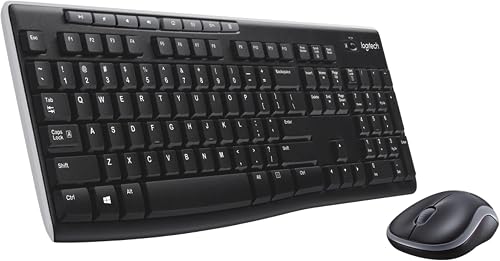 Best for simple wireless work
Logitech MK270 Full Size Wireless Keyboard
9.6/10 our score
See it on Amazon -
3
 Best for a wrist rest and phone holder
SABLUTE Wireless Keyboard and Mouse Combo
9.5/10 our score
See it on Amazon
- 4
 Check it
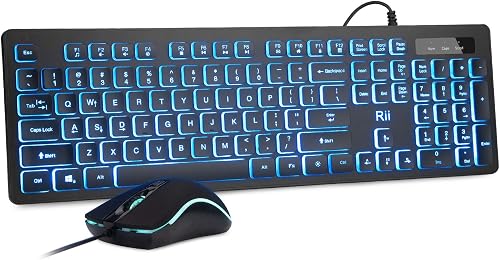
Rii Wired Keyboard and Mouse Combo
Best for straightforward wired lighting - 5
 Check it
SABLUTE Wireless Keyboard and Mouse Combo
Best for a slim rechargeable set - 6
 Check it
SABLUTE Ergonomic Wireless Keyboard and Mouse Combo
Best for a wave layout and palm rest - 7
 Check it
GEODMAER 65% Gaming Keyboard and Mouse Combo
Best for saving desk space - 8
 Check it
TECKNET Wired Large Print Keyboard and Mouse
Best for large, easy-to-see characters
Which backlit keyboard and mouse combo fits your desk?
The MageGee stands out for adjustable keyboard lighting and a full-size layout, while the SABLUTE KM22 MAX adds a wrist rest and phone holder. Choose first between wired and wireless, then decide how much keyboard space and lighting control you need.
MageGee Gaming Keyboard and Mouse Combo: Best for adjustable RGB lighting
- 104-key full-size layout
- 8 backlight colors and 5 light modes
- 6 mouse speed levels
- Wired USB connection
A full-size wired set with adjustable RGB keyboard lighting and a backlit mouse. It fits buyers who want lighting controls and a standard number pad.
Pros
- Multiple keyboard lighting modes
- Full-size layout with number pad
- Mouse has 6 speed levels
Cons
- Wired set needs desk cable space
- Gaming styling may not suit every office
MageGee is the strongest fit if you want a full-size wired set with configurable RGB. Its keyboard has 104 keys, including a number pad, and the light controls offer 8 colors, 5 modes, and multiple brightness and speed levels.
The mouse has a 7-color breathing light and 6 speed levels from 600 to 3200. That range gives you a way to adjust cursor movement for different tasks without relying on one speed.
The keyboard uses floating removable keycaps and has non-slip pads underneath. Those details may suit a desk where you type and game, though the wired connection means you'll need room to route both peripherals' cables.
Choose MageGee when you want adjustable lighting on a full-size keyboard and mouse. Its white K1 design and gaming look may be less suited to a subdued office setup.
Logitech MK270 Full Size Wireless Keyboard: Best for simple wireless work
- Wireless USB receiver
- Full-size layout
- Low-profile quiet keys
- Spill-resistant keyboard design
The MK270 is a practical wireless alternative with a full-size keyboard, quiet low-profile keys and a compact ambidextrous mouse. It has no stated keyboard backlight, so choose it for wireless convenience rather than illuminated keys.
Pros
- Full-size layout with number pad
- Compact ambidextrous mouse
- Keyboard has a spill-resistant design
Cons
- No backlighting specified
- Uses batteries
The Logitech MK270 is the wireless convenience pick, with a full-size keyboard, low-profile quiet keys and a compact mouse that works for left- or right-handed users. For a higher-end Logitech set, read the MX Keys S combo review.
Its included USB receiver connects the set to a computer.
This model does not specify backlighting, so it is a practical alternative for shoppers comparing keyboard and mouse sets who can give up illuminated keys. For another Logitech set to compare, read the Logitech MK540 review.
It also has a spill-resistant keyboard design, adjustable tilt legs and 8 multimedia hotkeys.
The keyboard and mouse use batteries, and each has an on/off switch. Logitech gives stated battery life of up to 36 months for the keyboard and 12 months for the mouse, though actual life can vary with use.
Pick it if wireless connection and a standard layout matter more than backlighting. If you need a Dell-branded set, compare our best Dell wireless keyboard and mouse options; for HP, see the best keyboard mouse combo HP guide.
SABLUTE Wireless Keyboard and Mouse Combo: Best for a wrist rest and phone holder
- Wireless 2.4 GHz USB receiver
- 7 solid and 1 rainbow backlight colors
- Wide wrist rest
- Built-in phone holder
This rechargeable wireless set combines backlighting with a wide wrist rest and a built-in phone holder. It suits a home desk where you want a full-size layout and a phone in view.
Pros
- Backlight has multiple color choices
- Rechargeable keyboard and mouse
- Phone holder fits devices up to 11.9 in
Cons
- USB-C dongle and Bluetooth are not included
- Multimedia keys may have limited function on Mac
SABLUTE's KM22 MAX is a wireless full-size choice with extra desk features. The keyboard has 111 keys, a wide wrist rest and a built-in holder for a phone or other device up to 11.9 in.
Its backlight offers 7 solid colors and a rainbow option, plus 3 modes. The keyboard and mouse are rechargeable, and the set uses one shared USB-A receiver for its 2.4 GHz connection.
This combo is designed for quiet typing and clicking, which can help in a shared room. Compare quiet keyboard and mouse combos for other options.
The mouse has 6 buttons, 3 DPI levels and forward and back controls for browsing.
Choose it if you want lighting, wrist support and a phone holder in one set. It doesn't include Bluetooth or a USB-C dongle, so check that your computer has a suitable USB-A port.
Rii Wired Keyboard and Mouse Combo: Best for straightforward wired lighting
- Three keyboard backlight colors
- Three adjustment modes
- Full-size US layout
- Wired USB connection
Rii pairs a full-size keyboard with a wired mouse, and both have lighting. The keyboard backlight can be adjusted or turned off when you want a less bright desk.
Pros
- Keyboard lighting can be adjusted or switched off
- Full-size layout with multimedia shortcuts
- Mouse has a breathing backlight
Cons
- Wired set needs cable routing
- Keyboard lighting offers three colors
Rii's wired set keeps things straightforward while providing illumination on both devices. The keyboard has three backlight colors and adjustment modes, and you can switch its lighting off.
The full-size US layout includes 105 keys and 12 multimedia shortcuts. Foldable feet let you change the keyboard angle, while the mouse has a breathing backlight and a 1200 DPI setting.
This is a useful fit if you want a wired keyboard with lighting but don't need a large range of colors. The chiclet keys are described as quiet and soft, with a more audible Enter key.
Consider Rii for a full-size wired office or home setup with adjustable lights. You'll need a free USB connection and a place to route the cable.
SABLUTE Wireless Keyboard and Mouse Combo: Best for a slim rechargeable set
- Slim 102-key keyboard
- 7 switchable backlight colors
- Rechargeable keyboard and mouse
- Shared wireless USB receiver
This compact wireless combo has a slim keyboard with a number pad, adjustable lighting and rechargeable devices. Its quiet scissor keys suit workspaces where loud typing is a concern.
Pros
- Slim design saves desk space
- Keyboard and mouse recharge by USB-C
- Windows and Mac layouts are supported
Cons
- Wireless connection uses a shared USB receiver
- Charge both devices before first use
This SABLUTE combo suits a smaller desk or someone who wants a slim wireless keyboard with a number pad. The keyboard measures 14.8 x 5.4 x 0.78 in and has 102 keys, including 12 shortcuts.
Choose from 7 keyboard backlight colors and 4 brightness levels. The rechargeable keyboard and mouse use a shared USB receiver, and the keyboard offers Windows and Mac layouts that you can switch with a key combination.
Quiet scissor keys keep typing noise down, and the mouse has 6 buttons with forward and backward functions. The manufacturer describes an auto-sleep function for both devices, so remember to charge them when needed.
Pick this set for compact dimensions, adjustable lighting and wireless use. Charge it fully before first use, especially if the keyboard or mouse responds slowly.
SABLUTE Ergonomic Wireless Keyboard and Mouse Combo: Best for a wave layout and palm rest
- Wave keys and faux leather palm rest
- Backlit keyboard
- Wireless 2.4 GHz receiver
- Mouse has 6 buttons
The wave keyboard, palm rest and adjustable front and back stands make this set a fit for buyers seeking a different typing shape. The keyboard and mouse share one wireless receiver.
Pros
- Wave keys and palm rest
- Adjustable keyboard stands
- Keyboard offers multiple backlight colors
Cons
- Wave layout may take adjustment
- Mouse is right-handed
The SABLUTE ergonomic set has a wave-shaped keyboard and faux leather palm rest, which makes it the better match for buyers seeking a different hand position from a flat keyboard. Adjustable front and back stands offer another way to set its angle.
The keyboard backlight comes in several colors, including blue, cyan, white, red, green, purple and yellow. The mouse has 6 buttons, 3 DPI levels and its own lighting choices.
One 2.4 GHz USB receiver connects both devices, and the keyboard and mouse are rechargeable. The keyboard also has 9 shortcut keys for common tasks.
Choose it if the wave layout and palm rest fit your typing preferences. The mouse is right-handed, so it may not suit every desk setup.
GEODMAER 65% Gaming Keyboard and Mouse Combo: Best for saving desk space
- 68-key compact keyboard
- RGB backlighting
- Wired keyboard and mouse
- Mouse supports up to 7200 DPI
A compact gaming set keeps separate arrow keys while dropping the number pad. Choose it when desk space matters more than full-size data entry.
Pros
- Small footprint
- RGB keyboard lighting
- Mouse speed settings can be changed
Cons
- No number pad
- Mouse driver software is needed to customize functions
GEODMAER saves desk space with a 65% keyboard that keeps separate arrow keys but leaves out the number pad. It has 68 keys and RGB lighting, making it a compact option for gaming or a small work area.
The set is wired, and both devices have extended 1.8 m braided cables. Its mouse supports up to 7200 DPI, with preset settings that can be changed through driver software.
The compact layout means some functions rely on function keys. If you enter numbers often, a full-size keyboard may be more convenient.
Choose GEODMAER when desk space matters more than a number pad. Its lighting and gaming features suit a different use than large-print or quiet office-focused sets.
TECKNET Wired Large Print Keyboard and Mouse: Best for large, easy-to-see characters
- Characters 4 times larger than standard
- 7-color keyboard lighting
- Built-in palm rest
- Wired USB connection
TECKNET combines large printed characters with adjustable keyboard lighting and a wired mouse. The key characters themselves are not backlit, so this set is best when larger print matters more than glowing legends.
Pros
- Large characters are easier to distinguish
- Multiple lighting settings
- Built-in palm rest
Cons
- Key characters are printed, not backlit
- Wired connection limits placement
TECKNET is the large-print pick, with characters described as 4 times larger than standard. It also has a built-in hard plastic palm rest and a mouse shaped to fit the hand's curve.
The keyboard offers 7 lighting colors, 8 brightness levels and 4 modes. One detail matters if you want illuminated letters: the lighting surrounds the keys, but the characters themselves are printed and do not glow.
The set connects by USB and includes a 5 ft cable. TECKNET describes a spill-resistant design and a 36-month support period that requires registration.
Choose it when large, visible characters matter more than backlit legends. The wired connection and 104-key layout make it a better fit for a fixed desk than a portable setup.
What should you check before buying a backlit keyboard with mouse combo?
Check whether the keyboard legends light up, whether the mouse is illuminated, and how the set connects. These details determine whether the combo fits dark-room typing, a cable-free desk or a workspace that needs a full number pad.
Do the key letters light up?
A backlit keyboard may light the letters, the spaces around the keys or both. MageGee describes light-transmitting legends, while TECKNET specifies that its large characters are printed and the light surrounds the keys.
If you often type in a dim room, prioritize a model whose key legends are illuminated. If you want larger characters for visibility, TECKNET may still suit you, but its lighting works differently.
Does the mouse have its own light?
Some sets light both devices, while others focus on the keyboard. MageGee and Rii describe backlit mice, and the SABLUTE options also include mouse lighting.
A lit mouse is mainly a style choice, so don't let it outweigh comfort or connection needs. If mouse shape matters more, compare specialized wireless trackball mice or wireless vertical mice.
Should you pick wired or wireless?
A wired combo avoids charging and battery swaps, but it needs cable routing and USB ports. Wireless sets reduce cables, though they may use a shared receiver and need charging or replacement batteries.
For a desk used in several rooms, check the receiver type and whether the keyboard and mouse share it. A compact wireless set can be easier to move, while a wired set may be simpler for a fixed gaming desk.
Is a full-size layout worth the space?
A full-size keyboard includes a number pad, which helps if you enter figures often. The GEODMAER 65% model drops that pad to reduce its footprint, while the SABLUTE compact model still keeps one.
Measure the area where your keyboard will sit and consider your typing habits. If your laptop's backlight is the real issue, see our guide to the backlit keyboard on HP laptop.
How did we choose these backlit keyboard and mouse combos?
We compared the stated lighting controls, layout, connection type and practical features such as wrist rests, large print and rechargeable power. Our score weighs specs, features and buyer feedback against what you're shopping for.
The picks include wired and wireless sets, full-size and compact layouts, and options for different lighting needs. One key distinction is whether the keyboard's letters glow or the light simply surrounds the keys.
Which backlit keyboard and mouse combo should you choose?
Pick MageGee if you want a full-size wired set with adjustable RGB lighting on the keyboard and mouse. Choose SABLUTE KM22 MAX for a wireless set with wrist support and a phone holder, or TECKNET if larger printed characters are your priority.
If cables are the deciding factor, compare the wireless SABLUTE sets and check the receiver and charging details. For a backlit keyboard and mouse combo, confirm that its lighting works the way you expect before choosing a layout.
Our top 3 picks at a glance
-
1
Best for adjustable RGB lighting
MageGee Gaming Keyboard and Mouse Combo
9.7/10 our score
See it on Amazon -
2
Best for simple wireless work
Logitech MK270 Full Size Wireless Keyboard
9.6/10 our score
See it on Amazon -
3
Best for a wrist rest and phone holder
SABLUTE Wireless Keyboard and Mouse Combo
9.5/10 our score
See it on Amazon
Frequently asked questions
Do backlit keyboard and mouse combos light up both devices?
No. Some sets light the keyboard and mouse, while others only describe keyboard lighting.
Check which device has illumination and whether the keyboard legends themselves light up.
For example, TECKNET lights around the keys, but its characters are printed rather than backlit.
Are wireless backlit keyboard and mouse combos rechargeable?
Some are rechargeable, while others use replaceable batteries. The SABLUTE combos here describe rechargeable keyboard and mouse power, while the Logitech MK270 uses batteries.
Also check how the keyboard and mouse connect.
Several wireless sets share one USB receiver.
Is a wired backlit keyboard and mouse combo better for gaming?
A wired set avoids charging the keyboard and mouse and can keep the desk connection simple. The MageGee and Rii sets both use USB cables, while GEODMAER adds a compact keyboard and a mouse with selectable speed settings.
Choose the layout and controls that fit your games.
Can you turn off a keyboard backlight?
Many backlit keyboards let you lower or switch off the lighting. Rii describes a key sequence to turn off its keyboard backlight, and MageGee says its lighting can also be turned off.
Check the control method for your chosen model before relying on a dark-room setup.


