6 Best Wireless Keyboard and Mouse Combos (November 2026)
The best wireless keyboard and mouse combos include the Logitech MK270 Full Size Wireless Keyboard for everyday desktop use, the Logitech MK470 Slim Wireless Combo Compact Keyboard for small, quiet desks, and the Lovaky 2.4G Wireless Keyboard Mouse Combo for multi-system compatibility.
On this page (8 sections)
- Which wireless keyboard and mouse combo fits your desk?
- Best wireless keyboard and mouse combos by use
- What connection should a wireless keyboard and mouse combo use?
- Does one shared receiver matter?
- Which keyboard layout should you choose?
- How much do noise and comfort features matter?
- What should you check before buying a wireless combo?
- Which wireless keyboard and mouse combo should you choose?
The Logitech MK270 is the best wireless keyboard and mouse combo for most people, pairing a full-size keyboard with a compact ambidextrous mouse through one USB receiver. For a quiet, compact desk choose the MK470, or pick the MK540 if you want an integrated palm rest.
A wireless keyboard mouse combo is easiest to live with when its connection fits your computer, the keyboard layout fits your work and the receiver does not use a port you need for something else. These six options use USB receivers; several share one receiver between keyboard and mouse.
If you are still deciding between a bundle and separate devices, start with our best keyboard and mouse combo guide. For keyboard layout and size advice, see our complete computer keyboard buying guide.
Our picks at a glance
-
1
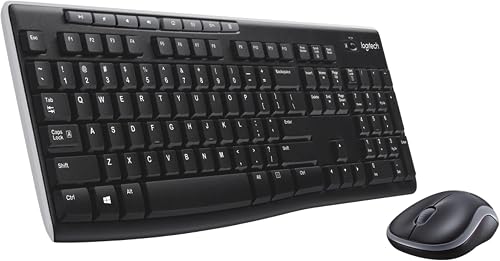 Best for everyday desktop use
Logitech MK270 Full Size Wireless Keyboard
9.6/10 our score
See it on Amazon -
2
 Best for small, quiet desks
Logitech MK470 Slim Wireless Combo Compact Keyboard
9.5/10 our score
See it on Amazon -
3
 Best for multi-system compatibility
Lovaky 2.4G Wireless Keyboard Mouse Combo
9.4/10 our score
See it on Amazon
- 4
 Check it
RECCAZR Wireless Keyboard and Mouse Combo Silent
Best for quiet typing with shortcuts - 5
 Check it
Logitech MK540 Full Size Advanced Wireless Keyboard
Best for palm-rest comfort - 6
 Check it
EDJO Wireless Keyboard and Mouse Combo
Best for long battery intervals
Which wireless keyboard and mouse combo fits your desk?
The MK270 is the best all-around pick for a standard desk, while the MK470 takes less space and the MK540 adds a palm rest. The Lovaky, RECCAZR and EDJO sets offer shared receivers with broader stated operating system support.
We compared the connection details, layout, comfort features, battery information and stated compatibility for each set. Our score weighs specs, features and buyer feedback against what you're shopping for.
| Product | Best for | Connection | Keyboard | Battery life | Our score |
|---|---|---|---|---|---|
| Logitech MK270 Full Size Wireless Keyboard | everyday desktop use | 2.4 GHz wireless USB receiver | Full-size with number pad, arrow keys and F-keys | Up to 36 months keyboard, 12 months mouse | 9.6 |
| Logitech MK470 Slim Wireless Combo Compact Keyboard | small, quiet desks | 2.4 GHz wireless nano USB receiver | Compact low-profile with number pad | Up to 36 months keyboard, 18 months mouse | 9.5 |
| Lovaky 2.4G Wireless Keyboard Mouse Combo | multi-system compatibility | 2.4 GHz USB receiver | Full-size 104-key layout | 9.4 | |
| RECCAZR Wireless Keyboard and Mouse Combo Silent | quiet typing with shortcuts | Shared nano USB receiver | Full-size with number pad and 12 shortcuts | 9.4 | |
| Logitech MK540 Full Size Advanced Wireless Keyboard | palm-rest comfort | Logitech Unifying USB receiver | Full-size with number pad and palm rest | 9.3 | |
| EDJO Wireless Keyboard and Mouse Combo | long battery intervals | Shared 2.4 GHz USB receiver | Full-size with number pad and 12 shortcuts | Up to 365 days claimed for keyboard and mouse | 9.3 |
Best wireless keyboard and mouse combos by use
These wireless keyboard and mouse combos are ordered by their scores, with each pick matched to a specific desk need. The best choice depends on whether you value a full-size layout, quieter typing, comfort features or broader system support.
Logitech MK270 Full Size Wireless Keyboard: Best for everyday desktop use
- One USB receiver
- Full-size layout with number pad
- Up to 33 ft wireless range
- 36-month keyboard and 12-month mouse battery life
A full-size keyboard, compact ambidextrous mouse and single receiver cover the basic needs of a shared desktop setup.
Pros
- Single included USB-A receiver
- Spill-resistant keyboard design
- Mouse suits left- or right-handed users
Cons
- Keyboard is full size rather than compact
- Battery life varies with use and conditions
The Logitech MK270 is the straightforward choice for everyday desktop typing. Its full-size layout includes F-keys, arrow keys and a number pad, while the compact mouse is designed for either hand.
A single included USB-A nano receiver connects the set, and Logitech gives a wireless range of up to 33 ft. The keyboard has low-profile, quiet keys, 8 multimedia hotkeys and adjustable tilt legs.
Logitech states battery life of up to 36 months for the keyboard and 12 months for the mouse. Both devices have on/off switches, and the keyboard has a spill-resistant design.
Choose the MK270 if you want familiar full-size keys and a receiver you can leave plugged into the computer. If your desk is tight or you want lower noise, compare it with the slimmer quiet keyboard and mouse combo options.
Logitech MK470 Slim Wireless Combo Compact Keyboard: Best for small, quiet desks
- Compact low-profile keyboard with number pad
- Quiet keyboard and noise-reduced mouse
- One nano USB receiver
- Up to 36-month keyboard and 18-month mouse battery life
The slim keyboard and quiet mouse suit a tighter desk where lower noise and a compact footprint matter.
Pros
- Compact layout retains a number pad
- Ambidextrous mouse
- Auto-sleep helps save battery
Cons
- Layout is optimized for Windows
- Battery door may be glossy or matte
The MK470 fits a smaller desk where you still want a number pad. Its compact, low-profile keyboard uses scissor keys, while the ambidextrous 3-button mouse has optical tracking and a mechanical scroll wheel.
Logitech describes the keyboard as whisper quiet and the mouse as noise reduced. The shared nano receiver uses a 2.4 GHz connection with a stated range of up to 33 ft, and auto-sleep helps conserve battery.
Battery life is stated at up to 36 months for the keyboard and 18 months for the mouse. The layout is optimized for Windows, so check the function keys you rely on if you use another system.
Pick the MK470 when a slim profile and quiet use matter more than a standard full-size keyboard. See our backlit keyboard and mouse combo picks if seeing the keys in a dim room is a priority.
Lovaky 2.4G Wireless Keyboard Mouse Combo: Best for multi-system compatibility
- One shared 2.4 GHz USB receiver
- Full-size 104-key layout
- Windows, Mac OS, Chrome OS and Linux support
- Auto-sleep and battery indicator
A shared receiver and broad stated operating system support make it a flexible option for a full-size desk setup.
Pros
- Receiver stores inside the mouse
- Ambidextrous mouse
- Adjustable keyboard tilt legs
Cons
- Requires separate AA and AAA batteries
- Keyboard and mouse can be used separately
Lovaky suits a full-size setup used with different operating systems. Its 104-key layout, adjustable tilt legs and symmetrical mouse cover the basic desktop needs, and the brand states compatibility with Windows, Mac OS, Chrome OS and Linux.
The mouse stores the shared 2.4 GHz USB receiver inside its body. Lovaky gives a range of up to 33 ft and says the keyboard and mouse can also be used separately.
An auto-sleep function and battery level indicator help you keep track of power. The keyboard uses one AAA battery and the mouse uses one AA battery.
Choose Lovaky if broad stated system support matters more than slim size. Mac users who prefer a separate pointing device can also compare our wireless mouse picks for Mac.
RECCAZR Wireless Keyboard and Mouse Combo Silent: Best for quiet typing with shortcuts
- One shared nano USB receiver
- Full-size keyboard with number pad
- 12 multimedia shortcut keys
- Quiet membrane keys and mouse clicks
This full-size set pairs quiet membrane keys and mouse clicks with shortcut keys for common media controls.
Pros
- Receiver connects both devices
- Adjustable tilt legs
- Three mouse DPI settings
Cons
- Batteries are not included
- Some function keys may not work with every system
The RECCAZR set pairs a full-size keyboard with quiet keys, quiet mouse clicks and 12 multimedia shortcut keys. Its avocado green finish gives it a distinct look among the black options here.
One nano USB receiver connects both devices and is stored under the mouse. The keyboard has adjustable tilt legs and a number pad, while the mouse offers 800, 1200 and 1600 DPI settings.
RECCAZR states compatibility with Windows, Mac OS and Linux. The set does not include batteries, and some multimedia function combinations may not work with every system.
Pick it if you want quiet operation and dedicated media shortcuts in a full-size layout. If you need a mouse shaped for your left hand, consider a separate wireless left-handed mouse.
Logitech MK540 Full Size Advanced Wireless Keyboard: Best for palm-rest comfort
- Integrated palm rest
- One Logitech Unifying USB receiver
- Ambidextrous mouse with soft rubber grips
- Up to 36-month keyboard and 18-month mouse battery life
A full-size keyboard with an integrated palm rest and a mouse with soft rubber grips suit longer desk sessions.
Pros
- Spill-resistant keyboard design
- Adjustable tilt legs
- Convenient media and calculator hotkeys
Cons
- Stated compatibility focuses on Windows and Chrome OS
- Full-size keyboard needs more desk space
The Logitech MK540 focuses on comfort at a fixed desk. Its full-size keyboard has an integrated palm rest, adjustable tilt legs and a spill-resistant design, while its ambidextrous mouse has soft rubber side grips.
A mini Logitech Unifying USB receiver connects the set, with a stated wireless range of up to 33 ft. The keyboard includes media, calculator and battery-check hotkeys.
Logitech states battery life of up to 36 months for the keyboard and 18 months for the mouse. Its stated compatibility includes Windows and Chrome OS, so confirm support for your operating system before choosing it.
Choose the MK540 if you want a palm rest and a mouse with rubber grips. For a Dell-branded option, compare the Dell wireless keyboard and mouse combos.
EDJO Wireless Keyboard and Mouse Combo: Best for long battery intervals
- One shared USB receiver stored in mouse
- Full-size keyboard with number pad and 12 shortcuts
- Up to 365 days battery life claimed
- Windows, Mac OS, Chrome OS and Linux support
A shared receiver, quiet keys and broad stated system support make this a practical full-size option for home or office.
Pros
- Receiver stores in the mouse
- Adjustable keyboard tilt legs
- Auto-sleep after inactivity
Cons
- Batteries are not included
- Battery life depends on use and conditions
EDJO combines a full-size keyboard with 12 shortcut keys and a compact contoured mouse. The shared USB receiver stores on the back of the mouse beside the battery compartment.
EDJO claims up to 365 days of battery life for both devices, with an auto-sleep mode after 10 minutes of inactivity. The keyboard uses soft membrane keys, and the mouse is described as using silent micro-motion technology.
The set states support for Windows, Mac OS, Chrome OS and Linux. Its batteries are not included, so have one AA battery for the mouse and one AAA battery for the keyboard ready.
Choose EDJO if you want a full-size layout and long claimed battery intervals. Compare battery life claims carefully because your usage can change how often you need replacements.
What connection should a wireless keyboard and mouse combo use?
A USB receiver is a good fit when your computer has an available USB port and you want a simple plug-in connection. The sets in this roundup use receivers, with some models sharing one receiver across both devices.
A shared receiver leaves another port free and is easier to keep track of when it stays in the mouse or computer. Before buying, check whether your laptop has USB-A ports or needs an adapter for the receiver.
For a laptop-specific shortlist, see laptop keyboard and mouse combos.
Bluetooth can be more convenient when you want to save USB ports or switch between compatible devices. The six combos here are receiver based, so choose a Bluetooth model if that connection is a requirement.
Does one shared receiver matter?
One shared receiver matters most when your computer has few open USB ports or you want to connect the keyboard and mouse together. Lovaky, RECCAZR and EDJO explicitly describe one receiver for both devices, and Logitech identifies a receiver for each of its combos.
Check where the receiver is stored before you put it away. A receiver under the mouse is easy to carry with the set, while one left in a desktop can stay connected between work sessions.
Which keyboard layout should you choose?
A full-size keyboard with a number pad suits frequent data entry and spreadsheet work. The MK270, Lovaky, RECCAZR, MK540 and EDJO all have full-size layouts; the MK470 has a compact layout that still includes a number pad.
Compact keyboards leave more room for the mouse, notebooks or other desk items. If you often use arrow keys or a number pad, compare the actual layout and key functions before choosing a slimmer keyboard.
How much do noise and comfort features matter?
Quiet keys and mouse clicks help when you share a room or take calls near your desk. The MK470 is described as whisper quiet with a noise-reduced mouse, while RECCAZR and EDJO describe quiet keys and clicks.
Comfort is more personal, so focus on features you can identify. Tilt legs let you change the keyboard angle, the MK540 includes a palm rest, and the MK270 mouse is designed for either hand.
What should you check before buying a wireless combo?
Check operating system support, receiver type, keyboard layout and battery details before ordering. A combo that works with your computer but lacks a key layout you need can be less useful than a simpler set that fits your routine.
For an existing computer, confirm the ports available for a USB receiver and whether you need an adapter. Also check whether batteries are included: the RECCAZR and EDJO sets specify that they are not.
Which wireless keyboard and mouse combo should you choose?
Choose the MK270 for a familiar full-size desktop set with one receiver, the MK470 for a slimmer and quieter workspace, or the MK540 for its integrated palm rest. Pick Lovaky, RECCAZR or EDJO when their stated system support and receiver setup better match your computer.
If you mainly want less noise, use the quiet combo guide to narrow your options. For a different desk need, the backlit and Dell-specific roundups cover those choices.
Our top 3 picks at a glance
-
1
Best for everyday desktop use
Logitech MK270 Full Size Wireless Keyboard
9.6/10 our score
See it on Amazon -
2
Best for small, quiet desks
Logitech MK470 Slim Wireless Combo Compact Keyboard
9.5/10 our score
See it on Amazon -
3
Best for multi-system compatibility
Lovaky 2.4G Wireless Keyboard Mouse Combo
9.4/10 our score
See it on Amazon
Frequently asked questions
Do wireless keyboard and mouse combos share one receiver?
Many wireless keyboard and mouse combos connect through one USB receiver, but check the connection details before buying. All six picks here use a receiver for both devices, and some store it inside the mouse.
A shared receiver saves a USB port, while Bluetooth models can connect without a USB receiver.
Is a 2.4 GHz combo better than Bluetooth?
A 2.4 GHz combo with a USB receiver is simple to set up on a computer with a free USB port. Bluetooth avoids using that port and can suit devices that support Bluetooth input.
Choose based on the ports and connection options on your computer, and confirm compatibility with your operating system.
Can a wireless keyboard and mouse combo work with a Mac?
Some combos state support for Mac OS, including the Lovaky, RECCAZR and EDJO picks here. The Logitech MK470 is described as optimized for Windows, so check whether its key functions fit your Mac setup.
For a phone, a compact Bluetooth keyboard for a phone may be a better match than a desktop combo.
What should I do if the wireless connection drops?
Keep the receiver close to the keyboard and mouse, and check that it is fully seated in a working USB port. Nearby devices, obstacles and the computer can affect wireless range, so a stated range is not a promise for every desk.
Replace the batteries if needed, then check the device instructions for reconnecting.


