Logitech MX Keys for Mac Review: Worth It? (November 2026)
The Logitech MX Keys S for Mac suits people who want a full-size Mac layout, low-profile keys and smart backlighting. Its main trade-offs are a full-size footprint and Bluetooth setup, which may need a receiver for FileVault password entry at startup.
On this page (8 sections)
- Is the Logitech MX Keys S for Mac worth considering?
- What does the Mac-specific layout change?
- How does typing feel on the full-size model?
- What should you know about backlighting and charging?
- Does Bluetooth cause a FileVault startup problem?
- Which version should you choose?
- How we compared these Mac keyboards
- Which keyboard should you pick?
The Logitech MX Keys S for Mac is a good fit if you want a full-size keyboard with a Mac layout, low-profile keys and smart backlighting. Its Bluetooth connection can pair with up to 3 Apple devices, while USB-C charging keeps the setup cable simple.
The main decision is size. The full-size model takes more desk space than the MX Keys Mini, and Bluetooth can create a startup issue on a Mac with FileVault enabled.
Is the Logitech MX Keys S for Mac worth considering?
Yes, if you want a full-size Mac keyboard with backlighting and the option to switch among several Apple devices. The low-profile keys have a laptop-like shape, and the key surfaces are dished to fit your fingertips.
The MX Keys S for Mac is a membrane keyboard with a QWERTY layout. Its backlighting turns on when your hands approach and adapts to the environment; Logi Options+ lets you adjust brightness and duration.
It also supports Smart Actions in Logi Options+, which can group repeated tasks behind one keystroke. That feature may help if your work includes the same multi-step actions throughout the day.
The choice is less clear if you have a small desk or prefer a compact layout. Compare the Logitech MX Keys Mini review if you want a smaller Mac keyboard with dedicated dictation, emoji and microphone keys.
What does the Mac-specific layout change?
The Mac layout is the main reason to choose this version over a keyboard with a standard PC layout. Logitech describes the MX Keys S for Mac as made for Mac and gives it a matching Space Grey finish.
That can make switching between a MacBook keyboard and an external keyboard feel more familiar. It also suits a setup where you want one keyboard for a Mac, iPad or other supported Apple device.
The keyboard connects over Bluetooth Low Energy and can pair with up to 3 devices. Compare Logitech Bluetooth keyboards if you are considering other models.
You can switch between them, which is useful when one desk serves more than one computer or tablet.
Before buying, check how the layout fits your habits. A Mac-specific keyboard is most useful when you regularly use Apple devices; someone who moves between Mac and Windows may prefer to compare key placement and shortcuts against their usual layout.
How does typing feel on the full-size model?
The MX Keys S uses a low-profile design with spherically dished keys. Logitech describes the typing feel as laptop-like, with the shape of each key intended to fit the fingertips.
That profile may suit you if you prefer a shorter key height and a familiar laptop-style feel. It is a membrane keyboard, so choose it for that style rather than expecting a mechanical-switch experience.
The keyboard also has an optimum angle intended to support a more comfortable wrist position. That is a design feature, not a guarantee of comfort for every desk or hand position; your chair height, desk height and typing posture still matter.
If you are deciding between a low-profile membrane board and a mechanical one, see Logitech MX Keys vs MX Mechanical. That comparison can help you choose based on the typing style and sound you prefer.
What should you know about backlighting and charging?
The keys light up when your hands approach and adapt to the surrounding light. You can use Logi Options+ to customize brightness and how long the illumination stays on.
The MX Keys S for Mac charges through USB-C. Logitech describes it as rechargeable, and the keyboard's built-in battery is a 1500 mAh Li-Po battery.
Backlighting and battery life are connected on the Mini: Logitech gives that model a battery estimate of up to 10 days with a full charge or up to 5 months with backlighting off. Those figures are for the Mini, so don't apply them to the full-size model.
For help with battery service, read how to replace a Logitech MX Keys battery. Check the instructions for your specific model before attempting a repair.
Does Bluetooth cause a FileVault startup problem?
It can. Logitech notes that FileVault may prevent Bluetooth input when you need to enter your password at startup or after a reboot.
If your Mac uses FileVault, plan for this before relying on the keyboard as your only way to enter a password. Logitech recommends a Logi Bolt USB Receiver in this case, and the receiver is not included.
The supplied connection is Bluetooth Low Energy. Logitech says additional wireless compatibility is only with Logi Bolt receivers, so don't assume a Unifying Receiver will work.
Which version should you choose?
The full-size MX Keys S for Mac is the better fit if you want a complete layout and have enough desk space. The Mini suits a smaller workspace, while the combo is for someone who also wants the matching MX Master 3S for Mac mouse.
| Option | Best fit | What sets it apart |
|---|---|---|
| MX Keys S for Mac | Full-size Mac desk | Low-profile layout, backlighting, Smart Actions |
| MX Keys Mini for Mac | Compact setup | Smaller footprint and dedicated smart keys |
| MX Keys S Combo for Mac | Keyboard and mouse together | MX Keys S keyboard with MX Master 3S mouse |
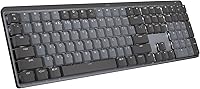
Logitech MX Keys S Mac Wireless Keyboard: Best for a full-size Mac workspace

- Full-size low-profile layout
- Spherically dished keys
- Smart backlighting
- Bluetooth pairing with up to 3 devices
This full-size model combines a Mac layout with low-profile keys, backlighting and Bluetooth switching among up to 3 Apple devices. It fits a desk where you want a number row and full keyboard layout.
Pros
- Mac key layout and Space Grey finish
- Backlighting responds to nearby hands and ambient light
- Smart Actions can automate repeated tasks
- USB-C rechargeable
Cons
- Takes more desk space than the Mini
- FileVault startup may require a separate Logi Bolt receiver
The standalone full-size keyboard keeps the choice focused on typing. It has the Mac layout, USB-C charging, smart backlighting and Bluetooth switching among up to 3 Apple devices.
Logitech MX Keys S Combo Mac Wireless: Best for a matched keyboard and mouse

- Mac key layout
- Backlit keys
- USB-C charging
- Bluetooth pairing with up to 3 Apple devices
The combo pairs the MX Keys S for Mac keyboard with an MX Master 3S for Mac mouse. Choose it if you want both devices in matching Space Grey finishes.
Pros
- Mac key layout
- Backlighting responds when hands approach
- Pairs with up to 3 Mac computers and iPads
- Includes an MX Master 3S for Mac mouse
Cons
- The package includes a mouse you may not need
- Bluetooth may require a separate Logi Bolt receiver for FileVault startup
The combo adds the MX Master 3S for Mac. Consider it if you want both devices and prefer matching Space Grey finishes, but the mouse makes less sense if you already have one you like.
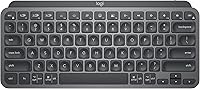
Logitech MX Keys Mini for Mac Minimalist: Best for a compact Mac setup

- Compact Mac layout
- Dictation, emoji and microphone keys
- Backlit keys
- Bluetooth pairing with up to 3 Apple devices
The Mini keeps a Mac-focused layout in a smaller keyboard, with dedicated dictation, emoji and microphone keys. It suits a limited desk or a setup where portability matters more than a full-size layout.
Pros
- Smaller footprint than the full-size MX Keys S
- Dedicated dictation, emoji and microphone keys
- Pairs with multiple Apple devices
- USB-C rechargeable
Cons
- Compact form leaves less room than a full-size keyboard
- Not compatible with Logitech Unifying Receiver technology
The Mini gives up the full-size footprint for a compact shape and dedicated dictation, emoji and microphone keys. If your work depends on keys or spacing that the smaller layout omits, the full-size model is the safer choice.
How we compared these Mac keyboards
We compared the stated layouts, connection options, charging and features against the needs of someone choosing a Mac keyboard. Our score weighs specs and features against what you’re shopping for.
The full-size MX Keys S earns a strong score for its Mac layout, smart backlighting, USB-C charging and three-device Bluetooth pairing. The combo shares the keyboard approach and adds a mouse, while the Mini earns a slightly higher score for buyers who value a compact layout and its dedicated smart keys.
For more options across Logitech's wireless range, browse our best Logitech wireless keyboard guide. If you are still deciding what kind of layout or connection suits your desk, our best keyboard for computer buying guide covers the broader choice.
Which keyboard should you pick?
Choose the MX Keys S for Mac if you want a full-size Mac layout, fingertip-shaped low-profile keys and smart backlighting. Pick the Mini if desk space matters more, or the combo if you also want the included MX Master 3S for Mac mouse.
Before you buy, consider how many Apple devices you switch between and whether FileVault startup affects your setup. For questions about pairing the keyboard with a mouse, see our Logitech MX Master USB receiver guide; if gaming is part of your decision, read whether a Logitech MX Master works for gaming.
Frequently asked questions
Does the Logitech MX Keys S for Mac have a Mac layout?
Yes. The MX Keys S for Mac has a Mac key layout and a Space Grey finish.
It connects over Bluetooth Low Energy and supports switching among up to 3 Apple devices, so it can suit a desk shared between a Mac and an iPad.
Can you use the MX Keys S for Mac with multiple devices?
Yes. You can pair the keyboard with up to 3 devices over Bluetooth Low Energy and switch between them.
The keyboard supports macOS, iOS and iPadOS; check the requirements for your devices and setup before choosing it.
Will Bluetooth work to enter a FileVault password at startup?
Bluetooth may prevent you from entering a password at startup or reboot when FileVault is enabled on your Mac. Logitech says to use a Logi Bolt USB Receiver in that case, but the receiver is not included.
Should you choose the full-size MX Keys S or the Mini?
Choose the full-size MX Keys S if you want a full keyboard layout and have room for it. Choose the Mini if a smaller footprint matters more and its compact layout suits your work; it also has dedicated dictation, emoji and microphone keys.