9 Best Large Print Wireless Keyboards (November 2026)
The best large print wireless keyboards include the SABLUTE Wireless Keyboard and Mouse Combo for a complete ergonomic set, the Logitech K400 Plus Wireless Touch TV Keyboard for PC-connected TV control, and the KOPJIPPOM Large Print Wireless Keyboard and Mouse for adjustable color backlighting.
On this page (3 sections)
The best large print wireless keyboard for most buyers is the SABLUTE Wireless Keyboard and Mouse Combo, because it combines 4X larger characters, 9 backlit effects, a wrist rest and rechargeable power.
That mix suits people who want one set to handle readability, comfort and lighting without choosing separate parts.
KOPJIPPOM offers several large-print choices, while Trueque stands out for yellow keycaps with black letters.
Each approach can help, but the best fit depends on whether you prefer bigger letters, stronger contrast or light behind the keys.
Large print changes the key legend, not always the physical key size.
The keys can stay familiar in spacing while the letters on top become easier to find at a glance.
That distinction matters if you want easier reading while keeping a familiar full-size layout.
It also matters for touch typists, because wider spacing can change hand position even when the printed letters are larger.
For more age-friendly choices, compare keyboards for seniors.
Those guides can help you decide whether large legends, high contrast or backlighting should come first.
For a broader look at layouts, number pads and connection types, use our guide to the best keyboard for computer.
A full-size layout with a number pad suits data entry, while a compact board suits a smaller desk.
If you want a keyboard without wireless features, compare the best large print keyboard.
Wired models can suit a fixed desk where cables are not a problem.
Our score weighs the stated specs and features against the needs behind this search.
We looked for readable legends, reliable wireless setup, useful lighting, comfortable layouts and practical power choices.
We also paid attention to who each design suits in daily use, from office work to school and home use.
A wrist rest, quiet keys or a matching mouse can matter as much as the size of the letters.
Setup is part of the decision too, because a receiver, charging cable or replaceable battery changes how the keyboard fits your space.
Care is simple for most models, but keeping the receiver safe and charging before a long session can prevent small frustrations.
Honest trade-offs matter, and no single keyboard in this list fits every hand, desk or operating system.
Use the picks below to match the feature you need most, rather than chasing every extra on paper.
Our picks at a glance
-
1
 Best for a complete ergonomic set
SABLUTE Wireless Keyboard and Mouse Combo
9.5/10 our score
See it on Amazon -
2
 Best for PC-connected TV control
Logitech K400 Plus Wireless Touch TV Keyboard
9.4/10 our score
See it on Amazon -
3
 Best for adjustable color backlighting
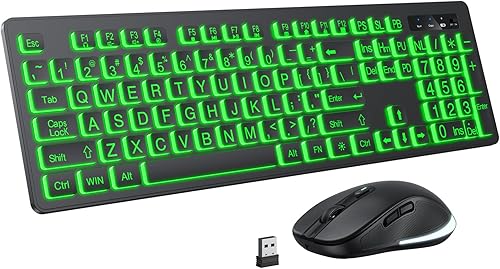
KOPJIPPOM Large Print Wireless Keyboard and Mouse
9.4/10 our score
See it on Amazon
- 4
 Check it
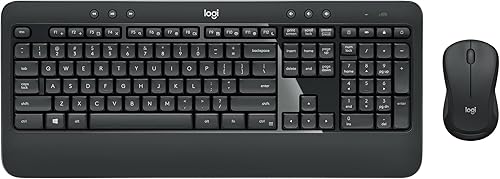
Logitech MK540 Full Size Advanced Wireless Keyboard
Best for familiar office typing - 5
 Check it
KOPJIPPOM Large Print Backlit Wireless Keyboard
Best for a large-print keyboard and mouse - 6
 Check it
KOPJIPPOM Large Print Backlit Wireless Keyboard
Best for a keyboard-only setup - 7
 Check it
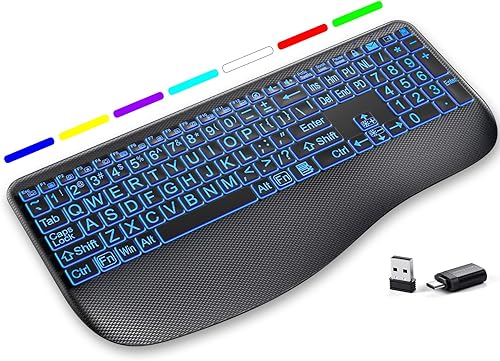
Hamile Large Print Wireless Backlit Keyboard
Best for quiet scissor-switch typing - 8
 Check it
Trueque Wireless Keyboard and Mouse Combo
Best for high-contrast yellow keys - 9
 Check it
Fonicer Full Size Large Print 2.4g Wireless
Best for a slim large-print set
The best large print wireless keyboards for different needs
The SABLUTE is the most complete large print wireless keyboard set here, while the KOPJIPPOM and Hamile models give you more choices around lighting, mouse inclusion and key feel. Pick the feature that solves your main typing problem first.
| Product | Best for | Connection | Layout | Power | Our score |
|---|---|---|---|---|---|
| SABLUTE Wireless Keyboard and Mouse Combo | a complete ergonomic set | 2.4G USB wireless | 111-key QWERTY | Rechargeable battery | 9.5 |
| Logitech K400 Plus Wireless Touch TV Keyboard | PC-connected TV control | RF Unifying receiver | 84-key QWERTY | 2 pre-installed AA batteries | 9.4 |
| KOPJIPPOM Large Print Wireless Keyboard and Mouse | adjustable color backlighting | 2.4G USB wireless | 104-key QWERTY | Rechargeable battery | 9.4 |
| Logitech MK540 Full Size Advanced Wireless Keyboard | familiar office typing | USB Unifying receiver | 104-key QWERTY | 9.3 | |
| KOPJIPPOM Large Print Backlit Wireless Keyboard | a large-print keyboard and mouse | 2.4G wireless | 104-key QWERTY | Built-in rechargeable batteries | 9.2 |
| KOPJIPPOM Large Print Backlit Wireless Keyboard | a keyboard-only setup | USB-A wireless | 104-key QWERTY | 9.0 | |
| Hamile Large Print Wireless Backlit Keyboard | quiet scissor-switch typing | USB-A and USB-C | 112-key QWERTY | 8.6 | |
| Trueque Wireless Keyboard and Mouse Combo | high-contrast yellow keys | 2.4GHz USB wireless | 104-key QWERTY | 8.3 | |
| Fonicer Full Size Large Print 2.4g Wireless | a slim large-print set | 2.4G wireless | 101-key QWERTY | 3 AA batteries | 8.1 |
SABLUTE Wireless Keyboard and Mouse Combo: Best for a complete ergonomic set
SABLUTE Wireless Keyboard and Mouse Combo: Best for a complete ergonomic set
- 4X larger characters
- 9 backlit effects
- Extra-large wrist rest
- Rechargeable keyboard and mouse
- Phone and tablet holder
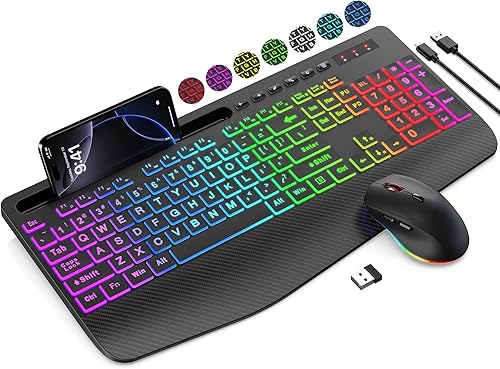
The SABLUTE combines large print, adjustable RGB lighting, a wrist rest and a wireless mouse in one set. Its phone and tablet holder adds a useful place for a second screen.
Pros
- 4X larger characters
- 9 backlit effects
- Rechargeable keyboard and mouse
- Wrist rest and device holder
Cons
- Does not connect directly to a tablet or phone
- USB-C dongle is not included
The SABLUTE is the top pick because it covers several needs in one package. Its 4X larger characters help make the keys easier to read, and the keyboard has 9 backlit effects, including 7 solid colors and 1 rainbow backlight.
The extra-large wrist rest has a widest edge of 2.8 in. A phone and tablet holder accommodates devices under 11.9 in, so the keyboard can support a desk where you keep a second screen nearby.
The keyboard has 111 keys, 6 one-touch hotkeys and a 6-button mouse with 3-level tracking speed. Both devices use built-in rechargeable power and enter sleep mode after 90 seconds of inactivity.
SABLUTE specifies 2.4G USB wireless and compatibility with laptops, personal computers and televisions. The set is clearest for Windows use, with a minimum required version of Windows 10.
It doesn't connect directly to a tablet or phone, and the USB-C dongle is not included.
Choose it when you want a readable keyboard, matching mouse, wrist support and backlighting in one set.
Logitech K400 Plus Wireless Touch TV Keyboard: Best for PC-connected TV control
Logitech K400 Plus Wireless Touch TV Keyboard: Best for PC-connected TV control
- Integrated touchpad
- Quiet keys
- 33 ft wireless range
- Up to 18 months of battery life
- Spill-resistant design
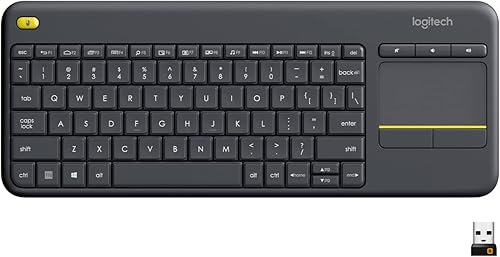
The K400 Plus is a compact all-in-one controller for a PC-connected TV. Its large touchpad reduces the need for a separate mouse, while the wireless range suits couch use.
Pros
- Built-in touchpad
- Long battery life
- Quiet keys
- Spill-resistant design
Cons
- Not a large-print keyboard
- No rechargeable battery
The Logitech K400 Plus is the unusual pick in this roundup because it is built around PC-to-TV control, not oversized key legends. Its integrated touchpad gives you pointer control without a separate mouse.
The 84-key QWERTY keyboard has quiet keys and a large touchpad. Logitech specifies wireless control up to 33 ft through a Unifying receiver, which suits a couch or entertainment setup where the computer is connected to a TV.
It uses 2 pre-installed AA batteries and has battery life of up to 18 months under the stated use conditions. The on/off switch can help conserve power between sessions.
The K400 Plus works with Windows 7, Windows 8, Windows 10 and later, Android 7 or later, and Chrome OS. It also has a spill-resistant design.
Choose it when a built-in touchpad matters more than large-print legends. For a true oversized-key design with lighting, see our guide to the best backlit large print keyboard.
KOPJIPPOM Large Print Wireless Keyboard and Mouse: Best for adjustable color backlighting
KOPJIPPOM Large Print Wireless Keyboard and Mouse: Best for adjustable color backlighting
- 4X larger characters
- 7 backlight colors
- 3 brightness levels
- Rechargeable keyboard and mouse
- One USB receiver for both devices
This KOPJIPPOM set pairs oversized letters with 7 color options and 3 brightness levels. It includes a full-size number pad and a rechargeable keyboard and mouse.
Pros
- 4X larger characters
- 7 colors and 3 brightness levels
- Full-size layout
- Rechargeable
Cons
- Multimedia keys may not fully work with Mac OS
- Backlight turns off after 120 seconds without use
This KOPJIPPOM set is a strong match for buyers who want 4X larger characters and adjustable lighting. The backlight offers 7 color options and 3 brightness levels, so you can change the keyboard's appearance and visibility for different rooms.
The 104-key QWERTY layout includes a number pad, media and function keys. The keyboard and mouse share one USB receiver, which is stored in the mouse, and the set uses 2.4G wireless technology with a stated range of up to 33 ft.
Both devices are rechargeable and use a USB-C charging cable. The backlight turns off after 120 seconds without use, and the set has a separate power switch and backlight switch.
KOPJIPPOM lists compatibility with Windows versions from Windows 2000 through Windows 11 and Mac OS. Multimedia keys may not fully work with Mac OS.
Choose this set when you need a full-size large print wireless keyboard with a matching mouse and several color choices.
Logitech MK540 Full Size Advanced Wireless Keyboard: Best for familiar office typing
Logitech MK540 Full Size Advanced Wireless Keyboard: Best for familiar office typing
- Full-size 104-key layout
- Integrated palm rest
- Spill-resistant keyboard
- Adjustable tilt legs
- Keyboard battery life up to 36 months
The MK540 is a traditional full-size keyboard and mouse set for Windows and Chrome OS. Its palm rest, tilt legs, hotkeys and long battery life suit a desk used every day.
Pros
- Full-size number pad
- Integrated palm rest
- Spill-resistant design
- Long keyboard battery life
Cons
- Not a large-print keyboard
- Uses replaceable batteries
The Logitech MK540 is best for buyers who want a conventional full-size wireless keyboard and mouse set rather than oversized legends. Its 104-key layout, palm rest and adjustable tilt legs give it a familiar office shape.
The keyboard has reduced-noise keys, a spill-resistant design and hotkeys for media, calculator and battery-check functions. Its included Logitech Unifying USB receiver supports wireless use up to 33 ft from a PC or laptop.
Logitech specifies keyboard battery life of up to 36 months and mouse battery life of up to 18 months. The set uses an included AA battery for the mouse and is powered by replaceable batteries.
The ambidextrous mouse has soft rubber side grips and enhanced tracking. Compatibility includes Windows 7, Windows 8, Windows 10 or later, Windows 11 and Chrome OS.
Choose the MK540 when you want long battery life, standard key legends and a full-size office layout. It isn't the right choice if oversized print is your main reason for shopping.
KOPJIPPOM Large Print Backlit Wireless Keyboard and Mouse: Best for a large-print keyboard and mouse
KOPJIPPOM Large Print Backlit Wireless Keyboard: Best for a large-print keyboard and mouse
- 4X larger characters
- 3 brightness levels
- Full-size number pad
- 12 multimedia hotkeys
- Rechargeable keyboard and mouse
This KOPJIPPOM combo focuses on readable keys, backlighting and a complete full-size layout. Its 12 multimedia hotkeys and rechargeable keyboard and mouse fit routine computer work.
Pros
- 4X larger characters
- Full-size number pad
- 12 multimedia hotkeys
- Rechargeable
Cons
- Backlight has 3 brightness levels but no stated color options
- Windows is the clearest compatibility fit
This KOPJIPPOM combo makes the large-print feature central.
Its letters are 4X larger than standard keyboard fonts, and the backlight has 3 brightness levels for typing in lower light.
The large letters make each key easier to spot, which can help beginners, seniors and anyone who looks down while typing.
The backlight helps in a dim room, and the three levels let you soften the glow when you want less light.
The 104-key full-size layout includes a number pad and 12 multimedia hotkeys for internet, email, playback and volume controls.
That layout suits spreadsheets, forms and everyday office tasks where numbers and shortcuts save time.
The keyboard and mouse connect through one supplied USB nano receiver using 2.4G wireless technology.
One receiver keeps the desk tidy and leaves more USB ports free for other devices.
Both devices have built-in rechargeable batteries and can enter sleep mode after 10 minutes without operation.
Sleep mode helps save power during breaks, and you can wake the set with normal use.
A supplied USB-C cable handles charging.
Keep that cable in a known place so the keyboard and mouse are ready before a long work session.
The set is designed for Windows, with compatibility also described for Chrome OS and Linux.
Windows is the clearest fit, so check your system before choosing it for another platform.
Its plug-and-play connection does not require an additional driver.
That makes setup straightforward on a desktop or laptop with a free USB port.
Choose it when you want a complete large print wireless keyboard and mouse set with a number pad, hotkeys and rechargeable power.
KOPJIPPOM Large Print Backlit Wireless Keyboard: Best for a keyboard-only setup
KOPJIPPOM Large Print Backlit Wireless Keyboard: Best for a keyboard-only setup
- 4X larger characters
- 7 color options
- 3 brightness levels
- Quiet low-profile keys
- Rechargeable keyboard
Choose this keyboard-only KOPJIPPOM when you already have a mouse. It combines oversized characters, 7 backlight colors, quiet low-profile keys and a full-size number pad.
Pros
- Keyboard only
- 7 color options
- Quiet low-profile keys
- Rechargeable
Cons
- Uses a USB-A connection
- Multimedia keys may not fully work with Mac OS
This keyboard-only KOPJIPPOM is a good fit when you already have a mouse or prefer to choose one separately. It offers 4X larger characters, 7 color options and 3 brightness levels.
The 104-key QWERTY layout includes media and function keys, hotkeys and a number pad. Its low-profile membrane keys are designed for quiet typing, and the keyboard uses a USB-A wireless connection.
The keyboard is rechargeable and has a USB-C charging cable. Its backlight switches off after 120 seconds without use, which can reduce unnecessary power use during pauses.
KOPJIPPOM describes compatibility with Windows 2000 through Windows 10, Vista, Raspberry Pi 3 and 4, and Mac OS. Multimedia keys may not fully work with Mac OS.
Choose it when large print, backlighting and a separate mouse are more important than buying a matched set. If you specifically want Bluetooth, compare our best large print keyboard bluetooth guide because this model uses USB-A wireless.
Hamile Large Print Wireless Backlit Keyboard: Best for quiet scissor-switch typing
Hamile Large Print Wireless Backlit Keyboard: Best for quiet scissor-switch typing
- Oversized high-contrast letters
- 7 backlight colors
- 3 brightness levels
- Wide curved wrist rest
- USB-C adapter included
The Hamile is a keyboard-only pick with large print, quiet scissor-switch keys and a wide curved wrist rest. Its included USB-C adapter helps connect it to USB-C port devices.
Pros
- Quiet scissor-switch keys
- Wide curved wrist rest
- 7 colors and 3 brightness levels
- USB-C adapter included
Cons
- Does not support Bluetooth
- Mouse is not included
The Hamile is the best keyboard-only pick for buyers who want large print with quiet scissor-switch keys. Its full-size keyboard measures 16.54 x 8.01 x 0.94 in and has 112 keys.
The oversized, high-contrast letters are paired with 7 backlight colors and 3 brightness levels. The keyboard remembers the last light setting after power-off, so you don't need to choose it again each time.
A wide curved wrist rest and adjustable stand change the way your hands meet the keyboard. The low-profile scissor-switch keys provide a laptop-like typing feel and are designed to reduce tapping noise.
The rechargeable keyboard uses a USB-C charging cable. It includes a USB receiver, USB-C adapter and user manual, and it works with Windows and Android devices through USB-A or USB-C connections.
Hamile says the keyboard can stand by for up to 3 months and provide 25 days of continuous use with the backlight off. It does not support Bluetooth, and a mouse is not included.
Choose it when key feel, quiet typing and flexible USB ports matter more than getting a complete keyboard and mouse set.
Trueque Wireless Keyboard and Mouse Combo: Best for high-contrast yellow keys
Trueque Wireless Keyboard and Mouse Combo: Best for high-contrast yellow keys
- Yellow keycaps with black letters
- Wrist rest and tilt legs
- Phone and tablet holder
- 6 hotkeys
- Sleep mode
The Trueque makes contrast the main focus with yellow keycaps and black letters. Its full-size keyboard, wrist rest, holder and matching mouse suit a straightforward Windows desk setup.
Pros
- High-contrast keycaps
- Wrist rest and tilt legs
- Phone and tablet holder
- One receiver for both devices
Cons
- Batteries are not included
- Windows is the clearest compatibility fit
Trueque uses a different approach to visibility: yellow keycaps with black letters create a high-contrast surface without a backlight. The full-size 104-key keyboard also has a wrist rest, tilt legs and a built-in phone or tablet holder.
The keyboard and mouse share one USB receiver and use 2.4GHz wireless technology with a stated range of up to 33 ft. Six hotkeys provide direct access to common functions, while the 6-button mouse includes forward and backward controls.
The soft membrane keys are designed for quiet typing. Trueque also describes the mouse as having 95% less noise than a standard click, and both devices use smart sleep modes during inactivity.
The keyboard needs 2 AAA batteries and the mouse needs 1 AA battery. Those batteries are not included, so plan for them before setup.
Trueque lists compatibility with Chromebook, laptop and personal computer use, with support described for Windows, Chrome OS, Linux and Mac OS.
Choose it when high contrast is more useful to you than colored backlighting. The yellow-and-black design is also easy to distinguish from standard black keyboards.
Fonicer Full Size Large Print 2.4g Wireless: Best for a slim large-print set
Fonicer Full Size Large Print 2.4g Wireless: Best for a slim large-print set
- High-contrast large print
- 101-key full-size layout
- 14.57 x 5.51 x 0.79 in size
- Scissor-key switches
- Shared USB receiver
The Fonicer keeps the large-print keyboard and mouse set slim enough for a handbag or suitcase. Its scissor-key switches and slope angle suit buyers who want a quieter, portable layout.
Pros
- Slim 0.79 in height
- High-contrast print
- Scissor-key switches
- Keyboard and mouse included
Cons
- No backlight
- Uses 3 AA batteries
The Fonicer is the most compact large print wireless keyboard and mouse set here. Its 14.57 x 5.51 x 0.79 in keyboard has 101 keys and is slim enough to place in a handbag or suitcase.
The keys keep a typical keyboard size while using larger printed letters. High-contrast legends help visibility, and the scissor-key switches are designed for smooth, quiet typing.
The keyboard and mouse share a USB receiver stored next to the keyboard's battery compartment. Fonicer lists compatibility with Windows 98, Vista, Windows 7, Windows 8, Windows 10 and higher, Mac OS and Google Chromebook.
The keyboard uses 2 AA batteries and the mouse uses 1 AA battery. There is no backlight, so this choice depends on readable print and room lighting rather than illuminated keys.
Choose it when portability and a slim profile matter. Its 101-key layout is a little less expansive than the 104-key full-size options.
How to choose a large print wireless keyboard
The best large print wireless keyboard depends first on how you read keys and second on how you connect. Compare the print style, backlight, physical layout, receiver type and power system before choosing a score or brand.
Large print versus backlit keys
Large print makes the letters themselves easier to see in normal light. Backlighting adds light around or behind the legends, which can help in a dim room but may not solve glare or viewing-angle problems.
The SABLUTE, KOPJIPPOM and Hamile picks combine large print with backlighting. The Trueque uses yellow keycaps with black letters, while the Fonicer has large high-contrast print without a backlight.
Look for separate brightness control if you share a room or prefer a softer glow. The KOPJIPPOM and Hamile models offer 3 brightness levels, while the SABLUTE offers 9 backlit effects.
Full-size layouts and number pads
A full-size keyboard is useful when you enter numbers often or want familiar navigation keys. The SABLUTE has 111 keys, the Hamile has 112, and several picks use 104-key layouts with a number pad.
The Fonicer has 101 keys and is slimmer than the other full-size options. The Logitech K400 Plus has 84 keys because it combines keyboard controls with a touchpad for TV use.
For more detail on layout differences, see the best keyboard for computer guide before choosing between a compact design and a number pad.
USB receiver or Bluetooth
Most large print wireless keyboards here use a USB receiver rather than Bluetooth. That setup can be simple on a desktop or laptop, but you need an open compatible port.
The Hamile supports USB-A and USB-C through its included adapter. The KOPJIPPOM keyboard-only model uses USB-A, and the SABLUTE uses 2.4G USB wireless.
SABLUTE also states that it cannot connect directly to a tablet or phone.
The Logitech K400 Plus uses an RF Unifying receiver. If your computer is close to a television, its receiver and touchpad may be more useful than a standard large-print layout.
Rechargeable or replaceable batteries
Rechargeable keyboards reduce the need to keep replacement batteries nearby. The SABLUTE, KOPJIPPOM and Hamile rechargeable models suit desks where you can connect a charging cable.
Replaceable batteries can be easier if the keyboard is kept away from a charging cable. The Logitech K400 Plus uses 2 AA batteries, the Logitech MK540 uses replaceable batteries, and the Fonicer uses 3 AA batteries across its keyboard and mouse.
Check whether the battery or cable is included before setup. The Trueque requires 2 AAA batteries for its keyboard and 1 AA battery for its mouse, and those batteries are not included.
Keyboard-only or keyboard and mouse set
A keyboard-only model makes sense if you already like your mouse. The KOPJIPPOM Large Print Backlit Wireless Keyboard and Hamile are the clearest keyboard-only choices here.
A matched set reduces the number of receivers and gives you a mouse with a similar design. The SABLUTE, both KOPJIPPOM combo models, Trueque and Fonicer include a keyboard and mouse.
The Logitech K400 Plus is different because its touchpad takes the place of a separate mouse. The Logitech MK540 is a conventional full-size keyboard and mouse set without large-print legends.
Setup and care
Start by placing the receiver in an open USB port, then turn on the keyboard and mouse if your set includes both.
Keep the receiver close enough for the intended desk or TV setup, and confirm the receiver is stored in the keyboard or mouse before assuming it is missing.
A short search of the battery area or packaging often saves time when a small receiver is hard to find.
Charge rechargeable models before a long work session.
For battery models, keep the correct AA or AAA size available and use the power switch or sleep mode when the keyboard will sit unused.
That habit keeps the keyboard ready and avoids a surprise stop in the middle of typing.
Clean around the keycaps with the keyboard disconnected or switched off.
Avoid putting liquid directly on the keys, even when a model has a spill-resistant design.
A dry cloth and occasional shake of crumbs from a raised angle are usually enough for routine care.
If the letters still look small, move the keyboard closer, improve room lighting or increase the computer's text size.
Large print helps with key identification, but your screen settings and seating distance also affect readability.
Small changes to chair height or monitor position can make the whole setup easier on your eyes and wrists.
Which large print wireless keyboard should you choose?
The best large print wireless keyboard depends on your main priority.
Choose the SABLUTE for the most complete set, the KOPJIPPOM combo for large print with adjustable color lighting, or the Hamile for a quieter keyboard-only design with USB-C support.
Those choices cover different desks and different ways of typing.
The SABLUTE suits buyers who want a matching mouse, wrist support and backlighting together.
The KOPJIPPOM combo suits buyers who want color choices and a full-size number pad.
The Hamile suits buyers who already have a mouse and care more about quiet key feel.
Pick Trueque when yellow-and-black contrast is easier for you to read.
High contrast can be clearer than backlighting in a bright room where light behind the keys is hard to see.
Choose Fonicer when you want a slim set for travel, and choose Logitech K400 Plus when you need touchpad control from a PC-connected TV.
The Fonicer suits a bag or small workspace, while the K400 Plus suits couch use where a separate mouse is awkward.
Think about your main problem first, whether that is reading keys, reaching controls or keeping the desk clear.
Then check the connection, because most picks here use a USB receiver rather than Bluetooth.
Check the power system next, since rechargeable models need a cable and battery models need the right size on hand.
A full-size number pad helps with numbers, while a touchpad helps with navigation from a distance.
If you want a matching mouse and more large-print options, continue with our guide to the best large print wireless keyboard and mouse.
For Mac-specific choices, see the best large print keyboard for Mac.
Those next steps can narrow the list to the layout and connection that fit your computer best.
Keep the receiver safe, charge or replace batteries before they run low, and clean the keys with the keyboard switched off.
That simple care helps the keyboard stay ready for daily work, school or evening browsing.
Our top 3 picks at a glance
-
1
Best for a complete ergonomic set
SABLUTE Wireless Keyboard and Mouse Combo
9.5/10 our score
See it on Amazon -
2
Best for PC-connected TV control
Logitech K400 Plus Wireless Touch TV Keyboard
9.4/10 our score
See it on Amazon -
3
Best for adjustable color backlighting
KOPJIPPOM Large Print Wireless Keyboard and Mouse
9.4/10 our score
See it on Amazon
Frequently asked questions
What is the best large print wireless keyboard?
The SABLUTE Wireless Keyboard and Mouse Combo is the strongest all-around pick because it combines 4X larger characters, 9 backlit effects, a wrist rest, a device holder and rechargeable power. Choose the Hamile if you want a keyboard-only model with scissor-switch keys, or Trueque for yellow high-contrast keycaps.
Are large print wireless keyboards good for low vision?
Large print keyboards can make key legends easier to read because the letters are larger or have stronger contrast. The SABLUTE, KOPJIPPOM, Hamile, Trueque and Fonicer models in this guide use large-print or high-contrast designs.
Backlighting may help in dim rooms, but it does not replace a comfortable viewing setup.
Do large print wireless keyboards work with laptops?
Yes, many use a USB wireless receiver that connects to a laptop. Check the laptop's available port before choosing.
The Hamile includes a USB-C adapter, while the SABLUTE uses 2.4G USB wireless and does not connect directly to a tablet or phone.
Are large print wireless keyboards rechargeable?
Several picks here use rechargeable power, including the SABLUTE, both KOPJIPPOM backlit models, the KOPJIPPOM keyboard and mouse set, and the Hamile. The Trueque and Fonicer use replaceable batteries, while the Logitech models use AA batteries.
Do wireless keyboards need Bluetooth?
No. Most picks here use a small USB receiver instead of Bluetooth.
That can make setup simple on a desktop or laptop with a matching port, but it also means you should check the port type.
The Hamile uses USB-A or USB-C through its included adapter and does not support Bluetooth.