Can You Use a Wired Keyboard with a Wireless Mouse?
Yes, a wired keyboard and wireless mouse can work together on the same computer. The keyboard uses a cable, while the mouse connects through its USB receiver or Bluetooth.
On this page (8 sections)
- Can you use a wired keyboard with a wireless mouse?
- What ports does each device need?
- How do you set up a wired keyboard and wireless mouse?
- Can you use this setup with a laptop?
- What if you run out of USB ports?
- Which products make sense for mixed setups?
- What should you check if the mouse won't connect?
- When should you choose a wired mouse too?
A wired keyboard and wireless mouse can work together on the same computer. The keyboard uses a cable, while the mouse connects through a USB receiver or Bluetooth, so each device can use a different connection method.
The main thing to check is how the mouse connects. A receiver uses a USB port; Bluetooth uses the computer's Bluetooth connection and leaves its USB ports free.
Can you use a wired keyboard with a wireless mouse?
Yes, you can use a wired keyboard and wireless mouse at the same time. They are separate input devices, and the computer can recognize both even though one uses a cable and the other connects wirelessly.
Connect the keyboard to a compatible USB port, then connect the mouse using its receiver or Bluetooth. The computer's available ports and wireless features determine which setup is convenient.
If you're choosing a keyboard first, our best keyboard for computer guide explains the main layouts and features to compare. For a matched set, see the best keyboard and mouse combo options.
What ports does each device need?
A wired USB keyboard needs a compatible USB port, and a receiver-based wireless mouse needs another USB port. A Bluetooth mouse doesn't use a USB receiver, though the computer needs Bluetooth support.
Many computers have multiple USB ports, but a laptop may have fewer available ports once other accessories are connected. Look at the port type and count before choosing where each device will go.
Does a wireless mouse always need a USB receiver?
No. Some wireless mice connect with Bluetooth instead of a USB receiver.
Check the mouse instructions to confirm whether it uses Bluetooth, a receiver, or offers both methods.
A receiver-based mouse needs one open USB port for its small receiver. If the computer lacks a free port, a compatible USB hub can add connections, or a Bluetooth mouse can avoid using a port for its receiver.
Can a keyboard and mouse share one receiver?
Some keyboard and mouse sets use a shared receiver, but separate devices may need separate connections. Don't assume a keyboard's receiver will also pair with a mouse from another brand or model.
For mixed setups, connect each device using the method it supports. A wired keyboard connects by cable, while the mouse uses its own receiver or Bluetooth pairing.
How do you set up a wired keyboard and wireless mouse?
Plug in the wired keyboard, then connect the mouse through its receiver or Bluetooth. Follow the mouse's instructions if it needs a power switch, pairing step, or software.
- Plug the keyboard cable into an available compatible USB port.
- For a receiver-based mouse, plug its receiver into another available USB port.
- For a Bluetooth mouse, turn it on and pair it through the computer's Bluetooth settings.
- Move the mouse and type a few characters to check that both devices respond.
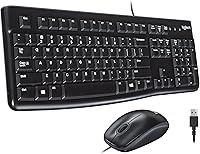
Many basic USB keyboards work as soon as they are connected. For example, the Logitech MK120 keyboard and mouse combo connects through USB ports on a desktop, laptop, or netbook.
If the keyboard or mouse doesn't respond, check that its cable or receiver is firmly connected. For Bluetooth, confirm that the mouse is charged or powered on and paired with the correct computer.
Can you use this setup with a laptop?
Yes, a laptop can use a wired keyboard and wireless mouse if it supports their connection methods. The keyboard needs a suitable port or adapter, and the mouse needs either a free USB port for its receiver or Bluetooth support.
Check the laptop's ports before connecting accessories. If a receiver takes the only open port, a Bluetooth mouse may be a better fit, provided your laptop supports Bluetooth and the mouse can pair with it.
What if you run out of USB ports?
A compatible USB hub can provide more ports for a wired keyboard and receiver-based mouse. Plug the hub into the computer, then connect each device to an open port on the hub.
A hub adds connections, but it doesn't change how the mouse connects. Bluetooth still requires Bluetooth support, while a receiver-based mouse still needs its receiver plugged into a USB port.
For a tidy, matched setup with fewer individual connections to plan, compare Logitech keyboard and mouse combos. If you want both devices wired, see the best wired keyboard and mouse combo guide.
Which products make sense for mixed setups?
Choose separate devices when you want a wired keyboard and already have, or plan to choose, a wireless mouse. A combo can make sense when you prefer both devices to share the same wired setup.
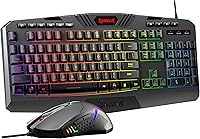
The Redragon S101-3 PRO is a wired keyboard and mouse combo with a full-size RGB keyboard, programmable macro keys, and an included mouse. It suits someone who wants both devices wired rather than a mixed connection.
Anker soundcore 2 is a portable Bluetooth speaker, not a mouse or keyboard. It may suit a desk setup where you also want a Bluetooth speaker for audio, but it does not connect an input device.
If you're considering another brand's matched set, compare Dell keyboard and mouse combos. A matched set may simplify choosing compatible devices, while separate devices give you more freedom to pick different connection styles.
What should you check if the mouse won't connect?
Check the mouse's power, connection method, and receiver or Bluetooth pairing. A wired keyboard working correctly doesn't confirm that the mouse is connected.
For a USB receiver, try another compatible port and check that the receiver is fully inserted. If the receiver is plugged into a hub, test a direct computer port to help identify whether the hub is part of the issue.
For Bluetooth, check that Bluetooth is enabled on the computer and that the mouse appears as paired. If the mouse was paired with another device, follow its instructions to enter pairing mode again.
When should you choose a wired mouse too?
Choose a wired mouse if you want both input devices connected by cable and don't mind using another port. A wireless mouse is more useful when you want to move it freely or reduce cables around your desk.
A wired keyboard with a wireless mouse is a practical middle ground: the keyboard stays connected by cable, while the mouse can use a receiver or Bluetooth. Check the computer's ports and Bluetooth support, then choose the mouse connection that fits your setup.
Frequently asked questions
Can I use a wired keyboard and a wireless mouse together?
Yes. Connect the keyboard by its cable, then connect the mouse with its USB receiver or Bluetooth.
The computer handles each device connection separately, so they don't need to match.
Check that the mouse's connection method works with your computer and that the needed port or Bluetooth support is available.
Does a wireless mouse need a USB port?
A wireless mouse with a USB receiver needs a compatible USB port. A Bluetooth mouse can connect without using a USB port, but the computer must have Bluetooth and support pairing.
Check the mouse's instructions to see which connection method it uses.
Can a wired keyboard interfere with a wireless mouse?
A wired keyboard and wireless mouse are designed to work as separate input devices, so the keyboard cable doesn't prevent the mouse from connecting. If the mouse doesn't respond, check its power, receiver or Bluetooth pairing, and whether the computer recognizes it.
Can I connect a wireless mouse through a USB hub?
Usually, a USB receiver can plug into a compatible USB hub, but a direct computer port is a useful first check if the mouse has connection trouble. A Bluetooth mouse doesn't need a USB receiver or hub.
Confirm the hub has an available port and works with your computer.