9 Best Wired Keyboard and Mouse Combos (November 2026)
The best wired USB keyboard and mouse combos include the Redragon S101-3 PRO Gaming Keyboard and Mouse for customizable gaming, the Logitech MK120 Full Size Wired Keyboard for familiar office typing, and the Logitech MK270 Full Size Wireless Keyboard for wireless desk flexibility.
On this page (4 sections)
The Redragon S101-3 PRO is the best wired keyboard and mouse combo for gaming, with RGB lighting, programmable macro keys and an included wrist rest. For everyday typing, the Logitech MK120 offers a familiar full-size layout with a number pad and USB plug-and-play.
A wired USB keyboard and mouse combo connects directly to your computer, so you don't have to manage wireless pairing or replace batteries for the set. The tradeoff is a cable from each device, which can limit where you place them.
If you're comparing a broader range of best keyboard and mouse combos, first decide whether you need wired-only reliability or would accept a receiver-based set. This roundup focuses on the wired choices and includes one wireless alternative to make that tradeoff clear.
Our picks at a glance
-
1
 Best for customizable gaming
Redragon S101-3 PRO Gaming Keyboard and Mouse
9.7/10 our score
See it on Amazon -
2
 Best for familiar office typing
Logitech MK120 Full Size Wired Keyboard
9.6/10 our score
See it on Amazon -
3
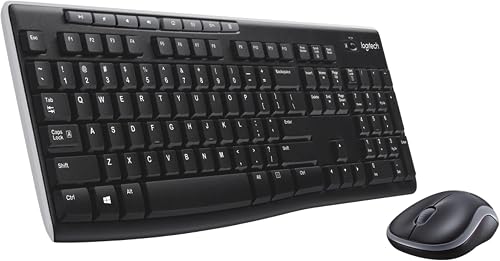 Best for wireless desk flexibility
Logitech MK270 Full Size Wireless Keyboard
9.6/10 our score
See it on Amazon
- 4
 Check it
MageGee Gaming Keyboard and Mouse Combo
Best for colorful no-software setup - 5
 Check it
Amazon Basics Wired USB Keyboard and Mouse
Best for simple media controls - 6
 Check it
EDJO Wired Keyboard and Mouse Combo
Best for an integrated palm rest - 7
 Check it
HP 150 Wired Mouse and Keyboard Combo
Best for quiet, low-profile keys - 8
 Best for a spill-resistant keyboardCheck it
- 9
 Check it
Lenovo 310 USB-A Wired Keyboard Mouse Combo
Best for a slim keyboard with phone stand
How we chose these wired keyboard and mouse combos
We compared connection type, keyboard layout, shortcut features and mouse details against the needs of shoppers seeking a dependable USB desktop set. Our score weighs specs, features and buyer feedback against what you're shopping for.
A wired USB combo can make setup simple, but the keyboard and mouse usually need separate ports unless the model provides a shared connection method. Confirm the port type and count on your computer, especially if it has only USB-C ports.
We included options for office typing, media shortcuts, gaming lighting and a slim keyboard design. For broader keyboard-only advice, see our best keyboard for computer guide.
| Product | Best for | Connection | Keyboard | Extra controls | Our score |
|---|---|---|---|---|---|
| Redragon S101-3 PRO Gaming Keyboard and Mouse | customizable gaming | Wired USB | Full size, 114 keys | 5 macro keys, 4 media keys | 9.7 |
| Logitech MK120 Full Size Wired Keyboard | familiar office typing | Wired USB | Full size with F-keys and number pad | 9.6 | |
| Logitech MK270 Full Size Wireless Keyboard | wireless desk flexibility | Wireless via USB receiver | Full size with number pad | 9.6 | |
| MageGee Gaming Keyboard and Mouse Combo | colorful no-software setup | Wired USB | Full size, 104 keys | 9.3 | |
| Amazon Basics Wired USB Keyboard and Mouse | simple media controls | Wired USB | Full size, QWERTY | 9.2 | |
| EDJO Wired Keyboard and Mouse Combo | an integrated palm rest | Wired USB | Full size, 104 keys | 8.9 | |
| HP 150 Wired Mouse and Keyboard Combo | quiet, low-profile keys | Wired USB-A | Full size with numeric keypad | 8.6 | |
| Lenovo 300 USB Combo | a spill-resistant keyboard | Wired USB | Full size, 104 keys | 8.4 | |
| Lenovo 310 USB-A Wired Keyboard Mouse Combo | a slim keyboard with phone stand | Wired USB-A | Full size, 104 keys | 8.1 |
The best wired keyboard and mouse combos
The Redragon S101-3 PRO leads for configurable gaming controls, while the Logitech MK120 is a straightforward choice for general desktop work. The remaining picks add distinct features such as media keys, a palm rest or a phone stand.
Redragon S101-3 PRO Gaming Keyboard and Mouse: Best for customizable gaming
- RGB keyboard backlighting
- 5 dedicated macro keys
- Ergonomic wrist rest
- Wired USB connection
This full-size gaming set pairs RGB lighting with programmable macro keys, an ergonomic wrist rest and adjustable mouse sensitivity.
Pros
- 6 keyboard backlight modes
- Mouse sensitivity adjusts from 800 to 7200 DPI
- Settings save to the hardware
Cons
- Gaming features may be more than an office setup needs
- Software is needed for customization
The Redragon S101-3 PRO is the pick for a desk that needs both gaming controls and ordinary typing. Its full-size keyboard has 114 keys, RGB backlighting and 5 dedicated macro keys, while the mouse sensitivity adjusts from 800 to 7200 DPI.
The keyboard includes 6 backlight modes, and the mouse has 10 lighting effects. Redragon's software lets you customize colors, brightness and patterns, so this set suits buyers who want to change the look of both devices.
The soft-touch membrane keys are described as quiet, and the set includes an ergonomic wrist rest. A foldable stand changes the keyboard angle, and 4 independent media keys keep common controls within reach.
Choose this combo if you want configurable lighting and macro controls in one wired set. Its gaming-focused features make it a less direct fit if you only need a plain keyboard and mouse for basic office tasks.
Logitech MK120 Full Size Wired Keyboard: Best for familiar office typing
- Full-size keyboard with number pad
- Spill-resistant design
- Ambidextrous optical mouse
- USB plug-and-play
The MK120 keeps the layout familiar, with full-size F-keys, a number pad and an ambidextrous optical mouse.
Pros
- Simple USB setup
- Easy-to-read key characters
- Spill-resistant keyboard design
Cons
- Windows compatibility is specified
- No backlighting
The Logitech MK120 is a sensible pick for regular typing, spreadsheets and web use. Its full-size keyboard includes F-keys and a number pad, with deep-profile keys and bright, long-lasting characters.
The USB setup is simple: connect the keyboard and mouse to USB ports on your desktop or laptop. Its full-size optical mouse has an ambidextrous shape, which can suit a shared computer used by people with different hand preferences.
The keyboard has a spill-resistant design, sturdy adjustable tilt legs and keys rated for up to 10 million keystrokes, excluding the number lock key. Logitech specifies Windows compatibility, so check support before choosing it for a Mac.
Pick the MK120 if a familiar layout matters more than backlighting or gaming features. If you're choosing by brand, compare it with our best Dell keyboard mouse combo options and best keyboard mouse combo HP picks.
Logitech MK270 Full Size Wireless Keyboard: Best for wireless desk flexibility
- Wireless keyboard and mouse
- USB receiver
- Full-size layout
- Keyboard and mouse use batteries
This wireless Logitech set is included as a nearby alternative if a cable-free desk matters more to you than a wired connection.
Pros
- Wireless range up to 33 ft
- 8 multimedia hotkeys
- On/off switches
Cons
- Requires batteries
- Uses a USB receiver
The Logitech MK270 is the wireless alternative in this group. It uses a small USB receiver and runs on batteries, so it won't meet a strict wired-only requirement, but it can help if you want less cable on the desk.
Its full-size keyboard has low-profile quiet keys, F-keys, a number pad and arrow keys. Eight multimedia hotkeys provide quick access to functions such as email, internet, play and pause, and volume.
The keyboard's stated battery life is 36 months, and the mouse's is 12 months. Both have on/off switches, but you'll still need to replace batteries eventually.
Choose it if flexibility in device placement matters more than avoiding batteries. For a rechargeable set instead, compare our best rechargeable mouse and keyboard combo guide.
MageGee Gaming Keyboard and Mouse Combo: Best for colorful no-software setup
- 104-key full-size keyboard
- 8 RGB light colors
- 5 lighting modes
- Wired USB connection
MageGee combines a full-size keyboard with selectable lighting modes and a mouse with 6 speed levels, with no additional driver or software needed.
Pros
- Lighting can be turned off
- Floating keycaps are removable
- Works with Windows, Mac and Linux
Cons
- Gaming styling may not suit every desk
- Color is listed as K1 violet
MageGee's K1 is a wired gaming-style set with a 104-key layout and an RGB keyboard. It has 8 light colors, 5 modes and adjustable brightness and speed, with the option to turn the keyboard light off.
The mouse offers 6 speed levels, from 600 to 3200 DPI. Its 7-color breathing light can be locked to a preferred color using the side and middle buttons.
The keyboard is plug-and-play and doesn't need extra drivers or software. Its floating keycaps are removable, and the keyboard's non-slip pads help hold it in place during use.
This set suits you if you want a colorful keyboard and mouse without setting up customization software. The K1 is violet, so consider the color before choosing it for a subdued office setup.
Amazon Basics Wired USB Keyboard and Mouse: Best for simple media controls
- Full-size QWERTY keyboard
- 4 media function keys
- 3-button optical mouse
- Plug-and-play USB
Dedicated media and volume controls give this straightforward USB set a few useful shortcuts for everyday computer use.
Pros
- No software installation needed
- Media, mute and calculator hotkeys
- Optical mouse tracking
Cons
- Windows compatibility is specified
- No wrist rest
The Amazon Basics wired combo keeps the layout and controls simple, while adding useful shortcuts. Its full-size QWERTY keyboard has low-profile keys and dedicated function keys for media, volume, mute and calculator access.
The optical mouse is a 3-button model with 1000 DPI tracking. Both devices use a wired USB connection, and setup doesn't require installing software.
Choose this set if you want straightforward everyday use with media controls close at hand. Its listed operating system support is Windows, so confirm compatibility if you plan to connect it to another system.
EDJO Wired Keyboard and Mouse Combo: Best for an integrated palm rest
- 104-key layout
- Integrated palm rest
- 12 multimedia shortcut combinations
- USB plug-and-play
The built-in palm rest and foldable stand make EDJO a fit for buyers who want those keyboard features in a wired set.
Pros
- Foldable stand adjusts keyboard angle
- 12 multimedia shortcut combinations
- Windows and Mac compatibility
Cons
- Some multimedia functions are unavailable on Mac
- Keyboard has no backlighting
EDJO stands out for its full-size 104-key keyboard with an integrated palm rest and foldable stand. The stand lets you adjust the keyboard angle, while anti-slip features help keep it steady during typing.
Its optical wired mouse has a symmetrical shape intended for left- or right-handed use. Twelve multimedia shortcut combinations give quick access to functions such as music, volume, computer and email.
EDJO lists compatibility with Windows and Mac, among other systems. It also notes that some multimedia functions aren't available on Mac, so choose this set for its keyboard layout and palm rest if you use a Mac.
Pick EDJO when a built-in wrist rest is more useful than backlighting. Its wired USB connection avoids wireless pairing and battery changes.
HP 150 Wired Mouse and Keyboard Combo: Best for quiet, low-profile keys
- Low-profile chiclet keys
- Numeric keypad
- 12 top-row shortcut keys
- USB plug-and-play
HP pairs quiet, low-profile keys with a numeric keypad and shortcut keys for common functions.
Pros
- LED indicators for Num Lock, Caps Lock and Scroll Lock
- Ambidextrous mouse
- Windows and Mac OS compatibility
Cons
- USB-A connection required
- No wrist rest
The HP 150 is a fit for quiet shared spaces where low-profile keys and a numeric keypad are useful. Its full-size keyboard has chiclet keys and LED indicators for Num Lock, Caps Lock and Scroll Lock.
Twelve top-row shortcut keys activate common functions with a keypress. The wired mouse has an optical sensor rated at 1600 DPI and an ambidextrous shape.
The combo connects through USB-A and supports Windows and Mac OS. Check your available ports before buying, especially if your computer has only USB-C connections.
Choose HP if a low-profile keyboard with shortcut keys suits your workday. If you prefer a brand-specific comparison, our HP keyboard and mouse combo guide covers that category.
Lenovo 300 USB Combo: Best for a spill-resistant keyboard
- Full-size wired keyboard
- Waterproof keyboard exterior
- Island keys
- Ambidextrous optical mouse
The Lenovo 300 pairs an island-key layout with a waterproof keyboard exterior and an ambidextrous full-size mouse.
Pros
- Keyboard exterior is described as waterproof
- Mouse suits left or right hand use
- Full-size layout
Cons
- Windows compatibility is specified
- No dedicated media shortcuts are specified
The Lenovo 300 pairs a full-size 104-key keyboard with an ambidextrous optical mouse. Its keyboard uses an island-key design and has a waterproof exterior, a useful distinction for desks where small spills are a concern.
The mouse is full size and rated at 1600 DPI. Its shape suits either hand, which can help when a computer is shared between people who use different mouse hands.
Lenovo describes the keyboard layout as 2.5 zone and specifies Windows compatibility. Choose it for the waterproof keyboard exterior and simple wired connection, after checking that Windows support fits your computer.
Lenovo 310 USB-A Wired Keyboard Mouse Combo: Best for a slim keyboard with phone stand
- Ultra-slim keyboard design
- Integrated phone stand
- Quiet keys
- Spill-resistant keyboard
The Lenovo 310 adds an integrated phone stand and a slim keyboard design to a wired set for laptops, PCs and tablets.
Pros
- Quiet keystrokes
- Spill-resistant keyboard
- Compatible with Windows and Linux
Cons
- Phone stand adds a feature some desks may not need
- No dedicated media shortcuts are specified
The Lenovo 310 combines a slim, full-size keyboard with a wired mouse and an integrated phone stand. The stand keeps a phone in view on the desk, which may be useful if you check messages while working at a computer.
The keyboard's keys are described as quiet, and its construction is spill-resistant. The mouse uses a 2000 DPI sensor for cursor control.
This USB-A set supports Windows and Linux, and it also lists compatibility with tablets. Choose it if a phone stand and slim design are priorities, but check that your device has a suitable USB connection.
What should you check before buying a wired USB combo?
Check the connector, keyboard layout and cable reach before choosing a wired keyboard mouse combo. Those details decide whether it will fit your computer and desk without extra adapters or awkward placement.
Does the combo use USB-A or USB-C?
Most of these picks connect through USB or USB-A. If your computer has only USB-C ports, you'll need a compatible adapter or hub, and your keyboard and mouse cables must reach the ports comfortably.
A direct wired setup can use two USB ports, one for each device. Confirm how many ports remain available for other accessories such as a webcam or storage drive.
Do you need a number pad or special keys?
A number pad helps with frequent numeric entry, while a full-size F-key row and arrow keys suit general computer use. The Logitech MK120 and HP 150 include a number pad, while the Redragon and MageGee add gaming or media controls.
For more keyboard-specific advice, use our computer keyboard buying guide. It can help you decide which layout and key features deserve desk space.
Will the cables reach your preferred positions?
A wired keyboard and mouse need enough cable length to reach from the computer to your desk positions. Plan where the computer sits and how the cables will route before buying, especially if the tower is under a desk.
Wired and wireless devices can also be mixed. If you want a wired keyboard and wireless mouse, the keyboard can stay connected by cable while the mouse uses its own wireless connection.
Which wired keyboard and mouse combo should you choose?
Choose the Redragon S101-3 PRO if you want gaming lighting, macro keys and a wrist rest, or the Logitech MK120 if you prefer familiar full-size typing with simple USB setup. Pick the HP 150 for low-profile keys and shortcut controls, or the Lenovo 310 for a slim design with a phone stand.
For a strict wired setup, skip the Logitech MK270 because it uses a USB receiver and batteries. If you are weighing cable simplicity against wireless convenience, our wireless vs USB mouse guide explains the difference.
Our top 3 picks at a glance
-
1
Best for customizable gaming
Redragon S101-3 PRO Gaming Keyboard and Mouse
9.7/10 our score
See it on Amazon -
2
Best for familiar office typing
Logitech MK120 Full Size Wired Keyboard
9.6/10 our score
See it on Amazon -
3
Best for wireless desk flexibility
Logitech MK270 Full Size Wireless Keyboard
9.6/10 our score
See it on Amazon
Frequently asked questions
What is the best wired keyboard and mouse combo for everyday use?
The Logitech MK120 is a practical everyday pick if you want a familiar full-size layout, number pad and simple USB setup. The Amazon Basics set adds media and volume controls, while HP 150 offers low-profile keys and shortcut keys.
Choose based on the keyboard feel and shortcuts you expect to use.
Does a wired USB keyboard and mouse combo need batteries?
These wired sets connect through USB and don't require batteries for wireless operation. Check that your computer has the right open USB port, such as USB-A, before choosing a combo.
A wired set also keeps cables visible across the desk, so allow enough slack for your preferred keyboard and mouse positions.
Can I use a wired keyboard with a wireless mouse?
Yes. A keyboard and mouse can use separate connection types, so you can keep a wired keyboard and pair a wireless mouse with its receiver or Bluetooth connection if your computer supports it.
Our guide to a wired keyboard and wireless mouse explains the setup.
Are wired keyboard and mouse combos compatible with Mac?
Compatibility varies by model. The EDJO combo names Mac compatibility, and the HP 150 supports Mac OS; some keyboard shortcuts may work differently or be unavailable.
Check the operating system support for your chosen model and confirm the connector fits your computer.
Is a wired USB mouse the same as a wireless mouse with a receiver?
No. A wired USB mouse sends input through its cable, while a wireless mouse communicates without a cable and may use a USB receiver.
Both can occupy a USB port, but only the wired mouse needs its cable routed across the desk.
See our wireless mouse vs USB mouse comparison for more.


