Logitech MX Keys S Combo Review: Worth It? (November 2026)
The Logitech MX Keys S Combo suits a productivity desk that needs backlighting, multi-device pairing and a fast-scrolling mouse. Its premium feature set is more than you need for basic typing, where the MK270 or compact MK470 may fit better.
On this page (8 sections)
- What does the Logitech MX Keys S Combo include?
- How does the MX Keys S Combo compare with simpler Logitech combos?
- Is the MX Keys S keyboard comfortable for long work sessions?
- What should you know about the mouse and shortcuts?
- Will the MX Keys S Combo work with your computer?
- When is the MK270 a better choice?
- When does the MK470 make more sense?
- How should you decide between these Logitech combos?
The Logitech MX Keys S Combo is a productivity bundle for people who want backlit typing, multi-device pairing and a fast-scrolling mouse. It combines the MX Keys S keyboard with the MX Master 3S mouse, while the MK270 and MK470 offer simpler setups for everyday use or a compact desk.
The combo makes the most sense if you'll use its extra controls and device switching. If you mainly need a keyboard and mouse for one computer, compare what those features add to your setup before choosing.
What does the Logitech MX Keys S Combo include?
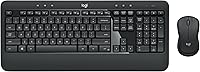
The MX Keys S Combo pairs a 104-key backlit keyboard with the MX Master 3S mouse. Both can connect to up to 3 devices, using Bluetooth Low Energy or the included Logi Bolt receiver.
Logitech MX Keys S Combo Performance Wireless: Best for multi-device productivity

- 104 keys
- Backlit keys
- Pairs with up to 3 devices
- MX Master 3S mouse
A feature-rich keyboard and mouse bundle for switching among devices and working with shortcuts, backlighting and fast scrolling.
Pros
- Backlit keys adapt as hands approach
- Pairs with up to 3 devices
- MX Master 3S includes MagSpeed scrolling and an 8K DPI sensor
- Rechargeable keyboard and mouse
Cons
- Premium feature set may be unnecessary for basic typing
- Smart Actions require Logi Options+ on Windows or macOS
- Bluetooth FileVault startup issue may require the Logi Bolt receiver
The keyboard has a laptop-like profile and spherically dished keys. Its backlighting responds as your hands approach and adjusts to the environment, with more lighting customization available through Logi Options+.
The mouse adds MagSpeed scrolling and an 8K DPI sensor. Logitech says it tracks on glass at least 4 mm thick, which can help if your desk setup doesn't include a conventional mouse pad.
Does the Logitech MX Keys S Combo review fit your setup?
This Logitech MX Keys S Combo review points to a clear use case: a desk where typing, scrolling and device switching all matter. The pairing options can help if you move between a laptop, tablet and another computer, while Smart Actions can run multiple actions with one keystroke.
Smart Actions and extra lighting customization require Logi Options+ on Windows or macOS. If you don't plan to set up shortcuts or adjust lighting, you may not use all the combo's software features.
How does the MX Keys S Combo compare with simpler Logitech combos?
The MX Keys S Combo prioritizes productivity features and device flexibility. The MK270 prioritizes a familiar full-size layout, while the MK470 focuses on quiet typing and a slimmer footprint.
| Combo | Best fit | Standout features |
|---|---|---|
| Logitech MX Keys S Combo Performance Wireless | Backlighting and multi-device work | Up to 3 devices, Smart Actions, MX Master 3S |
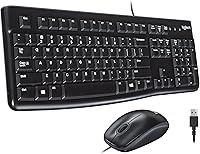
| Logitech MK270 Full Size Wireless Keyboard | Everyday full-size typing | Number pad, multimedia hotkeys, spill-resistant keyboard |
| Logitech MK470 Slim Wireless Combo Compact Keyboard | Quiet typing in a smaller space | Low-profile scissor keys, slim keyboard, compact mouse |
If you want to compare more models before deciding, our best keyboard and mouse combo guide covers other types of setups. For brand-specific choices, see the best Logitech keyboard mouse combo options and the best keyboard mouse combo HP options.
Is the MX Keys S keyboard comfortable for long work sessions?
The MX Keys S keyboard has a stable design with an optimum angle, and Logitech describes its keys as shaped for your fingertips. Those details may suit you if you prefer a laptop-like profile over a taller desktop keyboard.
The keyboard is 430.2 mm wide and weighs 810 g. Measure your desk space and check that the keyboard leaves room for your mouse and other work tools.
Logitech describes the mouse as sculpted for the hand, with the aim of supporting wrist posture during long work periods. Hand fit is personal, so consider how its shape and controls compare with the mouse you already use.
What should you know about the mouse and shortcuts?
The MX Master 3S mouse has MagSpeed scrolling, an 8K DPI sensor and programmable Smart Actions support. The scroll wheel is aimed at fast movement through long pages and documents, while the app can assign multi-step shortcuts to one keystroke.
Smart Actions require Logi Options+ on Windows or macOS. If you use a different operating system, check which functions are supported there before relying on software customization.
The mouse connects along with the keyboard to up to 3 devices. Its controls and shortcut options can be useful if you regularly switch tasks or applications, but may add little to a simple browsing setup.
Will the MX Keys S Combo work with your computer?
The MX Keys S Combo supports Windows, macOS, Linux, Chrome OS, iPadOS and Android, with basic functions supported without software. The listed pairing methods are Bluetooth Low Energy and the included Logi Bolt USB receiver.
Logitech notes a specific Mac startup issue: FileVault might prevent password entry at startup or reboot when the keyboard is connected over Bluetooth. In that situation, Logitech recommends using the Logi Bolt receiver.
The combo isn't compatible with other Logitech USB receivers. Check your available USB ports and receiver needs before choosing how to connect it.
When is the MK270 a better choice?
Choose the MK270 if you want a full-size keyboard for everyday typing without the MX combo's productivity features. It includes a number pad, arrow keys, full-size F-keys and 8 multimedia hotkeys.
The keyboard has low-profile, quiet keys and a spill-resistant design. Its included USB receiver offers a stated wireless range of up to 33 ft, and the keyboard and mouse use replaceable batteries with stated lifespans of up to 36 months and 12 months, respectively.
You can also compare the Logitech MK540 Advanced review if comfort features such as a palm rest and a full-size mouse matter to you. The MK270 is the simpler option in this group, while the MX Keys S Combo has backlighting, multi-device pairing and more advanced mouse controls.
When does the MK470 make more sense?
The MK470 suits a smaller desk or a quieter work area. Its slim keyboard has low-profile scissor keys and a number pad, and Logitech describes both the keyboard and mouse as quiet.
The included USB nano receiver provides a stated range of up to 33 ft. The combo also has auto-sleep and stated battery life of up to 36 months for the keyboard and 18 months for the mouse.
Its layout is optimized for Windows. Choose it when a slim profile and quiet input matter more than backlighting or the MX Keys S Combo's multi-device features.
How should you decide between these Logitech combos?
Pick the MX Keys S Combo if you'll use backlighting, pairing with up to 3 devices, Smart Actions or the MX Master 3S mouse. Pick the MK270 for a straightforward full-size keyboard and mouse, or the MK470 for a slim, quiet combo on a smaller desk.
If you're still weighing keyboard layouts and features, our best keyboard for computer buying guide explains what to consider for your setup. The deciding factor is whether the MX combo's added controls and connections solve needs you actually have.
Frequently asked questions
Is the Logitech MX Keys S Combo worth it?
The MX Keys S Combo is a strong fit if you will use its backlit keys, multi-device pairing, Smart Actions and MX Master 3S mouse. Those features matter less for basic typing and browsing, so a simpler combo such as the MK270 may be a better match if you want a full-size keyboard with a number pad.
Can the MX Keys S Combo connect to more than one device?
Yes. Logitech says the combo can pair with up to 3 devices through Bluetooth Low Energy or the included Logi Bolt USB receiver.
Check which connection works with your computer and setup; Logitech notes that the combo is not compatible with other Logitech USB receivers.
Does the MX Keys S Combo work with macOS?
The combo supports macOS, and the Logi Options+ app for Smart Actions and extra lighting customization is available for Windows and macOS. Logitech notes that FileVault might prevent password entry during startup or reboot over Bluetooth; it recommends using the included Logi Bolt receiver in that case.
What is a simpler alternative to the MX Keys S Combo?
The MK270 keeps the essentials: a full-size keyboard with number pad, 8 multimedia hotkeys, a spill-resistant design and a compact ambidextrous mouse. For a slimmer setup, the MK470 has quiet low-profile scissor keys, a number pad and a compact mouse.