9 Best Portable Document Scanners (November 2026)
The best portable document scanners include the Epson Workforce ES-50 Compact & Lightweight Mobile for lightweight laptop travel, the Brother DS-640 Compact Mobile Document Scanner for fast color scanning, and the ScanSnap iX2500 Wireless or USB High-Speed Document for large wireless batches.
On this page (6 sections)
- The best portable document scanners for different work styles
- How we chose the best portable document scanner
- What should you check before choosing a portable document scanner?
- How do you use and care for a portable document scanner?
- Is a portable document scanner better than a phone?
- Which portable document scanner should you choose?
The Epson WorkForce ES-50 is the best portable document scanner for most people working from a laptop, with a 9.44 oz design, USB power and a single-page scan time as fast as 5.5 seconds. It suits laptop users who need to digitize paperwork away from a permanent desk without adding a heavy device to their bag.
The Brother DS-640 is a strong alternative for faster stated color scanning, while ScanSnap models fit wireless batch work.
Portable scanners vary widely in how they handle paper and where they connect. Some feed one sheet at a time and fit easily in a laptop bag, which makes them practical for receipts, cards and occasional pages.
Others have automatic feeders, duplex scanning and Wi-Fi, but they are better suited to a desk or shared workspace where space and power are not a concern.
The right choice depends on your daily workflow rather than the longest feature list. If you scan a few pages at a time while traveling, a light USB model keeps setup simple.
If you scan packets every week, a feeder model can save repeated handling even though it takes more room.
For most laptop users, low weight and direct USB connection matter more than wireless options they may not use. You can plug the scanner into your computer, feed a page and save the file without searching for an outlet.
That simplicity is useful in hotels, classrooms, client offices and temporary workspaces.
If you are still comparing printer and scanner types, start with this home printer buying guide. For a larger office setup, see our desktop document scanner reviews.
Our picks at a glance
-
1
 Best for lightweight laptop travel
Epson Workforce ES-50 Compact & Lightweight Mobile
9.5/10 our score
See it on Amazon -
2
 Best for fast color scanning
Brother DS-640 Compact Mobile Document Scanner
9.4/10 our score
See it on Amazon -
3
 Best for large wireless batches
ScanSnap iX2500 Wireless or USB High-Speed Document
9.3/10 our score
See it on Amazon
- 4
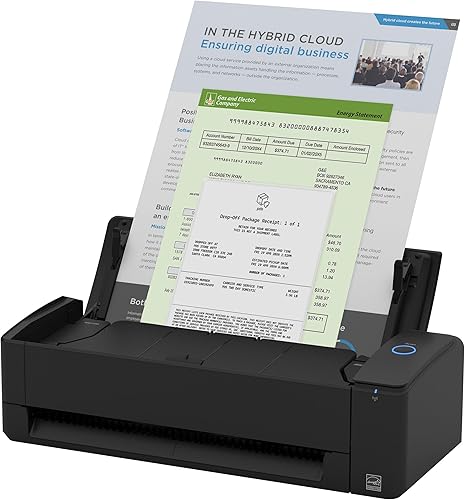 Check it
ScanSnap iX1300 Wireless or USB Double-Sided Color
Best for small-space duplex scanning - 5
 Best for simple mobile duplex scanningCheck it
- 6
 Check it
HP Small USB Document & Photo Scanner
Best for occasional home scanning - 7
 Check it
Epson DS-70 Portable Document Scanner Mobile Single-Sheet
Best for long documents on the road - 8
 Check it
Plustek Mobile Scanner S410 Plus
Best for automatic folder workflows - 9
 Check it
IRIScan Express 4 Black Compact Portable USB
Best for basic Windows scanning
The best portable document scanners for different work styles
The best portable document scanner depends on how much paper you scan, whether you need both sides at once and where you will connect it. These picks are ordered by score, with the highest-scoring model first.
Epson Workforce ES-50 Compact & Lightweight Mobile: Best for lightweight laptop travel
- Single-sheet scanning
- Scans a page in as fast as 5.5 seconds
- USB powered
- Windows and Mac compatible
- OCR for searchable PDFs and editable files
The ES-50 is a light single-sheet scanner for people who carry a laptop and scan receipts, cards or paperwork away from a desk.
Pros
- Very light
- USB powered
- Windows and Mac support
Cons
- Single-sheet scanning
- No Wi-Fi
The Epson WorkForce ES-50 is the easiest pick for frequent laptop travel. Its 9.44 oz weight, compact 10.7 x 10.7 x 1.3 in dimensions and USB power keep the basic setup simple when you work away from a permanent desk.
It scans one sheet at a time, including documents up to 8.5 x 72 in, receipts and ID cards. Epson states that a page can scan in as fast as 5.5 seconds, and the automatic feeding mode can combine new sheets into one file.
The ES-50 supports Windows and Mac, and the USB 2.0 connection means you do not need batteries or a separate power supply. That matters when you move between home, a client site and a shared office, since you can rely on the laptop as the power source.
Epson ScanSmart software helps you scan, review and save files, while included OCR can create searchable PDFs and editable Word and Excel files. The TWAIN driver also helps the scanner work with other imaging software on your computer.
Choose it when low carry weight and straightforward USB scanning matter most. A single-sheet design is slower for a large stack than the feeder-based ScanSnap and Canon models, so keep batch size in mind before you buy.
Brother DS-640 Compact Mobile Document Scanner: Best for fast color scanning
- Up to 16 ppm
- Micro USB 3.0 powered
- Windows, Mac and Linux support
- Business card and plastic card scanning
- OCR and image optimization software
The DS-640 keeps color and black-and-white scanning at the same stated speed and supports several computer platforms.
Pros
- Up to 16 ppm
- Linux support
- Card and receipt handling
Cons
- Single-sheet scanning
- USB connection only
The Brother DS-640 suits people who want a compact scanner with a faster stated rate than the other single-sheet travel models here. Brother lists scanning up to 16 ppm, with the same color scan speed as black and white.
Its micro USB 3.0 cable supplies power from a PC or laptop, so you do not need a separate outlet for normal use. At less than 1 foot in length and about 1.5 lb in weight, it is designed to fit in a bag, purse or pocket for travel.
The scanner supports Windows, Mac and Linux, plus TWAIN/WIA, ICA and SANE drivers for supported systems. That broader platform support can matter if you use different computers at home and work.
The DS-640 handles business cards, plastic cards, receipts and documents up to 72 inches long. Its software can send scans to a file, image, OCR, email or cloud destination, with tools for background removal, text enhancement and color adjustment.
Pick it for fast color paperwork and broad computer support. Its one-sheet capacity means it is still a feed-and-scan workflow rather than a set-it-and-walk-away batch scanner.
ScanSnap iX2500 Wireless or USB High-Speed Document: Best for large wireless batches
- 45 ppm double-sided scanning
- 100-sheet feeder
- Wi-Fi 6 and USB-C
- Large touchscreen
- Automatic file naming and sorting
The iX2500 is the strongest batch option here, with a 100-sheet feeder and wireless scanning to computers, mobile devices and cloud services.
Pros
- Fast duplex scanning
- Large feeder
- Wireless or USB use
Cons
- Heavier than mobile single-sheet models
- Larger desk footprint
The ScanSnap iX2500 is the best fit for large batches, not for carrying in a laptop sleeve. Its 100-sheet document feeder and 45 ppm double-sided scanning are designed for repeated paperwork at a workstation.
Wi-Fi 6 and USB-C let you place it where it works best, and the large touchscreen supports personalized profiles. ScanSnap software can send documents to a PC, Mac, mobile device or cloud service, with automatic optimization, naming and sorting.
The iX2500 weighs 7.7 lb and measures 6.26 x 11.5 x 6.34 in, so it needs a stable surface and room for paper to enter and exit. That footprint is a fair trade for a feeder that can hold a substantial stack.
Its brake roller system, multi-feed sensor and skew detection are aimed at smoother feeding and fewer paper-handling problems. Those features are most useful when you scan mixed office paperwork and want the machine to manage the process.
Choose it when volume and wireless access matter more than travel weight. For a smaller wireless duplex scanner, consider the iX1300 below.
ScanSnap iX1300 Wireless or USB Double-Sided Color: Best for small-space duplex scanning
- Up to 30 ppm duplex scanning
- USB and Wi-Fi
- 20-sheet feeder
- Automatic de-skew and blank-page removal
- Windows, Mac, iOS, Android and ChromeOS support
The iX1300 combines duplex scanning and wireless use with a smaller operating footprint than the iX2500.
Pros
- Duplex scanning
- Wireless use
- Compact design
Cons
- Smaller feeder than the iX2500
- Heavier than single-sheet travel scanners
The ScanSnap iX1300 gives small workspaces duplex scanning without the iX2500's larger 100-sheet feeder. It scans up to 30 ppm, handles up to 20 sheets and connects through USB or Wi-Fi.
Its software can remove blank pages, correct skew and optimize color, so you spend less time cleaning up routine scans. You can send scans to computers, mobile devices and cloud services, and the scanner can work without a computer through supported mobile workflows.
The iX1300 supports Windows, Mac, iOS, iPadOS, Android and ChromeOS. That range helps if you scan from a laptop at a desk and from a phone or tablet while away from it.
It also handles documents, receipts, photos and plastic cards, which makes it flexible for a home office that deals with more than plain letter paper. The compact design is meant to save desk space even while it is being used.
Choose this model if you need wireless double-sided scanning in a smaller personal setup. Its 4.4 lb weight still makes it less travel-friendly than the Epson and Brother single-sheet models.
Canon imageFORMULA R10: Best for simple mobile duplex scanning
- Up to 12 ppm duplex scanning
- 20-sheet automatic feeder
- USB powered
- Windows and Mac compatible
- Built-in scanning software
The R10 gives mobile users duplex scanning and a 20-sheet feeder while keeping setup centered on a USB connection.
Pros
- Duplex scanning
- USB powered
- Built-in software
Cons
- No Wi-Fi
- Not intended for photo paper
The Canon imageFORMULA R10 is a practical middle choice for mobile duplex scanning. Its 20-sheet automatic feeder can scan both sides at up to 12 ppm, in color or black and white.
The R10 connects by USB and works with Windows and Mac, drawing power through the USB cable with power consumption listed at 2.5W or less. That setup suits a laptop user who wants duplex scanning without adding a wireless network step.
Its built-in software requires no separate installation and supports editing, straightening, trimming and custom scan destinations. You can preview scans and adjust files, which helps when a form or receipt needs a quick correction before saving.
Canon lists support for receipts, business cards, plastic or embossed cards, reports and legal documents. For travel-friendly photo scanning, compare portable photo scanners.
The scanner is not intended for photographs on photo paper, so choose another model for that specific job. Pick it when duplex scanning and a 20-sheet feeder matter but Wi-Fi does not.
HP Small USB Document & Photo Scanner: Best for occasional home scanning
- Up to 15 ppm simplex scanning
- USB 2.0 powered
- Windows and Mac compatibility
- Scans documents, photos, receipts and cards
- HP WorkScan software
The HPPS100 suits occasional paperwork, receipts, photos and cards when you want a small USB scanner for a PC or Mac.
Pros
- Lightweight design
- 15 ppm simplex scanning
- Windows and Mac support
Cons
- Single-sided scanning
- No wireless connection
The HPPS100 fits occasional home and office scanning when you need a small USB device for a PC or Mac. It uses one-sided scanning at up to 15 ppm and supports documents, photos, receipts and cards.
HP WorkScan software includes auto-scan and size detection, along with preview, crop, image adjustment and background cleanup tools. That software is aimed at users who want to adjust a scan without learning a complex scanning program.
The scanner uses USB 2.0 power and has a 10-sheet standard capacity, so it is best for small batches rather than continuous office use. The cable is included, and the device can be plugged in and unplugged as needed.
The stated paper range runs from 2 x 2.9 in to 8.5 x 14 in, which covers small cards through legal sized pages. The HPPS100 is also compact at 2 x 11.6 x 1.4 in, with a listed weight of 3 oz.
Choose it for small batches and mixed paper types. For double-sided pages, the Canon R10 or one of the ScanSnap models is a better match.
Epson DS-70 Portable Document Scanner Mobile Single-Sheet: Best for long documents on the road
- Single page in as fast as 5.5 seconds
- Documents up to 8.5 x 72 in
- USB powered
- OCR and document management software
- Windows and Mac compatible
The DS-70 is a light single-sheet scanner with support for long documents, receipts, business cards and ID cards.
Pros
- Lightweight
- Long-document support
- OCR included
Cons
- Single-sheet scanning
- No Wi-Fi
The Epson DS-70 is a lightweight single-sheet scanner for people who need to handle long pages while traveling. It supports documents up to 8.5 x 72 in, along with business cards, ID cards and receipts.
Like the ES-50, it scans a single page in as fast as 5.5 seconds and uses USB power instead of batteries or an external power supply. That means you can connect it to a Windows or Mac computer and scan without carrying a charger.
Included OCR and document management software can create editable text and searchable PDFs. That is useful for contracts, forms and receipts that you need to find again by a word in the text.
The DS-70 weighs 9.44 oz, which makes it easy to keep in a laptop bag for occasional use. It is a good choice when a light bag matters, but its single-sheet design is less suitable for a tall pile of paperwork.
Choose it for long documents and basic mobile scanning. If you want cloud scanning and automatic file sorting, the ES-50 offers the more detailed software workflow in this group.
Plustek Mobile Scanner S410 Plus: Best for automatic folder workflows
- USB powered
- Automatic scanning
- Letter and legal document support
- OCR through DocAction
- Automatic crop and deskew
The S410 Plus is a compact single-sheet scanner that can automatically process images and save them to chosen folders.
Pros
- Automatic crop and deskew
- OCR support
- Less than 1 lb
Cons
- Single-sheet scanning
- USB connection only
The Plustek Mobile Scanner S410 Plus suits users who want a simple automatic workflow for single sheets. It is USB powered and can automatically process images and save them to designated folders.
The S410 Plus handles letter and legal documents, business cards, plastic ID cards, invoices and receipts. That mix suits small business paperwork, where a receipt or card may need to go to a different folder than a letter.
Plustek DocAction includes OCR for searchable PDFs and editable Excel or Word files, with local computer, FTP and shared-folder destinations. You can also use the TWAIN driver with compatible software applications.
Automatic crop and deskew can reduce the cleanup needed after scanning, and the scanner is designed to process images without button presses. That hands-off approach can help when you scan a steady stream of single pages.
The scanner weighs 0.41 kg and uses a USB connection, so it remains a laptop centered device. Choose it when folder-based saving and automatic image handling matter more than wireless access.
IRIScan Express 4 Black Compact Portable USB: Best for basic Windows scanning
- Up to 8 ppm simplex scanning
- USB powered
- Business card, photo and receipt scanning
- Readiris OCR and PDF software
- Windows compatible
The IRIScan Express 4 is a basic Windows-only option for single-sided documents, receipts, photos and business cards.
Pros
- USB powered
- OCR and PDF software
- Long-document support
Cons
- Windows only
- Slower stated speed
- Simplex scanning
The IRIScan Express 4 is a basic Windows-only scanner for single-sided documents, receipts, photos and business cards. It scans up to 8 ppm and draws power through an included micro USB 2.0 cable.
Readiris OCR can scan to Word, PDF and Excel formats, which helps turn paper text into files you can search or edit. The included Readiris PDF software supports PDF creation, editing and annotation, while the TWAIN driver supports other imaging software.
It handles documents up to 8.5 x 72 in, as well as ID cards and receipts. The simplex design means each page is scanned on one side, so double-sided documents need a second pass.
IRIScan states that it is not compatible with Macintosh computers, so Mac users should choose a different model. That platform limit is the main point to check before you order.
Pick it for straightforward Windows scanning and bundled document software. Its simplex design and lower stated speed make it less suitable for frequent two-sided or high-volume work.
How we chose the best portable document scanner
We compared the stated connection types, paper handling, power method, scanning direction, software support and portability of each model. Our score weighs specs, features and buyer feedback against what you're shopping for.
A single-sheet scanner is usually the easiest model to carry. It works well for receipts, forms, cards and a few pages at a time.
USB power also reduces the number of accessories you need while working from a laptop. You can often rely on the computer connection for both power and data transfer.
An automatic document feeder changes the workflow. The ScanSnap iX2500 holds 100 sheets, while the iX1300 and Canon R10 hold 20 sheets.
Those models make more sense when you regularly scan packets rather than isolated pages. Loading a stack once can be simpler than feeding each sheet by hand.
Duplex scanning also matters. It captures both sides in one pass, which is useful for contracts, forms and double-sided office paperwork.
Simplex models are adequate when most pages have printing on one side. Software features such as OCR, automatic naming and cloud destinations matter when you need to find files later.
What should you check before choosing a portable document scanner?
Check your computer, paper types and expected batch size before choosing a portable document scanner. The best match is the model that fits your connection and document workflow, not simply the lightest scanner.
For Windows and Mac, the Epson ES-50, Epson DS-70, Brother DS-640, Canon R10, HPPS100 and ScanSnap models offer useful compatibility options. The IRIScan Express 4 is Windows only, while the Brother DS-640 also supports Linux.
For wireless scanning, choose the ScanSnap iX2500 or iX1300. USB-only models can be simpler for direct laptop use, but they need a physical connection during scanning.
For long pages, the Epson models, Brother DS-640, Plustek S410 Plus and IRIScan Express 4 support long-document workflows. For receipts and cards, check the model-specific media list before you buy.
People who scan photos should separate photo-paper needs from ordinary document scanning. The Canon R10 specifically excludes photographs on photo paper, while the HPPS100 lists photo handling.
How do you use and care for a portable document scanner?
Start by placing the scanner on a stable, clear surface and connecting the correct USB cable or wireless network. Install the supported software, choose a file type and scan a clean page before feeding a larger group.
Keep pages flat and remove clips, staples and folded corners. Feed one sheet at a time on single-sheet models, and keep the feeder within its stated capacity on models with automatic document feeders.
Review the first scan for orientation, cropping and text clarity. OCR can make text searchable or editable, but you should proofread converted documents before using them for records.
Dust and paper fibers can affect feeding and image quality. Follow the model's care instructions, keep the scanning path clean and store a portable scanner where its cable and feed opening won't be bent or blocked.
For phone-focused workflows, compare these picks with our guide to the best document scanner for iPhone. Epson owners can also review the best Epson document scanners, while Mac users may prefer our best document scanner for MacBook guide.
Is a portable document scanner better than a phone?
A portable document scanner is usually better for repeated paperwork because it feeds pages through a fixed path and can apply document-focused processing. A phone is more convenient for one quick page, especially when you already have it in hand.
The fixed path helps with alignment and consistent capture when you scan several sheets in a row. It also makes it easier to apply settings for file type, size and text recognition before you start.
For receipts, our guide on a receipt scanner on iPhone covers a phone-first option. For a printer that also handles office paperwork, compare the best duplex printer for home office.
A phone can work well for a single receipt, a note or a page you need to share right away. It is less convenient when the page is crumpled, the lighting is poor or you need a clean file for records.
A portable scanner makes the most sense when you regularly digitize forms, receipts, business cards or records from a laptop. Choose a feeder model when you scan batches, and choose a single-sheet model when low weight and easy packing matter most.
Think about how often you scan and how you file the results. If you scan daily, the time saved by a feeder or duplex pass can add up quickly.
If you scan only occasionally, a light single-sheet model may be enough.
Which portable document scanner should you choose?
The Epson WorkForce ES-50 is the best portable document scanner for lightweight laptop travel, while the Brother DS-640 is the better pick for faster stated color scanning and Linux support.
Choose the ScanSnap iX2500 for large wireless batches, the iX1300 for smaller-space duplex scanning, or the Canon R10 for USB-powered duplex work. Each of those models uses a feeder, which changes the workflow compared with feeding one sheet at a time.
The HPPS100, Epson DS-70, Plustek S410 Plus and IRIScan Express 4 fit more specific single-sheet needs. The HPPS100 suits occasional home scanning, the DS-70 handles long pages, the S410 Plus focuses on automatic folder saving, and the IRIScan Express 4 is Windows only.
Before you decide, check your computer platform and the paper you scan most often. Windows and Mac users have more options, while Linux support narrows the field to models that list it.
Paper type matters too, since some models list cards and receipts while others are aimed at standard documents.
If your priority is office printing plus scanning, compare these options with the best monochrome laser printer for home office. Match the scanner to your paper volume, computer platform and need for duplex or wireless use.
Our top 3 picks at a glance
-
1
Best for lightweight laptop travel
Epson Workforce ES-50 Compact & Lightweight Mobile
9.5/10 our score
See it on Amazon -
2
Best for fast color scanning
Brother DS-640 Compact Mobile Document Scanner
9.4/10 our score
See it on Amazon -
3
Best for large wireless batches
ScanSnap iX2500 Wireless or USB High-Speed Document
9.3/10 our score
See it on Amazon
Frequently asked questions
What is the best portable document scanner?
The Epson WorkForce ES-50 is the best portable document scanner for most laptop users because it weighs 9.44 oz, connects by USB and scans a single page in as fast as 5.5 seconds. Choose the Brother DS-640 if you prefer a stated speed of up to 16 ppm and Linux support.
Are portable document scanners worth using?
Portable document scanners are useful when you need clearer paper workflows than phone photos and want a device that connects to a laptop. Single-sheet models suit receipts, cards and occasional pages.
A duplex model with an automatic feeder is better for repeated multi-page work.
Can a portable document scanner scan receipts?
Yes. The Epson ES-50, Brother DS-640, ScanSnap models, Canon R10, HPPS100, Epson DS-70, Plustek S410 Plus and IRIScan Express 4 list receipt handling or receipt-focused scanning.
Check the model's supported computer and connection type before choosing one.
Do portable document scanners need batteries?
The portable models here use USB power rather than batteries. Connect the scanner to a compatible computer with the required USB cable, then install or open its scanning software.
A USB-powered model still needs a computer or another supported USB power source.



