7 Best Desktop Document Scanner Reviews (November 2026)
The best desktop document scanners include the Epson Workforce ES-400 II High-Speed Color Duplex for everyday office batches, the Epson Workforce ES-590W Wireless & USB High-Speed for wireless office workflows, and the Brother DS-640 Compact Mobile Document Scanner for tiny desks and travel.
On this page (7 sections)
- The best desktop document scanners for offices
- How should you choose a desktop document scanner?
- What feeder size works for a home office?
- Should an office use a network document scanner?
- Do you need OCR on a desktop document scanner?
- How should you set up and care for a desktop scanner?
- Which desktop document scanner should you buy?
The best desktop document scanner for most offices is the Epson Workforce ES-400 II, because its 50-sheet feeder, duplex color scanning, OCR and USB computer connection cover common document batches. The Epson ES-590W and ScanSnap iX2500 are better choices when you need a 100-sheet feeder and wireless scanning.
Desktop document scanner reviews are most useful when they compare the workflow, not just the scan speed. A scanner for a home office may need a small footprint and simple USB setup, while an office may need a larger feeder, OCR and flexible sharing.
If you are comparing a complete home setup, start with our home printer buying guide. For a phone-centered workflow, see our guide to the best document scanner for iPhone.
Our picks at a glance
-
1
 Best for everyday office batches
Epson Workforce ES-400 II High-Speed Color Duplex
9.7/10 our score
See it on Amazon -
2
 Best for wireless office workflows
Epson Workforce ES-590W Wireless & USB High-Speed
9.6/10 our score
See it on Amazon -
3
 Best for tiny desks and travel
Brother DS-640 Compact Mobile Document Scanner
9.4/10 our score
See it on Amazon
- 4
 Check it
ScanSnap iX2500 Wireless or USB High-Speed Document
Best for premium batch control - 5
 Check it
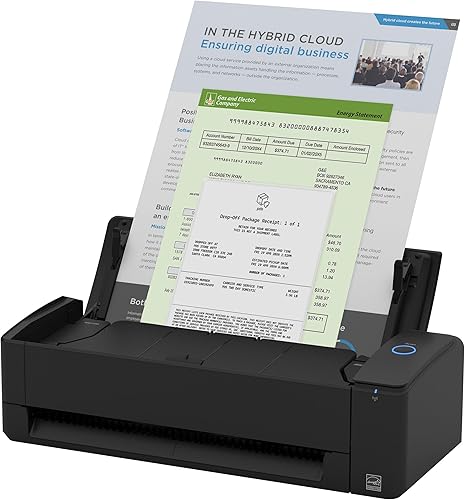
ScanSnap iX1300 Wireless or USB Double-Sided Color
Best for small shared workspaces - 6
 Best for USB-powered mobile workCheck it
- 7
 Check it
Canon imageFORMULA DR-C225 II Office Document Scanner
Best for upright desk placement
The best desktop document scanners for offices
The Epson ES-400 II is the strongest general office choice, while the ES-590W and ScanSnap iX2500 suit larger batches with wireless connections. Smaller models make more sense when desk space, portability or occasional scanning matters most.
Our score weighs specs, features and buyer feedback against what you're shopping for. We compared feeder capacity, duplex scanning, computer connectivity, OCR tools, operating footprint and the difference between office and home office workloads.
| Product | Best for | Feeder | Connection | Computer support | Our score |
|---|---|---|---|---|---|
| Epson Workforce ES-400 II High-Speed Color Duplex | everyday office batches | 50 sheets | USB | PC and Mac compatible | 9.7 |
| Epson Workforce ES-590W Wireless & USB High-Speed | wireless office workflows | 100 sheets | USB, Wi-Fi | 9.6 | |
| Brother DS-640 Compact Mobile Document Scanner | tiny desks and travel | 1 sheet | USB | 9.4 | |
| ScanSnap iX2500 Wireless or USB High-Speed Document | premium batch control | 100 sheets | USB, Wi-Fi | Windows, macOS, iOS, iPadOS, Android and ChromeOS support | 9.3 |
| ScanSnap iX1300 Wireless or USB Double-Sided Color | small shared workspaces | 20 sheets | USB, Wi-Fi | 9.2 | |
| Canon imageFORMULA R10 | USB-powered mobile work | 20 sheets | USB | 8.9 | |
| Canon imageFORMULA DR-C225 II Office Document Scanner | upright desk placement | 30 sheets | USB | 8.4 |
Epson Workforce ES-400 II High-Speed Color Duplex: Best for everyday office batches
- 50-sheet Auto Document Feeder
- Duplex color scanning
- USB connection
- OCR and searchable PDFs
A 50-sheet feeder, duplex scanning and OCR make this a strong fit for regular office paperwork. USB connectivity keeps the setup direct for a connected computer.
Pros
- 50-sheet feeder
- Duplex scanning
- OCR and editable Word or Excel files
Cons
- USB connection only
- Smaller feeder than the 100-sheet models
The Epson Workforce ES-400 II is the best match for a typical office that scans paper files every week. Its 50-sheet Auto Document Feeder gives you room to load a useful batch, and duplex scanning captures both sides in one pass.
The scanner connects by USB and works with PC and Mac systems. Epson ScanSmart software supports previewing, emailing and cloud uploads, while automatic file naming can reduce sorting work after a scan session.
OCR is a major reason to choose this model for digital filing. It can create searchable PDFs and convert scans to editable Word or Excel files.
Epson also includes a TWAIN driver for document management software.
Image tools include auto crop, blank page removal and background removal. Ultrasonic double-feed detection and dynamic skew correction are useful for reducing missed pages and crooked output during a batch.
Choose it for a direct computer workflow with a medium-size feeder. If several people need to scan over Wi-Fi or you regularly load more than 50 sheets, compare the Epson ES-590W and ScanSnap iX2500 first.
Epson Workforce ES-590W Wireless & USB High-Speed: Best for wireless office workflows
- 100-sheet Auto Document Feeder
- Wi-Fi and USB
- Up to 45 ppm
- 4.3-inch color touchscreen
The 100-sheet feeder and Wi-Fi connection suit busy offices that scan larger batches from more than one device. The 4.3-inch touchscreen also supports computer-free scan destinations.
Pros
- 100-sheet feeder
- Wi-Fi and USB
- 4.3-inch color touchscreen
Cons
- Minimum system requirements list Windows
- Larger weight than compact models
The Epson Workforce ES-590W is the best desktop document scanner here for wireless office workflows. Its 100-sheet feeder gives it twice the stated feeder capacity of the ES-400 II, and duplex scanning reaches up to 45 ppm.
Wi-Fi and USB connections give you more placement choices. The 4.3-inch color touchscreen supports ScanWay computer-free scanning to email accounts, cloud storage or connected USB flash drives.
The scanner also supports scanning from a computer or mobile device, and Epson lists the Epson Smart Panel app for iOS and Android. Its minimum system requirements list Windows, so check your office computers before choosing it for a mixed environment.
Paper and staple protection, blank page deletion and single-pass double-sided scanning are aimed at larger jobs. The 600 dpi resolution gives you more detail than the 300 dpi resolution listed for the ES-400 II, although everyday text filing does not always need the higher setting.
Choose the ES-590W when a large feeder, wireless connection and touchscreen matter together. It is a better office fit than a compact scanner when several document stacks arrive during the same workday.
Brother DS-640 Compact Mobile Document Scanner: Best for tiny desks and travel
- Up to 16 ppm
- USB-powered operation
- Windows, Mac and Linux support
- OCR and cloud scan destinations
The Brother DS-640 is better for occasional pages, receipts and cards than large office batches. Its compact body and USB power make it easy to move between work areas.
Pros
- Compact design
- USB-powered
- Windows, Mac and Linux support
Cons
- 1-sheet capacity
- Not a desktop batch scanner
The Brother DS-640 is best for a tiny desk, travel bag or home office that scans one page at a time. Its 1-sheet capacity and up to 16 ppm speed make it a poor match for large office batches, but its compact USB-powered design is easy to place.
Brother lists support for Windows, Mac and Linux, along with TWAIN/WIA, ICA and SANE drivers. The included micro USB 3.0 cable powers the scanner from a PC or laptop, so you do not need a separate outlet for the scanner.
The DS-640 can handle business cards, ID cards, plastic cards, receipts and plain paper. Its software supports scan-to destinations such as a computer, network, cloud service, email and OCR.
Automatic color adjustment, image rotation on PC, background removal and text enhancement help clean up everyday documents. The scanner measures 1.99 x 11.9 x 1.45 in, so it needs much less space than a traditional desktop feeder.
Choose it when mobility and footprint matter more than batch capacity. For a true office document scanner with an automatic feeder, move up to the Epson ES-400 II or Canon DR-C225 II.
ScanSnap iX2500 Wireless or USB High-Speed Document: Best for premium batch control
- 100-sheet document feeder
- 45 ppm double-sided scanning
- Wi-Fi 6 and USB-C
- Large touchscreen
The iX2500 combines a 100-sheet feeder with a touchscreen, Wi-Fi 6 and USB-C. It fits offices that want flexible device connections and automated document organization.
Pros
- 100-sheet feeder
- Wi-Fi 6 and USB-C
- 45 ppm duplex scanning
Cons
- More features than a basic USB workflow needs
- Higher weight than portable models
The ScanSnap iX2500 is the best choice for buyers who want a large feeder with flexible device connections. Its 100-sheet feeder and 45 ppm double-sided scanning place it alongside the Epson ES-590W for larger batches.
Wi-Fi 6 and USB-C let you connect to computers, mobile devices or cloud services. ScanSnap Cloud supports scanning without a computer, while the Quick Menu can send scans to favorite computer apps.
The iX2500 supports Windows, macOS, iOS, iPadOS, Android and ChromeOS according to its listed system requirements. That broad support makes it useful for a mixed-device home office or a small team.
Its software can automatically optimize, name and sort scanned documents into folders and cloud services. A brake roller system, multi-feed sensor and skew detection are designed to help feed pages smoothly.
Choose this model if you want the largest feeder in a flexible ScanSnap workflow. The Epson ES-590W is the closer alternative if its touchscreen and Epson software fit your office better.
ScanSnap iX1300 Wireless or USB Double-Sided Color: Best for small shared workspaces
- 20-sheet capacity
- Up to 30 ppm duplex scanning
- Wi-Fi and USB
- Compact operating footprint
The iX1300 keeps wireless and USB scanning in a smaller body than the large-feeder models. Its 20-sheet capacity works well for personal paperwork and smaller shared desks.
Pros
- Compact design
- Wi-Fi and USB
- Up to 30 ppm duplex scanning
Cons
- 20-sheet capacity
- Less suited to large batches
The ScanSnap iX1300 is the best wireless desktop scanner for a small shared workspace. It supports USB and Wi-Fi while using a 20-sheet feeder and a compact 4.5 x 11.7 x 3.3 in body.
Up to 30 ppm duplex scanning gives it more speed than the portable Brother DS-640 and Canon R10. The iX1300 also supports automatic de-skew, color optimization and blank page removal without requiring a complicated driver setup.
ScanSnap Home brings document, receipt, business card and photo organization into one software workflow. You can send scans to Mac, PC, mobile devices and cloud services, and the scanner can work without a computer.
The 20-sheet capacity is the main limit for office batches. It is enough for forms, receipts and short paperwork groups, but you will reload it more often than the 50- and 100-sheet models.
Choose it when wireless access and small-space placement are more important than maximum feeder capacity. For a home office that scans thick stacks, the Epson ES-400 II remains the stronger fit.
Canon imageFORMULA R10: Best for USB-powered mobile work
- 20-sheet automatic feeder
- Up to 12 ppm duplex scanning
- USB powered
- Windows and Mac compatibility
The Canon R10 suits remote desks and mobile users who need duplex scanning without a separate power connection. Its 20-sheet feeder is practical for smaller document groups.
Pros
- USB powered
- 20-sheet feeder
- Windows and Mac compatibility
Cons
- 12 ppm speed
- USB connection only
The Canon imageFORMULA R10 is the best USB-powered option for mobile or remote work. It has a 20-sheet automatic feeder, duplex scanning up to 12 ppm and a power draw of 2.5 watts or less.
The R10 works with Windows and Mac devices through USB. Its built-in software requires no installation, and it can create searchable PDFs and JPEG files while letting you edit, straighten and trim scans.
Canon lists support for receipts, business cards, plastic or embossed cards, reports and legal documents. The product is not intended for scanning photographs on photo paper or photographic media.
This model suits a home office that needs occasional batches without a separate power adapter. The 20-sheet feeder gives it more document capacity than the Brother DS-640, but its 12 ppm speed is lower than the Brother's stated 16 ppm.
Choose it for simple USB scanning from different locations. If your main goal is frequent office filing, the Epson ES-400 II provides a larger feeder and stronger document-management features.
Canon imageFORMULA DR-C225 II Office Document Scanner: Best for upright desk placement
- 30-sheet automatic feeder
- Up to 25 ppm duplex scanning
- Upright space-saving design
- Windows and Mac support
The upright DR-C225 II helps conserve desk depth while handling more than a compact mobile scanner. Its 30-sheet feeder fits moderate office batches.
Pros
- Upright design
- 30-sheet feeder
- Three-year warranty included
Cons
- USB connection only
- Taller body than low-profile scanners
The Canon imageFORMULA DR-C225 II is the best desktop scanner for an upright desk placement. Its 30-sheet automatic feeder and up to 25 ppm duplex scanning fit moderate office batches, while the upright design helps limit desk depth.
The scanner connects by USB and supports Windows and Mac. Canon includes a TWAIN driver, scanning software, a business card organizer and a PDF tool for creating, viewing, editing, converting and collaborating on PDF files.
It handles receipts, photos, business cards, plastic or embossed cards, reports, contracts, long documents, thick documents and thin documents. The 30-sheet feeder sits between the smaller 20-sheet models and the 50- or 100-sheet office scanners.
Its dimensions are 6.1 x 11.8 x 8.7 in, so measure the shelf height before choosing an upright scanner. The included three-year warranty is longer than the one-year warranties listed for several other picks here.
Choose it when desk depth is limited and a 30-sheet feeder is enough. Pick the Epson ES-400 II for OCR-focused filing or a 100-sheet model for larger daily batches.
How should you choose a desktop document scanner?
Choose feeder capacity first, then match connectivity and software to the way you handle files. A 50-sheet feeder is a useful middle ground for office work, while a 100-sheet model reduces reloads during large batches.
Duplex scanning is worth prioritizing when documents commonly have printing on both sides. All of the larger office-oriented picks here support two-sided scanning, while the Brother DS-640 and Canon R10 target smaller, more mobile workflows.
For a computer-based setup, USB is simple and direct. Wi-Fi adds flexibility for computers, phones, cloud services or computer-free scanning, but it also makes software and network compatibility more important.
OCR matters when you need to search old files or edit text after scanning. The Epson ES-400 II includes OCR for searchable PDFs and editable Word or Excel files, while Brother includes document management and OCR software with the DS-640.
If you use a MacBook, compare our guide to the best document scanners for Mac and MacBook. Buyers who need a smaller unit should also see the best portable document scanner and best handheld document scanner guides.
What feeder size works for a home office?
A 20- or 30-sheet feeder is enough for receipts, forms and short paperwork groups, while a 50-sheet feeder is better for regular home office batches. Choose 100 sheets when you often scan a full stack without stopping to reload.
The Epson ES-400 II is the most balanced home office choice because its 50-sheet feeder does not force you into the larger wireless models. The ScanSnap iX1300 is easier to place when desk space is tight.
For oversized documents, a standard desktop feeder may not be enough. See our guide to the best large document scanner if your work includes large-format pages.
Should an office use a network document scanner?
A network document scanner can make sense when several people need shared access, but Wi-Fi support alone does not guarantee every office workflow. Check the scanner's software, operating-system support and preferred scan destinations before setting it up.
The Epson ES-590W and ScanSnap iX2500 support wireless connections and cloud-oriented workflows. The Epson also supports scan destinations through its touchscreen, while the ScanSnap supports Wi-Fi 6 and USB-C.
For a more focused comparison, read our guide to the best network document scanner. If automatic feeding is your main concern, see the best document scanner with automatic document feeder.
Do you need OCR on a desktop document scanner?
You need OCR when scanned pages must be searchable, copied into editable files or organized by text. If you only archive images or send PDFs as attachments, OCR may be less important than feeder size and connection type.
The Epson ES-400 II is the clearest OCR-focused pick here because it creates searchable PDFs and converts scans to editable Word or Excel files. The Brother DS-640 also includes document management and OCR software.
OCR does not remove the need to name and organize files. Use consistent folders and filenames so scanned records remain easy to find after the scan session.
Read our guide to the best document scanner with OCR for a closer look at searchable filing workflows. For Epson-specific options, compare the best Epson document scanners.
How should you set up and care for a desktop scanner?
Place the scanner where the feeder and output path stay clear, connect it to the intended computer or network, and set a consistent file destination before scanning a large batch. Keep pages flat and remove clips, staples and folded corners when appropriate.
Start with a small group so you can check page order, orientation, crop and OCR results. Then load the full batch and watch for double feeds, skewed pages or blank pages that need review.
Keep the scanner's glass and feed path clean according to the brand's instructions. Store important digital files in an organized location, and keep a backup when the scans are the only copy of a document.
If you are moving files from an older computer into a newer all-in-one setup, our guide explains how to transfer files from an old desktop to an all-in-one PC. Our comparison of an all-in-one PC and a desktop tower can also help with planning the computer side of the workspace.
Which desktop document scanner should you buy?
Choose the Epson Workforce ES-400 II if you want the strongest balance of feeder size, duplex scanning, OCR and direct USB setup. Choose the Epson ES-590W or ScanSnap iX2500 when a 100-sheet feeder and wireless workflow are central to your desktop document scanner reviews shortlist.
Pick the Brother DS-640 or Canon R10 for smaller, mobile jobs. Choose the ScanSnap iX1300 for compact wireless scanning, or the Canon DR-C225 II when an upright body and 30-sheet feeder fit your desk better.
Our top 3 picks at a glance
-
1
Best for everyday office batches
Epson Workforce ES-400 II High-Speed Color Duplex
9.7/10 our score
See it on Amazon -
2
Best for wireless office workflows
Epson Workforce ES-590W Wireless & USB High-Speed
9.6/10 our score
See it on Amazon -
3
Best for tiny desks and travel
Brother DS-640 Compact Mobile Document Scanner
9.4/10 our score
See it on Amazon
Frequently asked questions
What is the best desktop document scanner for an office?
The Epson Workforce ES-400 II is the best desktop document scanner for most offices in this group because it combines a 50-sheet feeder, duplex color scanning, USB connectivity and OCR. Choose a 100-sheet Epson ES-590W or ScanSnap iX2500 when larger batches and wireless workflows matter more.
How many sheets should a desktop document scanner hold?
Choose a 50-sheet feeder for regular office paperwork and a 100-sheet feeder for larger batches. A 20- or 30-sheet feeder is easier to match to personal or moderate workloads, while a 1-sheet scanner is better for occasional pages, cards and receipts.
Is a wireless desktop document scanner better than USB?
Wireless scanning gives you more placement and device options, while USB keeps the connection simple and direct. The Epson ES-590W and ScanSnap models here support Wi-Fi and USB.
A USB model may be the better fit when one computer handles all scanning.
Do desktop document scanners create searchable PDFs?
Some desktop document scanners include OCR tools that can create searchable PDFs or convert scans into editable files. The Epson ES-400 II includes OCR, and the Brother DS-640 includes document management and OCR software.
Check the software workflow before choosing a scanner for archives.


