5 Best Monochrome Laser Printers for Home Offices (November 2026)
The best monochrome laser printers for home offices include the Brother MFC-L2820DW Wireless Compact Monochrome All-in-One Laser for complete home-office workflows, the HP LaserJet M207dw for compact two-sided printing, and the Brother HL-L2405W Wireless Compact Monochrome Laser Printer for simple wireless home printing.
On this page (4 sections)
The Brother MFC-L2820DW is the best monochrome laser printer for most home offices, with automatic duplex printing, wireless connections, copy and scan tools, and a 250-sheet tray. It suits people who want one machine to cover several daily tasks rather than a printer alone.
A monochrome laser printer makes the most sense when your daily work is mostly black-and-white documents. That includes letters, forms, invoices, schoolwork, and reports that do not need colour on the page.
The models here range from compact print-only units to multifunction printers with scanning, copying and faxing. Print-only models keep the setup simple and the body smaller, which can help on a narrow desk.
Multifunction models add real convenience when signed pages, receipts, or paper copies still arrive in your workflow. Speed also matters, because a busier office may feel the difference in a long queue.
Paper capacity matters in the same way, because a larger tray means fewer interruptions to load more sheets during the day. Connections shape how easy the printer is to use at home.
Wireless options let laptops, phones, and tablets print without a cable tied to one spot. Ethernet can suit a fixed desk setup, while USB remains useful for a direct connection to a single computer.
Duplex printing is worth checking if you regularly produce two-sided documents. Automatic duplex printing handles the page turnover for you, while manual duplex printing asks you to flip and reload pages yourself.
Toner planning should not be an afterthought, because each printer here uses a specific toner family. Knowing which cartridge matches your model up front can avoid confusion when it is time to replace supplies later.
For day to day care, keep the printer in a stable spot with room to open trays and reach the toner area. Load paper within the stated capacity, and keep the surrounding area clear so documents can stack without bending.
If you need help comparing printer types first, use our home printer buying guide. You can also compare this group with our broader guide to the best monochrome laser printer.
Our picks at a glance
-
1
 Best for complete home-office workflows
Brother MFC-L2820DW Wireless Compact Monochrome All-in-One Laser
9.3/10 our score
See it on Amazon -
2

-
3
 Best for simple wireless home printing
Brother HL-L2405W Wireless Compact Monochrome Laser Printer
8.7/10 our score
See it on Amazon
The best monochrome laser printers for home offices
The Brother MFC-L2820DW is the strongest all-around choice because it covers common home-office tasks without requiring a separate scanner. The other picks focus on smaller dimensions, simpler wireless printing, faster multifunction work or higher document volume.
Our score weighs specs, features and buyer feedback against what you're shopping for. The products are ordered from the highest score to the lowest.
Brother MFC-L2820DW Wireless Compact Monochrome All-in-One Laser: Best for complete home-office workflows
- Print, copy, scan and fax
- Automatic duplex printing
- 250-sheet paper tray
- 50-page automatic document feeder
- Dual-band wireless, Ethernet and USB
This compact multifunction printer handles black-and-white printing, copying, scanning and faxing. Automatic duplex printing, a 250-sheet tray and a 50-page ADF suit a busy home office.
Pros
- Multifunction design
- Automatic duplex printing
- Dual-band wireless connections
Cons
- Heavier than the print-only models
- Takes more desk depth than the HP
The Brother MFC-L2820DW fits a home office where printing is only one part of the workday. It prints, copies, scans and faxes, so you can handle paper forms and multi-page documents without adding another device.
Its black-and-white print speed reaches up to 34 pages per minute, and automatic duplex printing helps reduce manual page handling for two-sided documents. The 250-sheet paper tray also means fewer refill stops than a small personal printer.
The 50-page automatic document feeder is useful for multi-page copy, scan and fax jobs. Its 2.7-inch touchscreen gives you direct control, while the Brother Mobile Connect app supports printing, scanning and printer management from a mobile device.
Connection choices are broad for a home office. You can use dual-band wireless at 2.4GHz or 5GHz, Ethernet for a wired network, or USB for a local computer connection.
The compact body measures 15.7 in deep, 16.1 in wide and 12.5 in high and weighs 22.5 lb. It also supports TN830, TN830V and TN830XL toner.
Choose it if your home office needs one printer for regular documents, copies and scans. If you only print and want a smaller body, the HP LaserJet M207dw is easier to justify.
HP LaserJet M207dw: Best for compact two-sided printing
- Print-only design
- Automatic duplex printing
- Up to 28 black-and-white pages per minute
- Dual-band Wi-Fi with self-reset
- Ethernet and USB
The HP LaserJet M207dw keeps the setup focused on black-and-white printing. Automatic duplex printing, a 150-sheet capacity and dual-band Wi-Fi fit a compact home office.
Pros
- Smallest dimensions here
- Automatic duplex printing
- Prints from mobile devices, PCs and tablets
Cons
- Print-only design
- Lowest paper capacity in this group
The HP LaserJet M207dw is a focused choice for black-and-white printing in a small office. It is print-only, so it works best when scanning and copying are handled elsewhere.
It prints up to 28 black-and-white pages per minute and includes automatic duplex printing. That combination suits everyday reports, forms and presentations when you want two-sided output without manually turning pages.
The 150-sheet capacity is the smallest here, but the printer has the smallest dimensions in this group at 11 in deep, 13.98 in wide and 8.07 in high. At 12.4 lb, it is also easier to place on a compact desk than the larger multifunction picks.
Dual-band Wi-Fi includes self-reset behavior for connectivity issues, and Ethernet and USB provide wired options. HP also supports printing from mobile devices, PCs and tablets, with compatibility that includes Microsoft, Mac, AirPrint, Android and Chromebook.
The HP LaserJet M207dw suits 1 to 5 people who mainly print black-and-white documents. Pick it when desk space matters more than a larger tray or extra functions.
For a broader wireless comparison, see our guide to best laser printer wireless options.
Brother HL-L2405W Wireless Compact Monochrome Laser Printer: Best for simple wireless home printing
- Up to 30 pages per minute
- 250-sheet paper tray
- Dual-band wireless
- USB connection
- Brother Mobile Connect app
The HL-L2405W is a print-only choice for homes that want wireless black-and-white output without multifunction hardware. Its 250-sheet tray and compact footprint suit regular document printing.
Pros
- 250-sheet tray
- Dual-band wireless
- Compact design
Cons
- Manual duplex printing
- No copy, scan or fax functions
The Brother HL-L2405W is a practical monochrome laser printer for home use when you want wireless printing and a larger paper tray without copy or scan hardware. It is print-only and uses manual duplex printing.
Its output reaches up to 30 pages per minute, which is faster than the HP LaserJet M207dw in this group. The 250-sheet tray is also better suited to regular document work than a 150-sheet tray.
Dual-band wireless connects multiple devices, while USB provides a local connection to one computer. The Brother Mobile Connect app supports mobile printing, printer management, toner tracking and supply ordering.
The printer measures 14.2 in deep, 14 in wide and 7.2 in high and weighs 15.1 lb. Its manual feed slot supports envelopes and specialty paper, while the maximum media size is 8.5 x 14 in.
The HL-L2405W uses Brother Genuine TN830, TN830XL or TN830XL 2PK toner. Choose it if you want a compact wireless printer with a 250-sheet tray and don't need automatic two-sided printing.
If your desk has very little spare room, compare it with our best small monochrome laser printer guide. For wireless features across more models, see best monochrome wireless laser printer.
Canon imageCLASS MF462dw II: Best for fast multifunction printing
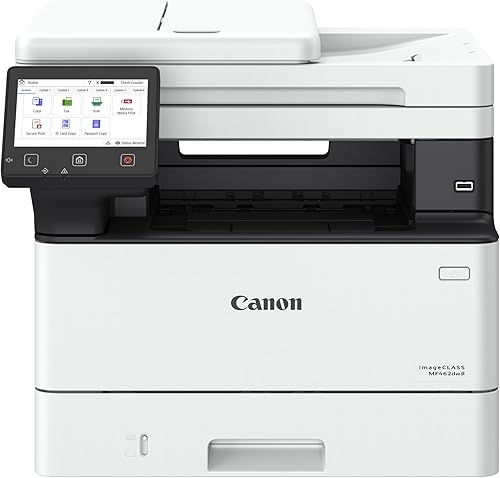
- Print, scan, copy and fax
- Up to 37 pages per minute
- Automatic duplex printing
- 50-sheet duplex ADF
- 250-sheet cassette and 100-sheet multipurpose tray
The Canon imageCLASS MF462dw II combines fast printing with automatic duplex scanning, copying and faxing. Its larger body and 5-inch color touchscreen suit a home office with heavier document demands.
Pros
- Fastest multifunction print speed here
- 50-sheet duplex ADF
- Expandable paper capacity
Cons
- Heaviest model here
- Largest dimensions in this group
The Canon imageCLASS MF462dw II is the fast multifunction choice for a home office that handles frequent black-and-white documents. It prints, scans, copies and faxes, with output up to 37 pages per minute and an initial print time of about 4.9 seconds.
Automatic duplex printing helps with two-sided files, while the 50-sheet duplex automatic document feeder scans both sides in one pass. That saves manual page turning when you digitize or copy multi-page documents.
Paper handling includes a 250-sheet standard cassette and a 100-sheet multipurpose tray. Optional paper cassette AH-1 can expand capacity with an additional 550 sheets.
The 5-inch color touchscreen provides access to printer functions and the Application Library. Wireless connections support computers and mobile devices, and mobile printing works through the Canon PRINT app, Apple AirPrint and Mopria Print Service.
This model is the largest and heaviest in the group at 18.1 in deep, 16.6 in wide, 14.8 in high and 46.6 lb. It uses Canon Genuine Toner 070, with the standard cartridge providing about 3,000 pages.
Choose the Canon when speed, duplex scanning and multifunction work matter more than a small footprint. For ordinary home printing, its larger body may be more printer than you need.
Brother Laser Printer: Best for high-volume document queues

- Up to 50 pages per minute
- 520-sheet main tray
- 100-sheet multipurpose tray
- Automatic duplex printing
- Dual-band wireless and Gigabit Ethernet
This Brother print-only model is built for a home office that handles large document queues. Its 520-sheet main tray, 50-page-per-minute output and network connections are more than most light users need.
Pros
- Fastest print speed here
- Largest standard paper capacity
- Dual-band wireless and Gigabit Ethernet
Cons
- Larger and heavier than compact picks
- Print-only design
The Brother Laser Printer is the high-volume pick for a home office that regularly sends long document queues. It prints up to 50 pages per minute, making it the fastest model in this group.
Its 520-sheet main tray and 100-sheet multipurpose tray reduce refill stops during heavy black-and-white printing. Optional trays can expand total capacity up to 1,660 sheets, although those trays require an additional purchase.
Automatic duplex printing supports two-sided office documents. Dual-band wireless, Gigabit Ethernet and USB 2.0 provide options for shared home-office use across a network or from a local computer.
The printer measures 15.3 in deep, 14.7 in wide and 11.4 in high and weighs 29.8 lb. It uses TN920UXXL replacement toner, which supports up to 18,000 pages, and includes a TN920 cartridge with a 3,000-page yield.
Security features include Triple Layer Security for network, device and document protection. This is still a print-only printer, so it will not replace a scanner or copier.
Choose it if print speed and paper capacity are your main concerns. For a smaller home office with lighter output, the Brother MFC-L2820DW or HL-L2405W is easier to place and better matched to everyday workloads.
How to choose a monochrome laser printer for home use
The best monochrome laser printer for home use depends on your document volume and whether you need more than printing. Start with the daily job, then compare paper handling, duplex printing, connections and toner options.
Do you need printing, scanning and copying?
Choose a multifunction model if you scan signed forms, copy documents or send faxes from the same workspace. The Brother MFC-L2820DW and Canon imageCLASS MF462dw II both combine print, scan, copy and fax functions.
A print-only model is simpler when all your work arrives digitally. The HP LaserJet M207dw, Brother HL-L2405W and Brother Laser Printer focus on black-and-white printing.
Is automatic duplex printing worth it?
Automatic duplex printing is worth prioritizing if you print reports, handouts or other two-sided files often. It reduces manual page handling and makes two-sided printing easier to repeat.
The Brother HL-L2405W uses manual duplex printing. The other four models here include automatic duplex printing, so compare that feature carefully if paper-saving output is part of your routine.
How much paper capacity do you need?
A 150-sheet tray can work for light printing, but a 250-sheet tray is more convenient for regular home-office documents. The HP LaserJet M207dw has a 150-sheet capacity, while the Brother MFC-L2820DW and HL-L2405W each have a 250-sheet tray.
The Canon adds a 100-sheet multipurpose tray to its 250-sheet cassette. The Brother Laser Printer goes further with a 520-sheet main tray and a 100-sheet multipurpose tray for high-volume work.
Which connections fit your setup?
Wireless is useful when several devices need to print without a direct cable. The Brother MFC-L2820DW, HP LaserJet M207dw, Brother HL-L2405W, Canon imageCLASS MF462dw II and Brother Laser Printer all include wireless connection options.
Ethernet can suit a fixed home-office network, while USB is useful for a direct connection to one computer. Check the specific connection mix before choosing a printer for your desk or shared workspace.
How should you plan for toner?
Look at the toner family before you buy so replacement supplies match the printer. The Brother MFC-L2820DW and HL-L2405W use TN830-family toner, the Canon uses Genuine Toner 070, and the Brother Laser Printer uses TN920UXXL replacement toner.
The Canon's standard toner provides about 3,000 pages. The Brother Laser Printer supports an ultra-high-yield cartridge of up to 18,000 pages, which better suits a large print queue.
For a different ink-based category, see our guide to which Epson EcoTank printers use 502 ink. If you want a wider mix of wireless models, compare best wireless printers for home office.
Setup and care for a home-office laser printer
Place the printer where you can open its paper tray, access its toner area and connect its selected network or USB cable. Leave enough working space for loading paper and handling documents, and check that the surface is steady.
Clear a path for finished pages as well as for input paper. A printer that can open and load easily is much simpler to use day after day.
Use the connection method that matches your routine. Wireless works well for shared devices, Ethernet suits a fixed network, and USB keeps the printer tied to one computer.
If several people in the home need to print, wireless or Ethernet is usually the more flexible route. Test the connection after setup by sending a short document from each device you plan to use.
That check can show whether a laptop, phone, or tablet needs any extra setup. It is easier to fix a small connection issue at the start than during a busy workday.
Load paper within the tray's stated capacity and use the manual feed slot when the model provides one. The Brother HL-L2405W and Canon imageCLASS MF462dw II include extra options for envelopes, specialty paper or separate media loading.
Keeping specialty paper separate can also make mixed jobs easier to manage. Keep toner supplies matched to the model, using the Brother TN830 family with the Brother MFC-L2820DW or HL-L2405W.
Use Canon Genuine Toner 070 with the Canon, and TN920UXXL replacement toner with the Brother Laser Printer. Matching the cartridge family helps keep output consistent and avoids a poor fit.
Check toner levels before a large job if you print in batches. A quick check can stop a document set from running short halfway through.
Automatic duplex printing can reduce paper use, but it does not remove the need to check page orientation in your document settings. A short test file can confirm that both sides print in the order you expect.
Wipe the exterior with a dry or slightly damp cloth and keep paper dust away from the tray area. Store extra paper flat and dry so sheets feed cleanly.
Verdict: which monochrome laser printer should you choose?
The Brother MFC-L2820DW is the best monochrome laser printer for home office use when you need printing, scanning, copying and faxing in one compact unit. It suits a home office where paper documents still need to be digitized or duplicated.
That wider set of tasks makes it the most flexible pick in this group for everyday work.
Its 250-sheet tray, 50-page ADF, automatic duplex printing and flexible connections cover the widest range of home-office tasks. The tray helps with regular printing, while the feeder supports multi-page copying and scanning.
Automatic duplex printing also makes two-sided documents easier to produce without manual page handling.
Pick the HP LaserJet M207dw for the smallest print-only setup with automatic duplex printing. It is a good fit when desk space is tight and scanning is handled elsewhere.
Its smaller body and lower paper capacity suit lighter, focused printing.
Choose the Brother HL-L2405W for simple wireless printing with a 250-sheet tray. It suits homes that want straightforward black-and-white output without multifunction hardware.
The trade-off is manual duplex printing and the lack of copy, scan, or fax functions.
The Canon imageCLASS MF462dw II is the better choice for faster multifunction work. Its duplex feeder and larger paper options can help when multi-page documents are common.
The cost of that speed and function is a larger, heavier body that needs more desk space.
The Brother Laser Printer fits a home office with large document queues. Its larger main tray and fast output are aimed at heavier printing rather than light daily use.
It remains print-only, so it does not replace a separate scanner or copier.
The right pick comes down to the work you do most. If you need one machine for printing, copying, and scanning, the Brother MFC-L2820DW remains the strongest all-around option.
If your needs are narrower, one of the more focused models may fit your desk and budget pattern better.
Our top 3 picks at a glance
-
1
Best for complete home-office workflows
Brother MFC-L2820DW Wireless Compact Monochrome All-in-One Laser
9.3/10 our score
See it on Amazon -
2
-
3
Best for simple wireless home printing
Brother HL-L2405W Wireless Compact Monochrome Laser Printer
8.7/10 our score
See it on Amazon
Frequently asked questions
What is the best monochrome laser printer for home office use?
The Brother MFC-L2820DW is the best monochrome laser printer for most home offices because it combines printing, copying, scanning and faxing with automatic duplex printing, dual-band wireless, Ethernet, USB, a 250-sheet tray and a 50-page automatic document feeder.
Choose a print-only model if you do not need document scanning or copying.
Is a monochrome laser printer good for home use?
Yes. A monochrome laser printer for home use is a good fit when you mainly print black-and-white documents, forms, schoolwork or business pages.
Laser models here offer document speeds from 28 to 50 pages per minute.
Check the paper capacity and duplex method if you print often.
Should a home office printer have automatic duplex printing?
Automatic duplex printing is useful when you regularly print two-sided documents because the printer handles page turnover for you. The Brother MFC-L2820DW, HP LaserJet M207dw, Canon imageCLASS MF462dw II and Brother Laser Printer include automatic duplex printing.
The Brother HL-L2405W has manual duplex printing.
What paper capacity should a home office laser printer have?
A 150-sheet capacity can suit light printing, while a 250-sheet tray reduces refill stops for regular home-office work. The Brother MFC-L2820DW and HL-L2405W each have a 250-sheet tray.
For very large document queues, the Brother Laser Printer has a 520-sheet main tray and a 100-sheet multipurpose tray.
Do monochrome laser printers scan and copy?
Some do, but print-only models do not. The Brother MFC-L2820DW and Canon imageCLASS MF462dw II print, scan, copy and fax, while the HP LaserJet M207dw, Brother HL-L2405W and Brother Laser Printer are print-only.
Choose a multifunction model if you regularly digitize or duplicate paper documents.



