6 Best Portable Photo Scanners (November 2026)
The best portable photo scanners include the Epson FastFoto FF-680W High-Speed Duplex Photo for large photo archives, the Canon CanoScan LiDE 400 Slim Scanner for high-resolution flatbed scans, and the Plustek ePhoto Z300 Photo Scanner for fragile older prints.
On this page (5 sections)
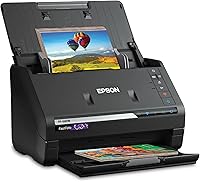
The best portable photo scanner for most large collections is the Epson FastFoto FF-680W, with batch scanning, duplex capture and Wi-Fi or USB connectivity.
That choice suits people with boxes of prints rather than a small handful to digitize. Batch feeding lets you load a group and let the scanner work through them, which saves repeated handling.
Choose the Canon for a slim high-resolution flatbed, the HP for very light travel, or the Pandigital for direct SD card storage.
Each option answers a different situation. The Canon suits careful desk work with one photo at a time, while the HP is easier to carry between home and office.
The Pandigital suits people who prefer scanning without a computer close by. Knowing your main situation first makes the comparison much clearer.
Portable photo scanners differ more in feeding method than in appearance. A batch scanner moves through a stack with less repeated placement.
A flatbed gives you one scanning surface and more control over each image. That control can matter for a print you want to place a certain way.
A single sheet model sits between those approaches in daily use. It feeds one item through a path, which is simple for occasional photos and papers.
Portability also means different things depending on how you will use the scanner. A light USB model fits a bag, while a larger batch model works best at a fixed desk.
That trade-off is worth weighing early. A scanner that is easy to carry may still be slow for a large archive.
A larger scanner may digitize many prints faster, but it will take more space and effort to move.
Resolution matters, but it is only one part of the decision. Feeding method, supported photo sizes and connection type will shape your daily workflow.
If you only have a few prints, a simple one at a time model may be enough. If you have hundreds, batch speed becomes harder to ignore.
If you are also choosing a printer, start with this home printer buying guide.
For a phone-based option, compare these steps for a photo scanner on iPhone.
Use those guides to check whether phone scanning or a printer setup already covers part of your needs. You may find a dedicated scanner is still worth it for large collections.
Our picks at a glance
-
1
 Best for large photo archives
Epson FastFoto FF-680W High-Speed Duplex Photo
9.7/10 our score
See it on Amazon -
2
 Best for high-resolution flatbed scans
Canon CanoScan LiDE 400 Slim Scanner
9.6/10 our score
See it on Amazon -
3

- 4
 Check it
ScanSnap iX2500 Photo Edition Wireless or USB
Best for wireless photo workflows - 5
 Check it
HP Small USB Document & Photo Scanner
Best for lightweight travel - 6
 Check it
Pandigital Personal Photo Scanner/Converter
Best for computer-free scanning
The best portable photo scanners for different needs
The Epson is the best fit for a large photo archive, while the other portable photo scanners solve different workflow problems. Choose by how many photos you scan at once, where you work and how you plan to save the files.
Epson FastFoto FF-680W High-Speed Duplex Photo: Best for large photo archives
- Up to 36 photos per batch
- Up to 1 photo per second at 300 dpi
- Duplex photo scanning
- Wi-Fi and USB connectivity
The Epson combines fast batch scanning, duplex capture and photo restoration tools for people digitizing thousands of prints. It also handles documents and multiple photo sizes.
Pros
- Fast batch scanning
- Captures photo backs
- Wi-Fi and USB
Cons
- Larger than flatbed and single-sheet models
- Designed for Windows 7 or later
The Epson FastFoto FF-680W High-Speed Duplex Photo is the strongest choice for thousands of prints because it can batch-scan up to 36 photos at a time. Epson says it can scan as quickly as 1 photo per second at 300 dpi under its stated testing conditions.
Its duplex design captures a photo and handwritten notes on the back in one scan. That matters for family albums, postcards and prints with dates or names written behind them.
The scanner handles Polaroid photos, panoramas, postcards and photos up to 8 x 10 in. It offers 300 dpi for sharing, 600 dpi TIFF for archiving and 1200 dpi for enlargements.
Epson includes auto enhancement, color restoration, red-eye reduction, de-skew, crop and rotate tools. For printing from a phone on the go, see portable photo printers for iPhone.
The FastFoto app can add voice and text to photos, create slideshows and support sharing from a smartphone.
The Epson also scans documents up to 240 in and supports speeds up to 45 ppm/90 ipm. Its 11.7 x 11.7 x 6.9 in size and 8.2 lb weight make it less convenient to move than the smaller models.
Choose it for a large archive where batch speed and photo-back capture matter most. The carrier sheet and cleaning cloth also support handling delicate prints.
Canon CanoScan LiDE 400 Slim Scanner: Best for high-resolution flatbed scans
- 4800 x 4800 dpi resolution
- USB Type-C data and power
- 8-second scanning
- Vertical stand included
The Canon is a slim flatbed choice for careful one-photo-at-a-time scanning. Its high resolution and USB-powered setup suit detailed work at a desk or temporary workspace.
Pros
- Very high resolution
- Slim design
- USB-powered operation
Cons
- Scans one sheet at a time
- No wireless connection
The Canon CanoScan LiDE 400 Slim Scanner suits careful one-photo scanning when you want high resolution in a thin body. Its stated 4800 x 4800 dpi resolution is the highest in this group.
Canon gives it 5 EZ buttons, an auto scan mode and built-in PDF buttons. It can scan and save multi-page PDFs, so the same device can handle photos and occasional documents.
The scanner connects through USB Type-C, with one cable for data and power. A vertical stand is included, and its stated dimensions are 7.7 x 14.5 x 0.4 in.
That makes it a better match for smaller collections, selected family photos or detailed scans where you want to place each print yourself.
Choose the Canon when high resolution and a slim flatbed design matter more than batch speed. For a broader look at USB-connected models, see our guide to best USB photo scanners.
Plustek ePhoto Z300 Photo Scanner: Best for fragile older prints
- CCD sensor
- Scans 4 x 6 photos in 2 seconds
- Supports 3 x 5, 4 x 6, 5 x 7 and 8 x 10 photos
- Photo enhancement tools
The Plustek uses a CCD sensor and a roller design intended for photo scanning. It suits users who want faster feeding than a flatbed while keeping control over individual prints.
Pros
- CCD sensor
- Simple single-photo feeding
- Supports several photo sizes
Cons
- USB only
- Scans one photo at a time
The Plustek ePhoto Z300 Photo Scanner is a strong fit for older prints because it uses a CCD sensor and a roller design made for photo feeding. It scans 4 x 6 photos in 2 seconds at 300 dpi and 8 x 10 photos in 5 seconds at 300 dpi.
It supports 3 x 5, 4 x 6, 5 x 7 and 8 x 10 photos, along with letter and A4 paper. Its optical resolution is up to 600 dpi, with 300 dpi and 600 dpi settings.
The Plustek scans one photo at a time through its feeder. That is slower than a batch scanner, but it can be easier to manage when prints vary in size or condition.
Its software includes auto-crop, rotate, faded-color restoration and other image adjustments. The product information also describes support for saving in different file formats and uploading to Facebook, X and Google Drive.
The scanner measures 19.3 x 4 x 11.4 in and weighs 1.5 kg. Its USB connection keeps setup simple, but it needs a computer rather than a wireless mobile workflow.
Choose it when individual photo handling and a CCD sensor matter more than wireless access. It is also worth comparing with our best photo scanner for old photos guide.
ScanSnap iX2500 Photo Edition Wireless or USB: Best for wireless photo workflows
- Up to 36 photos in the feeder
- Up to 100 documents in the feeder
- Wi-Fi 6 and USB-C
- 3 photo carrier sheets
The ScanSnap iX2500 Photo Edition fits users who want wireless scanning, automatic organization and a photo carrier sheet option. Its touchscreen and cloud support add convenience for mixed photo and document work.
Pros
- Wireless or USB connection
- Large document feeder
- Photo carrier sheets included
Cons
- Heavier than the smallest portable scanners
- Newer operating system requirements
The ScanSnap iX2500 Photo Edition Wireless or USB High-Speed Scanner suits users who want a modern wireless workflow for both photos and documents. Its automatic document feeder holds up to 100 documents or up to 36 photos.
ScanSnap includes 3 photo carrier sheets for delicate prints and quick-start instructions for photo scanning profiles. The scanner can connect through Wi-Fi 6 or USB-C and can send scans to computers, mobile devices and cloud services.
A large touchscreen lets you select profiles at the scanner. Automatic rotation, cropping, color restoration and red-eye reduction reduce the number of manual adjustments after scanning.
The ScanSnap handles more than photos, including documents, receipts and business cards. It can also automatically optimize, name and sort scanned data.
At 6.26 x 11.5 x 6.34 in and 7.7 lb, it is not the lightest model here. Its system requirements include Windows 10 or 11, macOS Monterey 12 or later, iOS 16 or later, iPadOS 16 or later, Android 10 or later and ChromeOS 138 or later.
Choose it for wireless photo and document organization when your devices meet those requirements.
HP Small USB Document & Photo Scanner: Best for lightweight travel
- 3-ounce weight
- USB 2.0 power
- 1-sided sheetfed scanning
- 1200 dpi stated image resolution
The HPPS100 is the easiest model here to carry between a home and office. It scans photos, receipts, cards and documents through a single-sheet path.
Pros
- Lightest option here
- USB-powered
- Windows and Mac compatibility
Cons
- Simplex scanning only
- 300 dpi listed in specifications
The HP Small USB Document & Photo Scanner is the best travel-oriented choice because it weighs 3 ounces and measures 2 x 11.6 x 1.4 in. It fits a bag or briefcase more easily than the larger photo archive scanners.
The HPPS100 uses USB 2.0 power and scans one side at a time. HP gives it a stated operating speed of 15 pages per minute, or about 4 seconds per page, for small document and photo batches.
It supports paper sizes from 2 x 2.9 in up to 8.5 x 14 in. The scanner works with Windows and Mac computers, and HP WorkScan software includes auto-scan, size detection, preview, crop, edit and image optimization tools.
The specifications list 300 dpi, while the product description mentions 1200 dpi resolution. For important photo archives, confirm the intended resolution setting before choosing it.
Choose the HP for lightweight, occasional scanning of photos, receipts, cards and documents. It is less suitable for a large collection because it is simplex and single-sheet rather than a high-volume batch scanner.
Pandigital Personal Photo Scanner/Converter: Best for computer-free scanning
- Scans photos up to 8.5 x 11 in
- 600 dpi resolution
- Saves directly to SD card
- No PC needed
The Pandigital is suited to users who want to scan photos without a computer. Direct SD card storage makes it useful for simple transfers to a computer or digital photo frame.
Pros
- Works without a PC
- Direct SD card saving
- Scans up to 8.5 x 11 in
Cons
- No wireless connection
- Older computer requirements
The Pandigital Personal Photo Scanner/Converter is the simplest choice when you want to scan photos without a computer. It saves full-color JPEG scans directly to an SD card and can also transfer files to a computer through USB.
It scans printed photos from wallet size up to 8.5 x 11 in at 600 dpi. The five-in-one reader supports SD, MS, MSPRO, MMC and XD cards.
The direct-to-card workflow can be useful away from a desk or when several people are sorting photos. You scan the prints, move the card to another device and organize the images later.
Its design is focused on photos rather than mixed document work. It does not offer the Epson's duplex capture, the ScanSnap's wireless workflow or the Canon's 4800 x 4800 dpi resolution.
Choose it for computer-free photo scanning and simple file transfer. Check that your storage workflow can read the supported card types before you start a large project.
How we compared portable photo scanners
The best portable photo scanner depends first on the number of photos you need to digitize.
A small collection can be handled one print at a time without much frustration. A large archive changes the calculation because repeated placement adds up quickly.
We compared feeder capacity, scan speed, resolution, connection type, photo-size support and the tools each model includes for organizing or improving scans.
Feeder capacity tells you how much you can load before you need to reload. That matters when you plan to work through a box of prints in one sitting.
Scan speed tells you how quickly each photo moves through the scanner. A faster model can make a long session feel much more manageable.
Resolution tells you how much detail the digital file holds. Higher resolution can help with archiving and enlargements, but it also creates larger files.
Connection type tells you where the scanner can sit and how files reach your devices. USB is simple at a desk, while Wi-Fi supports more flexible placement.
Photo-size support tells you which prints the scanner accepts. Common sizes are easy, but wider prints or unusual formats need a closer check.
We also considered portability in practical terms. A 3-ounce USB scanner is easier to carry than an 8.2 lb batch scanner, but the larger model can save much more time with boxes of prints.
Weight affects travel, storage and how often you will set the scanner up. A light model is more likely to be used for quick jobs.
Size affects shelf and desk space in a similar way. A compact scanner may fit a small workspace where a larger feeder unit cannot.
We looked at how each model helps with the next steps after scanning. Organizing tools, naming options and sharing features can matter as much as the scan itself.
Photo handling tools also matter for older prints. Color restoration, cropping and rotation can reduce manual editing.
Our score weighs specs, features and buyer feedback against what you are shopping for. We did not treat a high resolution number as a substitute for batch speed or photo handling.
That balance is important because no single spec describes the full experience. A scanner should fit the photos you have and the devices you already use.
Trade-offs were kept in view throughout. Speed, detail, portability and ease of use rarely peak in the same product.
The final choice should match your collection size and work area. That practical fit matters more than any single headline number.
| Product | Best for | Photo batch size | Resolution | Size | Our score |
|---|---|---|---|---|---|
| Epson FastFoto FF-680W High-Speed Duplex Photo | large photo archives | Up to 36 photos | 600 dpi optical; 1200 dpi interpolated | 11.7 x 11.7 x 6.9 in | 9.7 |
| Canon CanoScan LiDE 400 Slim Scanner | high-resolution flatbed scans | 4800 x 4800 dpi | 7.7 x 14.5 x 0.4 in | 9.6 | |
| Plustek ePhoto Z300 Photo Scanner | fragile older prints | 300 or 600 dpi | 19.3 x 4 x 11.4 in | 9.1 | |
| ScanSnap iX2500 Photo Edition Wireless or USB | wireless photo workflows | 600 dpi | 9.0 | ||
| HP Small USB Document & Photo Scanner | lightweight travel | 2 x 11.6 x 1.4 in | 8.7 | ||
| Pandigital Personal Photo Scanner/Converter | computer-free scanning | 600 dpi | 8.6 |
What should you check before buying a portable photo scanner?
Check the scanner's feeding method first. A flatbed scans one item at a time, a single-sheet scanner feeds one print through a path, and an automatic document feeder can process a larger group with less repeated placement.
Resolution is the next choice. Use 300 dpi when you mainly need convenient digital copies, 600 dpi for more detailed archives and higher settings when the scanner supports enlargements from small prints.
Connection type affects where you can work. USB scanners need a computer or compatible device, Wi-Fi models can support wireless workflows, and the Pandigital can save directly to an SD card without a PC.
Photo size also matters. The Epson handles photos up to 8 x 10 in, the Plustek supports several common photo sizes, and the Pandigital reaches 8.5 x 11 in.
For a smaller footprint, compare these best compact photo scanners. If you need a printer with scanning built in, learn what a flatbed scanner on a printer is.
How should you scan and protect printed photos?
Clean loose dust from prints before scanning and use a carrier sheet when the scanner includes one for delicate photos.
A light dusting can remove loose particles that might mark the surface. Use a soft cloth and handle prints by the edges where possible.
Keep the work area dry, flat and free of grit that could mark a print or affect feeding.
A clean desk surface gives you room to sort prints by size before they go through the scanner. Sorting first can reduce stops and starts.
Scan a small group first and check the file format, crop, orientation and color before continuing.
That first group works as a quick check for your settings. If the orientation is wrong, it is easier to fix before a full batch is scanned.
Save archive copies at a higher resolution, then make smaller copies for sharing.
Higher resolution files keep more detail for future use. Smaller copies are easier to send by email or upload to a shared folder.
Use clear folders and file names based on dates, people or events.
Clear names help you find a photo months or years later. A date or event name is usually more useful than a long string of numbers alone.
Keep a second copy on another drive or cloud service, especially after scanning irreplaceable family photos.
A second copy protects you from a failed drive or a lost device. Scanning is only half the work if the files are not backed up.
Check the back of photos before scanning when notes or dates may be written there. Some scanners can capture both sides, and the back may hold details you want to keep.
Place photos in a consistent order so the scanned files stay easy to sort. Keeping one orientation for each batch can make later review faster.
Pause and clean the scanner path if feeding starts to look uneven. A clean path helps protect prints and keeps scans consistent.
Store originals in a dry place after scanning, away from direct sunlight and damp air. Digital copies are useful, but the originals may still have value.
Label boxes or sleeves so you can find an original print if you need it again. That link between a digital file and a physical print can save time later.
A document-focused automatic feeder can help with papers, but it may not suit delicate prints. Photo paths are often gentler, but they still need care with curled or brittle prints.
For mixed work, choose settings that suit the most delicate item in the batch.
See our guide to best document scanners with automatic document feeders when documents are your main job.
That guide can help if papers, receipts and files matter more than photos. For a photo archive, keep photo handling as the priority.
Which portable photo scanner should you choose?
Choose the Epson FastFoto FF-680W when you have a large archive and want batch speed, duplex capture and photo restoration tools.
That model fits people who want to work through many prints with fewer interruptions. Batch feeding and two-sided capture can save time across a whole collection.
Pick the Canon for a slim high-resolution flatbed, or the Plustek when individual photo feeding and a CCD sensor fit your older prints.
The Canon suits careful one at a time scanning at a desk. Its slim shape and high resolution make it a strong choice for selected photos.
The Plustek suits people who want a feeder path made with photo handling in mind. Individual feeding can be easier to manage when prints differ in size or condition.
The ScanSnap is the better wireless and mixed-document option.
That choice fits users who scan photos alongside papers, receipts and business cards. Wireless connection and touchscreen profiles can make regular scanning feel more streamlined.
It also suits people who want scans sent to cloud services or mobile devices. That workflow can reduce the need to sit at one computer for every batch.
Choose HP for the lightest USB travel setup, or Pandigital when direct SD card scanning without a computer is the deciding feature.
The HP fits occasional scanning away from a desk. Its light weight makes it easier to carry, but it is not built for a large archive.
The Pandigital fits simple photo work where a computer is not part of the process. Saving to a card can suit sorting sessions away from a desk.
For phone-only scanning, use the photo scanner on iPhone guide before buying hardware.
That guide can show whether your phone already handles a small job well. For a large collection, dedicated hardware will usually be faster and more consistent.
Think about where you will scan most often. A fixed desk favors a larger batch model, while travel favors a light USB model.
Think about how you will save and organize files. A scanner that fits your devices will be used more often.
Think about the condition of your prints. Delicate or varied photos may need gentler handling than a standard document path.
The right choice is the one that matches your collection, space and workflow. Start with those needs, then match the scanner to them.
Our top 3 picks at a glance
-
1
Best for large photo archives
Epson FastFoto FF-680W High-Speed Duplex Photo
9.7/10 our score
See it on Amazon -
2
Best for high-resolution flatbed scans
Canon CanoScan LiDE 400 Slim Scanner
9.6/10 our score
See it on Amazon -
3
Frequently asked questions
What is the best portable photo scanner for most photos?
The Epson FastFoto FF-680W is the strongest choice for a large photo archive because it batch-scans up to 36 photos and captures both sides in one pass. It also supports Wi-Fi, USB, photo restoration tools and several scan formats.
Can a portable photo scanner scan old photos?
Yes. The Epson FastFoto FF-680W, Canon CanoScan LiDE 400 and Plustek ePhoto Z300 can digitize printed photos.
The Epson and Plustek also include features that can help with color restoration, cropping or other image adjustments.
Is a flatbed or sheetfed scanner better for photos?
A flatbed scanner gives you a one-photo-at-a-time scanning surface, while a sheetfed scanner can move photos through a feeder more quickly. Choose a flatbed for careful individual scans and a sheetfed model for larger batches.
Can you scan photos without a computer?
Yes. The Pandigital Personal Photo Scanner/Converter saves scans directly to an SD card and does not need a PC for scanning.
Other models here use USB or Wi-Fi connections and depend on a computer or mobile device for their workflow.
What resolution should you use for scanning photos?
Use 300 dpi for convenient sharing, 600 dpi for detailed archiving and a higher setting when you plan to enlarge a small print. The Epson supports 300, 600 and 1200 dpi options, while other models have their own resolution limits.