6 Best Duplex Printer for Home Office (November 2026)
The best duplex printers for home offices include the Brother DCP-L2640DW Wireless Compact Monochrome Multi-Function Printer for fast black-and-white work, the Canon PIXMA TR7120 Wireless Color Inkjet Printer for color documents with an ADF, and the Canon PIXMA TS6520 Wireless Color Inkjet Printer for simple color home printing.
On this page (3 sections)
The best duplex printer for most home offices is the Brother DCP-L2640DW. It prints black-and-white documents at up to 36 pages per minute, has automatic duplex printing, and includes copy and scan functions.
Its 50-page auto document feeder makes multi-page copying and scanning easier. You can load a stack once instead of feeding each sheet on the glass.
A 250-sheet paper tray also fits a busier routine, because you refill less often during large print jobs. Dual-band wireless, Ethernet and USB give flexible connection options for laptops, desktops and phones.
Automatic duplex printing reduces paper use for long documents. It also removes the need to turn pages by hand during a print job.
Choose a color inkjet when your home office handles photos, school projects or color presentations. A monochrome laser cannot produce color output.
Choose a monochrome laser when most work is reports, forms, invoices and other text-heavy documents. In that case, black-and-white clarity and speed matter more than color features you would rarely use.
Think about your weekly print volume before you choose. If you print a few pages a week, a smaller color model may be enough.
If you print daily and scan in batches, the Brother setup is easier to live with. Its faster output keeps printing from stalling the rest of your work.
Set-up is simpler when you plan the location before the box arrives. Leave room for the paper tray to open, for pages to come out, and for you to reach the controls.
Keep the printer on a stable surface away from direct heat and dust. Paper stored nearby should stay dry and flat, since damp or curled sheets can affect feeding and print quality.
For care, use the correct toner and replace it before quality drops. The Brother DCP-L2640DW lists Brother Genuine TN830 and TN830XL toner options.
If you are still comparing printer types, start with this home printer buying guide. It explains how to weigh printing, scanning, copying, paper handling and connection options.
Our score weighs specs, features and buyer feedback against what you are shopping for. We checked the listed functions and compared the trade-offs between laser and inkjet models.
Our picks at a glance
-
1
 Best for fast black-and-white work
Brother DCP-L2640DW Wireless Compact Monochrome Multi-Function Printer
9.6/10 our score
See it on Amazon -
2
 Best for color documents with an ADF
Canon PIXMA TR7120 Wireless Color Inkjet Printer
9.5/10 our score
See it on Amazon -
3
 Best for simple color home printing
Canon PIXMA TS6520 Wireless Color Inkjet Printer
9.5/10 our score
See it on Amazon
- 4
 Check it
HP Envy 6155 Wireless All-in-One Color Inkjet Printer
Best for family color printing - 5
 Check it
HP OfficeJet Pro 8135 Wireless All-in-One Color Inkjet Printer
Best for a feature-rich home office - 6
 Check it
Brother HL-L2480DW Wireless Compact Monochrome Multi-Function Laser
Best for compact laser copying
The best duplex printers for home offices
The best duplex printer for home office use depends on your document mix. The Brother laser models favor fast black-and-white work, while the Canon and HP inkjets add color output and different levels of office handling.
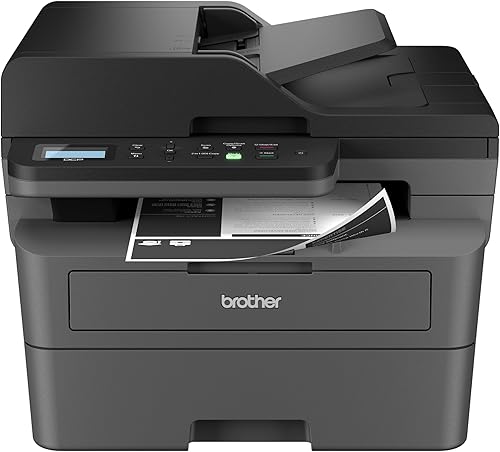
Brother DCP-L2640DW Wireless Compact Monochrome Multi-Function Printer: Best for fast black-and-white work
- Automatic duplex printing
- Up to 36 pages per minute
- 50-page auto document feeder
- 250-sheet paper tray
- Copy and scan functions
Fast monochrome output, automatic duplex printing and a 50-page auto document feeder make this a strong fit for busy home offices.
Pros
- Fast black-and-white printing
- Automatic duplex printing
- 50-page auto document feeder
- 250-sheet paper tray
Cons
- Black-and-white printing only
- Larger than the compact color inkjet picks
The Brother DCP-L2640DW is the best fit for a home office that prints many text documents. Its up to 36 pages per minute black-and-white speed gives it a clear output advantage over the color inkjet models in this group.
Automatic duplex printing helps reduce paper use for reports and forms. The 50-page auto document feeder also helps when you need to scan or copy several pages without placing each sheet on the glass.
The 250-sheet paper tray reduces how often you refill paper during a busy workday. Dual-band wireless, Ethernet and USB give you several ways to connect laptops, PCs, smartphones and tablets.
This model prints, scans and copies, but it is monochrome. Pick it when black-and-white clarity and speed matter most.
If you need color, compare it with the best all-in-one printer for home office.
Canon PIXMA TR7120 Wireless Color Inkjet Printer: Best for color documents with an ADF
- Automatic two-sided printing
- Color printing and scanning
- Auto document feeder
- Dual-band Wi-Fi
- 1.42-inch monochrome OLED display
The TR7120 adds color printing, scanning, copying and an auto document feeder while keeping automatic duplex printing for everyday documents.
Pros
- Color documents and photos
- Auto document feeder
- Automatic duplex printing
- Compact footprint
Cons
- Slower than the Brother laser models
- Smaller paper capacity
The Canon PIXMA TR7120 is the strongest color choice for multi-page home office tasks. It combines automatic two-sided printing with a color inkjet engine, copier, scanner and auto document feeder.
The ADF matters when you scan or copy several pages in one session. Instead of placing each sheet on the glass, you can load the stack and let the printer work through it.
That workflow suits contracts, school assignments and shared household paperwork. It is less useful if most of your scans are single pages or occasional photos.
Its 100-sheet capacity is smaller than the Brother laser models, so it fits a lighter print routine better than a high-volume document queue. You should expect to refill paper more often on busy days.
Canon lists print speeds of 14 black-and-white pages per minute and 9 color pages per minute. Those speeds are fine for everyday home use, but they will not match a fast monochrome laser on large text jobs.
The 1.42-inch monochrome OLED display keeps basic settings and printer status visible without adding a large control panel. In daily use, that means you can check ink levels and job status at a glance.
Dual-band Wi-Fi supports printing from around the home, and mobile printing works through the Canon PRINT App, Apple AirPrint and Mopria Print Service. That helps when a phone or tablet needs a quick print without opening a laptop.
This is a good choice if color documents and multi-page scanning share the same workload. It is a weaker fit if you mainly print long black-and-white reports and need the fastest possible output.
Canon PIXMA TS6520 Wireless Color Inkjet Printer: Best for simple color home printing
- Automatic two-sided printing
- Color printing, scanning and copying
- 1.42-inch OLED display
- Dual-band Wi-Fi
- Compact design
The TS6520 keeps the core duplex, color, scan and copy features while using a shorter body than the TR7120.
Pros
- Compact 6.7-inch height
- Automatic duplex printing
- Color printing and scanning
- OLED display
Cons
- No auto document feeder
- Slower than the monochrome laser models
The Canon PIXMA TS6520 is a compact color duplex printer for home users who want printing, scanning and copying without an auto document feeder. Its automatic two-sided printing handles everyday documents while the 1.42-inch OLED display keeps controls simple.
At 14 black-and-white pages per minute and 9 color pages per minute, it matches the listed print speeds of the TR7120. The difference is the workflow: the TS6520 has integrated scanning and copying, but the features do not include an ADF.
Its 14.8 x 14 x 6.7-inch dimensions make it the shortest printer in this group. That lower 6.7-inch height can help when shelf clearance is limited, but measure the space around the printer before placing it.
Choose the TS6520 for school papers, recipes, forms and occasional color photos. For a color home office that scans multi-page documents often, the TR7120 is the more suitable Canon.
HP Envy 6155 Wireless All-in-One Color Inkjet Printer: Best for family color printing
- Automatic two-sided printing
- Print, scan and copy
- 100-sheet input tray
- 2.4-inch color touchscreen
- Dual-band Wi-Fi
The Envy 6155 suits households that need color documents, scans and copies with a touchscreen and a 100-sheet tray.
Pros
- Color printing, scanning and copying
- Automatic duplex printing
- Color touchscreen
- 11.2 lb weight
Cons
- Slower output than the laser picks
- No auto document feeder in the listed features
The HP Envy 6155 suits a home office that shares printing with family color work. It prints, scans and copies in color, supports automatic duplex printing, and has a 100-sheet input tray.
Its listed speeds are 10 black-and-white pages per minute and 7 color pages per minute. That makes it better suited to moderate document flow than to a large stack of black-and-white pages.
A 2.4-inch color touchscreen gives you printer controls without relying on a computer. Dual-band Wi-Fi and the HP app support printing, scanning, copying and faxing from a smartphone, while HP AI is intended to improve the layout of web pages and emails.
The Envy 6155 accepts letter-size media up to 8.5 x 11 inches. HP also states that the printer works only with cartridges using original HP chips or circuitry, so factor that cartridge requirement into your long-term setup.
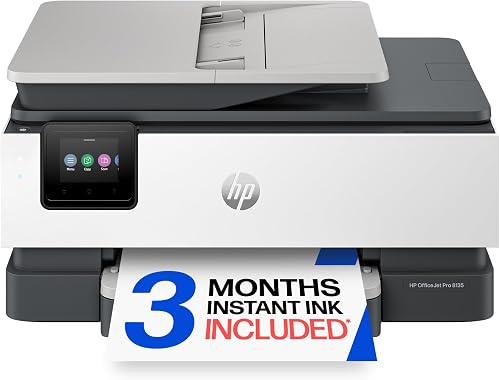
HP OfficeJet Pro 8135 Wireless All-in-One Color Inkjet Printer: Best for a feature-rich home office
- Automatic duplex printing
- Print, scan, copy and fax
- Auto document feeder
- 225-sheet input tray
- 2.7-inch color touchscreen
The OfficeJet Pro 8135 is the most office-focused color option here, with fax, an auto document feeder and a 225-sheet tray.
Pros
- Fastest listed color option
- Auto document feeder
- 225-sheet paper capacity
- Print, scan, copy and fax
Cons
- Larger footprint than the compact Canon models
- Color inkjet workflow may not suit black-and-white-heavy offices
The HP OfficeJet Pro 8135 is the best color option for a busier home office. It adds faxing, an auto document feeder and a 225-sheet input tray to automatic duplex printing, scanning, copying and color output.
Its listed print speeds reach 20 black-and-white pages per minute and 10 color pages per minute. That is the fastest color output in this group, although the Brother monochrome models remain faster for black-and-white work.
The ADF helps with multi-page scans and copies, while the 2.7-inch color touchscreen gives you a larger control surface than the Canon models. Ethernet and USB join dual-band wireless for connection flexibility.
The OfficeJet Pro 8135 is larger than the compact Canon printers at 13.29 x 18.12 x 9.17 inches. Measure your desk depth and width before choosing it, especially if the printer must share a narrow work surface.
For more color office options, compare this model with the best office printers.
Brother HL-L2480DW Wireless Compact Monochrome Multi-Function Laser: Best for compact laser copying
- Automatic duplex printing
- Up to 36 pages per minute
- Copy and scan functions
- 250-sheet paper tray
- 2.7-inch touchscreen
The HL-L2480DW brings fast black-and-white duplex printing, copying and scanning to a compact laser design with a touchscreen.
Pros
- Fast black-and-white printing
- Automatic duplex printing
- 250-sheet paper tray
- 2.7-inch touchscreen
Cons
- Black-and-white printing only
- No auto document feeder in the listed features
The Brother HL-L2480DW is a compact monochrome laser printer for home offices that need fast duplex printing, copying and scanning. It reaches up to 36 pages per minute and includes a 250-sheet paper tray.
Its 2.7-inch touchscreen gives you on-device controls, while dual-band wireless, Ethernet and USB support different home office setups. The printer can also print from and scan to popular cloud-based apps, including Google Drive, Dropbox, Evernote and OneNote.
The main difference between this model and the Brother DCP-L2640DW is the listed workflow. The HL-L2480DW includes a flatbed scan glass and does not list a 50-page auto document feeder, so it is less convenient for repeated multi-page scans.
It accepts media up to 8.5 x 14 inches and supports automatic duplex printing. Choose it when you want fast black-and-white documents, a touchscreen and a compact laser footprint without a color requirement.
How to choose a duplex printer for home office work
Choose a duplex printer by matching its output type and document handling to your normal workload. A printer that saves paper but slows down every job may be a poor fit for a busy office.
Do you need a monochrome or color duplex printer?
A monochrome laser suits text-heavy work best. The Brother DCP-L2640DW and Brother HL-L2480DW both reach up to 36 black-and-white pages per minute.
Those speeds fit offices where invoices, reports and forms dominate. Quick output keeps several short jobs from becoming a bottleneck.
Color inkjets add flexibility for photos, school projects, presentations and color diagrams. The Canon and HP models print in color, but their black-and-white speeds are lower than the Brother lasers.
That trade-off is worth it when color is normal work. If you rarely need color, slower text output may not serve you well.
Automatic duplex printing matters most for regular multi-page jobs. It handles both sides so you do not need to turn pages by hand.
Use duplex mode for reports, drafts, school assignments and internal documents. For pages that must stay single-sided, choose one-sided printing in the settings.
Duplex printing does not mean duplex scanning. If you scan many two-sided originals, check feeder scanning behavior before you buy.
An auto document feeder is worth prioritizing for frequent multi-page scans or copies. The Brother DCP-L2640DW has a 50-page ADF, and the Canon PIXMA TR7120 and HP OfficeJet Pro 8135 also include an ADF.
The Canon PIXMA TS6520, HP Envy 6155 and Brother HL-L2480DW do not list an ADF. They still scan and copy, but expect more manual page handling.
Paper capacity shapes daily use too. The HP OfficeJet Pro 8135 lists 225 sheets, the Brother models list 250-sheet trays, and the Canon and HP Envy models list 100 sheets.
A larger tray reduces refills, while a faster engine shortens each job. Both matter, but they solve different problems.
If you need color scanning and office features, see the best all-in-one color printer for home office. If black-and-white output is your main need, compare the best monochrome laser printer for home office.
Before setting up, measure space for the printer, trays and output area. Then connect by wireless, Ethernet or USB, install software on each device, and test a short duplex job to check orientation.
How much does automatic duplex printing matter?
Automatic duplex printing matters most when you regularly print more than one page. It lets the printer handle the two-sided workflow, so you don't need to turn pages by hand between sides.
Use duplex mode for reports, drafts, school assignments and internal documents. For forms or pages that must remain single-sided, choose one-sided printing in the print settings.
Duplex printing does not automatically mean duplex scanning. If you scan many two-sided originals, look for clear information about the feeder's scanning behavior before you buy.
When is an auto document feeder worth it?
An auto document feeder is worth prioritizing when you scan or copy multi-page documents often. The Brother DCP-L2640DW has a 50-page ADF, while the Canon PIXMA TR7120 and HP OfficeJet Pro 8135 also include an ADF.
The Canon PIXMA TS6520, HP Envy 6155 and Brother HL-L2480DW do not list an ADF in the features. They can still scan and copy, but you should expect more manual page handling for multi-page jobs.
For combined printing and scanning needs, review the best office printer and scanner guide before deciding.
What paper capacity fits a home office?
A larger tray helps when you print often because you refill it less frequently. The HP OfficeJet Pro 8135 has the largest listed capacity at 225 sheets, followed by the 250-sheet trays in the Brother models.
The Canon and HP Envy models list 100-sheet capacities.
Paper capacity is not the same as print speed. A large tray helps reduce interruptions, while a faster engine shortens the time spent producing a document.
Keep paper dry and flat, and load it in the direction shown by the printer's guides. For duplex documents, check that the paper type and size selected in the print dialog match the sheets in the tray.
What should you check before setting up a wireless printer?
Start by placing the printer where its dimensions, power cord and paper access fit comfortably. Leave room to open trays and remove pages, then connect it to your wireless network through the printer's controls or its mobile app.
Install the correct printer software on each computer or mobile device you plan to use. Print a simple one-sided page first, then try a short duplex document so you can confirm the page orientation.
If your printer supports Ethernet or USB, those connections can give you another setup option. The Brother DCP-L2640DW, Brother HL-L2480DW and HP OfficeJet Pro 8135 list Ethernet and USB, while the Canon models list USB in their hardware interface data.
How should you manage ink or toner?
Use the correct replacement supply for the printer model. The Brother DCP-L2640DW and HL-L2480DW list Brother Genuine TN830 and TN830XL toner options.
The HP OfficeJet Pro 8135 lists HP 923 and HP 923e EvoMore cartridge options, while the HP Envy 6155 is built around HP 68 setup cartridges. Canon's models use their stated ink cartridge systems, with the TS6520 listing PG-295 black and CL-286 color tanks.
If you are considering an EcoTank model instead, see which Epson EcoTank printers use 502 ink. That is a different ink system from the cartridge-based printers in this roundup.
Which duplex printer should you buy?
Pick the Brother DCP-L2640DW if your home office mainly prints black-and-white documents and you want the fastest output, a 50-page ADF and a 250-sheet tray.
It suits daily reports, invoices and forms. The feeder also helps when you scan or copy a stack without reloading each page.
Pick the Canon PIXMA TR7120 for color printing plus an ADF. It fits a home office where color documents and multi-page scans are both routine.
Its 100-sheet capacity means more frequent refills than the larger Brother and HP models. That is a fair trade if your print volume stays light to moderate.
Choose the Canon PIXMA TS6520 when you want a shorter color printer and can manage multi-page scans manually. Its 6.7-inch height helps where shelf clearance is limited.
This model suits school papers, recipes, forms and occasional color photos. It is less convenient for repeated multi-page scanning because it does not list an ADF.
Choose the HP Envy 6155 for shared household color printing. It prints, scans and copies in color, with a 100-sheet tray and a 2.4-inch color touchscreen.
That touchscreen helps when several people use the printer without going to a computer. It suits moderate household flow better than a large stack of black-and-white pages.
Choose the HP OfficeJet Pro 8135 when a color home office needs faxing, an ADF and a 225-sheet tray. It is the most office-focused color option here, with speeds up to 20 black-and-white pages per minute and 10 color pages per minute.
Its larger footprint needs careful measuring before you buy. Check desk depth and width, and leave room to load paper and collect finished pages.
Pick the Brother HL-L2480DW for fast monochrome duplex printing with a touchscreen and flatbed scanning. It reaches up to 36 pages per minute and includes a 250-sheet paper tray.
That model fits laser speed and on-device controls in a compact design. It does not list a 50-page ADF, so multi-page scans need more manual handling than with the Brother DCP-L2640DW.
For care across all picks, use the correct ink or toner for each model and keep spare paper dry and flat. Match paper size and type in the print dialog to the sheets loaded, especially for duplex jobs.
For more printer comparisons, start with our home printer buying guide.
Our top 3 picks at a glance
-
1
Best for fast black-and-white work
Brother DCP-L2640DW Wireless Compact Monochrome Multi-Function Printer
9.6/10 our score
See it on Amazon -
2
Best for color documents with an ADF
Canon PIXMA TR7120 Wireless Color Inkjet Printer
9.5/10 our score
See it on Amazon -
3
Best for simple color home printing
Canon PIXMA TS6520 Wireless Color Inkjet Printer
9.5/10 our score
See it on Amazon
Frequently asked questions
What is the best duplex printer for a home office?
The Brother DCP-L2640DW is the strongest choice for most home offices because it combines automatic duplex printing, up to 36 black-and-white pages per minute, scanning, copying and a 50-page auto document feeder.
Choose a color Canon or HP when color documents and photos matter more than laser speed.
Are duplex printers worth it for home use?
Yes, automatic duplex printing can reduce the number of sheets used for multi-page documents because the printer places content on both sides of the paper.
It is most useful for school work, reports, forms and office documents. Check the printer settings before each job so pages are flipped on the intended edge.
Is a laser or inkjet duplex printer better for a home office?
A monochrome laser printer is usually the better fit for frequent black-and-white documents because the fastest picks here reach 36 pages per minute. Inkjet models make more sense when you need color printing, scans, copies or photos.
Your document mix matters more than the printer type alone.
Do all duplex printers scan both sides automatically?
No. Automatic duplex printing and two-sided scanning are separate features.
The Brother DCP-L2640DW and Canon PIXMA TR7120 include an auto document feeder for multi-page scanning, but an auto document feeder does not by itself confirm automatic two-sided scanning.
Check the exact scan workflow before buying.