9 Best Large Print Keyboards (November 2026)
The best large print keyboards include the BOOGIIO Large Print Computer Keyboard for high contrast, the KOPJIPPOM Large Print Backlit Keyboard for dim rooms, and the KOPJIPPOM Large Print Wireless Keyboard and Mouse for wireless desks.
On this page (4 sections)
The best large print keyboard for most people is the BOOGIIO Large Print Computer Keyboard, with yellow keycaps, black oversized letters and a familiar 104-key layout. Pick a backlit keyboard for low-light typing, or choose the KOPJIPPOM wireless set if you want a keyboard and mouse together.
A large print keyboard does more than make letters bigger. It can help you find seldom used keys faster, cut down on mistakes when you look down, and reduce the strain of squinting at small legends during longer sessions.
For many people, the sweet spot is a full-size QWERTY layout that feels the same as a standard keyboard. That way you keep the number row, the arrow keys and the numeric keypad where you expect them, and you do not need to relearn touch typing.
Contrast matters as much as size. Black print on yellow keys, or dark letters on a lit keycap, will stay readable when the room light changes, while pale print on dark keys can disappear in glare or dim corners.
Backlighting adds another layer of help. It can light the key legends after dark, in a shared bedroom, or in a room where the main light is off, and adjustable brightness lets you keep it soft enough not to distract you.
Connection type shapes daily habits too. A wired USB keyboard starts as soon as you plug it in and never needs charging, which suits a fixed desk or a shared computer.
A wireless set frees the desk from cables but asks you to keep the battery charged.
Wrist support and typing angle also affect comfort over time. Foldout feet change the slope of the board, and a wrist rest can support your hands during long stretches of writing, office work or study.
Think first about where you will use it and when. A school computer, a home office desk and a shared workstation each place different demands on contrast, lighting and portability.
If you want broader advice on choosing the best keyboard for computer, start with layout, connection and desk space before comparing extra features.
Check the size of the board against your desk as well. A full-size layout with a numeric keypad needs more room than a compact board, and a wrist rest adds to that footprint even while it improves support.
Our picks at a glance
-
1

-
2
-
3
 Best for wireless desks
KOPJIPPOM Large Print Wireless Keyboard and Mouse
9.4/10 our score
See it on Amazon
- 4
 Check it
X9 Large Print Backlit Computer Keyboard
Best for shortcut access - 5
 Check it
KOPJIPPOM Large Print Keyboard
Best for color choice - 6
 Check it
SABLUTE Wired Large Print Backlit Keyboard
Best for wrist support - 7
 Check it
SABLUTE Large Print Wired Keyboard
Best for desk organization - 8
 Check it
QUASIO Large Print Backlit Keyboard
Best for retro-style keys - 9
 Check it
Adesso AKB-132UY Luminous 4 X Large Print
Best for yellow-key simplicity
The best large print keyboards for readable everyday typing
The BOOGIIO is the strongest high-contrast choice, while backlit models suit dim rooms and the wireless KOPJIPPOM set reduces cable clutter. The right pick depends on whether visibility, lighting, wireless use or wrist support matters most.
Large letters help in daylight too, not only at night. They can make a keyboard easier to share, since other people can find keys without hunting for a faded legend.
Our score weighs specs, features and buyer feedback against what you're shopping for.
Look at the whole picture for your own desk. Key color, light controls, layout, connection and any support features will shape whether a model feels easy on day one and still suits you after months of use.
| Product | Best for | Layout | Connection | Key color | Our score |
|---|---|---|---|---|---|
| BOOGIIO Large Print Computer Keyboard | high contrast | 104-key QWERTY with numeric keypad | USB-A wired | Yellow with black print | 9.7 |
| KOPJIPPOM Large Print Backlit Keyboard | dim rooms | 104-key QWERTY with numeric keypad | USB-A wired | 9.5 | |
| KOPJIPPOM Large Print Wireless Keyboard and Mouse | wireless desks | 9.4 | |||
| X9 Large Print Backlit Computer Keyboard | shortcut access | 107-key QWERTY with numeric keypad | 9.3 | ||
| KOPJIPPOM Large Print Keyboard | color choice | 104-key QWERTY with numeric keypad | 9.2 | ||
| SABLUTE Wired Large Print Backlit Keyboard | wrist support | 104-key QWERTY with numeric keypad | USB-A wired | 9.1 | |
| SABLUTE Large Print Wired Keyboard | desk organization | QWERTY with 78 stated keys | USB-A wired | 8.8 | |
| QUASIO Large Print Backlit Keyboard | retro-style keys | 104-key QWERTY with numeric keypad | USB-A wired | 8.3 | |
| Adesso AKB-132UY Luminous 4 X Large Print | yellow-key simplicity | 104-key US QWERTY | USB | 8.1 |
BOOGIIO Large Print Computer Keyboard: Best for high contrast
- Yellow keycaps with black large print
- Full-size 104-key QWERTY layout
- Wired USB connection
- Spill-resistant design
Yellow keycaps and black oversized letters make this a strong choice when contrast matters most. The full-size wired layout keeps familiar typing and numeric-keypad access.
Pros
- Strong yellow-and-black contrast
- Full-size numeric keypad
- Quiet membrane switches
Cons
- Wired rather than wireless
- Yellow keys may not suit every desk
The BOOGIIO Large Print Computer Keyboard is the best starting point when high contrast matters more than backlighting. Yellow keycaps and crisp black oversized letters create a clear color difference that can make familiar keys easier to locate.
Its full-size 104-key US QWERTY layout includes a numeric keypad, so you don't need to change your usual typing pattern. The keyboard uses a wired USB-A connection and plug-and-play setup.
The membrane switches are described as quiet and rated for a life cycle of 5 million keystrokes. Foldout feet let you raise the back of the keyboard, which can change the angle of your hands during longer typing sessions.
The design is spill resistant, but a spill still needs time to air dry completely before further use. BOOGIIO states compatibility with Windows and Mac systems, with some system hotkeys limited outside Windows.
Choose it for a simple, familiar layout and strong yellow-and-black contrast. If you need visible keys in a dark room, compare it with our best backlit large print keyboard guide.
KOPJIPPOM Large Print Backlit Keyboard: Best for dim rooms
- 4X larger font
- White adjustable backlight
- Full-size 104-key layout
- Spill-resistant design
The adjustable white backlight adds visibility when room lighting changes. Its familiar full-size layout is suited to desk work, study and everyday typing.
Pros
- Large print and adjustable light
- No batteries to charge
- Numeric keypad
Cons
- Wired connection
- Some multimedia keys may not fully work on Mac
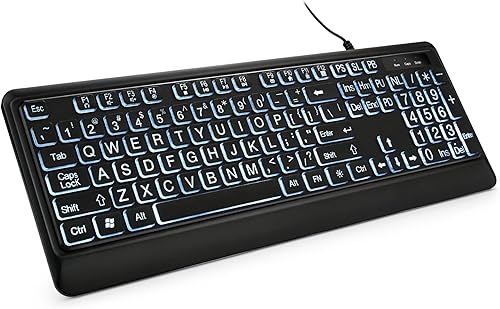
The KOPJIPPOM Large Print Backlit Keyboard is the best large print keyboard here for adjustable white lighting. Its letters are described as 4X larger than standard keyboard fonts, and the backlight can be turned on or off with adjustable brightness.
This is a full-size 104-key QWERTY keyboard with a numeric keypad and a USB-A wired connection. It needs no battery charging, which makes it a practical choice for a fixed desk.
Foldout feet let you change the keyboard angle. The spill-resistant design adds protection against accidental water or coffee spills, but you should still allow the keyboard to dry fully before using it again.
The stated compatibility includes Windows, Mac OS and Raspberry Pi 3/4. Multimedia keys may not fully work on Mac systems, so Mac users should focus on the standard typing keys first.
Pick it when a white backlight is more useful than colored lighting. It is also a good fit for anyone who wants large letters without giving up a numeric keypad.
KOPJIPPOM Large Print Wireless Keyboard and Mouse: Best for wireless desks
- Keyboard and mouse combo
- 7 backlight colors
- Rechargeable design
- One USB receiver for both devices
This rechargeable set keeps both keyboard and mouse on one wireless receiver. It suits buyers who want large letters, colored backlighting and fewer cables.
Pros
- Keyboard and mouse included
- Rechargeable
- Single receiver for both devices
Cons
- Windows compatibility is the clearest fit
- Requires charging
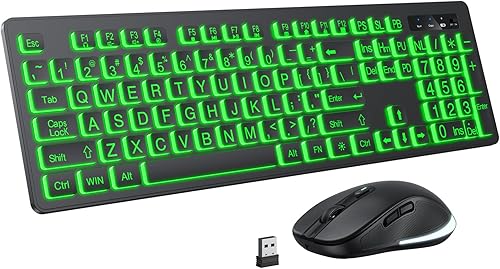
The KOPJIPPOM Large Print Wireless Keyboard and Mouse is the strongest pick for a low-cable desk. One USB receiver handles both devices, while the keyboard and mouse use a 2.4GHz wireless connection with a stated range of up to 33 ft.
The 104-key keyboard has large letters, 7 backlight colors and 3 brightness levels. The set is rechargeable and includes a USB Type-C charging cable, so you don't need separate disposable batteries for normal use.
The backlight turns off after 120 seconds of non-use to save power. A separate power switch and backlight switch give you more control when the keyboard is sitting unused.
This set is stated for Windows systems and is also described as compatible with Mac OS, although some multimedia keys may not fully work there. The mouse has a DPI switch with 800, 1200 and 1600 settings.
Choose it when you need both a keyboard and mouse, not just larger key legends. For a keyboard-only wireless setup, see our best large print wireless keyboard comparison.
X9 Large Print Backlit Computer Keyboard: Best for shortcut access
- 7 backlight colors
- 4 brightness levels
- Full-size 107-key layout
- 12 shortcut keys
The X9 combines oversized letters with a 107-key layout, numeric keypad and shortcut keys. Its four brightness levels give more adjustment than a simple on-or-off light.
Pros
- Four brightness levels
- 12 shortcut keys
- Full-size layout
Cons
- Windows is the stated operating system family
- Wired USB-A connection
The X9 Large Print Backlit Computer Keyboard suits users who want large print with extra shortcut access. Its 107-key full-size layout includes a numeric keypad and 12 shortcut keys for common controls.
The USB-A connection is wired and USB powered, so setup does not involve charging or pairing. Its 7-color backlight has 4 brightness levels, giving you more light adjustment than models with only a few settings.
The keyboard is described for Windows, PC and laptop use. Its domed membrane switch type is suited to standard everyday typing, while the large print helps you find keys without changing the QWERTY layout.
The X9 is a practical choice for a home office, study space or shared desk where shortcut keys are useful. It may be less suitable if you need confirmed Mac multimedia support or a wireless connection.
The extra keys can speed up routine tasks such as volume changes or playback control. They also mean a slightly wider board, so measure your desk space before you place it beside a monitor or other gear.
Set the brightness to the lowest level that keeps the legends clear in your room. That keeps the light comfortable for your eyes and leaves the key colors easy to tell apart without the glow washing out the print.
KOPJIPPOM Large Print Keyboard: Best for color choice
- 4X larger font
- 7 backlight colors
- 3 brightness levels
- Foldable stands
This wired KOPJIPPOM model offers large print plus seven backlight colors without battery charging. Foldable stands let you adjust the keyboard angle for daily typing.
Pros
- Seven color options
- USB plug-and-play setup
- Numeric keypad
Cons
- Wired connection
- Backlight adds more controls to learn
The KOPJIPPOM Large Print Keyboard is the best wired choice for color and brightness control. Its print is described as 4X larger than standard keyboard fonts, and its backlight offers 7 colors with 3 brightness levels.
The full-size 104-key QWERTY layout includes a numeric keypad. Foldable stands let you change the angle, while the USB-A connection provides plug-and-play setup without battery charging.
The keyboard is described as compatible with Windows, Mac OS and Raspberry Pi 3/4. As with other models in this group, some multimedia keys may not fully work with Mac OS even when standard typing works.
Its spill-resistant design is useful for everyday desk use. Keep liquids away from the keyboard when possible, and let it dry fully after an accidental spill.
Choose this model if you want more lighting choices than a plain white backlight. For Apple computers specifically, compare our guide to the best large print keyboard for Mac.
SABLUTE Wired Large Print Backlit Keyboard: Best for wrist support
- 3X larger block letters
- 7-color backlight
- Integrated wrist rest
- Phone and tablet holder
The K31PRO adds an integrated wrist rest and a top slot for phones or tablets. It suits long desk sessions where support and screen visibility matter alongside large letters.
Pros
- Integrated wrist rest
- Phone and tablet holder
- Backlight memory function
Cons
- Wired connection
- Some multimedia keys may not fully work on Mac
The SABLUTE Wired Large Print Backlit Keyboard is best for wrist support and a phone or tablet slot. Its K31PRO design combines 3X larger block letters with an integrated low-profile wrist rest and foldout tilt stands.
The full-size 104-key US QWERTY layout includes a numeric keypad. A built-in top console slot holds phones and tablets under 11.5 in, which can keep a second screen visible while you type.
The dedicated lighting control offers 7 colors and 3 brightness levels. Its memory function restores the lighting mode after a reboot, so you don't have to choose the setting again each time.
The keyboard uses USB-A power and does not need batteries. Standard typing keys support Windows and Mac OS, while some top-row multimedia shortcuts may not fully work on Mac systems.
Choose it when a wrist rest and device holder are worth the larger footprint. It is more feature-heavy than a basic high-contrast keyboard, so check that your desk has room for its 16.85 x 7.44 in dimensions.
SABLUTE Large Print Wired Keyboard: Best for desk organization
- Oversized print keys
- 7 backlight colors
- Wrist rest
- Phone and tablet holder
This SABLUTE combines large print, a wrist rest and a built-in holder for a phone or tablet. It is aimed at everyday typing, study and office use.
Pros
- Wrist rest included
- Phone and tablet holder
- No battery charging
Cons
- The published key count differs from a typical full-size layout
- Backlight has no memory function
The SABLUTE Large Print Wired Keyboard is designed for desk organization and supported typing. It combines oversized print keys with an integrated wrist rest and a built-in holder for a phone or tablet.
The keyboard uses a USB-A wired connection and does not need batteries or charging. Its backlight offers 7 colors and adjustable brightness, but it does not have a memory function.
The product data states a QWERTY layout and 78 keys, which differs from the 104-key layouts used by most other picks here. Check the key arrangement carefully if you rely on a numeric keypad or full-size shortcut row.
The holder can keep a phone, small tablet, notes or a business card within view, but it does not charge the device. The keyboard is described for laptop, Mac, PC and Windows use, with Windows as the stated operating system family.
Choose it when the wrist rest and holder solve a real desk problem. Choose a different model if a traditional full-size 104-key layout is essential.
QUASIO Large Print Backlit Keyboard: Best for retro-style keys
- 4X larger font
- 7-color backlight
- Round raised keycaps
- Spill-resistant design
Round raised keycaps give this keyboard a different look while the large print and backlight focus on visibility. It keeps a full-size layout with a numeric keypad.
Pros
- Distinct round keycap design
- Seven backlight colors
- Quiet typing claim
Cons
- Wired connection
- Raised keycaps may feel different from flat keys
The QUASIO Large Print Backlit Keyboard is the best fit for retro-style raised keycaps. Its 4X larger print, round raised keycaps and 7-color backlight give it a different feel from flat office keyboards.
The full-size 104-key QWERTY layout includes a numeric keypad. The backlight has 3 brightness levels and 2 modes, and the keyboard connects through USB-A without battery charging.
QUASIO describes the keyboard as spill resistant and quiet for everyday typing. Its stated compatibility includes Windows, Mac OS and ChromeOS, along with desktops, laptops, notebooks and Chromebooks.
Raised round keycaps may feel different if you're used to flat keys. That can be useful if you prefer more visible key shapes, but it is worth checking your desk habits before choosing a style-focused design.
Choose it when large print, backlighting and a distinctive key shape matter together. For a simpler high-contrast look, the BOOGIIO or Adesso may be a better match.
Adesso AKB-132UY Luminous 4 X Large Print: Best for yellow-key simplicity
- 4X black print on fluorescent yellow keys
- Quiet membrane switches
- Multimedia hotkeys
- Windows one-touch controls
The Adesso uses fluorescent yellow keys with black 4X print for a simple high-contrast design. Its extra media and Windows controls suit users who want quick access keys.
Pros
- High-contrast color scheme
- Quiet membrane switches
- Media and Windows hotkeys
Cons
- Windows is the stated operating system family
- No backlight described
The Adesso AKB-132UY Luminous 4 X Large Print is a good choice for simple yellow-key visibility. Its fluorescent yellow keys use black 4X print, creating a strong contrast without a separate backlight system.
This is a 104-key US QWERTY USB keyboard with quiet membrane switches. The layout includes multimedia controls and Windows one-touch controls for functions such as My Computer, Search, Calculator, Mail, Home and Favorites.
Adesso describes the membrane switches as supporting up to 5 million keystrokes. The keyboard is intended for PC use with Windows, so buyers using another operating system should confirm how the extra controls will behave.
The design is straightforward: bright yellow keys, black letters and direct USB power. It does not add the color modes or brightness settings found on the backlit picks.
Choose it when you want high contrast and Windows shortcut access without a backlight. It is also worth considering for a shared computer where simple controls are easier to explain.
How to choose a large print keyboard
The best large print keyboard should make important keys easy to find without forcing you to relearn the layout. Start with the key color and letter contrast, then check whether you need backlighting, a numeric keypad or wireless use.
Is contrast or backlighting more important?
Contrast is the first thing to check because the printed letter must stand out from the keycap. BOOGIIO and Adesso use yellow keys with black print, while the backlit models add light to the key area.
A backlight helps in dim rooms, but very bright light can be distracting. Models such as the KOPJIPPOM B09LH4KF5H, X9 and QUASIO provide brightness controls, so you can adjust the light instead of leaving it at one setting.
Do you need a full-size layout?
A full-size keyboard usually keeps the number row, navigation keys and numeric keypad in familiar positions. That matters if you enter numbers often or already type by touch.
Most picks here have 104 keys, while the X9 has 107 keys. The SABLUTE B0CDFMW94G states 78 keys, so compare its arrangement with your normal workflow before ordering.
Is wired or wireless better?
Wired keyboards are easy to connect and do not need charging. They are a good fit for a fixed desk, school computer or shared workstation.
Wireless models reduce cable clutter and give you more freedom to position the keyboard. The KOPJIPPOM wireless set also includes a mouse, but you need to manage charging and confirm operating-system support.
If you need Bluetooth specifically, see our guide to the best large print keyboard bluetooth options. Bluetooth and 2.4GHz wireless are different connection methods, so check what your computer supports.
What ergonomic features help?
Foldout feet can change the keyboard angle, while an integrated wrist rest supports the lower hands during typing. These features do not replace a comfortable desk height, so place the keyboard where your shoulders can stay relaxed.
The SABLUTE K31PRO and B0CDFMW94 include wrist rests. The BOOGIIO, KOPJIPPOM and QUASIO models include or describe foldout stands, which may help you adjust the typing angle.
A small change in angle can make a long session feel easier. Try the board flat and raised, and settle on the position where your wrists stay straight and your shoulders stay loose.
A wrist rest works best when your hands rest on it lightly between keystrokes. Pressing hard into the rest can add pressure, so keep your arms supported by your chair and desk as well.
If you share a desk, check that the rest and the board do not crowd your mouse or other tools. A wider board may need a different spot for your pointer, or a slightly deeper desk surface.
If you want a keyboard and matching pointer device, compare the best large print wireless keyboard and mouse sets. For older users, our guide to the best keyboard for seniors focuses on visibility and simple daily use.
Care for the board with simple habits. Keep drinks away from the keys, wipe the keycaps with a soft dry cloth, and let any spill dry fully before you use it again.
For backlit models, turn the light down or off when you do not need it. That saves power on wireless sets and keeps the room calm if you type while others are nearby.
Place the keyboard where the letters are easy to see from your normal seat. If you need to lean in to read the legends, a different contrast or a brighter backlight may work better for you.
Think about your main tasks too. Frequent number entry benefits from a numeric keypad, while heavy writing benefits more from a comfortable angle and quiet keys.
A phone or tablet holder can help if you often check a second screen while you type. Measure the slot against your device and leave room for cables if it needs charging nearby.
Setup should stay simple. Wired models usually work as soon as they are plugged in, and wireless sets need the receiver in place and the battery charged before first use.
How should you set up and care for one?
Place the keyboard where the letters are easy to see from your normal sitting position. Adjust the backlight only as high as needed, and use the foldout feet or wrist rest if they keep your hands comfortable.
Keep drinks away from the keys even when a keyboard is described as spill resistant. After a spill, disconnect it, allow it to air dry completely and follow the product instructions before reconnecting it.
More guides on this topic
- Best Wireless Keyboards for Seniors
Which large print keyboard should you choose?
Choose the BOOGIIO Large Print Computer Keyboard if yellow keys, black oversized letters and a familiar wired layout are your priorities. Pick the KOPJIPPOM backlit model for adjustable white lighting, the wireless KOPJIPPOM set for a keyboard-and-mouse setup, or the SABLUTE K31PRO for a wrist rest and device holder.
For a different high-contrast option, choose the Adesso. If your main need is colorful backlighting, compare the X9, KOPJIPPOM and QUASIO models by brightness controls and key layout.
The best large print keyboard is the one whose contrast, lighting and layout match the way you type every day.
If you type mostly in daylight and rarely look down, strong contrast on the keycaps may be enough for you. The BOOGIIO and Adesso both use yellow keys with black print, so the legends stay clear without any light to switch on or adjust.
If your room is often dim, a backlight can make the same large letters easier to find after dark. Look for brightness levels rather than a single on value, so you can match the glow to the room and keep it from feeling harsh.
If cables bother you or you move the keyboard between desks, a wireless set may suit you better. The KOPJIPPOM combo adds a mouse on the same receiver, which keeps the desk tidy but needs charging and a free USB port.
If long sessions leave your wrists tired, a wrist rest or foldout feet may matter more than extra light colors. The SABLUTE models add support under the hands, while other picks let you tilt the board to a gentler angle.
Check the operating system before you settle on a model. Most of these boards list Windows first, and some multimedia keys may not fully work on a Mac even when normal typing does.
Measure your desk space before you order. Full-size boards with a numeric keypad and a wrist rest take up more room, and a larger footprint can crowd a mouse or a notebook.
For shared computers, simple controls are often easier for everyone to use. A wired board with clear legends and no pairing step can work well in a school, library or family computer area.
The best large print keyboard is the one whose contrast, lighting and layout match the way you type every day.
Our top 3 picks at a glance
-
1
-
2
-
3
Best for wireless desks
KOPJIPPOM Large Print Wireless Keyboard and Mouse
9.4/10 our score
See it on Amazon
Frequently asked questions
What is the best large print keyboard?
The BOOGIIO Large Print Computer Keyboard is the best large print keyboard for most people in this comparison. Its yellow keycaps, black oversized letters, full-size 104-key layout and wired USB connection focus on clear everyday typing.
Choose a backlit model instead if you often type in dim lighting.
Are large print keyboards good for low vision?
Large print keyboards can make key legends easier to locate because the letters are bigger and often use stronger contrast. BOOGIIO and Adesso use yellow keys with black print, while several KOPJIPPOM, X9, SABLUTE and QUASIO models add backlighting.
The best choice depends on the contrast and lighting that work for you.
Are backlit large print keyboards better?
Backlit large print keyboards are useful when your room lighting changes or you type in a dim space. KOPJIPPOM, X9, SABLUTE and QUASIO models add adjustable lighting to large key legends.
A backlight does not replace contrast, so compare the printed key color and the light controls together.
Should I choose a wired or wireless large print keyboard?
Choose a wired large print keyboard when you want plug-and-play setup without charging. Choose the KOPJIPPOM wireless keyboard and mouse set when fewer cables and a shared USB receiver matter more.
Check the computer's operating system before choosing wireless or wired multimedia controls.
What keyboard layout is easiest to use?
A familiar full-size QWERTY layout is usually easiest when you want to type without relearning key positions. Most picks here include a numeric keypad, while the SABLUTE B0CDFMW94G listing states 78 keys, so compare the layout before buying.
Foldout feet or a wrist rest can also change the typing position.