7 Best All-in-One Color Printers for Home Offices (November 2026)
The best all-in-one color printers for home offices include the Canon MegaTank G3270 All-in-One Wireless Color Printer for high-volume home printing, the Brother MFC-L8930CDW Business Color Laser All-in-One Printer for busy document workloads, and the HP Envy 6155 Wireless All-in-One Color Inkjet for everyday color and photos.
On this page (5 sections)
The Canon MegaTank G3270 is the best all in one color printer for home office use if you want wireless printing with refillable ink tanks. For faster document work, compare the Brother and Canon color lasers; for faxing and an ADF in an inkjet, consider the HP OfficeJet Pro 8139.
Home office printers need to handle more than one task. Compare all-in-one printers for home if you are also weighing household needs.
Think about how often you print, whether you scan multi-page files, and whether color output or two-sided printing matters most.
Start with our home printer buying guide to compare printer types and features. If you need a monochrome office machine, see our guide to the best all in one printer for home office.
Our picks at a glance
-
1
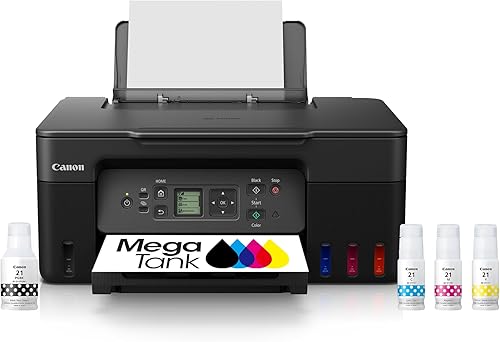 Best for high-volume home printing
Canon MegaTank G3270 All-in-One Wireless Color Printer
9.7/10 our score
See it on Amazon -
2
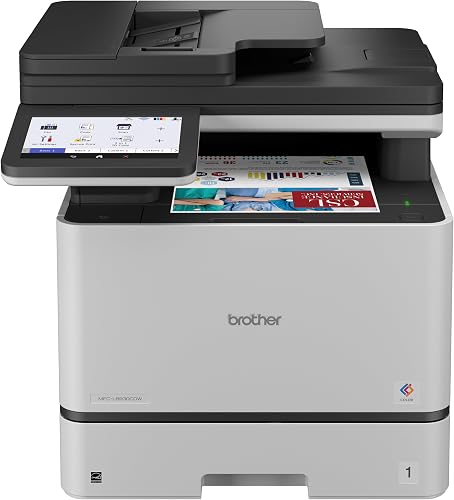 Best for busy document workloads
Brother MFC-L8930CDW Business Color Laser All-in-One Printer
9.5/10 our score
See it on Amazon -
3
 Best for everyday color and photos
HP Envy 6155 Wireless All-in-One Color Inkjet
9.4/10 our score
See it on Amazon
- 4
 Check it
HP OfficeJet Pro 8139 Wireless All-in-One Color
Best for fax and multi-page scanning - 5
 Check it
Canon Color imageCLASS MF753Cdw II
Best for fast color laser output - 6
 Check it
Epson EcoTank ET-2900 Wireless All-in-One Color Supertank
Best for refillable home ink tanks - 7
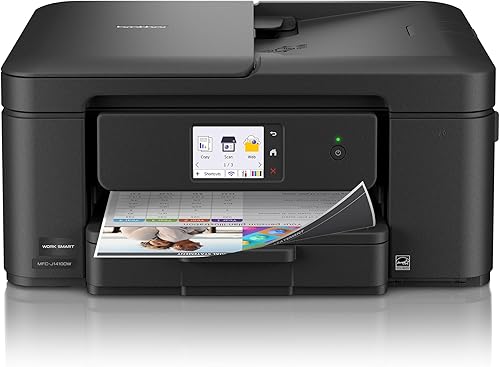 Check it
Brother Work Smart 1410 Wireless Color Inkjet
Best for compact home office tasks
How we chose all in one color printers for home office use
We compared the listed functions, print speeds, paper handling, duplex support, connectivity and stated dimensions for each model. Our score weighs specs and features against what a home office buyer needs.
A useful multifunction printer should match your document load and desk space. We gave extra weight to duplex printing, an ADF, larger input trays and refillable tanks when those features solve common home office tasks.
How do these home office color printers compare?
The biggest differences are printing technology, paper handling and speed. Use the table to narrow the choices, then check each model's trade-offs below.
| Product | Best for | Functions | Print speed | Size (D x W x H) | Our score |
|---|---|---|---|---|---|
| Canon MegaTank G3270 All-in-One Wireless Color Printer | high-volume home printing | Print, copy and scan | 11 ppm black, 6 ppm color | 21.9 x 16.4 x 10.6 in | 9.7 |
| Brother MFC-L8930CDW Business Color Laser All-in-One Printer | busy document workloads | Print, scan and copy | Up to 33 ppm, black and color | 20.7 x 16.1 x 21.6 in | 9.5 |
| HP Envy 6155 Wireless All-in-One Color Inkjet | everyday color and photos | Print, scan and copy | 10 ppm black, 7 ppm color | 17.05 x 5.35 x 14.21 in | 9.4 |
| HP OfficeJet Pro 8139 Wireless All-in-One Color | fax and multi-page scanning | Print, scan, copy and fax | 20 ppm black, 10 ppm color | 13.29 x 18.12 x 9.17 in | 9.2 |
| Canon Color imageCLASS MF753Cdw II | fast color laser output | Print, scan, copy and fax | Up to 35 ppm, black and color | 18.2 x 16.8 x 17 in | 9.1 |
| Epson EcoTank ET-2900 Wireless All-in-One Color Supertank | refillable home ink tanks | Print, scan and copy | 11 ppm black, 6 ppm color | 12.5 x 14.2 x 6.4 in | 9.0 |
| Brother Work Smart 1410 Wireless Color Inkjet | compact home office tasks | Print, copy and scan | 16 ppm black, 9 ppm color | 13.5 x 15.4 x 7.2 in | 8.7 |
Which all-in-one color printer fits your home office?
The Canon MegaTank G3270 is the best fit for many homes that print color regularly and want refillable tanks. The other models add laser speed, automatic document feeding, faxing or a smaller body.
Canon MegaTank G3270 All-in-One Wireless Color Printer: Best for high-volume home printing
- Wireless print, copy and scan
- Up to 2 years of ink included
- Single-sided printing
- 1.35 in square LCD
The refillable MegaTank system and included ink suit a home office that prints color often. It prints single-sided only, so plan for manual page turning when you need two-sided copies.
Pros
- Wireless print, copy and scan
- Up to 2 years of ink included
- Refillable ink tank
Cons
- Single-sided printing
- Color speed is 6 ppm
The Canon MegaTank G3270 suits a home office that prints documents, worksheets and color pages throughout the week. Canon includes enough ink for up to 2 years, and says one set can print up to 6,000 black-and-white or 7,700 color pages.
Wireless print, copy and scan cover the core tasks without a separate scanner. The 1.35 in square LCD gives you a small on-printer control screen.
This model prints one side at a time. If you regularly handle long reports, budget time to turn pages manually or choose a printer with automatic duplex support.
Its 11 ppm black and 6 ppm color speeds are suited to steady home use rather than a busy office queue. At 13.2 lb, it is also easier to reposition than the larger color laser models here.
Choose it if refillable ink and wireless scanning matter more than automatic two-sided printing. For an alternative in a compact tank design, compare the best compact all-in-one printer.
Brother MFC-L8930CDW Business Color Laser All-in-One Printer: Best for busy document workloads
- Print and copy speeds up to 33 ppm
- Automatic duplex printing
- 80-page auto document feeder
- Dual-band Wi-Fi and Gigabit Ethernet
This color laser handles frequent document jobs with automatic two-sided printing and high-speed two-sided scanning. Its 71.2 lb weight and 21.6 in height call for a sturdy, roomy spot.
Pros
- Up to 33 ppm print and copy speed
- Automatic duplex printing
- 80-page ADF and 7 in touchscreen
Cons
- 71.2 lb weight
- Large footprint for a home office
The Brother MFC-L8930CDW is built for a home office with a steady stream of paperwork. See Brother laser all-in-one printers for more options from the brand.
Its stated print and copy speed reaches 33 ppm, and automatic duplex printing helps reduce manual page handling.
For scanning, the 80-page ADF supports two-sided scanning at up to 104 images per minute under the conditions Brother specifies. The 7 in color touchscreen can store up to 64 customized shortcuts for common tasks.
It connects through dual-band Wi-Fi or Gigabit Ethernet, giving you a choice of wireless or wired networking. The 71.2 lb body and 21.6 in height are substantial, so check the desk or cabinet space before choosing it.
Brother includes standard-yield toner cartridges and offers TN635XXL super-high-yield replacement cartridges. Choose this model for fast, frequent office documents and multi-page scanning; it may be more printer than a light home workload needs.
HP Envy 6155 Wireless All-in-One Color Inkjet: Best for everyday color and photos
- Print, scan and copy
- Automatic two-sided printing
- 100-sheet input tray
- 2.4 in color touchscreen
The Envy 6155 combines wireless color printing with automatic duplexing and a 100-sheet tray. It suits lighter home workloads that include documents and borderless photos.
Pros
- Wireless print, scan and copy
- Automatic duplex printing
- 100-sheet input tray
Cons
- No automatic document feeder
- Instant Ink trial changes to a paid plan unless canceled
The HP Envy 6155 is a home-focused inkjet for everyday color documents and borderless photos. It prints, scans and copies, and its automatic duplex feature handles two-sided jobs without manual page turning.
A 100-sheet input tray and 2.4 in touchscreen cover routine printing and control. Its stated speeds are 10 ppm for black and 7 ppm for color, making it a fit for a moderate home workload.
The dual-band Wi-Fi and HP app support wireless printing and scanning from compatible devices. HP also includes a 3-month Instant Ink trial, which becomes a monthly paid plan unless you cancel.
The Envy 6155 does not have an ADF, so scanning a stack means placing pages individually on the flatbed. For a dedicated scanning setup, compare flatbed scanners for photos and documents.
Pick it when photos and everyday color matter more than batch scanning or fax capability.
HP OfficeJet Pro 8139 Wireless All-in-One Color: Best for fax and multi-page scanning
- Print, scan, copy and fax
- Automatic duplex printing
- Automatic document feeder
- 225-sheet input tray
An ADF, fax function and 225-sheet tray make this inkjet a fit for paperwork-heavy home offices. It also offers automatic two-sided printing and dual-band Wi-Fi.
Pros
- ADF and fax
- 225-sheet input tray
- Automatic duplex printing
Cons
- Color speed is 10 ppm
- Instant Ink trial changes to a paid plan unless canceled
The HP OfficeJet Pro 8139 brings an ADF, fax and a 225-sheet input tray to an inkjet home office. Those features can help when you handle multi-page forms, reports or a mix of print and scan jobs.
Its listed speeds reach 20 ppm black and 10 ppm color, with automatic duplex printing for two-sided documents. A 2.7 in touchscreen gives you controls at the printer, and dual-band Wi-Fi supports wireless use.
The HP app supports print, scan, copy and fax tasks from a smartphone. HP includes a 1-year Instant Ink trial, which moves to a monthly fee after the trial unless canceled.
Choose the OfficeJet Pro when paper handling and faxing are central to your workflow. Its 17.6 lb weight and 13.29 x 18.12 x 9.17 in dimensions still require a planned spot near power and network access.
Canon Color imageCLASS MF753Cdw II: Best for fast color laser output
- Print, scan, copy and fax
- Automatic duplex printing
- Up to 35 ppm
- 50-sheet duplex ADF
This color laser combines duplex printing with a 50-sheet, two-sided ADF and a 5 in touchscreen. It fits a home office with steady document traffic and enough room for a 50 lb printer.
Pros
- Up to 35 ppm print speed
- Automatic duplex printing
- 50-sheet duplex ADF
Cons
- 50 lb weight
- Toner is a separate ongoing supply
The Canon Color imageCLASS MF753Cdw II is a color laser option for home offices that print reports, forms and other document-heavy work. For more office models, see color laser printers for offices.
Its stated print speed reaches 35 ppm, and it supports automatic duplex printing.
The 50-sheet duplex ADF can scan both sides in one pass. A 5 in color touchscreen offers on-device controls, and the standard cassette holds up to 250 sheets, with another 50 sheets in the multipurpose tray.
This model prints, scans, copies and faxes, with wireless connections for computers and mobile devices. It weighs 50 lb, so choose a sturdy surface with room for its 18.2 x 16.8 x 17 in body.
Canon says it includes a 3-year limited warranty. Consider it if you want a fast color laser with a duplex ADF, and compare toner supply needs before choosing a laser over a tank printer.
Epson EcoTank ET-2900 Wireless All-in-One Color Supertank: Best for refillable home ink tanks
- Refillable EcoTank system
- Ink included for up to 3 years
- 100-sheet tray
- 1.44 in color display
The ET-2900 has refillable tanks and ink included for up to 3 years, according to Epson. Its compact size can suit a tight workspace, while simplex printing means it does not print both sides automatically.
Pros
- Refillable ink tanks
- Ink included for up to 3 years
- Compact 6.4 in height
Cons
- Simplex printing
- Color speed is 6 ppm
The Epson EcoTank ET-2900 uses refillable tanks for home printing, scanning and copying. Epson says the included ink can last up to 3 years, with stated yields of up to 3,600 black or 6,500 color pages.
Its 100-sheet tray, flatbed scanner and 1.44 in color display cover everyday home tasks. Epson gives speeds of 11 ppm black and 6 ppm color, so it fits steady printing better than a high-volume queue.
The printer is 6.4 in tall and weighs 9.3 lb, which can make it easier to fit on a desk or shelf. It supports Wi-Fi and USB connections for computers and compatible mobile devices.
The ET-2900 uses simplex printing, so it does not automatically print both sides. Choose it for a compact tank system, and consider a duplex model if you frequently print long documents.
Brother Work Smart 1410 Wireless Color Inkjet: Best for compact home office tasks
- Print, copy and scan
- Automatic duplex printing
- 20-sheet single-sided ADF
- 150-sheet paper tray
The Work Smart 1410 pairs a compact body with automatic duplex printing, a 20-sheet ADF and a 150-sheet tray. Its touchscreen can connect to popular cloud apps for print and scan tasks.
Pros
- Automatic duplex printing
- 20-sheet ADF
- 150-sheet paper tray
Cons
- ADF scans one side at a time
- Color speed is 9 ppm
The Brother Work Smart 1410 combines a compact inkjet body with automatic duplex printing and a 20-sheet ADF. Its 150-sheet tray helps reduce paper refills during a busy week.
The stated print speeds reach 16 ppm black and 9 ppm color. A 2.7 in touchscreen provides access to popular cloud apps, and the Brother Mobile Connect app supports printing, copying, scanning and device management.
The ADF scans one side at a time, so it is less suited to two-sided document batches than a duplex ADF. It can still save time over placing each page individually on the flatbed.
Choose this Brother for a smaller workspace that needs a tray, ADF and two-sided printing. For setup and wireless options across the category, see our guide to the best all-in-one printer wireless.
What should you check before choosing a home office color printer?
Choose a printer by matching its paper handling and supply system to the work you do each week. A feature that saves time on every job can matter more than a higher maximum speed you rarely use.
Do you need a duplex printer or an ADF?
Automatic duplex printing handles both sides of a sheet without manual page turning. If you print long documents, it can save time and paper handling.
An ADF feeds several pages for scanning or copying. Check whether it scans both sides in one pass if you regularly digitize double-sided forms; the Brother MFC-L8930CDW and Canon imageCLASS MF753Cdw II have duplex ADFs.
How much printing do you do each month?
Tank printers may suit regular color printing because they use refillable bottles rather than standard ink cartridges. Canon says the G3270 includes up to 2 years of ink, while Epson says the ET-2900 includes ink for up to 3 years.
Those are maker estimates, not a guarantee of how long ink will last in your office. Your page coverage and print mix affect how quickly supplies run down.
Do you need a color laser printer?
A color laser can be a good fit when print speed and repeated document jobs matter. The Brother MFC-L8930CDW and Canon imageCLASS MF753Cdw II list print speeds of up to 33 ppm and 35 ppm, respectively.
Laser printers use toner rather than liquid ink. Read our explainer on whether laser printers use ink to understand the supply difference.
Will the printer fit your desk?
Compare the printer's stated depth, width and height with the space you have, and leave room to open trays and load paper. The Brother MFC-L8930CDW is 21.6 in tall and weighs 71.2 lb, while the Epson ET-2900 is 6.4 in tall and weighs 9.3 lb.
If you use a Mac, check model compatibility and app support for your setup. Our guide to the best all-in-one printer for Mac covers that choice.
Which all-in-one color printer should you choose?
Choose the Canon MegaTank G3270 for refillable ink and routine wireless color printing. Pick the Brother MFC-L8930CDW or Canon imageCLASS MF753Cdw II for faster document work and duplex scanning, or the HP OfficeJet Pro 8139 when you need an ADF and fax in an inkjet.
For room planning, compare the printer footprint with the computer and monitor already on your desk. Our guides explain how an all-in-one computer works and how much desk space an all-in-one computer needs.
Our top 3 picks at a glance
-
1
Best for high-volume home printing
Canon MegaTank G3270 All-in-One Wireless Color Printer
9.7/10 our score
See it on Amazon -
2
Best for busy document workloads
Brother MFC-L8930CDW Business Color Laser All-in-One Printer
9.5/10 our score
See it on Amazon -
3
Best for everyday color and photos
HP Envy 6155 Wireless All-in-One Color Inkjet
9.4/10 our score
See it on Amazon
Frequently asked questions
Which all-in-one color printer is best for a home office?
The Canon MegaTank G3270 is a strong fit if you want wireless printing, scanning and copying with refillable ink tanks. For frequent two-sided documents, choose a laser model such as the Brother MFC-L8930CDW or Canon imageCLASS MF753Cdw II.
If you need a fax or an automatic document feeder, the HP OfficeJet Pro 8139 includes both.
Should I choose an inkjet or a color laser printer?
Choose an inkjet when refillable tanks, everyday color or photos matter most. The Canon MegaTank G3270 and Epson EcoTank ET-2900 use tank systems, while the HP models use ink cartridges.
A color laser can suit frequent document printing and duplex workflows.
Compare the printer's size, paper handling and supply type with your routine.
Do all-in-one color printers print on both sides?
No. Some print on one side only, while others support automatic duplex printing.
The Canon MegaTank G3270 and Epson EcoTank ET-2900 are simplex models; the Brother and HP picks listed here include automatic duplex printing.
Check duplex support if you regularly print long reports or forms.
Do I need an automatic document feeder for a home office?
An ADF helps scan or copy a stack of pages without placing each sheet on the glass by hand. The Brother MFC-L8930CDW has an 80-page ADF, while the Brother Work Smart 1410 has a 20-sheet, single-sided ADF.
For occasional single-page scans, a flatbed alone may be enough.
Do laser printers use ink?
Laser printers use toner rather than liquid ink. Color laser models use toner in black, cyan, magenta and yellow, while inkjet printers use ink cartridges or refillable tanks.
Read more about whether laser printers use ink before choosing a supply system.



