7 Best Wireless All-in-One Printers (November 2026)
The best wireless all-in-one printers include the Canon MegaTank G3270 All-in-One Wireless Color Printer for low-ink-cost color printing, the Brother DCP-L2640DW Wireless Compact Monochrome Multi-Function Printer for fast black-and-white documents, and the Epson EcoTank ET-2800 Wireless Color All-in-One Supertank for refillable home color printing.
On this page (7 sections)
- The best all-in-one printer wireless picks for each use
- How we picked these wireless all-in-one printers
- Which wireless all-in-one printer fits your workspace?
- Do you need automatic duplex printing?
- Is a color or monochrome wireless printer better?
- How should you set up a wireless all-in-one printer?
- Best all-in-one printer wireless verdict
The best all-in-one printer wireless choice for most homes is the Canon MegaTank G3270. It combines wireless printing, copying and scanning with up to 2 years of ink included and stated yields of up to 6,000 black and white or 7,700 color pages from one ink set.
A wireless all-in-one printer lets you share printing, scanning and copying across devices. You can send a document from a computer, phone or tablet instead of moving the device next to the printer.
If you are still comparing printer types, start with our home printer buying guide. It explains the main checks for paper handling, ink systems, wireless use and everyday placement.
Our picks at a glance
-
1
 Best for low-ink-cost color printing
Canon MegaTank G3270 All-in-One Wireless Color Printer
9.7/10 our score
See it on Amazon -
2
 Best for fast black-and-white documents
Brother DCP-L2640DW Wireless Compact Monochrome Multi-Function Printer
9.6/10 our score
See it on Amazon -
3
 Best for refillable home color printing
Epson EcoTank ET-2800 Wireless Color All-in-One Supertank
9.5/10 our score
See it on Amazon
- 4
 Check it
Canon PIXMA TS6520 Wireless Color Inkjet Printer
Best for compact duplex color printing - 5
 Check it
HP Envy 6155 Wireless All-in-One Color Inkjet
Best for touchscreen home printing - 6
 Check it
Canon PIXMA TR4720 All-in-One Wireless Printer Home
Best for home fax and document feeding - 7
 Check it
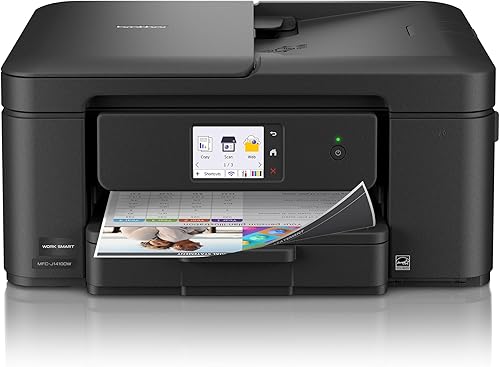
Brother Work Smart 1410 Wireless Color Inkjet
Best for small-office cloud workflows
The best all-in-one printer wireless picks for each use
The best wireless all-in-one depends on the work you do most. Choose the Canon MegaTank G3270 for high stated color yield, Brother for fast black-and-white documents, Epson for refillable color ink, or a compact cartridge model for lighter use.
For lower-cost choices, see all-in-one printers under 100 dollars.
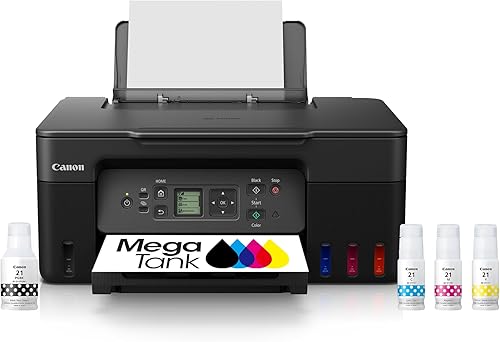
Canon MegaTank G3270 All-in-One Wireless Color Printer: Best for low-ink-cost color printing
- Wireless print, copy and scan
- Up to 2 years of ink included
- Up to 6,000 black and white or 7,700 color pages using one ink set
- 1.35 in square LCD
A wireless color ink tank printer with high stated page yields and basic copy and scan functions. It suits homes and small workspaces that print color documents often.
Pros
- High stated ink yield
- Wireless mobile printing
- Copy and scan functions
Cons
- Single-sided printing
- Larger footprint than some inkjet picks
The Canon MegaTank G3270 is the strongest fit for regular color printing at home. Its wireless print, copy and scan functions cover the three tasks most households need through the week.
Canon includes ink bottles, print heads, documentation and a power cord in the box. The printer has a 1.35 in square LCD, USB connectivity and support for smartphones and tablets.
Its stated output is up to 6,000 black and white pages or 7,700 color pages from one set of inks. Canon also states that up to 2 years of ink is included, which makes this model more suitable for frequent printing than a basic cartridge printer.
The small display suits simple checks for status and settings before a job starts. It keeps control of print, copy and scan tasks in one place on the printer.
The main trade-off is single-sided printing. If you want automatic 2-sided pages, consider the Canon PIXMA TS6520, HP Envy 6155 or Brother models below.
Place it where you can reach the ink tanks for refills and the paper tray for loading. That routine matters more on a tank model than the first setup step alone.
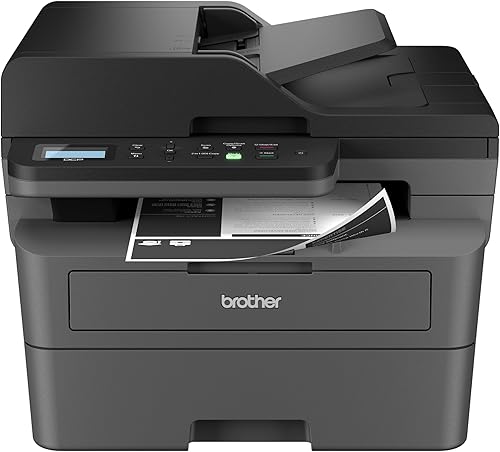
Brother DCP-L2640DW Wireless Compact Monochrome Multi-Function Printer: Best for fast black-and-white documents
- Up to 36 pages per minute
- Automatic duplex printing
- 50-page automatic document feeder
- Dual-band wireless, Ethernet and USB
A monochrome laser all-in-one built around fast document output, automatic 2-sided printing and multi-page scanning. It is a strong fit for small offices that do not need color.
Pros
- Fastest stated print speed here
- Automatic duplex
- 50-page feeder
Cons
- Black-and-white printing only
- Heavier than the inkjet picks
The Brother DCP-L2640DW is the best match for fast black-and-white paperwork. Its stated print speed reaches 36 pages per minute, and its automatic duplex function can print on both sides without manually turning each sheet.
A 50-page automatic document feeder helps with multi-page copying and scanning. The 250-sheet paper tray also means fewer refills during a busy workday.
This is a monochrome multifunction printer, so it is not the right choice for color photos or color charts. Its dual-band wireless, Ethernet and USB options make it more flexible for laptops, PCs, smartphones and tablets.
That mix of wired and wireless links helps in a small office with shared devices. You can keep one computer connected by cable while others use the network.
Choose it for forms, reports and office documents. For color work with refillable tanks, compare it with the Epson EcoTank ET-2800.
At 25 pounds, it is heavier than the inkjet picks here. Plan its position on the desk or cabinet before you need to move it.
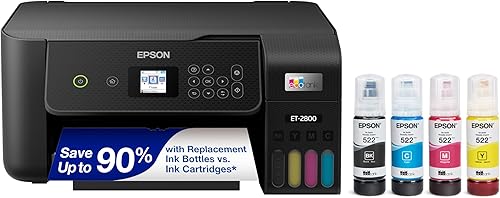
Epson EcoTank ET-2800 Wireless Color All-in-One Supertank: Best for refillable home color printing
- Cartridge-free refillable ink tanks
- Up to 4,500 black or 7,500 color pages per ink set
- Wireless print, scan and copy
- Up to 2 years of ink included
This wireless color supertank printer combines refillable tanks with printing, scanning and copying. It suits families that want fewer cartridge changes for regular home use.
Pros
- Refillable tank design
- High stated color yield
- Wireless multi-device printing
Cons
- Single-sided printing
- Wide body
The Epson EcoTank ET-2800 suits homes that want a refillable color ink system. It combines wireless printing, scanning and copying, with stated yields of up to 4,500 black pages and 7,500 color pages per ink bottle set.
Epson includes ink bottles, manuals, a power cord and software. The printer supports wireless connections to computers, laptops and smartphones, while USB provides a direct connection.
Its color print speed is listed at 5 pages per minute, and it uses single-sided printing. The wide 22.8 in body needs more desk space than the Canon PIXMA TS6520.
That width also affects shelf placement and how you reach the scanner lid. Measure the surface first and leave space to open the top.
Use genuine Epson ink if you choose this model. Epson recommends it to support print quality and performance.
For a family printing homework, photos and work pages, the tank design reduces cartridge changes. It suits regular use rather than occasional single page jobs.
Canon PIXMA TS6520 Wireless Color Inkjet Printer: Best for compact duplex color printing
- Automatic 2-sided printing
- 1.42 in OLED display
- Wireless printing from mobile devices
- Print, scan and copy
A compact wireless color inkjet with automatic duplex printing and a small OLED display. It fits families and students who need everyday documents, scans and photos.
Pros
- Automatic duplex
- Compact height
- Fast stated inkjet speed
Cons
- Two-cartridge system
- No automatic document feeder
The Canon PIXMA TS6520 is the best compact choice when you need color printing and automatic duplex pages. It prints, scans and copies, and its 1.42 in OLED display shows printer status and settings.
Canon lists wireless printing through the Canon PRINT App, Apple AirPrint and Mopria Print Service. It also supports laptops, PCs, smartphones and tablets.
The printer reaches stated speeds of 14 black and white pages per minute and 9 color pages per minute. Its 14.8 D x 14 W x 6.7 H in dimensions make it one of the easier models here to fit on a shallow desk.
The 2-cartridge hybrid ink system keeps color and black ink separate. That design is simple to replace, but it asks for more frequent cartridge checks than a tank model.
There is no automatic document feeder. Choose it for single-page scanning and copying, school work, recipes and photos, then choose the Brother DCP-L2640DW or TR4720 for larger multi-page jobs.
HP Envy 6155 Wireless All-in-One Color Inkjet: Best for touchscreen home printing
- Automatic 2-sided printing
- 2.4 in color touchscreen
- 100-sheet input tray
- Print, scan and copy
A wireless home color printer with a touchscreen, automatic duplex printing and a 100-sheet tray. It suits households that want simple controls for documents and photos.
Pros
- Color touchscreen
- Automatic duplex
- 100-sheet tray
Cons
- Cartridge restrictions apply
- No stated automatic document feeder
The HP Envy 6155 is a good wireless home printer for buyers who want touchscreen controls. It prints, scans and copies, adds automatic duplex printing, and has a 100-sheet input tray.
Its 2.4 in color touchscreen helps with printer controls, while the HP app supports printing, scanning, copying and faxing from a smartphone. HP lists black speeds up to 10 pages per minute and color speeds up to 7 pages per minute.
This model is intended to work with cartridges that use original HP chips or circuitry. Periodic firmware updates maintain those measures, so account for that cartridge requirement before choosing it.
Plan for that cartridge family when you budget for refills later. It is part of the ownership routine, not just the box contents.
The printer includes setup black and tri-color cartridges, a power cord and setup guides. It supports Letter media up to 8.5 x 11 in.
The 100-sheet tray suits everyday home printing without constant loading. It fits a household that prints documents and photos in short batches.
Canon PIXMA TR4720 All-in-One Wireless Printer Home: Best for home fax and document feeding
- Print, copy, scan and fax
- Automatic document feeder
- Automatic duplex printing
- Mobile printing
This wireless Canon adds fax capability to printing, copying and scanning. Its automatic document feeder makes it a practical choice for home paperwork.
Pros
- Four-in-one functions
- Automatic document feeder
- Automatic duplex
Cons
- Cartridge-based ink
- Starter cartridges included
The Canon PIXMA TR4720 is the best fit when a home printer needs fax as well as printing, scanning and copying. Its automatic document feeder helps handle multi-page paperwork, and automatic duplex printing supports 2-sided pages.
Canon includes starter PG-275 and CL-276 ink cartridges, an RJ-11 telephone/modem cable, a power cord and documentation. The printer supports mobile printing and has a 100-sheet capacity.
It accepts A4 or Letter media and uses a black cartridge plus a color cartridge. That cartridge setup is simple, but it is less suited to buyers who want a high-capacity refillable tank.
The included RJ-11 cable matters if you still use a phone line for fax. Check that connection before you plan the printer position near a phone outlet.
Choose this model for home forms, occasional faxing and document jobs. For a larger paper tray and cloud connections, compare the Brother Work Smart 1410.
Starter cartridges help you start printing after setup. They also mean you should check ink levels early rather than assume a full cartridge.
Brother Work Smart 1410 Wireless Color Inkjet: Best for small-office cloud workflows
- 2.7 in touchscreen
- Automatic duplex printing
- 20-sheet automatic document feeder
- 150-sheet paper tray
A wireless color all-in-one with a touchscreen, cloud app connections, automatic duplex printing and a small document feeder. It suits home offices and small offices.
Pros
- 150-sheet tray
- Automatic duplex
- Cloud app connections
Cons
- 20-sheet feeder is smaller than Brother's laser model
- Inkjet supply planning
The Brother Work Smart 1410 suits a home office or small office that needs color printing, copying, scanning and faxing in one unit. Its 2.7 in touchscreen connects with cloud apps, including Google Drive, Dropbox, Box and OneDrive.
Automatic duplex printing helps with 2-sided pages. A 20-sheet single-sided automatic document feeder handles multi-page jobs, while the 150-sheet paper tray gives it more capacity than several home-focused picks.
Brother lists speeds up to 16 black and white pages per minute and 9 color pages per minute. Wireless and USB 2.0 connections support laptops, PCs, smartphones and tablets.
The touchscreen is the main control point for cloud and app tasks. It helps with scanning to a chosen service without going back to a computer first.
Its feeder is smaller than the Brother laser model's 50-page feeder. Choose it for color and cloud workflow features, not for the highest-volume monochrome work.
For a small office, the 150-sheet tray reduces how often you load paper. That is useful when printing reports, flyers and everyday office pages.
How we picked these wireless all-in-one printers
We compared the stated functions, wireless options, print direction, paper handling, document feeders, ink systems and listed speeds. Our score weighs specs, features and buyer feedback against what you are shopping for.
A wireless printer should connect to the devices you actually use. The Canon MegaTank G3270 supports smartphones and tablets, while the Brother DCP-L2640DW and Brother Work Smart 1410 support laptops, PCs, smartphones and tablets.
The ink system also changes the daily cost and maintenance routine. The Canon MegaTank G3270 and Epson EcoTank ET-2800 use refillable ink systems, while the other color picks here use cartridges.
Paper handling was a key check because it changes how often you stop to refill or turn pages. Automatic duplex printing, tray size and feeder size point to different workloads.
We also checked physical size against desk use. A wide or deep printer can crowd a small workstation even when its function list looks strong.
Print speed matters most on longer documents and repeated jobs. A stated speed helps you sort a fast office model from a lighter home model.
Fax, cloud apps and touchscreen controls were treated as extras, not defaults. They earn their place only when your paperwork needs them each week.
That approach keeps the shortlist tied to real tasks. It avoids recommending a printer for features you may never use at home.
Which wireless all-in-one printer fits your workspace?
The Canon PIXMA TS6520 has the shortest listed height at 6.7 in, while the Epson EcoTank ET-2800 is the widest at 22.8 in. Measure the available surface, then leave room to load paper and open the scanner.
An all-in-one computer can also affect desk planning. If your printer will share a small workstation, see how an all-in-one computer works and how much desk space an all-in-one computer needs.
A document feeder matters when you copy or scan several pages. The Brother DCP-L2640DW has a 50-page feeder, the Brother Work Smart 1410 has a 20-sheet feeder, and the Canon PIXMA TR4720 includes an automatic document feeder.
Do you need automatic duplex printing?
Automatic duplex printing is useful when you regularly create 2-sided documents. It appears on the Brother DCP-L2640DW, Canon PIXMA TS6520, HP Envy 6155, Canon PIXMA TR4720 and Brother Work Smart 1410.
The Canon MegaTank G3270 and Epson EcoTank ET-2800 use single-sided printing. If 2-sided output is a main requirement, compare this roundup with our best duplex printer for home office.
Duplex printing does not replace careful paper settings. Select the correct paper size and print direction before starting a long job, especially when using an app or phone.
Apps can add a layer of settings between you and the printer. A wrong paper size on a phone can spoil a whole duplex run.
For reports and forms, automatic 2-sided printing saves paper and keeps pages in order. It also cuts the manual flipping that slows a busy home office.
For photos and one-off color pages, single-sided printing may be fine. Many tank models trade duplex for refillable ink and lower cartridge changes.
Choose duplex when you print packets, notes or manuals often. Choose a tank model when color volume matters more than 2-sided speed.
Check both print direction and paper capacity before you buy. A duplex printer with a small tray can still need frequent loading.
Is a color or monochrome wireless printer better?
Choose monochrome when most of your work is black text and speed matters. The Brother DCP-L2640DW has the highest stated black-and-white speed here at 36 pages per minute.
Choose color when you print photos, school projects, charts or color forms. The Canon MegaTank G3270 and Epson EcoTank ET-2800 are the main refillable color options, while the Canon PIXMA TS6520, HP Envy 6155, Canon PIXMA TR4720 and Brother Work Smart 1410 use cartridge systems.
For a closer color comparison, read best all in one color printer for home office. For Apple devices, see best all-in-one printer for Mac.
Monochrome suits forms, invoices and office reports where color adds little. It keeps the workflow focused on fast text output and multi-page handling.
Color suits a wider daily mix at home. Photos, school work and flyers need color ink even when text is the main job.
Tank color models ask for more care during refills. Cartridge color models ask for more frequent cartridge replacement and checks.
Think about the pages you print in a normal month. That mix is a better guide than the best feature list.
If color is occasional, a monochrome laser may still cover most office work. If color is weekly, an inkjet or tank model will feel more useful.
Match the printer to that routine first. Speed, ink system and color needs should follow from the work itself.
How should you set up a wireless all-in-one printer?
Place the printer on a stable surface near a power outlet and within a reliable wireless signal. Install the brand's app or software, connect the printer to your network, and add the devices you plan to use.
Print a setup page before starting a large job. Check that the paper size, print direction and color settings match the document.
Keep ink bottles and cartridges stored as the manufacturer directs. Refill tank models need careful handling during filling, while cartridge models need the correct cartridge family for the printer.
Leave room around the printer for paper loading and scanner use. A tight space can make daily tasks harder even when wireless setup works.
Connect each main device and test it once. A phone, laptop or tablet that prints during setup is less likely to fail later.
For duplex models, test a 2-sided page before a long run. That check confirms paper size, direction and tray loading.
Store replacement ink where you can find it quickly. Tank refills and cartridge swaps both go better when supplies are ready.
Keep the setup guides until you have finished the first jobs. They help if a device needs to reconnect or a setting changes.
Best all-in-one printer wireless verdict
The Canon MegaTank G3270 is the best all-in-one printer wireless choice for most homes that print color often and want high stated ink yields. Pick the Brother DCP-L2640DW for fast monochrome documents and automatic duplex printing.
Choose the Epson EcoTank ET-2800 for a refillable color tank, the Canon PIXMA TS6520 for a compact duplex printer, or the Canon PIXMA TR4720 when fax and an automatic document feeder matter. For a home office with cloud apps and a touchscreen, the Brother Work Smart 1410 is the more focused fit.
For broader home use comparisons, continue with best all-in-one printer for home.
Our top 3 picks at a glance
-
1
Best for low-ink-cost color printing
Canon MegaTank G3270 All-in-One Wireless Color Printer
9.7/10 our score
See it on Amazon -
2
Best for fast black-and-white documents
Brother DCP-L2640DW Wireless Compact Monochrome Multi-Function Printer
9.6/10 our score
See it on Amazon -
3
Best for refillable home color printing
Epson EcoTank ET-2800 Wireless Color All-in-One Supertank
9.5/10 our score
See it on Amazon
Frequently asked questions
What is the best all-in-one printer wireless for most homes?
The Canon MegaTank G3270 is the strongest overall choice here for homes that print color regularly. It combines wireless printing, copying and scanning with up to 2 years of ink included and stated yields of up to 6,000 black and white or 7,700 color pages from one ink set.
Choose the Canon PIXMA TS6520 instead if automatic duplex printing and a shorter body matter more.
Are wireless all-in-one printers good for home offices?
Yes. A wireless all-in-one printer can share printing, scanning and copying across computers, phones and tablets without placing every device beside the printer.
For a home office, compare duplex printing, document feeder size, paper capacity and whether you need color, fax or fast monochrome output.
Is a laser or inkjet wireless all-in-one printer better?
A laser model is often the better match for fast black-and-white document work, while an inkjet or ink tank model gives you color printing options. The Brother DCP-L2640DW reaches a stated 36 pages per minute in black and white, while the color picks support home documents and photos.
Choose by your document mix, not by printer type alone.
What should you check before buying a wireless all-in-one printer?
Check the printer's physical dimensions, wireless connection options, print direction, paper capacity, document feeder and ink system. Automatic duplex printing can reduce paper use, while an automatic document feeder can make multi-page scans and copies easier.
Also confirm that the printer supports the devices you plan to use.