6 Best Color Laser Printer for Office Use (November 2026)
The best color laser printers for office use include the Brother MFC-L8930CDW Business Color Laser All-in-One Printer for busy office teams, the Canon Color imageCLASS LBP646Cdw Wireless Laser Printer for print-only color work, and the HP LaserJet Pro 3105sdw Monochrome Laser Printer for black-and-white office volume.
On this page (5 sections)
The best color laser printer for office use is the Brother MFC-L8930CDW when several people need fast color printing, scanning, copying and secure network access. It is built for a shared workload, so speed and paper handling matter as much as the headline functions.
That Brother model prints and copies at up to 33 ppm in color and black. That pace suits a team that sends mixed reports, forms and presentations through the same machine during the day.
The Canon LBP646Cdw is a better fit for print-only color work. It concentrates on printing, with automatic duplex printing and wireless mobile printing, and leaves scanning and copying to another device.
The Canon MF753Cdw II is the speed pick for a color all-in-one. Its stated color speed reaches 35 ppm, and it adds scanning, copying and faxing for offices that want one machine to cover several tasks.
Office buyers should also separate color needs from document volume. A monochrome all-in-one can be the better daily machine when reports and forms are mostly black and white, with color handled by a second printer when needed.
That split often saves time in the routine. Text heavy pages can move quickly on a monochrome machine, while color pages can be reserved for charts, covers and client facing documents.
Think about who will use the printer each day. A shared office needs clear controls, reliable connections and enough paper capacity to avoid constant refills.
A smaller home office may value a simpler setup. In that case, the number of functions matters less than size, weight and where the machine can sit without crowding the desk.
Setup also shapes the right choice. Wireless printing helps laptops, phones and tablets, while Ethernet can give a fixed office printer a stable place on the network.
Care is simpler when the job matches the machine. Print-only models suit focused printing, and all-in-one models suit teams that scan and copy as part of the same workflow.
If you are setting up a home workspace, start with this home printer buying guide for paper handling, connection and function checks. It helps narrow the choice before you compare speed and size.
Our picks at a glance
-
1
 Best for busy office teams
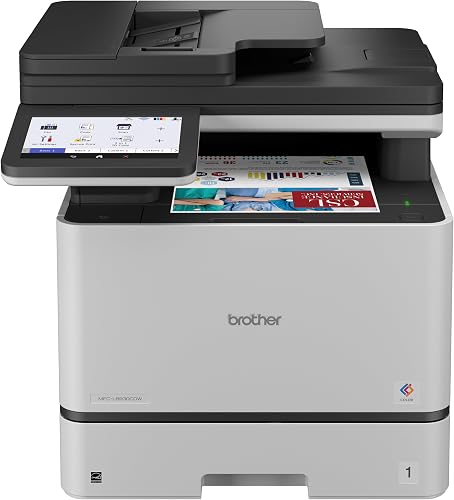
Brother MFC-L8930CDW Business Color Laser All-in-One Printer
9.5/10 our score
See it on Amazon -
2
 Best for print-only color work
Canon Color imageCLASS LBP646Cdw Wireless Laser Printer
9.5/10 our score
See it on Amazon -
3
 Best for black-and-white office volume
HP LaserJet Pro 3105sdw Monochrome Laser Printer
9.2/10 our score
See it on Amazon
- 4
 Check it
Canon Color imageCLASS MF753Cdw II
Best for fast color all-in-one work - 5
 Check it
Brother HL-L2405W Wireless Compact Monochrome Laser Printer
Best for compact home offices - 6
 Best for small monochrome teamsCheck it
Which color laser printer is best for office use?
The Brother MFC-L8930CDW is the strongest overall choice for shared office workloads because it combines 33 ppm color and black printing with duplex scanning, copying, an 80-page document feeder and advanced security features. Its dual-band wireless networking and Gigabit Ethernet also suit offices with mixed connection needs.
The Canon Color imageCLASS LBP646Cdw is the simpler option when you only need printing. It produces color and black pages at up to 26 ppm, includes automatic duplex printing and holds 250 sheets in its standard cassette.
The Canon Color imageCLASS MF753Cdw II is the faster color all-in-one. Its stated color speed reaches 35 ppm, and its 50-sheet duplex automatic document feeder adds useful capacity for multi-page office work.
Our score weighs specifications, features and buyer feedback against the needs of office printing. We checked the stated functions, speed, paper handling, connections and document features rather than treating every printer as a match for every workplace.
Best color laser printers for shared office workloads
The best color laser printer for office use depends on whether your team needs color on most pages or only on selected documents. These six picks include color machines, plus monochrome all-in-ones that can reduce the need to send routine black-and-white work through a color printer.
| Product | Best for | Functions | Print speed | Size | Our score |
|---|---|---|---|---|---|
| Brother MFC-L8930CDW Business Color Laser All-in-One Printer | busy office teams | Print, scan and copy | Up to 33 ppm | 20.7 x 16.1 x 21.6 in | 9.5 |
| Canon Color imageCLASS LBP646Cdw Wireless Laser Printer | print-only color work | Print only | Up to 26 ppm | 9.5 | |
| HP LaserJet Pro 3105sdw Monochrome Laser Printer | black-and-white office volume | Print, scan and copy | Up to 33 ppm black and white | 9.2 | |
| Canon Color imageCLASS MF753Cdw II | fast color all-in-one work | Print, scan, copy and fax | Up to 35 ppm | 9.1 | |
| Brother HL-L2405W Wireless Compact Monochrome Laser Printer | compact home offices | Print only | Up to 30 ppm black and white | 8.7 | |
| HP LaserJet MFP M235sdw | small monochrome teams | Print, scan and copy | Up to 30 ppm black and white | 12.13 x 16.46 x 11.59 in | 8.6 |
Brother MFC-L8930CDW: best for busy office teams
Brother MFC-L8930CDW Business Color Laser All-in-One Printer: Best for busy office teams
- 33 ppm color and black printing
- Duplex print, scan and copy
- 80-page auto document feeder
- Dual-band wireless and Gigabit Ethernet
This business all-in-one combines 33 ppm color and black printing with duplex scanning, copying, wireless networking and Ethernet. Its 80-page auto document feeder and legal-size glass suit shared office workflows.
Pros
- Fast color printing
- Duplex scanning
- Advanced security features
Cons
- Largest and heaviest printer in this group
- No fax function in the data
The Brother MFC-L8930CDW is the most complete match for a shared office that needs color output and several built-in functions. It prints and copies at up to 33 ppm, supports automatic duplex printing and includes an 80-page auto document feeder for scanning.
Its scanning features also reach beyond basic paper capture. The printer supports two-sided scanning up to 104 ipm, a legal-size glass, and scan destinations such as cloud services, email and SharePoint.
Some scan destinations require an internet connection and an account with the chosen service.
The 7 in color touchscreen gives users a way to preview scans and create up to 64 customized shortcuts. Dual-band 2.4GHz and 5GHz wireless networking, Gigabit Ethernet and USB 2.0 cover common office connection patterns.
Brother includes standard-yield toner with stated yields of 3,000 black pages and 1,800 color pages. TN635XXL replacement toner is rated for 7,500 black pages and 6,500 color pages.
The 71.2 lb printer is also the largest and heaviest pick here, so plan its location before setup.
Choose it when color, scanning and office security all matter. For an office that only prints, the Canon LBP646Cdw takes up less space and avoids paying for functions you do not need.
Canon Color imageCLASS LBP646Cdw: best for print-only color work
Canon Color imageCLASS LBP646Cdw Wireless Laser Printer: Best for print-only color work
- 26 ppm color and black printing
- Automatic duplex printing
- 250-sheet cassette and multipurpose tray
- Wireless mobile printing
The Canon LBP646Cdw is a focused color printer for offices that already have scanning and copying covered. Automatic duplex printing, a 250-sheet cassette and wireless mobile printing keep routine document work simple.
Pros
- Print-only design is easy to match to a shared workflow
- 250-sheet cassette
- Wireless setup
Cons
- Cannot scan, copy or fax
- Slower than the 33 and 35 ppm color picks
The Canon LBP646Cdw is the clearest choice for a team that needs color printing but already has another way to scan and copy. It is a print-only machine, with no scanning, copying or faxing, and reaches up to 26 ppm in both color and monochrome.
Automatic two-sided printing helps reduce page use during routine office work. The standard cassette holds 250 sheets, while the multipurpose tray handles 1 sheet for special jobs or changes in paper type.
Wireless setup is designed to be completed in a few steps. The printer also supports printing from compatible mobile devices through the Canon PRINT app, Apple AirPrint and Mopria Print Service.
The 5-line LCD screen keeps controls separate from a full touchscreen interface. Its 16.5 x 16.8 x 10.5 in footprint and 27.6 lb weight make it much easier to place than the larger multifunction color models.
Choose this Canon when printing is the main job. If you need scanning, copying or faxing in the same unit, compare it with the best color laser printer all in one options instead.
HP LaserJet Pro 3105sdw: best for black-and-white office volume
HP LaserJet Pro 3105sdw Monochrome Laser Printer: Best for black-and-white office volume
- 33 ppm black-and-white printing
- Automatic duplex printing
- 250-sheet capacity
- Scanning and copying
This HP all-in-one is not a color printer, but it fits an office where most work is black and white. It adds a 250-sheet capacity, automatic duplex printing, scanning, copying and support for teams of up to 7 users.
Pros
- Fast black-and-white printing
- Automatic duplex printing
- Security features
Cons
- Monochrome output only
- Cartridge restrictions may affect supply choices
The HP LaserJet Pro 3105sdw is a monochrome all-in-one, so it cannot replace a color printer for brochures, charts or presentations that need color. It can be a strong companion machine when most shared office pages are black and white.
It prints at up to 33 pages per minute and includes automatic two-sided printing. The 250-sheet capacity reduces refill frequency, while the automatic document feeder supports one-sided scanning.
HP positions this model for office teams of up to 7 users. Its scan-to-email workflow can use AI to generate subject lines, file names and summaries, while HP AI Precise Print can remove unwanted content from web pages and emails before printing.
The printer includes HP Wolf Pro Security with customizable settings. It also uses Wi-Fi that looks for the best connection, and the HP app supports printing, scanning, copying and faxing from a smartphone.
Choose this HP when black-and-white documents make up most of the workload. Keep a separate color printer available if your office regularly produces color pages.
Canon Color imageCLASS MF753Cdw II: best for fast color all-in-one work
Canon Color imageCLASS MF753Cdw II: Best for fast color all-in-one work
- 35 ppm color and black printing
- Print, scan, copy and fax
- Automatic duplex printing
- 50-sheet duplex automatic document feeder
The MF753Cdw II has the fastest stated color speed here at 35 ppm and adds fax, scanning and copying. Its 50-sheet duplex automatic document feeder suits offices that process multi-page documents.
Pros
- Fastest color printing in this group
- Four office functions
- Duplex document feeder
Cons
- 50 lb weight requires a sturdy location
- Optional cassette is needed for expanded paper capacity
The Canon MF753Cdw II has the highest stated color speed in this group at up to 35 ppm. It is a 4-in-1 machine with printing, scanning, copying and faxing, making it suitable when one device needs to cover several office tasks.
Its automatic duplex document feeder holds 50 sheets and scans both sides in one pass. The standard cassette holds 250 sheets, and the multipurpose tray adds 50 sheets.
An optional PF-K1 cassette can add up to 550 sheets for a total expandable capacity of up to 850 sheets.
A customizable 5 in color touchscreen keeps controls accessible for different users. Canon also supports wireless printing from compatible computers or mobile devices, along with the Canon PRINT app.
The printer weighs 50 lb and measures 18.2 x 16.8 x 17 in. That is a substantial footprint for a home office, but it gives a shared office a faster color all-in-one than the smaller Canon print-only model.
Choose it when color speed and four functions matter more than size. For a smaller color printer with print-only duties, the LBP646Cdw is easier to fit.
Brother HL-L2405W: best for compact home offices
Brother HL-L2405W Wireless Compact Monochrome Laser Printer: Best for compact home offices
- 30 ppm black-and-white printing
- 250-sheet tray
- Dual-band wireless and USB
- Compact 14.2 x 14 x 7.2 in design
This compact Brother is a practical home office choice when you need black-and-white pages rather than color. Its 250-sheet tray, dual-band wireless connection and 15.1 lb weight make it easier to place than the larger office machines.
Pros
- Small footprint
- Wireless and USB connections
- 250-sheet tray
Cons
- Monochrome output only
- Manual duplex printing
The Brother HL-L2405W is a monochrome printer, not a color laser printer, but its compact design makes it useful for a home office that mainly prints black-and-white documents. It prints one-sided pages at up to 30 ppm and has a 250-sheet paper tray.
Built-in dual-band wireless supports multiple devices, while USB connects it locally to one computer. The Brother Mobile Connect app supports remote printer management, mobile printing, toner tracking and supply orders.
Its 14.2 x 14 x 7.2 in dimensions and 15.1 lb weight make it the easiest pick here to place on a compact desk. A manual feed slot also supports envelopes and specialty paper.
Duplex printing is manual, so it requires more attention than the automatic duplex options in the office all-in-ones. The printer uses TN830, TN830XL and TN830XL2PK toner options.
Choose it for compact black-and-white home office printing. If your home office needs color, see the best compact printer wireless guide for smaller color-capable alternatives.
HP LaserJet MFP M235sdw: best for small monochrome teams
HP LaserJet MFP M235sdw: Best for small monochrome teams
- Automatic duplex printing
- Print, scan and copy
- Dual-band Wi-Fi, Ethernet and USB
- Up to 99 copies per run
The HP M235sdw suits 1–5 people who share black-and-white printing, scanning and copying. It has automatic duplex printing, dual-band Wi-Fi, Ethernet and USB, with a smaller footprint than the color all-in-ones.
Pros
- Compact all-in-one design
- Automatic duplex printing
- Multiple connection options
Cons
- Monochrome output only
- Lower copy speed than its print speed
The HP LaserJet MFP M235sdw is another monochrome option for offices that need printing, scanning and copying more than color output. HP describes it for 1–5 people, and its automatic duplex printing suits shared document work.
It prints at up to 30 ppm and has a 7-second initial page print time. Copying reaches up to 14 ppm, with up to 99 copies per run and a maximum black-and-white copy resolution of 300 x 300 dpi.
Dual-band Wi-Fi, Ethernet and USB provide several connection choices. HP also lists wireless printing from mobile devices, PCs and tablets, with support for Microsoft, Mac, AirPrint and Android.
The 12.13 x 16.46 x 11.59 in body is smaller than the color multifunction models. It weighs 21 lb, so it is easier to move into a small office or home workspace.
Choose it when a small team needs an all-in-one for black-and-white documents. For color pages, step up to the Canon MF753Cdw II or Brother MFC-L8930CDW.
Should you choose a color laser printer for a home office?
A color laser printer for a home office makes sense when you print color documents often enough to justify a larger machine and need clear pages for forms, presentations or office materials. Frequent use is the key test, because a big machine is harder to live with for occasional pages.
The Canon LBP646Cdw is the easiest color-only choice here, while the Brother MFC-L8930CDW adds scanning and copying. The Canon suits a desk where printing is the main job and other devices already cover capture.
Space matters at home. The Brother MFC-L8930CDW measures 20.7 x 16.1 x 21.6 in and weighs 71.2 lb, so it needs a sturdy surface and room around it for paper and scanning.
The Canon LBP646Cdw measures 16.5 x 16.8 x 10.5 in and weighs 27.6 lb. That smaller body is easier to place on a side table or a wider desk without taking over the work area.
If your home office prints mainly text, a monochrome model may be a better fit. The Brother HL-L2405W is the smallest pick, at 14.2 x 14 x 7.2 in and 15.1 lb, and it suits compact desks.
The HP M235sdw adds scanning and copying in a compact all-in-one body. It is a practical option when a small workspace needs more than printing but still needs to keep the footprint under control.
Consider daily care as well. A larger all-in-one needs space for the document feeder and glass, while a print-only model has fewer moving parts to manage.
For occasional color photos, laser printers are not always the right tool. Read are color laser printers good for photos before choosing a printer for image-heavy work.
What should you check before buying an office color laser printer?
Check the printer's functions first. A print-only model such as the Canon LBP646Cdw cannot scan or copy, while the Brother MFC-L8930CDW and Canon MF753Cdw II combine color printing with other office tasks.
That first check saves money and desk space. If your team already scans elsewhere, a print-only machine avoids paying for features that will sit unused.
If scanning is part of the daily routine, an all-in-one is easier to manage. One device can print a form, scan a signed page and copy a contract without moving between machines.
Next, match paper capacity to your routine. The LBP646Cdw, HP 3105sdw and Brother HL-L2405W include 250-sheet capacities, which suits regular office printing without frequent refills.
A 250-sheet capacity helps a small team through a normal workday. It is less suited to very large print runs, where a bigger feeder or an extra cassette reduces interruptions.
The Canon MF753Cdw II starts with a 250-sheet cassette and 50-sheet multipurpose tray, with optional expansion. That layout gives a main paper supply plus a smaller tray for different sizes or special jobs.
The optional PF-K1 cassette can add up to 550 sheets. Expansion is useful when the printer will serve several people and refill breaks slow the workflow.
Automatic duplex printing is useful for regular two-sided documents. It saves paper and reduces the chance of putting pages back in the wrong way.
The Brother HL-L2405W uses manual duplex printing, so it is less convenient for shared workloads that produce many two-sided pages. Manual duplex needs more attention from the user, and that adds up when several people print at once.
Connection options also affect setup. Wireless printing helps mobile and mixed-device offices, while Ethernet can suit a fixed shared printer that should stay reachable on the network.
Dual-band wireless is handy when laptops and phones move around the office. Ethernet is often cleaner for a printer that stays in one place and serves a whole team.
Security matters more as more devices join the network. Office printers may hold documents in transit, so check the security features and account setup before connecting them to shared systems.
Speed should match the workload, not just the headline number. A 35 ppm color all-in-one suits heavier color work, while a 26 ppm print-only model can be enough for lighter color use.
Also check size and weight before you buy. A 71.2 lb all-in-one needs a strong, stable spot, while lighter models are easier to move during setup or cleaning.
For Mac users, compare the best color laser printer for Mac options before deciding. Device compatibility should be confirmed alongside functions, paper handling and connections.
Verdict: which is the best color laser printer for office use?
The Brother MFC-L8930CDW is the best color laser printer for office use when your team needs fast color output, duplex scanning, copying, a large document feeder and network security. It is the most complete shared office choice in this group.
Its 80-page auto document feeder and duplex scanning suit multi-page work. That matters when teams scan contracts, reports and forms without standing over the machine for each batch.
Choose the Canon LBP646Cdw for print-only color work. It is a cleaner match when scanning and copying are already handled and the priority is simple color printing with automatic duplex output.
Choose the Canon MF753Cdw II for the fastest color all-in-one. Its 35 ppm stated color speed and four functions suit offices that want printing, scanning, copying and faxing in one unit.
Pick the HP LaserJet Pro 3105sdw or HP M235sdw when most pages are black and white. Those monochrome all-in-ones fit offices where color is occasional rather than daily.
The HP 3105sdw suits teams of up to 7 users, while the M235sdw suits 1 to 5 people. Either can sit beside a color printer and take the routine black-and-white load.
Choose the Brother HL-L2405W when a compact home office printer matters more than color. Its small size and light weight make it easier to fit into a tight workspace.
That Brother model is print-only and uses manual duplex printing. It is best for simple black-and-white printing where space is the main concern.
Daily care depends on the match you choose. Shared all-in-ones need regular paper checks and toner checks, while compact print-only models need less attention between jobs.
Setup should follow the workflow as well. Place a heavy all-in-one once, connect it through wireless or Ethernet, and confirm that every user can print before the old routine takes over.
If your office also needs document capture away from the desk, compare the best portable document scanner guide before adding another device. A scanner can handle field documents while the office printer stays focused on printing and copying.
Our top 3 picks at a glance
-
1
Best for busy office teams
Brother MFC-L8930CDW Business Color Laser All-in-One Printer
9.5/10 our score
See it on Amazon -
2
Best for print-only color work
Canon Color imageCLASS LBP646Cdw Wireless Laser Printer
9.5/10 our score
See it on Amazon -
3
Best for black-and-white office volume
HP LaserJet Pro 3105sdw Monochrome Laser Printer
9.2/10 our score
See it on Amazon