9 Best Flatbed Scanners for Photos and Documents (November 2026)
The best flatbed scanners for photos and documents include the Epson FastFoto FF-680W High-Speed Duplex Photo for batches of delicate photos, the Canon CanoScan LiDE 400 Slim Scanner for detailed flatbed scans, and the Epson Workforce ES-50 Compact & Lightweight Mobile for portable document scans.
On this page (8 sections)
- Best Flatbed Scanners for Photos and Documents
- How we chose flatbed scanners for photos and documents
- The best flatbed scanners for photos and documents
- What should you look for in a photo and document scanner?
- Which scanner works for oversized originals or art?
- Is a flatbed or a document feeder better for photos?
- More guides on this topic
- How do you choose the best flatbed scanner for photos and documents?
Best Flatbed Scanners for Photos and Documents
The Canon CanoScan LiDE 400 is the best flatbed scanner for photos and documents for most home users, with 4800 x 4800 dpi resolution and color restoration and dust removal features. Choose the Epson FastFoto FF-680W for batches of delicate photos, or a feeder-based ScanSnap when duplex document volume matters more than a stationary scan surface.
A flatbed is useful when you need to place an original on glass and keep it still. That makes it a sensible match for fragile prints, pages that should not be pulled through rollers, and mixed-size originals you scan one at a time.
If you are comparing a multifunction printer with a standalone scanner, start with the home printer buying guide. To understand how glass scanning works in an all-in-one, see what is a flatbed scanner on a printer.
Our picks at a glance
-
1
 Best for batches of delicate photos
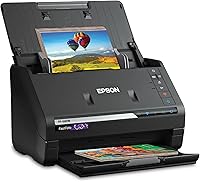
Epson FastFoto FF-680W High-Speed Duplex Photo
9.7/10 our score
See it on Amazon -
2
 Best for detailed flatbed scans
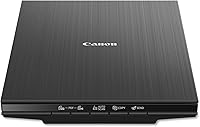
Canon CanoScan LiDE 400 Slim Scanner
9.6/10 our score
See it on Amazon -
3
 Best for portable document scans
Epson Workforce ES-50 Compact & Lightweight Mobile
9.5/10 our score
See it on Amazon
- 4
 Check it
Brother DS-640 Compact Mobile Document Scanner
Best for compact paper workflows - 5
 Check it
ScanSnap iX2500 Wireless or USB High-Speed Document
Best for large duplex batches - 6
 Check it
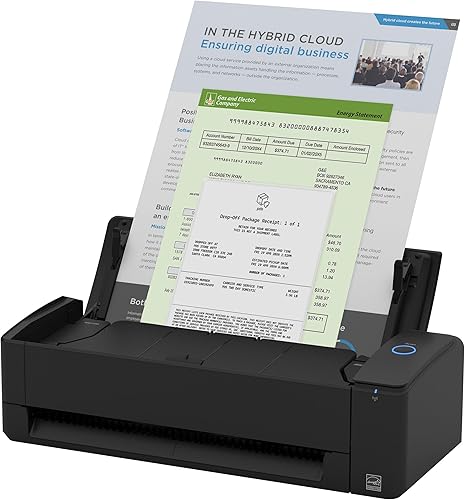
ScanSnap iX1300 Wireless or USB Double-Sided Color
Best for small-space duplex scanning - 7
 Check it
Plustek ePhoto Z300 Photo Scanner
Best for quick loose-photo scanning - 8
 Check it
HP Small USB Document & Photo Scanner
Best for lightweight occasional scans - 9
 Check it
Canon Canoscan Lide 300 Scanner
Best for basic home flatbed scans
How we chose flatbed scanners for photos and documents
The best flatbed scanner for photos and documents depends on whether you prioritize a stationary surface, photo handling, detail or document volume. We compared the stated scanner types, resolution, supported media, connections and photo or document features against those needs.
A true flatbed keeps the original on a glass bed while the scan head moves beneath it. Feed-through scanners can be faster for loose pages or batches, but they are a different fit when an original is delicate or should remain stationary.
Our score weighs specs, features and buyer feedback against what you’re shopping for. The list includes both flatbeds and useful alternatives, with each pick’s design called out so you can choose the right scanning path.
| Product | Best for | Photo batch size | Scanning | Connection | Our score |
|---|---|---|---|---|---|
| Epson FastFoto FF-680W High-Speed Duplex Photo | batches of delicate photos | Up to 36 photos | Both sides in one pass | Wi-Fi and USB | 9.7 |
| Canon CanoScan LiDE 400 Slim Scanner | detailed flatbed scans | USB Type-C | 9.6 | ||
| Epson Workforce ES-50 Compact & Lightweight Mobile | portable document scans | Single-sheet fed | USB 2.0 | 9.5 | |
| Brother DS-640 Compact Mobile Document Scanner | compact paper workflows | USB | 9.4 | ||
| ScanSnap iX2500 Wireless or USB High-Speed Document | large duplex batches | Wi-Fi and USB | 9.3 | ||
| ScanSnap iX1300 Wireless or USB Double-Sided Color | small-space duplex scanning | Wi-Fi and USB | 9.2 | ||
| Plustek ePhoto Z300 Photo Scanner | quick loose-photo scanning | USB | 9.1 | ||
| HP Small USB Document & Photo Scanner | lightweight occasional scans | Single-sided sheet-fed | USB | 8.7 | |
| Canon Canoscan Lide 300 Scanner | basic home flatbed scans | USB | 8.5 |
The best flatbed scanners for photos and documents
The Canon LiDE 400 is the most balanced stationary choice here, while the Epson FastFoto is built around batches of photos. The remaining picks suit portable document scanning or higher-volume feeding, so check the scanner type before choosing.
Epson FastFoto FF-680W High-Speed Duplex Photo: Best for batches of delicate photos
- Batch scans up to 36 photos
- Scans both sides in one pass
- Carrier sheet included
- Wi-Fi and USB connectivity
A photo-focused scanner for digitizing many prints, including fragile photos. It can capture handwritten notes on photo backs in the same scan.
Pros
- Photo batch scanning
- Includes a carrier sheet
- Photo restoration and image adjustment tools
Cons
- Feed-through design rather than a stationary flatbed surface
- Larger than a mobile scanner
The Epson FastFoto FF-680W is the strongest match here for digitizing a stack of prints, including photos that need careful handling. Epson says it can scan up to 36 photos in a batch and includes a carrier sheet and microfiber cloth.
Its double-sided scan can capture handwritten notes on the back of a photo in the same pass. For family archives, that can keep names, dates or short captions connected to the front image.
The FastFoto app offers tools for color restoration, red-eye reduction, de-skewing, cropping and rotation. It also supports different file settings for sharing, archiving and enlarging, giving you options based on how you plan to use the scans.
This is a feed-through photo scanner, not a flatbed. Choose it for batch photo work and its photo-specific features; choose a glass bed if you want each print to remain stationary during scanning.
Canon CanoScan LiDE 400 Slim Scanner: Best for detailed flatbed scans
- 4800 x 4800 dpi resolution
- Color restore and dust removal
- USB Type-C cable supplies data and power
- Scans in as fast as 8 seconds
A straightforward flatbed choice for photos and everyday documents. Its resolution and photo enhancement features suit buyers who want detail from individual scans.
Pros
- High stated resolution
- Photo enhancement features
- Built-in buttons for common tasks
Cons
- USB connection only
- One sheet at a time
The Canon CanoScan LiDE 400 is the best all-around flatbed choice for individual photos and documents. Its 4800 x 4800 dpi resolution and color restore and dust removal features give photo scans more detail and adjustment options than the simpler flatbed pick below.
USB Type-C supplies both data and power through one cable. Canon also gives it EZ buttons, an auto scan mode, and built-in PDF buttons for multi-page files.
The scanner works one item at a time, which is normal for a flatbed and gives you control over placement. That suits prints, book pages and everyday paperwork better than a workflow built around stacks of loose sheets.
Choose it when detail and a stationary surface matter. If you need to process many double-sided pages, consider a dedicated document feeder instead.
Epson Workforce ES-50 Compact & Lightweight Mobile: Best for portable document scans
- USB powered
- Scans one page in as fast as 5.5 seconds
- Handles documents up to 8.5 x 72 in
- OCR creates searchable PDFs and editable files
A compact document scanner for receipts, ID cards and long pages when you need to scan away from a desk. It feeds sheets through rather than holding photos flat under a lid.
Pros
- USB powered without an external supply
- Handles extra-long pages
- OCR supports searchable PDFs
Cons
- Not a flatbed scanner
- Single-sheet feeding
The Epson WorkForce ES-50 is for portable document scanning, not for keeping photos flat on glass. It connects by USB and can scan a single page in as fast as 5.5 seconds, making it useful for receipts, ID cards and paperwork away from a desk.
It handles documents up to 8.5 x 72 in and includes OCR for searchable PDFs and editable Word and Excel files. Its automatic feeding mode can combine multiple sheets into one file as you insert them.
Because the ES-50 feeds one sheet at a time, it is a better match for mobile paperwork than fragile prints. If a photo’s surface is damaged or curled, a flatbed is the more appropriate style.
Choose this model when size and document handling matter more than scanning photos on a stationary surface. It works with Windows and Mac and draws power from the USB connection.
Brother DS-640 Compact Mobile Document Scanner: Best for compact paper workflows
- Scans color and black-and-white documents up to 16 ppm
- USB powered
- Supports Windows, Mac and Linux
- Handles cards and receipts
A small, cable-powered option for paper documents, receipts and cards. It is built for feeding items through, so use a flatbed when a fragile original should remain stationary.
Pros
- Compact mobile design
- USB powered
- Works with Windows, Mac and Linux
Cons
- Not a flatbed scanner
- Single-sheet feeding
The Brother DS-640 suits compact paper workflows with documents, receipts and cards. It scans color and black-and-white pages at up to 16 ppm and runs from its included micro USB 3.0 cable.
Brother’s iPrint&Scan desktop app supports several destinations, including a computer, network, cloud services, email and OCR. The scanner also supports Windows, Mac and Linux.
This is another sheet-fed model, so it does not provide a flat glass surface for delicate photos. Use it for mobile document work and choose a flatbed when you want the original to stay still.
ScanSnap iX2500 Wireless or USB High-Speed Document: Best for large duplex batches
- 45 ppm double-sided scanning
- 100-sheet document feeder
- Wi-Fi 6 and USB-C
- Touchscreen profiles
A feeder-based choice for buyers who regularly process stacks of documents and want wireless or USB connections. It can also organize scanned photos, but it does not offer a flat stationary surface.
Pros
- High-capacity document feeder
- Double-sided scanning
- Wi-Fi and USB connectivity
Cons
- Feeder design is unsuitable for delicate originals that should not pass through rollers
- Larger than a simple flatbed
The ScanSnap iX2500 is a fit for large double-sided document batches. For shared office workflows, compare desktop document scanners.
Its 100-sheet feeder and stated 45 ppm duplex speed reduce the need to turn pages by hand, while Wi-Fi and USB-C give you connection choices.
A touchscreen lets you select personalized profiles, and the scanner supports sending files to computers, mobile devices and cloud services. It can also optimize, name and sort scanned data from documents, receipts, photos and business cards.
The feeder is the key tradeoff for photos: it does not hold an original stationary on glass. Choose this ScanSnap for stacks of paperwork, not for fragile prints you want to lay flat.
ScanSnap iX1300 Wireless or USB Double-Sided Color: Best for small-space duplex scanning
- Up to 30 ppm duplex scanning
- Wi-Fi and USB connectivity
- Handles documents, photos and cards
- Space-saving design
A compact feeder-based scanner for mixed paper and routine photo digitizing in a small workspace. Its automatic image adjustments help with everyday documents.
Pros
- Duplex scanning
- Wi-Fi or USB connection
- Designed to take up little desk space
Cons
- Not a flatbed scanner
- Feeder is not the right path for fragile originals
The ScanSnap iX1300 suits a small workspace with regular duplex scanning. Its space-saving design can scan up to 30 ppm, with automatic de-skew, color optimization and blank-page removal.
It connects by USB or Wi-Fi and can send scans to computers, mobile devices and cloud services. The scanner handles documents, receipts, photos and cards, though its feed-through approach differs from a flatbed.
Choose the iX1300 if you want a compact device for routine mixed paperwork and occasional photos. For fragile or curled prints, use a stationary flatbed surface instead.
Plustek ePhoto Z300 Photo Scanner: Best for quick loose-photo scanning
- Scans a 4 x 6 photo in 2 seconds at 300 dpi
- Supports photos up to 8 x 10 in
- Also scans letter and A4 paper
- Photo enhancement tools
A photo-focused feed-through scanner for loose prints and some documents. Choose it when scanning speed matters more than keeping each item stationary on a flatbed.
Pros
- Quick scanning for loose prints
- Supports common photo sizes
- Includes image enhancement tools
Cons
- Photos feed through the scanner
- Scans one item at a time
The Plustek ePhoto Z300 is aimed at quick loose-photo scanning. It supports common print sizes from 3 x 5 to 8 x 10 in, plus letter and A4 paper, and its stated resolution reaches 600 dpi.
Plustek says a 4 x 6 photo can scan in 2 seconds at 300 dpi. Its software includes image enhancement tools for faded photos, and the feed-through approach can be more efficient than placing each print on a flatbed.
That design also means the photo moves through the scanner. If keeping a delicate original stationary is your main concern, choose a glass flatbed or review our guide to a flatbed scanner for negatives and slides.
HP Small USB Document & Photo Scanner: Best for lightweight occasional scans
- USB-powered single-sided scanning
- Handles photos, documents, cards and receipts
- Scans up to 15 ppm
- HP WorkScan includes crop and image adjustments
A lightweight sheet-fed option for occasional documents and photos. It suits portability better than delicate originals that need to stay still on glass.
Pros
- USB powered
- Lightweight design
- Software supports cropping and image adjustments
Cons
- Not a flatbed scanner
- Single-sided feeding
The HP Small USB Document & Photo Scanner is a lightweight option for occasional scans. It is a single-sided sheet-fed model that handles photos, documents, cards and receipts, with USB power and HP WorkScan software.
The software includes auto-scan and size detection, plus tools to preview, crop, edit and adjust image quality. HP states a scanning speed of up to 15 ppm.
It is portable, but it does not have a flatbed surface. Choose it for papers and photos you can feed through, and use a flatbed for prints that should stay still.
Canon Canoscan Lide 300 Scanner: Best for basic home flatbed scans
- 2400 x 2400 dpi optical resolution
- Auto Scan Mode detects the item type
- USB connection
- Photo fade correction and dust reduction
A simple flatbed option for everyday photos and documents. Auto Scan Mode and EZ buttons help keep routine scans direct.
Pros
- Flatbed surface for stationary originals
- Automatic scan mode
- Photo correction features
Cons
- USB connection only
- Lower stated resolution than the LiDE 400
The Canon CanoScan LiDE 300 is the basic home flatbed in this roundup. It offers 2400 x 2400 dpi optical resolution, USB connectivity, Auto Scan Mode and four EZ buttons.
Its photo features include fade correction and dust reduction. It also has a built-in PDF button and can save searchable PDFs with OCR.
Choose the LiDE 300 for occasional photo and document scans when you do not need the LiDE 400’s higher stated resolution. The glass bed gives you a stationary surface for individual originals.
What should you look for in a photo and document scanner?
For a mix of photos and documents, choose a flatbed if you need a stationary surface and a feeder if you need speed across many loose pages. Check resolution, photo size support, software tools and connection type against the originals you plan to scan.
Surface and handling: A flatbed keeps the item on glass. A feeder moves paper through rollers, which can be convenient for stacks but less suitable for fragile prints.
Resolution: Higher stated resolution can help preserve detail or support cropping and enlargement. The Canon LiDE 400 lists 4800 x 4800 dpi, while the LiDE 300 lists 2400 x 2400 dpi.
Photo support: Check the largest print size and whether the scanner offers restoration features. Epson’s FastFoto supports prints up to 8 x 10 in and includes a carrier sheet for delicate photos.
Document volume: A flatbed handles pages one at a time. If you regularly scan both sides of stacks, an automatic document feeder can reduce manual work; see our picks for the best flatbed scanner with ADF.
Space and connection: Flatbeds need room to lift the lid and place each item. USB-only models need a nearby computer, while the ScanSnap options add Wi-Fi for flexible placement.
Which scanner works for oversized originals or art?
A standard flatbed is best for originals that fit on its glass, while oversized sheets or artwork may call for a larger scanning area. Measure the original first and compare it with the scanner’s supported area.
The Canon LiDE 400 supports paper sizes up to about letter size. For larger originals, compare our guide to the best flatbed scanner large, and for artwork see best flatbed scanner for art.
A scanner’s maximum paper size does not guarantee that every thick or bound item will lie flat. Check lid clearance and the supported media before scanning anything that could be damaged by pressure.
Is a flatbed or a document feeder better for photos?
A flatbed is usually the better fit when you need each photo to rest still on glass, while a document feeder is more efficient for batches of loose prints. Choose based on the condition and volume of the originals.
The FastFoto FF-680W and Plustek Z300 are photo-focused feed-through options, but their handling differs from a stationary glass bed. For fragile or irregular prints, use a flatbed and scan one at a time.
If your main goal is digitizing film originals, use a scanner suited to that media rather than assuming a photo flatbed can scan it well. Our flatbed scanner for negatives and slides guide covers that choice.
More guides on this topic
- Best A3 Flatbed Scanners
How do you choose the best flatbed scanner for photos and documents?
The best flatbed scanner for photos and documents is the one that fits your originals and the way you work: choose the LiDE 400 for detailed individual scans, the LiDE 300 for basic home scanning, or a photo-focused model for print batches. Pick a feeder when document volume is the priority.
If you scan sports cards or other small collectibles, a stationary glass surface can help keep each item positioned. Compare dedicated options in our best flatbed scanner for sports cards guide.
For occasional scans, a phone may be enough; use our guide to a photo scanner on iPhone to compare that approach. If you want a simple flatbed for mixed home use, start with the Canon LiDE 400.
Our top 3 picks at a glance
-
1
Best for batches of delicate photos
Epson FastFoto FF-680W High-Speed Duplex Photo
9.7/10 our score
See it on Amazon -
2
Best for detailed flatbed scans
Canon CanoScan LiDE 400 Slim Scanner
9.6/10 our score
See it on Amazon -
3
Best for portable document scans
Epson Workforce ES-50 Compact & Lightweight Mobile
9.5/10 our score
See it on Amazon
Frequently asked questions
Is a flatbed scanner better for old photos?
A flatbed can be a good fit for old photos because the print rests on a stationary glass surface instead of passing through a feeder. Place the photo gently and keep the glass clean.
For large batches of delicate prints, consider a scanner with a carrier sheet and photo-specific handling features.
What resolution should I use to scan photos?
Use a higher resolution when you may crop, enlarge or preserve fine detail, and a lower one for quick sharing. The Epson FastFoto supports separate sharing, archiving and enlargement settings, while the Canon LiDE 400 states 4800 x 4800 dpi resolution.
Choose a setting based on how you plan to use each scan.
Can a flatbed scanner scan documents?
Yes. A flatbed can scan a page at a time by placing it on the glass, which works well for occasional paperwork and mixed-size originals.
If you often scan stacks or both sides of pages, a document feeder can save handling time.
See our best flatbed scanner with ADF guide for feeder options.
Can I scan photos and documents with the same scanner?
Yes. Several scanners here handle both, but the best fit depends on what you scan most.
A flatbed keeps delicate photos stationary, while a feeder-based model can process paper and larger batches faster.
For everyday home printing and scanning choices, use our home printer buying guide.
How do I scan photos with an iPhone instead?
Use a photo scanning app when you only need a few prints and want to avoid setting up a scanner. A flatbed is more practical for batches, consistent placement or higher-resolution files.
Our guide to a photo scanner on iPhone covers a phone-based option.