7 Best Compact All-in-One Printers (November 2026)
The best compact all-in-one printers include the Canon MegaTank G3270 All-in-One Wireless Color Printer for high-volume home color printing, the Canon PIXMA TR8620a for a multi-purpose home office, and the Epson EcoTank ET-2800 Wireless Color All-in-One Supertank for cartridge-free color printing.
On this page (7 sections)
- How we chose compact all-in-one printers
- Compact all-in-one printer dimensions and features
- The best compact all-in-one printers for small desks
- How much space should a compact printer have?
- Which printer features matter most on a small desk?
- Are ink tank printers a good fit for limited office space?
- Which compact all-in-one printer should you choose?
The Canon MegaTank G3270 is the best compact all-in-one printer for most homes if you want wireless color printing and ink tanks. For a smaller desk, compare the Brother Work Smart 1410's narrower dimensions with your available space before you buy.
Compact can refer to a low body, a narrow width or a small total footprint. If price is your main limit, compare all-in-one printers under 100 dollars.
Those are different needs, so measure the desk and consider how you'll load paper and open the scanner lid.
Use our home printer buying guide to compare printer types and everyday features. If you print mostly black-and-white pages, first understand whether laser printers use ink.
Our picks at a glance
-
1
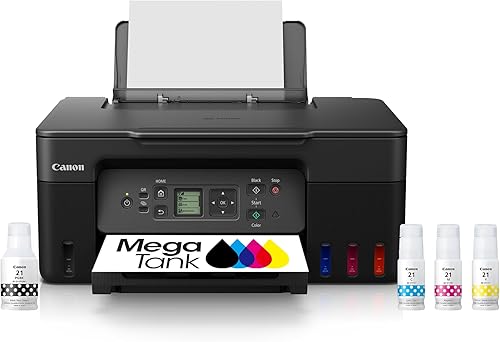 Best for high-volume home color printing
Canon MegaTank G3270 All-in-One Wireless Color Printer
9.7/10 our score
See it on Amazon -
2

-
3
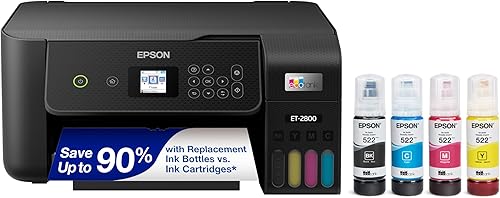 Best for cartridge-free color printing
Epson EcoTank ET-2800 Wireless Color All-in-One Supertank
9.5/10 our score
See it on Amazon
- 4
 Check it
HP Envy 6155 Wireless All-in-One Color Inkjet
Best for everyday color and duplex - 5
 Check it
Brother MFC-L2820DW Wireless Compact Monochrome All-in-One Laser
Best for small office black-and-white work - 6
 Best for a compact team document stationCheck it
- 7
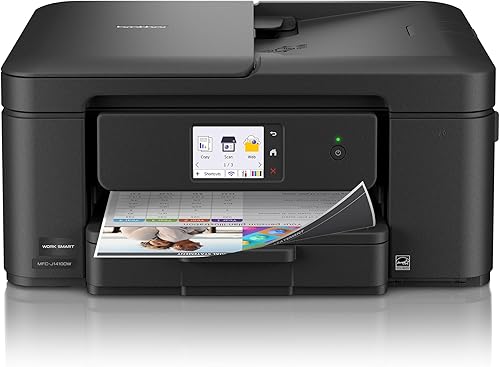 Check it
Brother Work Smart 1410 Wireless Color Inkjet
Best for a narrow desk
How we chose compact all-in-one printers
We compared stated dimensions, printer functions, paper handling and connection options against the needs of small desks and limited office space. Our score weighs specs, features and buyer feedback against what you're shopping for.
A shallow printer can still be wide, and a narrow printer can need more room behind it for paper. For a model to take along with a laptop, see compact printers for travel.
Check the measurements for the whole unit, then leave working space for the trays and scanner lid.
Compact all-in-one printer dimensions and features
The Brother Work Smart 1410 is the narrowest model here, while the Canon PIXMA TR8620a is the lowest. Compare these figures with your available desk space and the functions you need.
| Product | Best for | Functions | Dimensions | Printing | Our score |
|---|---|---|---|---|---|
| Canon MegaTank G3270 All-in-One Wireless Color Printer | high-volume home color printing | Print, copy and scan | 21.9 x 16.4 x 10.6 in | Color ink tank, single-sided | 9.7 |
| Canon PIXMA TR8620a | a multi-purpose home office | Print, copy, scan and fax | 13.8 x 17.3 x 7.5 in | Color inkjet, automatic duplex | 9.5 |
| Epson EcoTank ET-2800 Wireless Color All-in-One Supertank | cartridge-free color printing | Print, scan and copy | 14.8 x 22.8 x 10 in | Color ink tank, simplex | 9.5 |
| HP Envy 6155 Wireless All-in-One Color Inkjet | everyday color and duplex | Print, scan and copy | 17.05 x 5.35 x 14.21 in | Color inkjet, automatic duplex | 9.4 |
| Brother MFC-L2820DW Wireless Compact Monochrome All-in-One Laser | small office black-and-white work | Print, copy, scan and fax | 15.7 x 16.1 x 12.5 in | Monochrome laser, automatic duplex | 9.3 |
| HP LaserJet Pro 3101sdw | a compact team document station | Print, scan and copy | 15.7 x 16.5 x 12.3 in | Monochrome laser, automatic duplex | 9.2 |
| Brother Work Smart 1410 Wireless Color Inkjet | a narrow desk | Print, copy and scan | 13.5 x 15.4 x 7.2 in | Color inkjet, automatic duplex | 8.7 |
The best compact all-in-one printers for small desks
The best pick depends on what you print and which tasks the printer needs to handle. Browse all-in-one printers for home for a broader household comparison.
These 7 models cover ink tanks, color cartridge inkjets and monochrome laser printers.
Canon MegaTank G3270 All-in-One Wireless Color Printer: Best for high-volume home color printing
- Wireless print, copy and scan
- Ink bottles included
- Up to 6,000 black and white or 7,700 color pages per ink set, according to Canon
- Single-sided printing
The included ink bottles and high stated page yields suit homes that print often. Measure the 21.9 x 16.4 in footprint before giving it a small desk.
Pros
- Wireless print, copy and scan
- Ink bottles included
- High stated page yields
Cons
- Single-sided printing only
- Wide footprint for a compact desk
The Canon MegaTank G3270 combines wireless printing with copying and scanning. Canon includes ink bottles and says one set can print up to 6,000 black-and-white pages or 7,700 color pages, which gives frequent home printers a high stated yield to consider.
At 21.9 in deep and 16.4 in wide, it needs more desk room than a narrow model. Measure both directions and leave space to reach its 1.35 in square LCD and load paper.
The printer supports single-sided printing. Choose another pick if automatic two-sided pages matter to you, or if fax and an auto document feeder are part of your regular work.
Choose it for wireless color printing with included ink bottles. Its listed dimensions make it a better fit for a roomy desk than a very small one.
Canon PIXMA TR8620a: Best for a multi-purpose home office
- Print, copy, scan and fax
- Automatic two-sided printing
- 200-sheet capacity
- Auto document feeder
This low-profile inkjet combines fax with print, copy and scan features. Automatic two-sided printing and a 200-sheet capacity support a busy home office.
Pros
- Four functions including fax
- Automatic two-sided printing
- 200-sheet capacity
Cons
- Wider and deeper than the smallest picks
- Paper capacity is split between two feeds
The Canon PIXMA TR8620a fits a home office that needs more than basic printing. Compare all-in-one printers for home offices for other workspace options.
It handles print, copy, scan and fax jobs, with automatic two-sided printing and an auto document feeder.
Its body measures 13.8 in deep, 17.3 in wide and 7.5 in high. That low height may help when vertical clearance is limited, but its width is greater than the other inkjets here.
Paper capacity is 200 sheets, split between a 100-sheet cassette and a 100-sheet rear feed. Consider how that two-feed arrangement fits your desk and paper routine.
For computer compatibility, see our guide to the best all-in-one printer for Mac. Choose this Canon if fax and automatic duplex matter more than a narrow width.
Epson EcoTank ET-2800 Wireless Color All-in-One Supertank: Best for cartridge-free color printing
- Refillable ink tanks
- Wireless print, scan and copy
- Ink bottles included
- Single-sided printing
Refillable tanks avoid standard ink cartridges, and the included bottles have high stated yields. Its 22.8 in width makes desk measuring essential.
Pros
- Refillable ink tanks
- Wireless printing
- Ink bottles included
Cons
- Wide body for a small desk
- No automatic duplex printing
The Epson EcoTank ET-2800 pairs refillable ink tanks with wireless printing, scanning and copying. Epson says its included ink bottles can print up to 4,500 black pages and 7,500 color pages.
Its 22.8 in width is the largest in this group, so don't assume that a compact ink tank will fit a small desk. Measure the work surface and allow room to reach the paper and scanner.
It prints on one side at a time, according to its simplex printing feature. If you want to compare other models from the brand, read our guide to the best all-in-one printers from Epson.
Choose it when refillable tanks and color printing matter more than a narrow footprint. Consider a smaller-width model if desk width is your main limit.
HP Envy 6155 Wireless All-in-One Color Inkjet: Best for everyday color and duplex
- Print, scan and copy
- Automatic two-sided printing
- 100-sheet input tray
- 2.4 in touchscreen
Automatic two-sided printing and a touchscreen cover common home tasks. The 100-sheet tray keeps its paper capacity modest.
Pros
- Automatic two-sided printing
- Touchscreen controls
- Wireless printing
Cons
- 100-sheet input tray
- Uses cartridges with original HP chips or circuitry
The HP Envy 6155 handles color printing, scanning and copying, with automatic two-sided printing. See color all-in-one printers for home offices for more color-focused choices.
Its 100-sheet tray and 2.4 in touchscreen suit everyday home tasks without adding an auto document feeder.
It measures 17.05 in deep, 5.35 in wide and 14.21 in high. Check those dimensions against the available desk space, and leave room to open the scanner and load paper.
HP says the printer works only with cartridges that use original HP chips or circuitry, and that firmware updates maintain this restriction. Factor cartridge compatibility into your choice if ongoing supply flexibility matters.
Choose it for routine color documents and duplex printing. Look elsewhere if you need fax or a document feeder.
Brother MFC-L2820DW Wireless Compact Monochrome All-in-One Laser: Best for small office black-and-white work
- Monochrome print, copy, scan and fax
- Automatic two-sided printing
- 50-page auto document feeder
- Wireless, Ethernet and USB
The monochrome laser combines fax, automatic duplex printing and a 50-page feeder in a compact office-oriented footprint. It needs more depth and weighs more than the inkjets.
Pros
- 50-page auto document feeder
- Automatic two-sided printing
- Wireless, Ethernet and USB connections
Cons
- Black-and-white printing only
- Heavier than the inkjet options
The Brother MFC-L2820DW is a monochrome laser all-in-one with print, copy, scan and fax functions. Its 50-page auto document feeder, automatic duplex printing and wireless, Ethernet and USB connections suit a small office that handles batches of paperwork.
It measures 15.7 in deep, 16.1 in wide and 12.5 in high. At 22.5 lb, it is also heavier than the inkjets here, so check both desk space and how you'll place it.
Brother describes this as a compact monochrome printer, but it prints black-and-white pages only. For a color option from the brand, see our best all-in-one printers from Brother.
Choose it for document-heavy work that benefits from a feeder and fax. For color photos or documents, pick an inkjet instead.
HP LaserJet Pro 3101sdw: Best for a compact team document station
- Monochrome print, scan and copy
- Automatic two-sided printing
- 250-sheet input tray
- 50-sheet auto document feeder
A 250-sheet tray and 50-sheet feeder suit a small team that shares a document station. Check the full footprint and toner restrictions before setting it on a crowded desk.
Pros
- 250-sheet input tray
- 50-sheet auto document feeder
- Automatic two-sided printing
Cons
- Black-and-white printing only
- Uses cartridges with HP chips or circuitry
The HP LaserJet Pro 3101sdw combines monochrome printing, scanning and copying with automatic duplex printing. Its 250-sheet input tray and 50-sheet auto document feeder support a shared small-team document station.
The printer measures 15.7 in deep, 16.5 in wide and 12.3 in high. It has a larger footprint and more height than the lowest inkjets, so measure before placing it on a shallow shelf.
HP says this printer works only with cartridges that use HP chips or circuitry, and that periodic firmware updates maintain this restriction. Check supply compatibility as part of your decision.
Choose it for a team that prints black-and-white reports and scans multi-page documents. Skip it if you need color printing or a very low body.
Brother Work Smart 1410 Wireless Color Inkjet: Best for a narrow desk
- Print, copy and scan
- Automatic two-sided printing
- 20-sheet single-sided auto document feeder
- 150-sheet paper tray
Its 15.4 in width and 7.2 in height suit a desk with limited side-to-side space. Automatic duplex printing and a 20-sheet feeder add useful office features.
Pros
- Narrowest width among these picks
- Automatic two-sided printing
- 150-sheet paper tray
Cons
- Color and black printing use ink cartridges
- The 20-sheet feeder is single-sided
The Brother Work Smart 1410 has the narrowest width among these picks at 15.4 in, with a 13.5 in depth and 7.2 in height. Its compact body combines color printing, copying and scanning with automatic duplex printing.
A 150-sheet tray and 20-sheet single-sided auto document feeder add useful paper handling for a home office. Wireless and USB connections provide ways to connect, while its 2.7 in touchscreen supports cloud app connections.
It uses color ink cartridges, so it doesn't offer the refillable tank design of the Canon MegaTank or Epson EcoTank. For a computer that shares a desk with the printer, see how much desk space an all-in-one computer needs.
Choose it for a narrow desk that still needs duplex printing and an auto document feeder. Check the total footprint if depth is more limited than width.
How much space should a compact printer have?
Leave enough room for the printer's full width and depth, plus the space needed to open its scanner lid and access trays. The listed dimensions describe the body, not every movement you'll make while using it.
A shelf can fit a printer but block paper loading or scanning. Before buying, mark the printer's dimensions on the desk and check where its power and USB cables will run.
Which printer features matter most on a small desk?
Prioritize the features you use often, since extra functions can save space elsewhere in your setup. An all-in-one can replace separate devices, while a document feeder can reduce the work of scanning or copying multiple pages.
Automatic duplex printing saves manual page turning when you print on both sides. If you need color, choose an inkjet or ink tank model; the laser choices here are monochrome.
Are ink tank printers a good fit for limited office space?
Ink tank models can reduce cartridge changes, but their bodies may take up more desk area than compact cartridge inkjets. The Canon MegaTank G3270 measures 16.4 in wide, and the Epson EcoTank ET-2800 measures 22.8 in wide.
Compare tank capacity and dimensions together. A model with high stated page yields may suit frequent printing, but it still needs a desk that fits its body and provides access for refilling.
Which compact all-in-one printer should you choose?
Choose the Canon MegaTank G3270 if you want wireless color printing and included ink bottles, or the Brother MFC-L2820DW if your small office mainly prints monochrome pages and needs a feeder. For the narrowest listed width, consider the Brother Work Smart 1410 and measure the available depth too.
If a printer will share a desk with a computer, use How Does an All-in-one Computer Work? to understand that device's setup needs before planning the space.
Our top 3 picks at a glance
-
1
Best for high-volume home color printing
Canon MegaTank G3270 All-in-One Wireless Color Printer
9.7/10 our score
See it on Amazon -
2
-
3
Best for cartridge-free color printing
Epson EcoTank ET-2800 Wireless Color All-in-One Supertank
9.5/10 our score
See it on Amazon
Frequently asked questions
How do I measure for a compact all-in-one printer?
Measure the desk depth and width, then compare them with the printer's stated dimensions. Leave room for the paper tray, open scanner lid, cables and access to controls.
A printer's closed dimensions don't tell you how much working room a scan or paper-loading task needs.
Are ink tank printers compact?
Some are, but ink tanks don't guarantee a small footprint. The Canon MegaTank G3270 measures 21.9 x 16.4 in, while the Epson EcoTank ET-2800 is 22.8 in wide.
Compare the exact dimensions with your desk before choosing one for a tight space.
Should I choose an inkjet or a laser all-in-one?
Choose an inkjet if you need color printing, and consider a monochrome laser if most of your pages are black-and-white documents. This group includes both types, with several color options and 2 monochrome laser models.
For a quick explanation of supplies, read whether laser printers use ink or toner.
Can a compact all-in-one printer handle a home office?
Yes. Look for the functions you use, such as an automatic document feeder for multi-page scans, duplex printing for two-sided pages, or fax if you need it.
Our best all-in-one printer for a home office guide focuses on those work features.



