Bluetooth vs USB Keyboard: Which Is Better? (November 2026)
Choose USB for a direct, ready-to-type connection; choose Bluetooth to save a cable and free a USB port. Your device’s ports, operating system and work setting should settle the Bluetooth vs USB keyboard choice.
On this page (8 sections)
- Bluetooth vs USB keyboard: which connection is easier?
- Which is more dependable for everyday typing?
- Does Bluetooth save a USB port?
- Which keyboard is easier to move and position?
- How do power and battery needs compare?
- Which connection is better for a tablet or a computer?
- Which type should you choose for your desk?
- Bluetooth vs USB keyboard: what’s the final choice?
Choose a wired USB keyboard for a direct connection and Bluetooth for a cable-free setup that leaves USB ports open. Your device’s ports, Bluetooth support and where you type determine which connection fits.
A wired keyboard connects through a USB cable. A Bluetooth keyboard pairs wirelessly, but it needs its own power source and a compatible Bluetooth device.
The computer keyboard buying guide covers layout and features beyond connection type. This comparison focuses on setup, reliability, movement, power and compatibility.
 Best for iPad portability
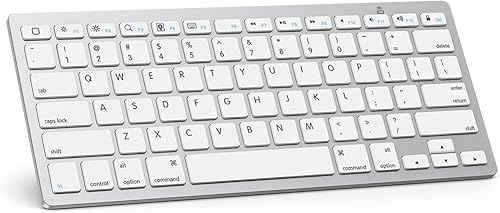
OMOTON Ultra-Slim Bluetooth Keyboard for iPad
 Best for a full-size desk setup
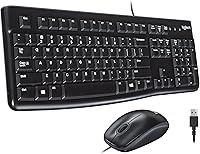
Logitech K120 Full Size Wired Keyboard USB
Bluetooth vs USB keyboard: which connection is easier?
USB is usually simpler to start using; Bluetooth takes pairing before you type. Choose USB when you want to plug in and get to work, and Bluetooth when you’re comfortable pairing devices.
Many wired USB keyboards use plug-and-play setup. The Logitech K120, for example, connects to a computer’s USB port without software installation.
Bluetooth requires a pairing step between keyboard and device. Once connected, the keyboard can be used without an attached cable, but first confirm that the computer or tablet supports Bluetooth.
Is USB or Bluetooth simpler for a new computer?
A USB keyboard is straightforward if your computer has an open, compatible port. Plug the cable in and follow any on-screen setup instructions.
Bluetooth can reduce cable clutter, especially on a laptop or tablet, but setup depends on the device’s Bluetooth settings. Keep another way to control the computer available if you need the keyboard to enter a password during startup or troubleshooting.
The connection types also differ from the broader wired-versus-wireless choice. Read our wired keyboard vs wireless keyboard comparison if you’re deciding whether a cable suits your desk at all.
Which is more dependable for everyday typing?
USB gives you a direct physical connection, while Bluetooth depends on a working wireless link and charged batteries. A cable removes pairing and wireless signal as possible sources of interruption.
A wired keyboard still depends on a sound cable, port and computer. If it stops responding, check that the plug is secure and try another USB port if one is available.
Bluetooth adds a few things to check: pairing status, battery power and wireless connection. Keep batteries fresh or charged, and reconnect the keyboard if the device no longer recognizes it.
For an always-in-place desktop, a cable can be easy to forget about. If you move between rooms or devices, Bluetooth can be more convenient, as long as each device supports the keyboard.
Does Bluetooth save a USB port?
Yes, a Bluetooth keyboard can leave a USB port free because the keyboard connection doesn’t use a USB plug or receiver. This can help on laptops and tablets with few ports.
That space matters when you connect storage, a mouse, a webcam or other wired gear. The Logitech K250 connects over Bluetooth without a USB receiver, so it doesn’t occupy a port for the keyboard.
A wired keyboard uses a USB port while connected. If your desk needs extra ports, consider a wired keyboard with a USB hub to add convenient connections around the keyboard.
Bluetooth doesn’t replace USB for every task. A wired keyboard may suit a fixed desk better when the computer has open ports and you prefer fewer setup steps.
Which keyboard is easier to move and position?
Bluetooth gives you more freedom to place the keyboard because there’s no cable running to the computer. USB is still practical when the keyboard stays close to the device.
A cable can limit where you put a keyboard, especially if the computer sits under a desk or the USB port is on the far side. A longer reach may also mean routing the cable around a monitor stand or other items.
Bluetooth can make a laptop or tablet setup easier to rearrange. A compact model like the OMOTON keyboard is made for compatible iPads and iPhones, measures 11.2 x 4.7 in and weighs 160 g.
For a permanent workstation, the cable may not get in the way. Measure the distance from your keyboard position to an open USB port before choosing a wired model.
How do power and battery needs compare?
A wired USB keyboard gets power through its cable; a Bluetooth keyboard needs batteries or another built-in power source. Think about whether you want to manage batteries or keep a cable connected.
The OMOTON uses 2 AAA batteries, which aren’t included, and it enters sleep mode after 10 minutes of inactivity. Pressing a key wakes it, though the keyboard may take a few seconds to respond.
The Logitech K250 includes 2 AAA batteries. Logitech says they can last 12 months of daily use, but actual battery life depends on use and conditions.
With a wired keyboard, you don’t need to change keyboard batteries. The cable must stay connected, and it uses a USB port while plugged in.
Which connection is better for a tablet or a computer?
Bluetooth is often the more practical choice for a tablet, while USB is an easy fit for a desktop or laptop with an open port. Check operating system support as well as the connection.
The OMOTON is designed for compatible iPads and iPhones and has 12 multimedia shortcuts for iOS. Its function keys are not fully compatible with other systems, so consider what device you’ll use before buying.
The Logitech K120 is a full-size USB keyboard for Windows 7, 8, 10 or later. It has F-keys and a number pad, which can suit a home or work desk.
The Logitech K250 uses Bluetooth and includes a number pad in a compact layout. It’s compatible with laptops, personal computers and tablets, but check the operating system requirements for your specific device.
Which type should you choose for your desk?
Choose USB for a fixed desk, direct setup and no keyboard batteries; choose Bluetooth for easier repositioning and a free USB port. Let your device compatibility and daily routine decide the connection.
Pick USB if you use a desktop with an available port, keep the keyboard in one place and want to start typing without pairing. The Logitech K120 has a full-size layout, while the Amazon Basics combo includes a wired mouse.
Pick Bluetooth if you use a compatible tablet, move your keyboard often or need to save a port. The OMOTON is compact for compatible Apple mobile devices, and the Logitech K250 adds a number pad.
A wired keyboard can also be adapted for wireless use, though that adds another device to your setup. Our guide to a wired keyboard to Bluetooth adapter explains that option.
Bluetooth vs USB keyboard: what’s the final choice?
Choose USB if you want a direct desk connection; choose Bluetooth if you value placement freedom and a free port. Match the keyboard to your device, then consider whether cables or battery changes would bother you more.
For a quiet wired option, see our guide to the best silent wired keyboard. If you’re also choosing office equipment, the home printer buying guide covers the connection and setup questions that matter for printers.
For photo archiving, our flatbed scanner guide for negatives and slides explains what to check before digitizing film. If you’re comparing printer connections too, read wireless printer vs Bluetooth printer.
Frequently asked questions
Is a Bluetooth keyboard better than a USB keyboard?
Bluetooth is better when you want to avoid a cable or keep a USB port free. A wired USB keyboard is better when you want a direct connection without pairing or battery changes.
Check your computer’s ports and Bluetooth support before choosing.
Does a Bluetooth keyboard need a USB port?
A Bluetooth keyboard connects through your device’s Bluetooth radio, so it doesn’t need a USB port for its keyboard connection. Some wireless keyboards use a USB receiver instead, so check the connection type carefully.
The Logitech K250 uses Bluetooth and has no USB receiver.
Can I use a USB keyboard with a tablet?
You can use a USB keyboard with a tablet if the tablet supports it and you have a compatible port or adapter. Bluetooth may be simpler for tablets without a suitable USB connection.
Check the tablet’s operating system and the keyboard’s compatibility before buying.
Do Bluetooth keyboards need batteries?
Bluetooth keyboards need a power source, often replaceable or rechargeable batteries. For example, the OMOTON keyboard uses 2 AAA batteries that aren’t included, while the Logitech K250 comes with 2 AAA batteries.
A wired USB keyboard draws power through its cable.
Which keyboard connection is better for gaming?
A wired USB connection avoids Bluetooth pairing and battery dependence, which can make it a straightforward choice for a gaming desk. Bluetooth performance varies by keyboard, device and setup, so check the connection details and your timing needs before choosing.