8 Best Wireless Left-Handed Mice (November 2026)
The best wireless left-handed mice include the Logitech G305 Lightspeed Wireless Gaming Mouse for ambidextrous gaming, the エレコム for precise thumb control, and the エレコム for a red-ball trackball.
On this page (4 sections)
The best wireless left-handed mouse depends on whether you want dedicated left-hand controls, a vertical grip, or a familiar ambidextrous shape. Our top pick is the ELECOM EX-G trackball for its left-hand layout and six buttons, while the Logitech G305 is a strong fit for left-handed gamers comfortable with an ambidextrous shell.
A wireless mouse can clear a cable from your desk, but the shape matters more than the connection alone. We compared left-handed mouse wireless options across trackball, vertical, and ambidextrous designs, focusing on how each handles in a left hand.
If you want a broader set of shapes, see our best left handed mouse guide. For keyboard pairing, our best keyboard for computer guide covers layout and connection choices.
Our picks at a glance
-
1
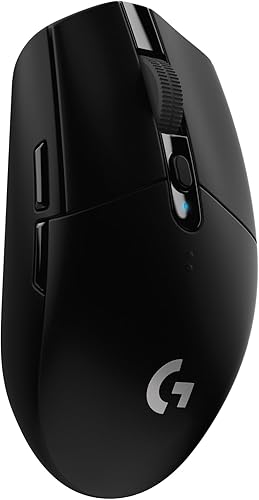 Best for ambidextrous gaming
Logitech G305 Lightspeed Wireless Gaming Mouse
9.7/10 our score
See it on Amazon -
2

-
3

- 4
 Best for small handsCheck it
- 5
 Check it
Logitech M185 Compact Ambidextrous 2.4 GHz Wireless
Best for simple everyday use - 6
 Best for quiet vertical useCheck it
- 7
 Check it
MEETION Left-Handed Wireless Ergonomic Vertical Mouse
Best for rechargeable multi-device use - 8
 Best for basic wireless vertical controlCheck it
Which wireless left-handed mouse fits each use?
The ELECOM EX-G is the best match for a dedicated left-hand trackball, while the G305 suits gaming if an ambidextrous shape works for you. The other picks cover compact everyday use, quiet clicks, vertical grips, and rechargeable connections.
Logitech G305 Lightspeed Wireless Gaming Mouse: Best for ambidextrous gaming
- Ambidextrous hand orientation
- LIGHTSPEED wireless with 1 ms report rate
- Up to 12,000 DPI sensitivity
- Up to 250 hours on 1 AA battery
The ambidextrous shell offers a wireless option for left-handed gamers who do not need dedicated thumb buttons. Its LIGHTSPEED connection and gaming sensor features suit play as well as everyday use.
Pros
- Ambidextrous design
- 1 ms report rate
- Built-in receiver storage
Cons
- Not a dedicated left-hand shape
- Uses a single AA battery
The Logitech G305 is an ambidextrous wireless gaming mouse rather than a dedicated left-handed design. That distinction matters: it can be used in either hand, but its product details do not describe thumb controls arranged specifically for left-hand use.
Its LIGHTSPEED wireless connection has a 1 ms report rate, and Logitech G lists sensitivity up to 12,000 DPI. Those features make it the most gaming-focused option here, with six buttons and built-in storage for the nano receiver.
Logitech G specifies up to 250 hours of continuous gameplay on one AA battery. Endurance mode through G HUB is described as extending battery life up to 9 months, though the mode and use conditions affect that figure.
Choose the G305 if fast wireless response and gaming controls matter more than a left-specific shell. If dedicated controls are a priority, consider a left handed mmo mouse or a model designed around a left thumb.
エレコム: Best for precise thumb control
- Left-hand thumb-operated trackball
- Six physical buttons
- 750 or 1500 DPI
- 2.4 GHz wireless
A left-hand trackball moves the cursor with the thumb while the mouse stays in place. Six buttons and adjustable DPI offer more control than a basic compact mouse.
Pros
- Dedicated left-hand layout
- Six physical buttons
- Ball can be removed for cleaning
Cons
- Trackball control takes some getting used to
- Uses a distinctive thumb-operated motion
This ELECOM EX-G is a dedicated left-hand thumb trackball with six physical buttons. It moves the cursor through a ball under the thumb, so the mouse body can stay in one place on the desk.
The DPI button switches between 750 and 1500, giving you a choice between slower and faster cursor movement. Two scroll-wheel tilt directions add horizontal scrolling, and ELECOM Mouse Assistant software can customize button functions.
The trackball is held by three artificial ruby bearings and can be pushed out through a hole on the underside for cleaning. The unusual control takes adjustment if you're used to sliding a mouse, so give yourself time to learn it.
Choose this model if you want left-hand controls and cursor movement with less arm travel. For a shape designed to support the hand differently, compare our best left handed ergonomic mouse picks.
エレコム: Best for a red-ball trackball
- Left-hand thumb-operated trackball
- Red optical tracking ball
- Six buttons
- 2.4 GHz wireless
This EX-G variant keeps the left-hand thumb trackball layout and uses a red ball for optical tracking. It suits buyers who want dedicated controls and a stationary mouse body.
Pros
- Dedicated left-hand layout
- Six buttons with software customization
- Red ball for optical tracking
Cons
- Trackball control takes practice
- More specialized than a standard mouse
This EX-G variant keeps the left-hand thumb trackball layout and adds a red ball for optical tracking. It also has six buttons, switchable 750 or 1500 DPI, and 2.4 GHz wireless connectivity.
The red ball is the main distinction from the other ELECOM trackball in this roundup. Choose between them by the ball version and the computer compatibility details you need, since the core thumb-operated layout is similar.
ELECOM Mouse Assistant software can assign functions to the buttons. As with any thumb trackball, the cursor motion differs from a conventional mouse, and the feel may take some getting used to.
If you already know you want a trackball, compare its control style with the options in our left handed mmo mouse guide. If you're still deciding, a conventional vertical mouse may be more familiar.
Perixx Perimice-719L: Best for small hands
- Left-handed vertical shape
- 2.4 GHz wireless with 10 m range
- Three DPI levels: 800, 1200, 1600
- Silent-click buttons
The compact vertical shape is designed especially for small hands. It adds silent clicks and three DPI settings for an office or laptop setup.
Pros
- Left-handed vertical design
- Compact size for small hands
- Silent-click buttons
Cons
- Windows 7, 8, and 10 are the stated system requirements
- Uses a USB receiver
Perixx Perimice-719L is a compact left-handed vertical mouse, with dimensions of 105 x 67 x 58 mm and a design aimed especially at small hands. Its 2.4 GHz connection uses a nano USB receiver and has a stated range of 10 m.
The vertical shape encourages a handshake position, while the silent-click buttons suit a quiet office or shared space. A DPI switch cycles through 800, 1200, and 1600, and the mouse has six buttons.
The stated system requirements are Windows 7, 8, and 10, so confirm compatibility if you use another system. This is the clearest size-specific option here for smaller hands, though its shape still differs from a standard mouse.
Choose the Perixx if a compact vertical design and quiet clicks are priorities. For more models with this general grip, see our best ergonomic vertical mouse guide.
Logitech M185 Compact Ambidextrous 2.4 GHz Wireless: Best for simple everyday use
- Ambidextrous contoured shape
- 2.4 GHz wireless nano receiver
- Up to 1 year of battery life
- Compact and portable
The compact ambidextrous shape works in either hand and keeps setup simple with a nano receiver. It is a straightforward option for everyday laptop or desktop use.
Pros
- Works for left- or right-handed use
- Compact for travel
- Plug-and-play receiver
Cons
- No dedicated left-hand controls
- Not a vertical or trackball design
The Logitech M185 is a compact ambidextrous wireless mouse for left-handed users who want a familiar shape. It connects through a nano USB receiver and works with Windows PCs, Macs, and laptops.
Its contoured shape is designed for either hand, but it does not offer dedicated left-hand thumb buttons. Logitech specifies up to 1 year of battery life from the included AA battery, with actual life varying by use and computing conditions.
This is a practical choice for basic pointing, scrolling, and travel. It has fewer specialized controls than the gaming and trackball picks, which can be an advantage if you want a simple mouse.
Choose the M185 if a small, familiar shape matters more than a vertical grip or left-specific controls. Mac users comparing other options can also read our best wireless mouse for a Mac guide.
Lekvey Left Handed Mouse: Best for quiet vertical use
- Left-hand vertical shape
- 2.4 GHz USB receiver
- Three DPI levels: 1000, 1200, 1600
- Quiet left and right clicks
The left-hand vertical shape, quiet main clicks, and forward and back buttons suit desk work where a handshake grip is preferred. Its 5 in length is recommended for medium and large hands.
Pros
- Dedicated left-hand shape
- Quiet left and right clicks
- Receiver stores in the mouse
Cons
- Batteries are not included
- Bluetooth and USB-C are not supported
The Lekvey is a left-handed vertical mouse with quiet main clicks and forward and back buttons. Its 5 x 2.5 in dimensions are recommended for medium and large hands, making it a larger fit than the compact Perixx.
The 2.4 GHz USB receiver stores on the bottom of the mouse, and the connection has a stated range of up to 10 m. Three DPI settings, 1000, 1200, and 1600, let you adjust cursor speed for different tasks.
It uses two AAA batteries, which aren't included, and enters sleep mode after 10 minutes of inactivity. Bluetooth and USB-C aren't supported, so plan on using the USB receiver and a compatible port.
Choose Lekvey if you want a left-specific vertical shape and quiet clicks for desk work. If your main goal is reducing desk movement, the ELECOM trackball uses a different control style.
MEETION Left-Handed Wireless Ergonomic Vertical Mouse: Best for rechargeable multi-device use
- Left-hand vertical shape
- Bluetooth 5.0 and 3.0 plus 2.4 GHz
- Rechargeable battery
- Four DPI settings from 1200 to 3200
This vertical mouse combines a rechargeable battery with Bluetooth and 2.4 GHz connections. Its stated recommended hand length is 6.7–7.1 in, so check that against your hand before choosing it.
Pros
- Rechargeable battery
- Bluetooth and 2.4 GHz options
- Four DPI settings
Cons
- Not compatible with Android TV or older Linux systems
- Recommended hand length is specific
The MEETION BTM010 is a rechargeable left-handed vertical mouse with Bluetooth 5.0 and 3.0 plus 2.4 GHz wireless. That gives it more connection choices than the receiver-only vertical picks in this group.
It has four DPI settings from 1200 to 3200, forward and back buttons, and RGB lighting. The recommended hand length is 6.7–7.1 in, so compare that range with your hand before buying.
MEETION says the shape is contoured to minimize wrist pressure, but comfort varies with hand size and grip. It supports Windows 10 and 11 and macOS 10.15 and above; it isn't compatible with Android TV or older Linux systems.
Choose this mouse if you want a rechargeable battery and Bluetooth option in a left-hand vertical design. For a different ergonomic input device, see our best ergonomic split keyboard guide.
KUNSI Left Handed Mouse: Best for basic wireless vertical control
- Left-hand vertical shape
- 2.4 GHz USB wireless
- Three DPI levels: 800, 1200, 1600
- Forward and back buttons
A simple left-hand vertical option with three DPI settings and browsing buttons. The forward and back buttons are unavailable on Mac OS.
Pros
- Dedicated left-hand design
- Three DPI settings
- Up to 10 m wireless range
Cons
- Two AAA batteries are not included
- Forward and back buttons do not work on Mac OS
The KUNSI is a basic left-handed vertical mouse with 2.4 GHz USB wireless and three DPI settings. Its stated range is up to 10 m, and the forward and back buttons add convenient page browsing on supported systems.
The mouse uses two AAA batteries, which are not included. Its maker notes that the forward and back buttons are unavailable on Mac OS, so Mac users should weigh that limitation before choosing it.
This is a straightforward option if you want a left-specific vertical shape without Bluetooth or recharging features. Its 800, 1200, and 1600 DPI choices cover basic cursor-speed adjustment.
Choose KUNSI if you want a simple wireless vertical design and will use a system that supports its extra buttons. For gaming-first features, compare it with our best left handed mouse gaming guide.
How should you choose a wireless left-handed mouse?
Choose by hand shape and control style first, then check wireless connection, power, and computer support. A left-handed ergonomic mouse wireless model can have a vertical grip, a trackball, or a conventional shell, and those shapes feel very different in use.
Which shape works for your left-handed wireless mouse?
A vertical mouse suits buyers who want a handshake-style grip, while a trackball suits those who want the cursor to move without sliding the mouse body. Ambidextrous mice fit either hand but may not have controls placed for left-hand use.
If you're considering an ergonomic option, compare the best left handed ergonomic mouse guide with our list of best ergonomic vertical mouse options. For a gaming desk, the best left handed mouse gaming guide focuses on gaming-oriented designs.
Which wireless connection and power source should you check?
Most picks here use a USB receiver, while the MEETION also supports Bluetooth. If you use a MacBook or a laptop with limited USB ports, confirm you can connect the receiver or choose a model with a supported Bluetooth connection.
Power needs also differ. The G305 and M185 use AA batteries, Lekvey and KUNSI use AAA batteries, the ELECOM and Perixx options are battery powered, and MEETION is rechargeable.
How important are size and hand fit?
Hand-size guidance can narrow the shortlist, but it doesn't replace checking how the shape fits your grip. Perixx is described as especially suited to small hands, Lekvey recommends medium and large hands, and MEETION gives a recommended hand-length range.
Measure your hand and compare the mouse dimensions or guidance before choosing a vertical design. A mouse that is too large or too small can make its special grip less useful.
What should you check before buying?
Check that the mouse supports your operating system, connection method, and preferred controls. Compatibility details vary, and some extra buttons may not work on every system.
For a Mac, the MEETION lists macOS 10.15 and above, while the KUNSI notes that forward and back buttons are unavailable on Mac OS. The ELECOM trackball software can customize buttons, so confirm the software version and functions for your system.
If the computer has only USB-C ports, verify how you'll connect a USB-A receiver. The Lekvey specifically does not support USB-C or Bluetooth, while the MEETION includes a Type-C charging cable and USB-A receiver.
Which wireless left-handed mouse should you choose?
Choose the ELECOM EX-G if you want a left-hand thumb trackball with six buttons, or Perixx if a compact vertical shape and silent clicks suit your hand. Pick the MEETION for rechargeable Bluetooth and receiver connections, or choose the M185 if you prefer a simple ambidextrous mouse.
For a dedicated gaming focus, the G305 offers an ambidextrous shape and a 1 ms wireless report rate. If you want a broader view of left-hand designs, start with our best left handed mouse guide.
Our top 3 picks at a glance
-
1
Best for ambidextrous gaming
Logitech G305 Lightspeed Wireless Gaming Mouse
9.7/10 our score
See it on Amazon -
2
-
3
Frequently asked questions
What should you check in a wireless left-handed mouse?
Check that the shape and controls suit your left hand. Dedicated left-handed models place their buttons or trackball for left-hand use, while ambidextrous mice can be held in either hand but may lack left-side thumb controls.
Also check the connection type, power source, and whether your computer supports the mouse.
Is an ambidextrous mouse good for left-handed use?
An ambidextrous mouse can work well if you want a familiar, compact shape and do not need dedicated left-hand buttons. The Logitech M185 and G305 are both described as ambidextrous.
For controls arranged specifically for a left hand, consider a dedicated vertical mouse or trackball instead.
Is a vertical mouse automatically more comfortable?
No. A vertical shape encourages a handshake-style grip, but comfort depends on your hand size, grip, and how the mouse fits your desk work.
Compare the stated dimensions and hand guidance where available, and expect the grip to feel different from a standard mouse.
Should you choose a wireless trackball or a regular mouse?
A trackball moves the cursor with the ball while the mouse body stays in place, so it needs less desk movement. A regular mouse moves across the surface and may feel more familiar if you already use that motion.
Trackball control can take practice, so consider whether you want to learn a different way to point.
Can these wireless left-handed mice work with a Mac?
Some options list Mac support, but compatibility varies by model and feature. The MEETION supports macOS 10.15 and above, while the ELECOM trackballs list macOS support; the Perixx states Windows 7, 8, and 10 requirements.
Check the operating system and button functions you need before choosing.


