5 Best USB Extension Cables (November 2026)
The best USB extension cables include the UGREEN 2 Pack USB Extension Cable for everyday desk setups, the ITD ITANDA USB Extension Cable 15FT USB 3.0 for long USB-A reach, and the Besgoods USB Extension Cable for multiple USB 2.0 devices.
On this page (7 sections)
- The best USB extension cables for different setups
- How to choose a USB extension cable
- Which USB extension cable is best for webcams, keyboards and mice?
- How should you set up and care for a USB extension cable?
- USB extension cable FAQs
- More guides on this topic
- Verdict: which is the best USB extension cable?
The UGREEN 2 Pack USB Extension Cable is the best USB extension cable for most desks, with USB 3.0 speed, 2A charging and 2 cables. Choose ITD ITANDA for a 15 ft reach, or KMMXXCPM for USB-C video, data and charging.
A USB extension cable adds distance between a computer port and a peripheral. The right choice depends on the connector type, cable length, data speed and whether the connected device needs charging or video.
If you're still deciding what this cable does, start with our guide to what is a USB extension cable. For a broader setup, our USB hub buying guide explains when adding several ports makes more sense.
Our picks at a glance
-
1

-
2
 Best for long USB-A reach
ITD ITANDA USB Extension Cable 15FT USB 3.0
9.6/10 our score
See it on Amazon -
3

- 4
 Best for stocking spare cablesCheck it
- 5
 Check it
KMMXXCPM USBC Extension Cable 6.6FT
Best for USB-C displays and charging
The best USB extension cables for different setups
The UGREEN 2 Pack is the strongest all-purpose choice, while the other cables focus on long reach, bulk packs, USB 2.0 accessories or USB-C performance. Choose the connection and job first, then compare length and speed.
Our score weighs specs, features and buyer feedback against what you're shopping for.
| Product | Best for | Length | Connector | Data rate | Our score |
|---|---|---|---|---|---|
| UGREEN 2 Pack USB Extension Cable | everyday desk setups | 3 ft each | USB 3.0 male-to-female | Up to 5 Gbps | 9.7 |
| ITD ITANDA USB Extension Cable 15FT USB 3.0 | long USB-A reach | 15 ft | USB Type-A male-to-female | Up to 5 Gbps | 9.6 |
| Besgoods USB Extension Cable | multiple USB 2.0 devices | 10 ft each | Up to 480 Mbps | 9.5 | |
| Smays USB Extension Cable | stocking spare cables | 5 ft each | Up to 480 Mbps | 9.3 | |
| KMMXXCPM USBC Extension Cable 6.6FT | USB-C displays and charging | USB Type-C male-to-female | Up to 20 Gbps | 8.8 |
1. UGREEN 2 Pack USB Extension Cable: Best for everyday desk setups
UGREEN 2 Pack USB Extension Cable: Best for everyday desk setups
- 2 cables
- 3 ft each
- USB 3.0 male-to-female
- 5 Gbps data transfer
- 2A charging
- Nylon braided jacket
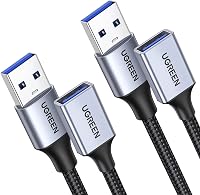
Two 3 ft USB 3.0 cables cover common desk and home office setups. The nylon braid, aluminum alloy connector and broad device compatibility make this the most balanced pick.
Pros
- 2-pack
- 5 Gbps data transfer
- 2A charging
- Nylon braided jacket
Cons
- Only 3 ft long
- USB-A connection
UGREEN is the best USB extension cable here for a typical computer desk because it combines 2 cables, 3 ft length, USB 3.0 connectivity and 5 Gbps data transfer. Two cables also help when you need to extend a keyboard and a printer, or a webcam and a hub, without buying separate cords.
If you need the hub itself, see the Anker USB 3.0 hub.
The male-to-female USB 3.0 connectors fit a computer port and a USB peripheral. The product is compatible with cameras, personal computers, printers and scanners, while the title also names webcams, phones, hubs, mice, keyboards, hard drives and headsets.
UGREEN lists charging up to 2A alongside data transmission. That gives the cable a wider role than a simple input extender, although the connected device and host port still affect charging behavior.
The nylon braided jacket and aluminum alloy connector suit a cable that will be moved around a desk. Multiple shielding layers are intended to reduce interference, and the 3 ft length keeps cable management simpler than a long extension.
Choose this pair when you want a balanced USB-A extension for daily work. If your device sits across a room, the short length will be less useful than the 15 ft ITD ITANDA cable.
2. ITD ITANDA USB Extension Cable 15FT USB 3.0: Best for long USB-A reach
ITD ITANDA USB Extension Cable 15FT USB 3.0: Best for long USB-A reach
- 15 ft length
- USB 3.0 Type-A male-to-female
- 5 Gbps data transfer
- Nylon jacket
- Nickel-plated connectors
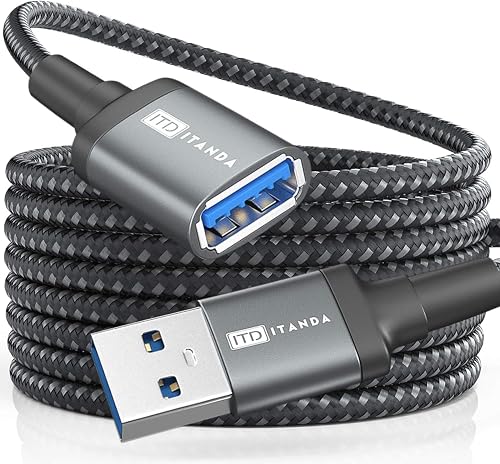
A 15 ft USB 3.0 cable gives you room to place a TV-connected device or desk peripheral farther from the computer. Its braided nylon jacket and reinforced joint suit a cable that may cross a larger room.
Pros
- Longest USB-A cable here
- 5 Gbps data transfer
- Backward compatible with USB 2.0, 1.1 and 1.0
Cons
- Single cable
- Long cable needs careful routing
ITD ITANDA is the best USB extension cable for a long USB-A connection because its 15 ft length gives you more placement freedom than every other USB-A pick here. It works well when a computer, television or desk sits far from the device you need to connect.
The cable uses USB 3.0 Type-A male-to-female connectors and supports data transfer up to 5 Gbps. It is also backward compatible with USB 2.0, 1.1 and 1.0 standard devices, so older accessories can still use the extension at their supported speed.
The nylon braided jacket, nickel-plated connectors, reinforced joint and aluminum alloy case address the strain that can come with a longer cable run. ITD ITANDA also describes more than 10,000 bend tests for the cable design.
A 15 ft cord needs a clear route. Keep it away from walkways, sharp bends and places where chairs or drawers can pull against the connector.
Choose ITD ITANDA when reach matters more than keeping the setup compact. For several shorter USB 2.0 devices, the Besgoods or Smays multipacks may give you more spare cables.
3. Besgoods USB Extension Cable: Best for multiple USB 2.0 devices
Besgoods USB Extension Cable: Best for multiple USB 2.0 devices
- 5 cables
- 10 ft each
- USB 2.0 Type-A male-to-female
- 480 Mbps data transfer
- PVC jacket
Five 10 ft cables are useful when several low-bandwidth peripherals need more reach. The USB 2.0 speed fits keyboards, mice, printers and similar devices better than fast external storage.
Pros
- Five cables
- 10 ft reach
- Supports charging and data transfer
Cons
- USB 2.0 speed
- PVC outer material
Besgoods is the best USB extension cable choice when you need 5 cables at 10 ft each. That combination suits homes, offices or work areas with several keyboards, mice, printers, flash drives, phones or other USB-enabled devices.
Each cable uses USB Type-A male-to-female connectors and supports USB 2.0 data transfer up to 480 Mbps. That speed is enough for many basic peripherals, but it is lower than the 5 Gbps USB 3.0 rate on the UGREEN and ITD ITANDA cables.
The 10 ft length can keep a computer port or hub away from the edge of a desk. It also helps when a printer or other peripheral sits on a separate table, but longer cords need a tidy route to avoid loops and snags.
Besgoods uses a PVC outer material and gold-plated connectors. The product is designed for charging and data transfer, with the USB 2.0 limit setting the better use case: everyday accessories rather than high-speed external drives.
Choose this pack if quantity and reach matter more than USB 3.0 performance. If 5 ft is enough and you want even more spare cords, Smays includes 10 cables.
4. Smays USB Extension Cable: Best for stocking spare cables
Smays USB Extension Cable: Best for stocking spare cables
- 10 cables
- 5 ft each
- USB 2.0 male-to-female
- 480 Mbps data transfer
- PVC cord
The 10-pack gives homes, offices or travel bags a ready supply of 5 ft USB 2.0 extenders. It fits printers, keyboards, mice, flash drives, hard drives and controllers that do not need USB 3.0 speed.
Pros
- 10 cables
- 5 ft length
- Useful for common USB 2.0 peripherals
Cons
- USB 2.0 speed
- Bulk pack may exceed a single setup's needs
Smays is the best USB extension cable pack for keeping extra cords at home, work or in travel storage. It includes 10 USB 2.0 male-to-female cables, each 5 ft long, so you can place several common peripherals without relying on one shared extension.
The cables support charging and data transfer up to 480 Mbps. That makes them a practical match for printers, keyboards, mice, flash drives, hard drives and controllers that do not require USB 3.0 transfer rates.
A 5 ft length is easier to manage than a 10 ft or 15 ft run. It gives enough room for many desk layouts while leaving less loose cable to coil behind the computer.
Smays uses a black PVC cord and packages the cables to help prevent tangling. The 10-pack is the main reason to choose it, especially for a classroom, office, repair drawer or household with several computers.
Choose Smays when you want a large supply of simple USB-A extenders. For one fast external-storage connection, use a USB 3.0 option instead.
5. KMMXXCPM USBC Extension Cable 6.6FT: Best for USB-C displays and charging
KMMXXCPM USBC Extension Cable 6.6FT: Best for USB-C displays and charging
- 6.6 ft USB-C male-to-female
- 20 Gbps data transfer
- 100W charging
- 4K at 120Hz video
- Nylon braided shield
This USB-C extender is the specialist choice for compatible laptops, docks, monitors and tablets. It supports 20 Gbps data, 100W charging and 4K at 120Hz video, but the connected USB-C male-to-male cable must not exceed 0.3 m.
Pros
- 20 Gbps data transfer
- 100W charging
- 4K at 120Hz video
Cons
- USB-C devices and ports required
- Connected male-to-male cable must stay within 0.3 m
KMMXXCPM is the best USB extension cable here for a compatible USB-C setup that needs more than data. Its 6.6 ft male-to-female cable supports up to 20 Gbps data transfer, 100W charging and 4K video at 120Hz.
The cable works with compatible docking stations, laptops, monitors, smartphones and tablets. It also supports Thunderbolt 3, USB 3.1, USB 3.0 and USB 2.0 connections, but the device's port must support the function you want, especially video output.
The 100W figure describes supported power delivery up to 20V and 5A. Actual charging depends on the charger, host device and connected equipment, so use the cable's rating as a limit rather than a promise that every setup will charge at 100W.
The cable's nylon braided shield, triple-layer protection and tinned copper cores are designed for signal protection. The main setup restriction is important: the connected USB-C male-to-male cable must not exceed 0.3 m, or the connection may malfunction.
Choose KMMXXCPM for a USB-C dock, laptop or display arrangement that needs video, power and fast data. For a standard USB-A keyboard, mouse or printer, one of the less complex USB-A cables is a better match.
How to choose a USB extension cable
The best USB extension cable matches the port on the computer, the port on the device and the job you need it to do. Start with connector type, then check speed, length and power needs.
USB-A or USB-C: which connector do you need?
USB-A is the rectangular connector used by many older computers, printers, keyboards, mice and other accessories. The UGREEN, ITD ITANDA, Besgoods and Smays cables use USB-A male-to-female connections.
USB-C is smaller and reversible, but its shape alone does not confirm speed, charging or video support. KMMXXCPM uses USB-C male-to-female connectors and lists support for 20 Gbps data, 100W charging and 4K at 120Hz video.
If your setup needs a USB-C connection, compare this roundup with our guide to the best USB-C extension cable. If you only need a replacement charging or data cord rather than an extender, see our best USB-C cable guide.
How much length is enough?
Choose the shortest cable that reaches without pulling on the connectors. A 3 ft cable is easier to route across a desk, 5 ft suits many work areas, and 10 ft or 15 ft helps when the device sits farther away.
Longer is not automatically better. Extra cable creates more slack to manage, and a long run may be less convenient when the device only needs to move a few inches.
For a long USB-A connection, ITD ITANDA offers 15 ft. For a large supply of moderate-length cables, Smays gives you 10 cables at 5 ft each.
Our guide to the best long USB extension cable focuses on reach. If your setup needs signal help over a longer run, compare it with the best USB extension cable with a booster.
What speed should a USB extension cable have?
Use USB 3.0 when you plan to move large files or connect a device that benefits from higher transfer speed. UGREEN and ITD ITANDA list up to 5 Gbps, while Besgoods and Smays list USB 2.0 speeds up to 480 Mbps.
A USB 2.0 extension can still suit a keyboard, mouse, printer or controller. The cable does not turn a USB 2.0 device into a USB 3.0 device, so match the cable to the slowest important part of the connection.
For the broader difference between adding ports and adding reach, read USB hub vs extension cable. If you need several connections at one location, an extension cable with multiple ports may fit better.
Do you need a powered USB extension cable?
A standard extension cable passes the connection between the host and the device. It does not add a new power supply unless the design specifically includes one.
Powered options can make more sense for setups with several devices or equipment that needs more power. Compare the best powered USB extension cable if a regular cable does not suit your power needs.
A desktop dock can also be a cleaner choice when you want ports within easy reach. Our guide to the best USB extension cable with a dock covers that type of setup, while a USB hub with a long cable can place several ports farther from the computer.
Which USB extension cable is best for webcams, keyboards and mice?
The best USB extension cable for a webcam should match the webcam's connector and required data speed, while a keyboard or mouse usually has simpler bandwidth needs. Keep the cable path stable so movement does not pull on the device.
UGREEN lists webcams among its compatible devices and offers USB 3.0 transfer up to 5 Gbps. That makes it the most flexible short option for a desk webcam.
For a webcam placed farther from the computer, ITD ITANDA's 15 ft length provides more reach. Check the webcam's connector before choosing a USB-A extension, and compare the dedicated guide to the best USB extension cable for webcam.
Keyboards and mice generally do not need the highest data rate. Besgoods and Smays can fit those accessories when you want 10 ft or 5 ft cables, and their USB 2.0 speed is suitable for basic input devices.
For a shorter keyboard or mouse setup, see the best USB extension cable for mouse and keyboard guide. If you want a more durable outer layer, compare the best braided USB extension cable.
How should you set up and care for a USB extension cable?
Connect the male end to the computer, hub or host port, then connect the peripheral to the female end. Keep the cable away from sharp edges, tight bends and places where furniture can pinch it.
Test the connection before routing the cable permanently. If a device disconnects, check both plugs, try a different host port and remove unnecessary adapters from the chain.
Do not assume every USB-C port supports video or high-speed data. The KMMXXCPM cable lists those functions, but the connected laptop, dock, monitor or phone must support them too.
For USB-A cables, check that the plug is fully seated and that the extension is not carrying more power than the connected equipment needs. A cable can extend a port, but it cannot replace a suitable powered hub for every setup.
USB extension cable FAQs
Can a USB extension cable carry data?
Yes. USB extension cables can carry data when the cable, host port and connected device support the same standard.
UGREEN and ITD ITANDA list up to 5 Gbps, while Besgoods and Smays list USB 2.0 transfer up to 480 Mbps.
The slowest device or port controls the working result. Choose USB 3.0 for faster storage transfers and USB 2.0 for basic peripherals such as keyboards, mice and many printers.
Are USB extension cables good for charging?
Yes, but charging depends on the cable, charger, host port and device. UGREEN lists charging up to 2A, and KMMXXCPM lists up to 100W power delivery for compatible USB-C equipment.
A cable rating is not a guarantee that every connected device will charge at that level. Confirm the charger and device requirements before relying on a USB extension for high-power charging.
Can you connect a USB extension cable to a hub?
Yes, if the hub and extension use matching connectors and the cable supports the hub's needs. A USB 3.0 extension is a better match for a USB 3.0 hub used with faster devices.
A hub can add ports, while an extension cable adds distance. If you need both, check the hub's power and speed requirements before connecting it through a long cable.
Is a 15 ft USB extension cable too long?
A 15 ft USB extension cable can work when the cable and connected devices support that distance, but routing becomes more important as length increases. ITD ITANDA lists a 15 ft USB 3.0 cable with up to 5 Gbps data transfer.
Keep the cable away from sharp bends and foot traffic. If the device is close to the computer, a shorter cable is easier to manage.
More guides on this topic
- Best Short USB Extension Cables
Verdict: which is the best USB extension cable?
The UGREEN 2 Pack USB Extension Cable is the best USB extension cable for most everyday computer setups because it combines 2 cables, 3 ft length, USB 3.0 speed, 5 Gbps data transfer and 2A charging.
Pick ITD ITANDA when you need a 15 ft USB-A reach. Choose Besgoods or Smays when you want several USB 2.0 cables for basic peripherals, and choose KMMXXCPM when your USB-C setup needs fast data, charging and compatible video.
Our top 3 picks at a glance
-
1
-
2
Best for long USB-A reach
ITD ITANDA USB Extension Cable 15FT USB 3.0
9.6/10 our score
See it on Amazon -
3