What Is a USB Extension Cable?
A USB extension cable adds extra reach between a USB port and a device. It uses a male connector on one end and a female port on the other, so you can connect a regular USB cable farther from the computer.
On this page (7 sections)
- What is a USB extension cable used for?
- How does a USB extension cable work?
- Which USB connectors can an extension cable use?
- How long can a USB extension cable be?
- Does a USB extension cable add more ports?
- What should you check before buying a USB extension cable?
- How do you use and care for a USB extension cable?
A USB extension cable adds extra reach between a computer's USB port and a peripheral. It has a male connector that plugs into the computer or hub and a female port that accepts the device's existing USB plug.
This setup helps when a cable is too short to reach comfortably. You can move a webcam higher, place a mouse or keyboard where you want it, or bring a USB port out from behind a desk without replacing the original device cable.
What is a USB extension cable used for?
A USB extension cable is used to increase the distance between a USB port and a connected device. It is useful for peripherals that stay on a desk, sit beside a television, or need a more accessible connection point.
Common uses include:
- Moving a webcam closer to eye level
- Bringing a port from behind a computer to the front of a desk
- Connecting a printer without moving the computer
- Placing a camera, microphone, headset, or controller farther away
- Reducing repeated plugging into a laptop or desktop port
- Connecting a hard drive or USB hub where the original cable is short
The cable doesn't create more USB ports. If you need extra ports for several devices, compare a USB hub instead.
A USB extension cable also doesn't automatically add video output, Ethernet, memory-card slots, or charging features. It mainly adds reach, while the connected devices and USB ports continue to control what the connection can do.
How does a USB extension cable work?
A USB extension cable connects one existing USB cable to a farther USB port. The male end plugs into the host port, and the female end accepts the device cable or plug.
For a typical USB-A extension, the connection looks like this:
Computer USB-A port → USB-A male-to-female extension → device USB-A cable or plug
The extension carries power and data supported by the complete connection. It doesn't upgrade a USB 2.0 computer port to USB 3.0, and it can't make a device transfer data faster than its own interface allows.
The UGREEN 2 Pack USB Extension Cable uses a USB 3.0 male-to-female connector, comes as 2 cables, and has a 3 FT + 3 FT length configuration. UGREEN lists support for up to 5 Gbps data transfer and up to 2 A charging, with a nylon braided jacket and aluminum alloy connector.
This pair suits a desk where you want flexible placement or a spare cable for another setup. Its short length is easier to manage than a long extension, but it won't solve a connection that needs to cross a room.
Which USB connectors can an extension cable use?
USB extension cables are defined by their connector shapes and the USB standard they support. The connector and the data standard are related, but they are not the same thing.
USB-A extension cables
USB-A is the familiar rectangular connector found on many desktop computers, televisions, printers, keyboards, mice, and older external drives. A USB-A extension normally has a male USB-A plug on one end and a female USB-A port on the other.
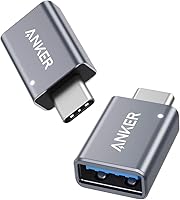
Check the port before ordering. A USB-A extension won't plug directly into a USB-C port without a suitable adapter or hub.
USB-C extension cables
USB-C is the smaller oval connector used by many current laptops, phones, tablets, docks, and accessories. USB-C cables can carry different combinations of data, charging, and video features, so connector shape alone doesn't tell you what every cable supports.
If you need a USB-C connection, start with our guide to the best USB-C extension cable. If your computer has USB-C but your device has USB-A, compare a USB-C to USB-A adapter or hub before choosing a cable.
USB 3.0 and USB 2.0
USB 3.0 extensions can support data speeds up to 5 Gbps when the computer port, extension, device cable, and peripheral all support that level. USB 2.0 devices can still connect through many USB 3.0 Type-A extensions, but the device remains limited by its own standard.
The USB-IF USB specifications provide the technical standards behind USB generations and connector systems. For everyday buying, match the extension to the port and device, then keep the total connection as short as practical.
How long can a USB extension cable be?
A USB extension cable can be as short as a few feet or as long as 15 FT in the products considered here, but longer is not always better. Signal quality, power delivery, USB generation, and the number of connected cable sections all affect reliability.
The ITD ITANDA USB Extension Cable 15FT USB 3.0 is a 15 FT USB Type-A male-to-female cable. It lists data transfer up to 5 Gbps, backward compatibility with USB 2.0, 1.1, and 1.0 devices, a nylon outer material, and a reinforced design with nickel-plated connectors and an aluminum alloy case.
Choose this length when a short extension leaves the device out of reach. A 15 FT run is easier to route along a wall or desk edge, but it creates more cable to manage and may be less suitable when you need the shortest possible signal path.
For a USB 3.0 setup, avoid adding several long passive extensions together. If the device disconnects, transfers fail, or the connection falls back to a lower speed, remove extra cable length first.
Does a USB extension cable add more ports?
A USB extension cable doesn't add ports. It gives one existing port more reach, while a USB hub turns one compatible port into several connection points.
The difference matters when you need multiple accessories. For a single webcam, printer, keyboard, or mouse, an extension cable may be enough.
For several USB devices, a hub may be the better fit.
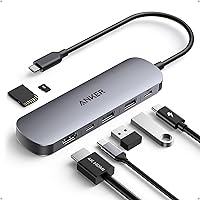
The Anker USB C Hub is a 5-in-1 hub with a 4K HDMI port, one 5 Gbps USB-C data port, two 5 Gbps USB-A data ports, and a USB-C 100W PD-IN charging port. It supports up to 85 W pass-through charging, requires a charger for pass-through power, and includes a welcome guide and an 18-month warranty.
This hub suits a USB-C computer that needs several ports in one place. Its USB-C data port doesn't provide video output, the USB-C ports don't support video output, and Anker states that the hub isn't compatible with Linux.
Read our USB hub vs extension cable comparison if you're deciding between extra reach and extra ports. For a built-in desktop expansion, see how to choose an internal USB 3.0 hub.
What should you check before buying a USB extension cable?
Check connector type, USB speed, length, power needs, and the device's location. These five details prevent most mismatches.
First, identify the host port. A USB-A male-to-female extension is designed for a standard USB-A connection.
A USB-C setup needs a USB-C cable or a compatible hub, and USB-C features should be checked separately.
Next, match the speed. A USB 3.0 extension makes the most sense for a USB 3.0 storage device or other high-speed peripheral, while a keyboard or mouse usually has modest data needs.
Then measure the route. Include the device's existing cable, the extension, bends around furniture, and the distance to the final position.
Leave a little slack so the connectors aren't pulled sideways.
Finally, consider power. A longer connection can be less forgiving for devices that draw more power, especially when several cable sections are joined.
If a hard drive, hub, or other device is unstable, try a shorter route or a powered hub.
For more USB-A options, see the best USB-A 3.0 extension cables. For a broader comparison of reach, connectors, and setup choices, our guide to the best USB extension cable can help.
How do you use and care for a USB extension cable?
Plug the extension into the computer or hub first, then connect the device to the extension's female port. Keep the cable away from sharp edges, avoid tight bends near the connectors, and support long runs so the plug isn't carrying the cable's weight.
If a device isn't recognized, unplug and reconnect both ends, check the connector orientation, and test the device without the extension. This helps show whether the problem is the cable, the USB port, the device cable, or the peripheral.
Choose a short UGREEN pair for simple desk reach, the ITD ITANDA 15 FT cable for a long Type-A route, or the Anker hub when you need several ports from USB-C. The right answer to “what is a USB extension cable” is simple: it adds distance, while a hub adds connection options.
Frequently asked questions
What is a USB extension cable used for?
A USB extension cable moves a USB device's connection point farther from the computer. It can make a short mouse, keyboard, webcam, printer, phone, or storage cable easier to place, especially when the computer port is behind a desk or television.
Does a USB extension cable reduce speed?
It can if the total connection becomes too long, uses a lower USB standard, or has poor signal quality. A USB 3.0 extension can support speeds up to 5 Gbps when the connected devices, cables, and ports support that level, but real performance depends on the complete connection.
Are USB extension cables universal?
No. Check the connector shape and USB generation before buying.
USB Type-A male-to-female extensions fit standard USB-A ports, while USB-C connections use a different connector and may have different data, charging, and video features.
How long can a USB extension cable be?
The usable length depends on the USB generation, cable quality, device power needs, and the total cable run. Shorter connections are usually easier to keep reliable, while a long run may need an active extension, powered hub, or a shorter cable arrangement.