7 Best Rechargeable Keyboard and Mouse Combos (November 2026)
The best rechargeable keyboard and mouse combos include the TECKNET 2.4G Rechargeable Ultra-Slim Wireless Keyboard for long gaps between charges, the Logitech MK270 Full Size Wireless Keyboard for long battery life without recharging, and the seenda Rechargeable Wireless Keyboard and Mouse Combo for a light-colored desk.
On this page (4 sections)
The best rechargeable mouse and keyboard combo for most desks is the TECKNET 2.4G set, with a full-size keyboard, shared USB receiver and rechargeable keyboard and mouse. For Bluetooth, choose the seenda SKM64-3, which can switch among three devices.
The key choice is how you want to connect. Most picks here use one USB receiver for both devices, while two support Bluetooth and the XISOGUU also has a wired mode.
A rechargeable set needs occasional charging, but it avoids routine battery swaps. If a USB receiver suits your computer better, compare these picks with our best wireless keyboard and mouse combo; for a cable connection, see the best wired keyboard and mouse combo.
Our picks at a glance
-
1
 Best for long gaps between charges
TECKNET 2.4G Rechargeable Ultra-Slim Wireless Keyboard
9.7/10 our score
See it on Amazon -
2
 Best for long battery life without recharging
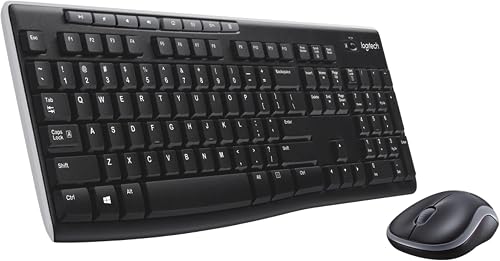
Logitech MK270 Full Size Wireless Keyboard
9.6/10 our score
See it on Amazon -
3
 Best for a light-colored desk
seenda Rechargeable Wireless Keyboard and Mouse Combo
9.5/10 our score
See it on Amazon
- 4
 Check it
SABLUTE Wireless Keyboard and Mouse Combo
Best for backlighting and wrist support - 5
 Check it
seenda SKM64-3 Wireless Bluetooth Keyboard Mouse Combo
Best for switching between three devices - 6
 Check it
Amazon Basics Ultra Premium Wireless Keyboard
Best for a simple rechargeable set - 7
 Check it
XISOGUU Wireless Keyboard and Mouse Combo
Best for three connection modes
How we chose rechargeable mouse and keyboard combos
The best rechargeable keyboard and mouse combos should match your connection needs, desk layout and charging habits. We compared the stated connection types, power features, keyboard layouts and practical extras for each pick.
Rechargeable power was the main filter, but this set also includes the Logitech MK270 as a battery-powered point of comparison. Its long stated battery life can suit someone who values fewer power interruptions more than rechargeable convenience.
Connection matters as much as charging. A USB receiver is simple when your computer has an open USB-A port, while Bluetooth can help when you switch among a computer, tablet and phone or want to save a port.
Layout and desk features separate the other options. A number pad helps with data entry, a wrist rest and phone holder change how the keyboard fits your desk, and backlighting can help when you work in dim light.
Our score weighs specs, features and buyer feedback against what you're shopping for.
| Product | Best for | Connection | Keyboard layout | Power | Our score |
|---|---|---|---|---|---|
| TECKNET 2.4G Rechargeable Ultra-Slim Wireless Keyboard | long gaps between charges | 2.4GHz USB receiver | Full size with number pad | Rechargeable keyboard and mouse | 9.7 |
| Logitech MK270 Full Size Wireless Keyboard | long battery life without recharging | Wireless USB receiver | Full size with number pad | Replaceable batteries | 9.6 |
| seenda Rechargeable Wireless Keyboard and Mouse Combo | a light-colored desk | 2.4GHz USB receiver | Full size with number pad | Rechargeable keyboard and mouse | 9.5 |
| SABLUTE Wireless Keyboard and Mouse Combo | backlighting and wrist support | 2.4GHz USB receiver | Full size | Rechargeable | 9.5 |
| seenda SKM64-3 Wireless Bluetooth Keyboard Mouse Combo | switching between three devices | USB-A and 2 Bluetooth channels | Full size with dual OS layout | Rechargeable | 9.3 |
| Amazon Basics Ultra Premium Wireless Keyboard | a simple rechargeable set | 2.4GHz USB receiver | Full size with number pad | Rechargeable | 9.2 |
| XISOGUU Wireless Keyboard and Mouse Combo | three connection modes | 2.4GHz, Bluetooth and wired | Full size with number pad | Rechargeable | 8.6 |
Rechargeable keyboard and mouse combos worth comparing
The TECKNET leads for a conventional full-size desk setup, while the Bluetooth seenda is the better fit when you need device switching. Pick a set by its connection and charging approach before weighing optional features.
TECKNET 2.4G Rechargeable Ultra-Slim Wireless Keyboard: Best for long gaps between charges
- Full-size keyboard with number pad
- Shared 2.4GHz USB receiver
- Built-in rechargeable keyboard and mouse batteries
- 12 multimedia hotkeys
A full-size layout and shared receiver suit a regular desk setup. TECKNET says a 2-hour charge can provide up to 120 days at 2 hours of daily use.
Pros
- Rechargeable keyboard and mouse
- Full-size layout with number pad
- Receiver stored inside keyboard
Cons
- No Bluetooth connection
- Some hotkeys may have limited compatibility on macOS and Android
The TECKNET is a strong match for a desk where you want a number pad and don't want to change batteries. Its keyboard and mouse both have built-in batteries, and a single USB receiver connects the pair.
TECKNET says a 2-hour charge provides up to 120 days of use based on 2 hours of daily use. That estimate depends on the stated routine, so longer daily sessions can mean more frequent charging.
The keyboard has a full function row, number pad and 12 multimedia hotkeys. Its scissor-switch keys make mild typing sounds, so it's quiet rather than completely silent.
The mouse and keyboard connect over 2.4GHz, not Bluetooth. Choose this set if your computer has a USB port available and you want a straightforward desk connection.
Logitech MK270 Full Size Wireless Keyboard: Best for long battery life without recharging
- Full-size keyboard with number pad
- Single USB receiver
- Up to 36-month keyboard and 12-month mouse battery life
- Spill-resistant keyboard
The MK270 is a conventional wireless set for buyers who prefer long battery life over charging. The keyboard uses replaceable batteries, so it isn't rechargeable.
Pros
- Long stated keyboard and mouse battery life
- Full-size keys and number pad
- Ambidextrous mouse
Cons
- Not rechargeable
- No Bluetooth connection
The Logitech MK270 is the battery-powered alternative in this group. Logitech gives a stated battery life of up to 36 months for the keyboard and 12 months for the mouse, with on/off switches on both.
Its keyboard has low-profile keys, a full-size layout, arrow keys and a number pad. The included USB receiver connects the keyboard and mouse, and the keyboard has 8 multimedia hotkeys.
The spill-resistant keyboard and adjustable tilt legs may suit a shared desk where small spills or changes to typing height are a concern. The compact mouse is designed for either hand.
This isn't a rechargeable keyboard and mouse combo, so skip it if charging is a firm requirement. It makes sense if you prefer long battery life and don't mind replacing batteries eventually.
seenda Rechargeable Wireless Keyboard and Mouse Combo: Best for a light-colored desk
- Full-size keyboard with number pad
- Shared 2.4GHz USB receiver
- Rechargeable keyboard and mouse
- White and silver finish
This slim white and silver set pairs a full-size layout with rechargeable power. It connects through a USB-A receiver rather than Bluetooth.
Pros
- Rechargeable keyboard and mouse
- Full-size layout with media keys
- One receiver for both devices
Cons
- No Bluetooth
- Newer Macs may need a USB-A adapter
The white and silver seenda is a rechargeable option for a light-colored, uncluttered desk. Both devices have built-in batteries, and one receiver connects them through 2.4GHz wireless.
The slim, full-size keyboard includes a number pad and media keys. That layout can keep spreadsheet and data-entry work familiar without taking up the bulk of a standard-height keyboard.
Seenda says one full charge lasts up to 1–2 months, depending on use. It is not a Bluetooth combo, so plan on a USB-A port or an adapter for a newer Mac without that port.
Choose it for rechargeable convenience and a silver-and-white finish. If you need multi-device pairing instead, the Bluetooth seenda below is a closer match.
SABLUTE Wireless Keyboard and Mouse Combo: Best for backlighting and wrist support
- Rechargeable keyboard and mouse
- Full-size keyboard with wrist rest
- 7 solid and 1 rainbow backlight colors
- Built-in phone holder
The SABLUTE combines a wrist rest, backlighting and a phone holder for buyers who want those features in one desk set. It uses a USB receiver and doesn't include Bluetooth.
Pros
- Rechargeable
- Backlight has 7 solid colors and 1 rainbow option
- Phone holder fits devices up to 11.9 in
Cons
- No Bluetooth connection
- USB receiver is needed for use
The SABLUTE suits a desk where wrist support and backlighting are priorities. Its full-size rechargeable keyboard has a 2.8 in wrist rest, 7 solid backlight colors and a rainbow setting.
A built-in phone holder fits devices up to 11.9 in, which can keep a phone or tablet in view while you work. The mouse has 3-level DPI control, and the keyboard has media shortcuts.
This set uses a shared USB-A receiver and does not include Bluetooth. SABLUTE says the combo can't connect to a tablet or phone, so don't choose it for a Bluetooth tablet setup.
Choose SABLUTE if you want a feature-rich desk keyboard and your computer can use its receiver. If you need a simpler layout, compare it with our best keyboard and mouse combo.
seenda SKM64-3 Wireless Bluetooth Keyboard Mouse Combo: Best for switching between three devices
- USB-A and dual Bluetooth channels
- Switch between up to 3 devices
- Rechargeable keyboard and mouse
- Windows and Apple keyboard layouts
The SKM64-3 supports one USB connection and two Bluetooth channels, so you can switch among three devices. Its connection options also make it the clearest fit here for Bluetooth use.
Pros
- Bluetooth and USB connection options
- Switches between 3 devices
- Rechargeable with Type-C charging
Cons
- 2.4GHz USB mode is for Windows
- Bluetooth 4.0 or above is required
The seenda SKM64-3 is the strongest choice here for switching among devices. Its USB-A connection and two Bluetooth channels allow up to three devices to be connected, with channel switching on the set.
The keyboard has Windows and Apple layouts, and the combo supports Bluetooth with Windows, macOS, iPadOS, iOS and Android. Bluetooth 4.0 or above is required; its 2.4GHz USB mode is for Windows.
Seenda says the rechargeable battery offers 200 hours of use and takes 3 hours to recharge. The slim keyboard has scissor-switch keys, and the mouse has adjustable DPI settings.
Choose it if one keyboard and mouse need to move between a computer and Bluetooth devices. For an iPad-focused keyboard choice, see our best Bluetooth keyboard for iPad guide.
Amazon Basics Ultra Premium Wireless Keyboard: Best for a simple rechargeable set
- Full-size keyboard with number pad
- Shared 2.4GHz USB receiver
- Built-in rechargeable battery
- Low-profile keys
This full-size Amazon Basics set offers a shared receiver and rechargeable power. Its receiver stores in the keyboard base.
Pros
- Rechargeable
- One receiver for keyboard and mouse
- Full-size layout
Cons
- No Bluetooth connection
- Compatibility information focuses on Windows
The Amazon Basics set keeps the setup simple: full-size keyboard, number pad, rechargeable power and one receiver for both devices. The receiver stores in the keyboard base when you aren't using it.
Its low-profile keys and slim design suit a desk where you want a conventional layout without extra controls. The 2.4GHz receiver connection is plug and play, according to Amazon Basics.
This combo is rechargeable, but it doesn't offer Bluetooth. Its compatibility details focus on Windows, so check that your computer supports the USB connection before choosing it.
Choose this set for a basic rechargeable arrangement with a shared receiver. If desk space is tight, compare its full-size layout with a compact keyboard and mouse combo.
XISOGUU Wireless Keyboard and Mouse Combo: Best for three connection modes
- 2.4GHz, Bluetooth and wired modes
- RGB backlighting
- Full-size keyboard with number pad
- Rechargeable keyboard and mouse
The XISOGUU offers three connection modes and RGB lighting, with a full-size membrane keyboard. Its feature set is broader than a basic office combo.
Pros
- Three connection modes
- RGB lighting with preset effects
- Rechargeable keyboard and mouse
Cons
- Membrane keyboard, not mechanical
- Keyboard battery life depends on lighting use
The XISOGUU stands out for its three connection modes: Bluetooth, 2.4GHz wireless and wired USB-C. The keyboard and mouse each have mode controls, giving you flexibility to move between a cable and wireless use.
Its full-size membrane keyboard has a number pad, RGB lighting, three multimedia keys and a volume knob. The mouse also has RGB lighting and four DPI settings.
XISOGUU says the keyboard and mouse can run continuously for 50 hours with lighting, and both have smart sleep functions. The keyboard is membrane rather than mechanical, which matters if you specifically want mechanical switches.
Choose it for connection flexibility and lighting, rather than for a plain office set. If you only need a receiver-based option, the TECKNET has a simpler feature set and a higher score.
What should you check before buying a rechargeable combo?
Check the connection first, because Bluetooth and USB receiver sets don't work the same way. A receiver-based combo needs a compatible open port, while Bluetooth options need a computer or tablet that supports the required Bluetooth version.
Then check how the keyboard fits your desk routine. A full-size layout with a number pad helps with frequent number entry, but a smaller setup may suit limited desk space; compare the best keyboard for computer guide if you're still deciding on layout.
Charging estimates are useful for comparison, but they depend on how often you use the keyboard and mouse. For example, TECKNET bases its up-to-120-day estimate on 2 hours of daily use, while seenda gives a 1–2 month estimate for its white and silver set.
Also think about device switching and extras. The seenda SKM64-3 supports up to three connected devices, while SABLUTE adds a wrist rest, lighting and phone holder but does not include Bluetooth.
A charging mouse pad is a separate accessory, not a replacement for a rechargeable combo's own power setup. Our guide to a rechargeable mouse pad explains what to check if you want to charge a compatible wireless mouse on your desk.
Which rechargeable mouse and keyboard combo should you choose?
Choose the TECKNET if you want a rechargeable, full-size set with one receiver and a long stated interval between charges. Pick the seenda SKM64-3 if Bluetooth and switching among devices matter most.
The SABLUTE fits a desk where wrist support, backlighting and a phone holder are useful. Choose the white and silver seenda for a lighter desk look, or Amazon Basics for a simpler rechargeable receiver setup.
The Logitech MK270 is the exception if your priority is long battery life rather than recharging. Before buying, match the connection type to your computer and make sure the layout fits your desk.
Our top 3 picks at a glance
-
1
Best for long gaps between charges
TECKNET 2.4G Rechargeable Ultra-Slim Wireless Keyboard
9.7/10 our score
See it on Amazon -
2
Best for long battery life without recharging
Logitech MK270 Full Size Wireless Keyboard
9.6/10 our score
See it on Amazon -
3
Best for a light-colored desk
seenda Rechargeable Wireless Keyboard and Mouse Combo
9.5/10 our score
See it on Amazon
Frequently asked questions
Are rechargeable keyboard and mouse combos better than battery models?
Rechargeable combos avoid routine battery swaps, but they need charging cables and downtime when power runs low. Battery models such as the Logitech MK270 can go a long time between battery changes, but they aren't rechargeable.
Choose based on whether you prefer plugging in to recharge or replacing batteries.
Can a rechargeable keyboard and mouse combo use Bluetooth?
Some can. The seenda SKM64-3 and XISOGUU support Bluetooth, while the TECKNET, seenda white and silver set, SABLUTE and Amazon Basics sets use a USB receiver.
Check the connection mode for each device before buying, especially if your computer has few open USB ports.
Can I use a rechargeable keyboard and mouse with an iPad?
It depends on the connection options and the iPad. The seenda SKM64-3 supports Bluetooth with iPadOS and iOS 13 or later, while the SABLUTE says it doesn't include Bluetooth and can't connect to a tablet or phone.
Confirm your device's supported connection and any adapter needs.
How often do rechargeable keyboard and mouse combos need charging?
Charge intervals depend on the set and how often you use it. TECKNET says its set can run up to 120 days after a 2-hour charge based on 2 hours of daily use; the white and silver seenda set says one charge lasts up to 1–2 months, depending on use.
Treat those as manufacturer estimates, not a guarantee for every desk routine.


