6 Best Compact Keyboard and Mouse Combos (November 2026)
The best compact keyboard and mouse combos include the TECKNET Wireless Keyboard and Mouse Combo for small desks, the Logitech MK270 Full Size Wireless Keyboard for full-size typing, and the Logitech MK470 Slim Wireless Combo Compact Keyboard for quiet modern desks.
On this page (4 sections)
The best compact keyboard mouse combo for most small desks is the TECKNET Wireless Keyboard and Mouse Combo, thanks to its 78-key mini keyboard, quiet typing, silent mouse clicks, and single USB receiver. That combination helps when a laptop, notebook, monitor stand, or other desk tools also need room.
It suits students, remote workers, and professionals who work in a dorm, coffee shop, home office, or shared workspace and want less clutter. The trade-off is clear, because a mini layout removes or compresses keys that some people use every day.
Choose the Logitech MK270 or TopMate when you need a full-size layout with a number pad and familiar arrow keys. Choose SABLUTE when rechargeable power and backlighting matter more than the smallest possible footprint.
Choose the Logitech MK470 when you want a number pad in a slimmer body for a quiet modern desk. Choose Macally when you want a simple PC-focused compact set with adjustable mouse speed.
Each option answers a different daily need, so the best pick depends on how you type, point, and move the setup.
A compact set can free space, but it can also change habits. People who enter numbers often may miss a keypad, while people who mostly write, browse, and click may enjoy the extra room.
Keyboard size also affects reach, because a shorter board can bring the mouse closer and reduce wide arm movement. Mouse size matters too, and a smaller mouse may suit people with smaller hands or a claw grip better than a palm grip.
Check hand size, fingertip reach, and the keys you press without looking before you decide.
Connection and power deserve the same care. Most picks here use a shared 2.4GHz USB receiver rather than Bluetooth, so a free USB-A port is essential.
Battery powered sets need spare AAA or AA batteries, while SABLUTE uses rechargeable power with a Type-C cable. Quiet keys and silent clicks help in shared rooms, but they do not fix a layout that lacks the keys you need.
Measure the usable desk depth, confirm the receiver will fit, and choose the smallest layout that still supports your work.
If you need a broader look at keyboard layouts, start with our guide to the best keyboard for computer. For a travel-focused setup, compare these picks with the best portable keyboard mouse combo.
Our picks at a glance
-
1

-
2
 Best for full-size typing
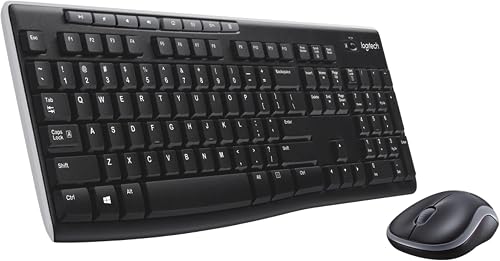
Logitech MK270 Full Size Wireless Keyboard
9.6/10 our score
See it on Amazon -
3
 Best for quiet modern desks
Logitech MK470 Slim Wireless Combo Compact Keyboard
9.5/10 our score
See it on Amazon
- 4
 Check it
Macally Small Wireless Keyboard and Mouse Combo
Best for basic PC setups - 5
 Check it
SABLUTE Wireless Keyboard and Mouse Combo
Best for rechargeable backlighting - 6
 Check it
TopMate Wireless Keyboard and Mouse Ultra Slim
Best for a slim full-size set
The best compact keyboard and mouse combos for small desks
The TECKNET is the best overall match for a small desk because it combines a 78-key layout with quiet operation and a shared receiver. The other picks suit different needs, including number pads, backlighting, rechargeable power, or full-size typing.
Our score weighs specs, features, and buyer feedback against what you're shopping for. We compared the keyboard size, connection type, power system, mouse controls, layout, and space-saving features.
TECKNET Wireless Keyboard and Mouse Combo: Best for small desks
- 78-key mini keyboard
- Scissor-switch keys
- Silent mouse clicks
- One 2.4GHz USB receiver
The TECKNET combo saves space with a 78-key mini keyboard and a small wireless mouse. Its quiet keys, silent clicks, 12 multimedia hotkeys, and shared receiver fit focused work in compact spaces.
Pros
- Small 78-key layout
- Quiet keyboard and mouse
- 36-month warranty
Cons
- No Bluetooth
- Batteries are not included
- Multimedia shortcuts are not fully compatible with Mac OS
TECKNET is the strongest choice when desk space is your first concern. Its 78-key mini keyboard is smaller than the full-size 104-key and 102-key designs in this group, so it leaves more room for a laptop, writing pad, or other desk items.
The scissor-switch keys are shaped to match your fingertips, while the keyboard keys and mouse clicks are designed for quiet use. That combination fits shared offices, dorm rooms, coffee shops, and home work areas where loud clicks can be distracting.
The keyboard and mouse share one nano USB receiver through a 2.4GHz wireless connection with a stated range of up to 49 ft. The receiver needs a USB-A port, and this set does not support Bluetooth.
It also requires 4 AAA batteries in total, with 2 for the keyboard and 2 for the mouse.
The 12 multimedia hotkeys cover volume, music playback, email, and web browsing. TECKNET says the multimedia shortcuts are not fully compatible with Mac OS, so Mac users should focus on the basic typing and pointing functions.
Choose TECKNET for a compact keyboard mouse combo that is quiet, portable, and simple to share between compatible computers. Pick another model if you need a number pad or Bluetooth.
Logitech MK270 Full Size Wireless Keyboard: Best for full-size typing
- Full-size keyboard
- Number pad and arrow keys
- 8 multimedia hotkeys
- Spill-resistant design
The Logitech MK270 keeps the number pad, arrow keys, and full-size F-keys that compact keyboards often remove. It is a better fit when desk space matters less than familiar typing.
Pros
- Full-size layout
- Spill-resistant keyboard design
- Ambidextrous mouse
Cons
- Larger than the compact picks
- USB receiver connection
- Windows-focused compatibility
The Logitech MK270 is the right pick when compact means manageable rather than mini. Its full-size keyboard keeps the number pad, arrow keys, and standard F-keys that are useful for spreadsheets, data entry, and regular desktop typing.
The low-profile keys are designed for a comfortable, quiet typing experience. Eight multimedia hotkeys provide direct access to internet, email, play, pause, and volume functions.
This combo uses one USB receiver with a stated wireless range of up to 33 ft. The keyboard has a spill-resistant design, durable keys, and adjustable tilt legs, while the compact mouse is ambidextrous for left- or right-handed use.
The battery figures are a major reason to choose this set. Logitech states up to 36 months for the keyboard and 12 months for the mouse, with on/off switches on both devices.
The keyboard and mouse are included, along with a USB receiver and user documentation.
Choose the MK270 when you need a familiar full-size keyboard and long battery intervals. It is not the best fit for a very narrow desk or a laptop bag.
Logitech MK470 Slim Wireless Combo Compact Keyboard: Best for quiet modern desks
- Slim compact keyboard
- Number pad
- Low-profile scissor keys
- 36-month keyboard battery life
The Logitech MK470 combines a slim body with a number pad, making it useful for small desks that still need spreadsheet keys. Its quiet keyboard and noise-reduced mouse suit shared work areas.
Pros
- Number pad in a compact body
- Quiet typing and mouse
- Long battery life
Cons
- Designed for Windows
- USB receiver required
- Larger keyboard than 78-key mini models
The Logitech MK470 is best for a quiet desk that still needs a number pad. Its compact keyboard has 104 keys, a number pad, low-profile scissor keys, and a layout optimized for Windows.
The slim keyboard and mouse take less visual and physical space than many traditional full-size sets. The ambidextrous mouse has 3 buttons, optical tracking, a mechanical scroll wheel, and 1000 DPI sensor resolution.
A single USB nano receiver provides a 2.4GHz wireless connection with a stated range of up to 33 ft. The keyboard battery life is listed as up to 36 months, while the mouse is listed at up to 18 months.
Auto-sleep helps reduce power use.
The MK470 is designed for Windows and also works with ChromeOS according to the product information. The keyboard has 12 customizable FN keys through Logi Options software, which may help if you want shortcuts for repeated tasks.
Choose it when a 78-key keyboard feels too restrictive but a standard bulky keyboard feels too large. For Mac-specific choices, see our guide to the best keyboard and mouse combo for Mac.
Macally Small Wireless Keyboard and Mouse Combo: Best for basic PC setups
- 78-key compact keyboard
- 12 shortcut keys
- 2.4GHz wireless connection
- Mouse with 3 DPI modes
The Macally set is a straightforward compact choice for a PC or laptop. Its 78-key keyboard, 12 shortcuts, and adjustable mouse speed cover everyday typing and pointing without taking much desk space.
Pros
- Compact 78-key layout
- 3 mouse DPI modes
- Up to 2-year warranty
Cons
- PC-focused design
- Requires 4 AAA batteries
- No backlight listed in the product data
The Macally Small Wireless Keyboard and Mouse Combo is a practical pick for basic PC use in a small space. Its 78 slim scissor keys keep the keyboard compact, while 12 shortcuts provide quick access to common tasks.
The 2.4GHz wireless connection uses a single USB dongle with a stated range of up to 30 ft. That shared receiver helps avoid using separate USB ports for the keyboard and mouse.
The mouse has a slim body, a 3-button layout, quiet clicks, and 3 DPI options: 800, 1200, and 1600. Choose a lower setting for slower pointer movement or a higher setting when you want to cross the screen with less hand movement.
This combo requires 4 AAA batteries. Macally describes it as designed for PC, although the compatibility data also names a wide range of computer brands and devices.
Check your operating system and USB ports before buying.
Choose Macally if you want a small keyboard mouse combo with adjustable mouse speed and a simple setup. It is less suitable if you want rechargeable power or a built-in backlight.
SABLUTE Wireless Keyboard and Mouse Combo: Best for rechargeable backlighting
- 7-color switchable keyboard backlight
- Rechargeable keyboard and mouse
- 102 keys with number pad
- Windows and Mac layouts
The SABLUTE adds rechargeable power, a switchable keyboard backlight, and Windows and Mac layouts. Its 102-key body is compact compared with some full-size designs but is not as small as a 78-key mini keyboard.
Pros
- Rechargeable design
- Switchable backlight
- Windows and Mac layouts
Cons
- Larger than mini compact keyboards
- Backlight affects battery use
- USB receiver connection
SABLUTE is the best choice here for rechargeable power and illuminated keys. Its 102-key keyboard includes a number pad and 12 shortcuts, so it gives you more keys than a 78-key mini design while staying described as ultra-slim.
The keyboard has 7 switchable backlight modes and 4 brightness levels. The mouse changes through 7 random colors.
These lighting controls can help in dim rooms, but they also add a reason to consider power use and charging habits.
The keyboard and mouse use rechargeable batteries and charge with the included Type-C cable. Auto-sleep helps conserve power, with standby figures of up to 365 days for the keyboard and 270 days for the mouse.
SABLUTE supports Windows and Mac layouts. Pressing Fn+W activates the Mac layout, while Fn+Q switches to the Windows layout.
The shared USB receiver provides a stated signal range of up to 33 ft.
Choose SABLUTE when you want lighting, a number pad, and rechargeable power in one set. It is not as small as TECKNET or Macally, and the backlight may be unnecessary for a bright office.
For Apple tablet setups, compare the layout and connection needs with the best keyboard and mouse combo for iPad.
TopMate Wireless Keyboard and Mouse Ultra Slim: Best for a slim full-size set
- 104-key keyboard
- Numeric keypad
- Scissor-switch keys
- Keyboard cover included
The TopMate keeps a full numeric keypad while using an ultra-slim 14.55 x 5.5 x 0.8 in body. The included cover adds a practical way to protect the keyboard between uses.
Pros
- Full-size 104-key layout
- Slim body
- Batteries and cover included
Cons
- Not as compact as 78-key models
- Hotkeys are not fully compatible with Mac
- Battery life varies by use
TopMate suits buyers who want a slim full-size keyboard with a protective cover. Its 104-key layout keeps the numeric keypad and 12 function keys, while the keyboard body measures 14.55 x 5.5 x 0.8 in.
The keyboard and mouse share one nano receiver through a 2.4G wireless connection with a stated range of up to 10 m. The receiver stores at the bottom of the mouse, and the set is designed for plug-and-play use without extra software.
Scissor-switch keys and a silent mouse are intended to reduce noise. The mouse has adjustable DPI, with 1600 DPI as the default setting.
The keyboard and mouse use included AA and AAA batteries, with battery life stated at 3 to 5 months depending on use.
The included keyboard cover helps protect against dust and liquid between uses. TopMate also describes the keyboard as compatible with Windows XP, ME, Vista, 7, 8, 10, and 11, while noting that hotkeys are not fully compatible with Mac.
Choose TopMate if you want a slim full-size keyboard and a cover in the same set. Pick a 78-key model if your main goal is the smallest possible desk footprint.
How do you choose a compact keyboard and mouse combo?
Choose by keyboard layout first, then check the receiver, power system, and mouse controls. A compact keyboard mouse combo is only useful if it keeps the keys you use most and connects to your computer without extra adapters.
Do you need a number pad?
Choose a 78-key keyboard if you rarely enter numbers and want the smallest layout. TECKNET and Macally use 78-key designs, which leave more room for a mouse and other desk items.
Choose the Logitech MK470, SABLUTE, or TopMate if you enter numbers often. Their keyboards include number pads, although they take more room than the mini options.
Will the receiver fit your computer?
Most of these wireless sets use a USB receiver rather than Bluetooth. TECKNET specifically requires a USB-A port, so check the ports on your laptop or desktop before ordering.
The shared receiver can save a port compared with separate keyboard and mouse receivers. If your computer has only USB-C ports, you may need a compatible adapter, which is not included in the product information here.
For laptop-focused alternatives, compare the best wireless keyboard mouse combo for laptop.
Should you choose batteries or rechargeable power?
Battery-powered sets are convenient if you keep spare batteries nearby. Logitech lists long battery life for the MK270 and MK470, while TopMate includes batteries and gives a 3 to 5 month range that varies with use.
SABLUTE is the rechargeable option in this group. It uses a Type-C cable and adds auto-sleep, which suits buyers who prefer charging instead of replacing batteries.
Is a 2.4GHz set suitable for shared spaces?
A 2.4GHz keyboard mouse combo can suit shared spaces when the keyboard and mouse are designed for quiet use. TECKNET, Logitech MK470, Macally, SABLUTE, and TopMate all describe quiet or noise-reduced operation.
Quiet operation does not change the layout or desk footprint. Check the key count and keyboard dimensions as carefully as the noise features.
Do you need to switch between devices?
These picks use a shared wireless receiver, so they are aimed at a single connected computer at a time. If you regularly move between a laptop, tablet, and desktop, a multi-device design may be a better match.
Our guide to the best keyboard mouse combo multi device focuses on switching between devices and the connection features that support it.
How should you set up and care for a small keyboard and mouse combo?
Start by placing the receiver where it has a clear path to the keyboard and mouse, then install or charge the required power source. A front USB port or a short extension can help if a tower sits under a desk or behind a monitor.
Keep the keyboard flat or at its intended angle, and use the mouse on a surface where its optical tracking stays consistent. Glass, glossy finishes, and heavy dust can make tracking feel uneven, so a plain matte pad or clean desk surface gives steadier control.
Test the keys and scroll wheel before you settle into a longer work session.
Store a removable receiver in its intended location when traveling. TECKNET stores its receiver inside the mouse battery compartment, while TopMate stores the nano receiver at the bottom of the mouse.
That habit prevents a lost receiver, which can make a wireless set unusable. Pack the keyboard and mouse separately from loose cables, pens, and drinks so keys and scroll wheels do not get pressed or scratched in a bag.
For laptop users, pairing the setup at a desk first can save time when you arrive at a new workspace.
Keep drinks away from the keyboard even when a model has a spill-resistant design. Spill resistant does not mean waterproof, and liquid can still reach switches, contacts, and battery compartments.
For cleaning, turn the devices off, remove batteries or disconnect charging, and use a dry or lightly damp cloth without allowing liquid to enter the keys. Wipe the top surfaces, key edges, and mouse shell, then let everything dry fully before use.
Compressed air can help with loose crumbs, but gentle pressure matters more than force.
If keys or clicks respond slowly, check the batteries or recharge the devices before changing other settings. SABLUTE specifically connects delayed responses or sticky keys with low battery voltage.
Try fresh batteries or a full charge, then test on a calm surface and in the same room. Move the receiver closer if walls, metal, or many nearby wireless devices seem to interfere.
Keep spare batteries in the right size, because a keyboard and mouse may not use the same type. Label the drawer or bag pocket where spares live so replacement takes minutes, not a search through cables.
Which compact keyboard mouse combo should you choose?
Choose the TECKNET Wireless Keyboard and Mouse Combo for the smallest practical layout, quiet use, and a shared receiver. Its 78-key design is the clearest fit for a small desk, travel bag, dorm room, or focused home office.
Students and remote workers who carry a laptop daily may value the light, slim body and single USB receiver. The silent clicks and quiet keys also help in shared rooms where extra noise carries.
People with larger hands, spreadsheet-heavy jobs, or a strong need for a number pad should look at a larger layout instead.
Choose the Logitech MK270 or TopMate when a full-size keyboard and number pad matter more than the smallest footprint. The MK270 keeps familiar F-keys, arrow keys, and number entry for regular desktop typing and data tasks.
TopMate keeps a 104-key layout in a slim body, and its included cover can protect the keyboard from dust and liquid between uses. Both suit people who learned touch typing on a standard board and dislike compressed keys.
The cost is desk space, because a full-size board leaves less room for a laptop, notebook, or monitor stand.
Choose the Logitech MK470 for a slim design with a number pad and long stated battery life. It sits between a 78-key mini board and a bulky full-size set, so it can suit a quiet modern desk without giving up number entry.
Its low-profile scissor keys and noise-reduced mouse fit shared offices and home work areas. Windows users who want customizable FN shortcuts may also like the Logi Options option.
Pick Macally for a simple 78-key PC setup with adjustable mouse DPI, including lower and higher speeds for different screen sizes and personal preference.
Pick SABLUTE for rechargeable power, backlighting, and Windows and Mac layouts. Its 102-key keyboard adds a number pad, 12 shortcuts, and switchable lighting for dim rooms, while the Type-C charging suits people who dislike buying batteries.
The backlight and larger body are trade-offs, so bright offices or very tight desks may prefer a mini board. Across all picks, the best compact keyboard mouse combo depends on the keys you use every day, your hand size, and your computer ports.
Measure your desk, confirm the USB receiver will fit, and choose the smallest layout that still supports your work.
Our top 3 picks at a glance
-
1
-
2
Best for full-size typing
Logitech MK270 Full Size Wireless Keyboard
9.6/10 our score
See it on Amazon -
3
Best for quiet modern desks
Logitech MK470 Slim Wireless Combo Compact Keyboard
9.5/10 our score
See it on Amazon
Frequently asked questions
What is the best compact keyboard mouse combo for a small desk?
The TECKNET Wireless Keyboard and Mouse Combo is the strongest fit for most small desks because it uses a 78-key mini keyboard, a quiet mouse, and one shared USB receiver. If you need a number pad, choose the Logitech MK470 or SABLUTE instead.
Measure the usable desk depth before choosing a full-size layout.
Is a compact keyboard and mouse combo better than a full-size set?
A compact keyboard and mouse combo is better when desk space, portability, or a short reach matters most. A full-size set is better when you use a number pad, arrow keys, and full-size function keys often.
The Logitech MK270 and TopMate keep full-size layouts, while TECKNET and Macally use 78-key keyboards.
Do compact keyboard and mouse combos use Bluetooth?
The products in this roundup use USB receivers rather than Bluetooth. TECKNET uses a 2.4GHz connection and requires a USB-A port, while the other wireless picks also use a shared or nano USB receiver.
Check your computer for a compatible USB port before ordering.
Which small keyboard and mouse combo is quietest?
TECKNET, Logitech MK470, Macally, SABLUTE, and TopMate all describe quiet or noise-reduced typing and mouse use in their product information. The best choice depends on layout, power, and connection needs as well as sound.
A low-profile or scissor-switch keyboard can also reduce key noise.
Are compact keyboard and mouse combos good for laptops?
Yes. A compact keyboard and mouse combo can give a laptop a more comfortable desktop position while keeping the setup small.
TECKNET, Macally, and the Logitech compact model are especially suited to limited desk space.
Confirm the USB receiver type and operating system before you buy.


