9 Best Mice for Hand Arthritis (November 2026)
The best mice for arthritic hands include the Anker 2.4G Wireless Ergonomic Mouse for a simple vertical grip, the Nulea M501 Wireless Trackball Mouse Ergonomic Thumb for thumb-controlled cursor movement, and the Logitech Ergo M575S Wireless Bluetooth Trackball Mouse for quiet trackball clicks.
On this page (4 sections)
The best mouse for hand arthritis depends on which movements feel difficult. A thumb trackball can reduce wrist travel, while a vertical mouse changes how your hand rests; check both the grip and controls before choosing.
This roundup compares nine mice by their control style, connection, hand fit and features that may matter when finger or wrist movement is uncomfortable. For help choosing a typing setup too, see our best keyboard for computer guide.
Our picks at a glance
-
1
 Best for a simple vertical grip
Anker 2.4G Wireless Ergonomic Mouse
9.7/10 our score
See it on Amazon -
2
 Best for thumb-controlled cursor movement
Nulea M501 Wireless Trackball Mouse Ergonomic Thumb
9.7/10 our score
See it on Amazon -
3
 Best for quiet trackball clicks
Logitech Ergo M575S Wireless Bluetooth Trackball Mouse
9.6/10 our score
See it on Amazon
- 4
 Check it
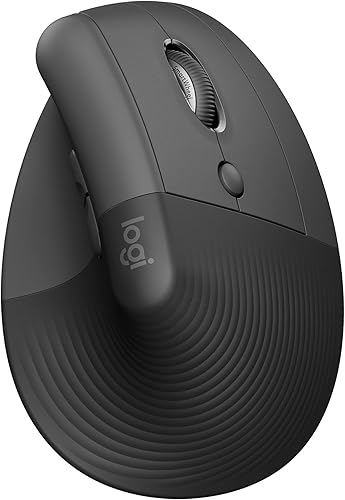
Logitech Lift Vertical Ergonomic Wireless Mouse
Best for small to medium hands - 5
 Best for multiple device connectionsCheck it
- 6
 Check it
ProtoArc EM11 NL Wireless Ergonomic Vertical Mouse
Best for small hands and rechargeable power - 7
 Best for a rechargeable vertical mouseCheck it
- 8
 Best for quiet clicks and rechargingCheck it
- 9
 Check it
UGREEN Ergonomic Wireless Mouse
Best for quiet tracking with larger hands
How we chose mice for arthritis in the hands
We compared the stated shape, controls, connectivity and power options against the needs of someone seeking a more comfortable way to control a cursor. Our score weighs specs and features against the searcher's needs.
A mouse cannot promise relief from arthritis symptoms, and no single shape works for everyone. Thumb trackballs reduce the need to move the mouse across a surface, while vertical models offer a more upright grip.
The products below are right-handed models. Check hand orientation and dimensions before buying, and consider whether your thumb can comfortably operate a trackball.
| Product | Best for | Control | Connection | Hand | Our score |
|---|---|---|---|---|---|
| Anker 2.4G Wireless Ergonomic Mouse | a simple vertical grip | Optical mouse | 2.4 GHz USB receiver | Right-handed | 9.7 |
| Nulea M501 Wireless Trackball Mouse Ergonomic Thumb | thumb-controlled cursor movement | Thumb trackball | Bluetooth or 2.4 GHz USB receiver | Right-handed | 9.7 |
| Logitech Ergo M575S Wireless Bluetooth Trackball Mouse | quiet trackball clicks | Thumb trackball | Bluetooth or Logi Bolt USB receiver | Right-handed | 9.6 |
| Logitech Lift Vertical Ergonomic Wireless Mouse | small to medium hands | Optical mouse | Bluetooth Low Energy or Logi Bolt USB | Right-handed configuration | 9.5 |
| TECKNET Ergonomic Mouse | multiple device connections | Optical mouse | Bluetooth or 2.4 GHz USB receiver | Right-handed; best for medium to large hands | 9.4 |
| ProtoArc EM11 NL Wireless Ergonomic Vertical Mouse | small hands and rechargeable power | Optical mouse | Bluetooth or 2.4 GHz USB-A receiver | Right-handed; designed for small to medium hands | 9.3 |
| Lekvey Ergonomic Mouse | a rechargeable vertical mouse | Optical mouse | 2.4 GHz USB receiver | Right-handed; recommended for medium or large hands | 9.1 |
| TECKNET Ergonomic Mouse | quiet clicks and recharging | Optical mouse | Bluetooth or 2.4 GHz USB-A receiver | Right-handed; fits small to medium hands | 8.6 |
| UGREEN Ergonomic Wireless Mouse | quiet tracking with larger hands | Optical mouse | Bluetooth or 2.4 GHz wireless | Right-handed; designed for medium to large hands | 8.1 |
Which mice suit different arthritis needs?
The best fit depends on your preferred grip and which movements you want to minimize. The top-scoring Anker is a vertical option, while the Nulea and Logitech M575S use thumb trackballs.
Anker 2.4G Wireless Ergonomic Mouse: Best for a simple vertical grip
- Right-handed vertical shape
- 2.4 GHz USB receiver
- 800, 1200 or 1600 DPI
A straightforward vertical mouse that places your hand in a handshake position. It uses a USB receiver and needs 2 AAA batteries.
Pros
- Vertical grip
- Three DPI settings
- Next and previous buttons
Cons
- Right-handed only
- Click sounds are unavoidable
The Anker is a simple starting point if you want to try a vertical grip without switching to a trackball. Its shape promotes a neutral handshake position, and the optical sensor has 800, 1200 and 1600 DPI settings.
It connects through a 2.4 GHz USB receiver, so it does not use Bluetooth. The receiver stores in the mouse's bottom, and the mouse runs on 2 AAA batteries that are not included.
The next and previous buttons can help with page browsing, though they add controls your fingers may not need. Anker notes that the key click sounds are unavoidable, so this is not the pick for a quiet workspace.
Choose it if you want a basic vertical shape and use a USB port. If you want to compare more upright models, see our best vertical mouse wireless picks.
Nulea M501 Wireless Trackball Mouse Ergonomic Thumb: Best for thumb-controlled cursor movement
- Thumb-controlled trackball
- Bluetooth or USB receiver
- Rechargeable
The thumb-operated ball moves the cursor without requiring the mouse to travel across the desk. You can connect it to up to 3 devices.
Pros
- Cursor control without moving the mouse
- Four DPI settings
- Rechargeable battery
Cons
- Right-handed only
- Buttons are not programmable
The Nulea M501 lets you control the cursor with a smooth thumb-operated ball rather than pushing the mouse around. That can be useful on a crowded desk or another small surface, though it still asks your thumb to do the tracking work.
It connects to up to 3 devices through Bluetooth or its USB receiver, and it has four DPI settings: 400, 800, 1200 and 1600. The built-in battery is rechargeable with the included cable; Nulea advises charging through a computer USB port or a 5V charger, not a fast charger.
For the trade-offs, see our rechargeable versus battery mouse guide.
Its six buttons are not programmable, and the forward and back buttons are not compatible with Mac OS. Consider those limits if you rely on custom shortcuts or use a Mac.
Choose it if thumb control feels easier than wrist movement. If you would rather try an upright grip, compare options in our guide to vertical mice for small hands.
Logitech Ergo M575S Wireless Bluetooth Trackball Mouse: Best for quiet trackball clicks
- Thumb-controlled trackball
- Bluetooth or Logi Bolt receiver
- Quiet clicks
Its sculpted shape supports the hand while the thumb trackball controls the cursor. It works on any surface because you do not move the mouse.
Pros
- Quiet clicks
- Bluetooth or USB receiver
- Up to 18 months of battery life
Cons
- Right-handed only
- Customizable buttons require Logi Options+ app
The Logitech Ergo M575S is another thumb trackball, with a sculpted shape that supports the hand while the thumb moves the cursor. Since you do not need to move the mouse, Logitech describes it as suitable for any surface and small workspaces.
It connects by Bluetooth or the included Logi Bolt USB receiver. Logitech says the included AA battery can last up to 18 months, though actual life can vary with use and computing conditions.
The clicks are quiet, and the mouse has 3 customizable buttons. Customization requires Logi Options+ on a recent version of Windows or macOS, so check that software fits your computer before relying on it.
Choose it if you want a trackball with quiet clicks and a sculpted hand rest. If you use a Mac, our best wireless mouse for a Mac guide covers connection and compatibility considerations.
Logitech Lift Vertical Ergonomic Wireless Mouse: Best for small to medium hands
- 57-degree vertical shape
- Softly textured grip and thumb rest
- Quiet clicks
A vertical grip with a thumb rest gives small to medium right hands a more upright alternative to a flat mouse. It has quiet clicks and customizable buttons.
Pros
- Designed for small to medium hands
- Quiet clicks
- Bluetooth or USB receiver
Cons
- Right-handed configuration
- Vertical shape may take getting used to
The Logitech Lift is designed for small to medium right hands and has a 57-degree vertical shape, softly textured grip and thumb rest. Its upright position may feel more natural to you than a flat mouse, but it does not remove the need to move your hand to steer.
It offers Bluetooth Low Energy or a Logi Bolt USB connection, plus customizable buttons and quiet clicks. Logitech says the battery can last up to 2 years; the included components include an AA battery and USB receiver.
The button choices may help if you want shortcuts, but be sure the grip feels comfortable before committing to long sessions. A vertical shape can take time to get used to.
Choose it if your hand is small to medium and you prefer a vertical grip. For a larger fit, see our guide to vertical mice for large hands.
TECKNET Ergonomic Mouse: Best for multiple device connections
- Vertical right-handed shape
- Bluetooth and 2.4 GHz receiver
- Six DPI levels
Switch among up to 3 connected devices and choose from six cursor-speed settings. Its maker recommends an adjustment period for the vertical shape.
Pros
- Connects to up to 3 devices
- Six DPI levels
- Left and right clicks are quiet
Cons
- Right-handed only
- Function buttons are not quiet
This TECKNET mouse can switch between up to 3 devices, using Bluetooth for two connections and a 2.4 GHz receiver for another. Six DPI settings give you several cursor-speed choices without requiring software.
Its near-vertical shape is right-handed and intended for medium to large hands. The left and right buttons are quiet, but the other function buttons are not, and it requires 2 AAA batteries.
The maker recommends allowing about a week to adjust to the shape. That makes it a better match if you can try a vertical grip gradually rather than expecting it to feel familiar right away.
Choose it if you need device switching and a medium to large fit. If quiet button sound matters most, see more options in our best silent mouse for computer guide.
ProtoArc EM11 NL Wireless Ergonomic Vertical Mouse: Best for small hands and rechargeable power
- Vertical grip for hands under 7.5 in
- Bluetooth or 2.4 GHz USB-A receiver
- Rechargeable
This rechargeable vertical mouse is designed for hand lengths under 7.5 in. Its left and right clicks are quiet, while the other buttons are not.
Pros
- Clear hand-length guidance
- Rechargeable
- Can connect to 3 devices
Cons
- Right-handed only
- Forward and back buttons do not work with Mac OS
The ProtoArc EM11 NL is designed for hands under 7.5 in long, which makes its fit guidance useful if larger vertical mice feel hard to hold. The vertical shape aims to keep the wrist and forearm in a more relaxed position.
It connects to up to 3 devices through dual Bluetooth and a 2.4 GHz USB-A receiver. The built-in battery recharges over USB-C, and the left and right buttons click quietly.
ProtoArc recommends taking 1–2 weeks to get used to the grip. Its buttons are not programmable, and the forward and back buttons are not compatible with Mac OS.
Choose it if your hand is small to medium and you want a rechargeable vertical mouse. For an upright mouse intended for bigger hands, compare our large-hand vertical mouse guide.
Lekvey Ergonomic Mouse: Best for a rechargeable vertical mouse
- Right-handed vertical grip
- Rechargeable
- Three DPI settings
A rechargeable vertical option with a USB receiver, page navigation buttons and three cursor-speed settings. The stated size is 5 x 3 in.
Pros
- Rechargeable by USB-C cable
- Three DPI settings
- Forward and back buttons work with Mac OS
Cons
- Right-handed only
- Vertical grip has an adjustment period
Lekvey combines a vertical grip with a rechargeable battery and a 2.4 GHz USB receiver. It has three DPI settings and forward and back buttons for browsing, with all buttons non-programmable.
The stated size is 5 x 3 in, and the package description recommends it for medium or large hands. Lekvey says some customers need a 3–5 day adjustment to the vertical shape, so give yourself time to judge the fit.
The wireless connection uses a receiver rather than Bluetooth. If you need a mouse that pairs directly with Bluetooth, one of the trackballs or multi-connection vertical options may suit your setup better.
Choose it if you prefer a rechargeable vertical mouse with a USB receiver.
TECKNET Ergonomic Mouse: Best for quiet clicks and recharging
- 52-degree vertical angle
- Rechargeable battery
- Bluetooth or USB-A receiver
A vertical mouse with a rechargeable battery and quiet clicks on the left and right buttons. Forward and back buttons are unavailable on Mac.
Pros
- Rechargeable
- Connects to 3 devices
- Six DPI levels
Cons
- Right-handed only
- Forward and back buttons do not work on Mac
This TECKNET vertical model has a 52-degree angle and is described as fitting small to medium hands. Its rechargeable battery, Bluetooth and USB-A receiver provide flexible connection and power choices.
It connects to up to 3 devices and offers six DPI levels. The left and right clicks are quiet, but the forward and back buttons do not work on Mac, so check your workflow if you use those controls.
The product details describe a right-handed design. As with other vertical mice, a more upright grip changes hand posture but still requires you to move the mouse to steer.
Choose it if you want a rechargeable vertical grip with quiet main clicks.
UGREEN Ergonomic Wireless Mouse: Best for quiet tracking with larger hands
- Vertical right-handed grip
- Quiet clicks
- Bluetooth or 2.4 GHz wireless
A quiet-click vertical mouse with four DPI settings and a 5-button layout. UGREEN says its fit is intended for medium to large hands.
Pros
- Quiet clicks
- Four DPI settings
- Can switch among up to 3 devices
Cons
- May not suit small hands
- Right-handed only
UGREEN's mouse pairs a vertical right-handed grip with quiet clicks and four DPI levels: 1000, 1600, 2000 and 4000. It connects by Bluetooth or 2.4 GHz wireless and can switch among up to 3 devices.
UGREEN describes it as suitable for medium to large hands and says it may not fit smaller hands. It uses one AA battery and has a smart sleep mode.
The 5-button layout may help with common browsing tasks, but consider whether the shape and size feel manageable before choosing it. Its higher score here reflects its quiet controls and device switching, balanced against its more limited hand-size fit.
Choose it if you have medium to large hands and want quiet clicks.
What should you compare before choosing a mouse for arthritis?
Compare grip style, hand size and the movements required by the controls. A mouse that feels easier to hold may still be uncomfortable if its main buttons or scroll wheel are hard for you to use.
Would a trackball or vertical mouse suit your hand better?
A trackball keeps the body in place while you steer with your thumb, which can reduce wrist and arm travel. A vertical mouse changes your grip angle, but you still move the whole mouse to guide the cursor.
Think about your most comfortable thumb and hand movements. If thumb motion is difficult, a trackball may not be a good fit even when reduced wrist movement sounds appealing.
How should you check size and handedness?
The products here are right-handed. Check the hand-size guidance where available: the Logitech Lift is for small to medium hands, the ProtoArc is for hands under 7.5 in long, and UGREEN says its mouse suits medium to large hands.
If your left hand is more comfortable, a right-handed mouse may force an awkward grip. See our wireless left-handed mouse guide for options made for left-hand use.
Do quiet clicks or wireless features matter?
Quiet clicks can reduce noise, but they do not mean every button is silent. TECKNET says only the left and right clicks are quiet on its B0DG5SW7F4 model, while the ProtoArc describes its left and right clicks as silent.
Choose Bluetooth if you want to pair without a USB receiver, or a receiver if that connection suits your computer. Rechargeable models avoid disposable batteries, while the Anker uses 2 AAA cells and the Logitech M575S includes an AA battery.
Which mouse is the best choice for arthritic hands?
Choose the Logitech Ergo M575S if reducing wrist travel matters and thumb control feels comfortable. Pick the Anker for a simple vertical grip, the Lift for small to medium hands, or the ProtoArc if you want a rechargeable vertical mouse with hand-length guidance.
For ongoing pain or difficulty using a computer, ask a health care professional about suitable input devices. Your most comfortable choice depends on your hand size, grip and which movements feel manageable.
Our top 3 picks at a glance
-
1
Best for a simple vertical grip
Anker 2.4G Wireless Ergonomic Mouse
9.7/10 our score
See it on Amazon -
2
Best for thumb-controlled cursor movement
Nulea M501 Wireless Trackball Mouse Ergonomic Thumb
9.7/10 our score
See it on Amazon -
3
Best for quiet trackball clicks
Logitech Ergo M575S Wireless Bluetooth Trackball Mouse
9.6/10 our score
See it on Amazon
Frequently asked questions
Can a mouse help if you have arthritis in your fingers?
A mouse with fewer movements or a grip that feels comfortable to you may make computer tasks easier, but comfort varies by person. A trackball keeps the mouse itself still, while a vertical mouse changes your hand position.
Try to match the control style to the movements that bother you most.
Is a trackball or vertical mouse better for arthritic hands?
A trackball can suit you if moving your wrist or arm is uncomfortable, since your thumb moves the cursor while the mouse stays in place. A vertical mouse may suit you if an upright handshake grip feels more relaxed.
Neither style is right for everyone, so consider your thumb comfort and hand size.
Should I choose a wireless mouse for arthritis?
Wireless connection does not determine whether a mouse feels comfortable, but it can reduce cable clutter around your hand. These picks use Bluetooth, a USB receiver or both.
Check which connection your computer supports and whether the mouse needs disposable batteries or recharging.
How can I choose a mouse for arthritis in my fingers?
Start with the controls you can use comfortably, including the main buttons, scroll wheel and any side buttons. A trackball reduces the need to move the mouse, but it still requires thumb control.
If clicking or scrolling causes ongoing pain, ask a health care professional about suitable input options.


