5 Best All-in-One Printers Under $100 (November 2026)
The best all-in-one printers under 100 dollars include the Canon MegaTank G3270 All-in-One Wireless Color Printer for low ink replacement needs, the Canon PIXMA TR8620a for fax and two-sided documents, and the HP Envy 6155 Wireless All-in-One Color Inkjet for everyday home documents.
On this page (5 sections)
The best all in one printer under 100 for most homes is the Canon MegaTank G3270, because its included ink system is built around a high stated page yield. That focus matters when you print in most weeks rather than only a few times a year.
An all-in-one printer prints, copies and scans from one device. Some models also fax, use a touchscreen, connect wirelessly or feed several pages for scanning.
Match the printer to your main job before you judge smaller details.
The Canon MegaTank G3270 prints, copies and scans wirelessly. Canon states up to 6,000 black and white or 7,700 color pages from a single set of inks, with up to 2 years of ink included.
That stated yield suits households that print school papers, forms and everyday documents on a steady schedule. Frequent ink replacement can interrupt a busy household routine.
The Canon PIXMA TR8620a takes a different route with print, copy, scan and fax functions. It also adds automatic two-sided printing and a 200-sheet capacity split between two feeding positions.
That split layout helps when you keep plain paper and a different paper type ready for separate jobs. Fax still matters for some offices and services.
The HP OfficeJet Pro 8135 suits a busier home office with print, scan, copy and fax functions. It adds an auto document feeder, automatic two-sided printing and a 225-sheet input tray.
Its listed black print speed reaches 20 pages per minute, which helps with batches of reports or presentations. A larger tray also reduces refills during longer jobs.
The HP Envy 6155 is aimed at everyday home printing with print, scan and copy functions. It includes automatic two-sided printing, a 100-sheet input tray and a 2.4-inch color touchscreen.
The Canon PIXMA TS7720 is the compact option for documents and photos. It prints, copies and scans with automatic two-sided printing and a 2.7-inch touchscreen, while keeping a shorter cabinet profile.
If you are comparing more than price, start with this home printer buying guide. It explains the main printer and scanner features before you decide which functions you actually need.
Keep paper stored flat and plan space for access during setup and refilling. A printer that fits your desk and routine will be easier to use every day.
Our picks at a glance
-
1
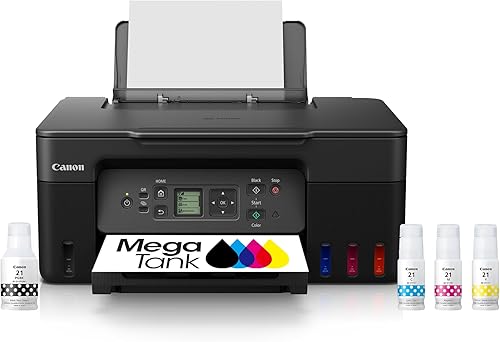 Best for low ink replacement needs
Canon MegaTank G3270 All-in-One Wireless Color Printer
9.7/10 our score
See it on Amazon -
2

-
3
 Best for everyday home documents
HP Envy 6155 Wireless All-in-One Color Inkjet
9.4/10 our score
See it on Amazon
- 4
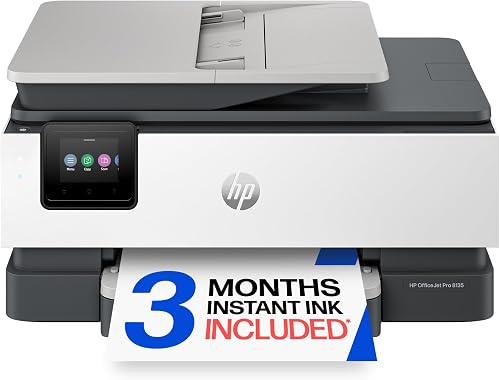 Check it
HP OfficeJet Pro 8135 Wireless All-in-One Color
Best for a busy home office - 5
 Check it
Canon PIXMA TS7720 Wireless All-in-One Color Inkjet
Best for compact photo and document printing
The best all-in-one printer under 100 for each home
The Canon MegaTank G3270 is the strongest overall pick for homes that print regularly, while the other models focus on faxing, speed, compact size or simple everyday jobs. Choose the feature that solves your main printing need first.
Our score weighs specs, features and buyer feedback against what you're shopping for. The products below are arranged from highest score to lowest score.
Canon MegaTank G3270 All-in-One Wireless Color Printer: Best for low ink replacement needs
- Wireless print, copy and scan
- Up to 2 years of ink included
- Up to 6,000 black and white or 7,700 color pages from one ink set
- 1.35-inch square LCD
The MegaTank design suits homes that print often and want more ink included at setup. It prints, copies and scans wirelessly, but it uses single-sided printing.
Pros
- Large stated ink yield
- Wireless print, copy and scan
- Smartphone and tablet support
Cons
- Single-sided printing
- Slower color speed than the other picks
The Canon MegaTank G3270 All-in-One Wireless Color Printer is the best all in one printer under 100 for households that want a large stated ink yield. It prints, copies and scans wirelessly, and it works with smartphones and tablets.
Canon includes up to 2 years of ink and states that one set can print up to 6,000 black and white or 7,700 color pages. That makes this the most compelling option here when reducing frequent ink replacement is more important than automatic duplex printing.
The G3270 prints up to 11 black and white pages per minute and 6 color pages per minute. Its 1.35-inch square LCD provides a small on-device display, while app control handles wireless tasks.
This model uses single-sided printing, so double-sided documents require manual page handling. Its 21.9 x 16.4 x 10.6 in size and 13.2 lb weight also deserve a place on your desk plan.
Choose it for regular household documents, copies and scans with a high stated ink yield. If you need automatic two-sided printing or fax, select another model below.
Canon PIXMA TR8620a: Best for fax and two-sided documents
- Wireless print, copy, scan and fax
- Automatic two-sided printing
- 200-sheet capacity
- 15 black and 10 color images per minute
The PIXMA TR8620a is a strong home-office choice when faxing and automatic two-sided printing matter. Its split 200-sheet capacity helps separate paper types.
Pros
- Fax included
- Automatic two-sided printing
- 200-sheet capacity
Cons
- Heavier than the compact Canon TS7720
- Standard ink tanks rather than a MegaTank system
The Canon PIXMA TR8620a is the best all in one printer under 100 for a home office that needs faxing and automatic two-sided printing. It combines print, copy, scan and fax functions with a 200-sheet paper capacity.
The capacity is split between a 100-sheet cassette and a 100-sheet rear feed. That layout can help when you keep different paper types ready for separate jobs.
Black printing reaches 15 pages per minute, while color printing reaches 10 pages per minute. Automatic duplex printing handles both sides without requiring you to turn each sheet by hand.
The TR8620a also includes a touchscreen, USB connection and compatibility with PCs and smartphones. Its 13.8 x 17.3 x 7.5 in size is wide but relatively low, and it weighs 17.4 lb.
Choose this model when faxing, two-sided documents and paper flexibility matter. For the highest stated ink yield, the Canon MegaTank G3270 is a better fit.
HP Envy 6155 Wireless All-in-One Color Inkjet: Best for everyday home documents
- Print, scan and copy
- Automatic two-sided printing
- 100-sheet input tray
- 2.4-inch color touchscreen
The HP Envy 6155 fits everyday home printing, scanning and copying with a 100-sheet tray and color touchscreen. It includes a 3-month Instant Ink trial, then a monthly fee applies unless canceled.
Pros
- Automatic two-sided printing
- Color touchscreen
- 100-sheet input tray
Cons
- Cartridge use is limited to original HP chips or circuitry
- No fax function in the listed features
The HP Envy 6155 Wireless All-in-One Color Inkjet is the best home printer under 100 for everyday color documents, scans and copies. It prints up to 10 black and 7 color pages per minute and has a 100-sheet input tray.
Automatic two-sided printing helps with longer documents. The 2.4-inch color touchscreen gives you on-device controls, while wireless printing and the HP app support mobile printing, scanning, copying and faxing from a smartphone.
The listed functions are print, scan and copy, so treat this as a general home multifunction printer rather than a fax-focused choice. Its maximum media size is Letter, or 8.5 x 11 in.
HP includes a 3-month Instant Ink trial. After 3 months, a monthly fee applies unless you cancel it.
The printer is intended to work only with cartridges using original HP chips or circuitry, and firmware updates maintain those measures.
Choose the Envy 6155 for routine home paperwork, color pages and copies in a 100-sheet setup. If you need an auto document feeder or a larger tray, move up to the OfficeJet Pro 8135.
HP OfficeJet Pro 8135 Wireless All-in-One Color: Best for a busy home office
- Print, scan, copy and fax
- Automatic two-sided printing
- Auto document feeder
- 225-sheet input tray
The OfficeJet Pro 8135 is the fastest pick here for black printing and the best fit for a busy home office. Its auto document feeder, fax function and 225-sheet tray support larger document jobs.
Pros
- Fastest black print speed here
- Auto document feeder
- 225-sheet input tray
Cons
- Largest and heaviest HP pick
- Cartridge use is limited to original HP chips or circuitry
The HP OfficeJet Pro 8135 Wireless All-in-One Color Inkjet Printer is the best all in one printer under 100 for a busy home office. It prints up to 20 black and 10 color pages per minute, and it adds faxing, an auto document feeder and a 225-sheet input tray.
The auto document feeder helps with multi-page scan, copy and fax jobs. Automatic two-sided printing handles duplex documents, while the 2.7-inch color touchscreen gives you a larger control surface than the HP Envy 6155.
HP includes wireless printing, the HP app and connections for laptops, PCs and smartphones. Ethernet and USB are also listed, which gives you more ways to connect the printer in a home office.
The OfficeJet Pro 8135 measures 13.29 x 18.12 x 9.17 in and weighs 17.6 lb. It includes a 3-month Instant Ink trial, followed by a monthly fee unless canceled, and it is intended to work only with cartridges using original HP chips or circuitry.
Choose this model when speed, paper capacity and multi-page handling matter more than a smaller footprint. Its features are more office-focused than those of the compact Canon TS7720.
Canon PIXMA TS7720 Wireless All-in-One Color Inkjet: Best for compact photo and document printing
- Print, copy and scan
- Automatic two-sided printing
- 2.7-inch touchscreen
- Two easy-to-replace ink cartridges
The PIXMA TS7720 keeps the footprint compact while offering automatic two-sided printing and a 2.7-inch touchscreen. Its two-cartridge system suits straightforward home printing.
Pros
- Compact 6.7-inch height
- Automatic two-sided printing
- 15 black and 10 color pages per minute
Cons
- No fax function
- Maximum media size is 8.5 x 11 in
The Canon PIXMA TS7720 Wireless All-in-One Color Inkjet Printer is the best compact home printer under 100 for documents and photos. It prints, copies and scans, with automatic two-sided printing and a 2.7-inch LCD touchscreen.
Black printing reaches 15 pages per minute, while color printing reaches 10 pages per minute. The two-cartridge system is designed for easy replacement, and the printer supports wireless printing from smartphones.
Its 13.8 x 14.8 x 6.7 in dimensions make it the shortest printer in this group. At 13.8 lb, it is also lighter than the Canon TR8620a and both HP models.
The TS7720 supports paper sizes up to 8.5 x 11 in. Its listed functions do not include fax, so choose it for everyday printing, copying and scanning rather than home-office communications.
Choose this Canon when desk space is limited and automatic duplex printing matters. For a larger stated ink yield, the MegaTank G3270 is the stronger option.
How we compared these all-in-one printers
We compared the listed functions, print speeds, paper capacity, ink setup, controls, wireless options and physical dimensions. The best choice depends on how often you print and whether you need faxing, two-sided printing or multi-page document handling.
Which all-in-one printer has the lowest ink replacement pressure?
The Canon MegaTank G3270 has the strongest stated ink yield in this group. Canon lists up to 6,000 black and white or 7,700 color pages from one set of inks, along with up to 2 years of ink included.
That does not make every print job free. Your actual use depends on page coverage, color use and the type of documents you print.
The HP Envy 6155 and HP OfficeJet Pro 8135 include 3-month Instant Ink trials. After those trials, a monthly fee applies unless canceled, so include that choice in your long-term budget.
Which model is best for two-sided printing?
The Canon PIXMA TR8620a, HP Envy 6155, HP OfficeJet Pro 8135 and Canon PIXMA TS7720 include automatic two-sided printing. The Canon MegaTank G3270 uses single-sided printing.
Automatic duplex printing is useful for school papers, work documents and multi-page forms. It also reduces the need to remove and turn pages manually.
If you print only occasional one-page documents, this feature may matter less than cabinet size or included ink. If you print long documents often, it should move higher on your list.
Which printer is best for faxing?
The Canon PIXMA TR8620a and HP OfficeJet Pro 8135 include print, copy, scan and fax functions. The HP Envy 6155, Canon MegaTank G3270 and Canon PIXMA TS7720 list print, copy and scan functions without fax.
The TR8620a offers a 200-sheet capacity, while the OfficeJet Pro 8135 has a 225-sheet tray and an auto document feeder. Choose the HP for heavier multi-page office work, or the Canon if you prefer its smaller height and split paper layout.
For more options, compare this guide with our roundup of best wireless printers with fax.
How to choose a home printer under 100
A good home printer under 100 should match your document volume, available desk space and preferred ink setup. Start with the main job, then check the features that prevent daily friction.
Match the printer to your print volume
Choose the Canon MegaTank G3270 when you print regularly and want a high stated yield from one ink set. Its wireless print, copy and scan functions cover common household tasks.
Choose a cartridge model when your printing is more occasional or when you prefer a smaller, simpler setup. The Canon PIXMA TS7720 uses two cartridges and has a compact 6.7-inch height.
For a home office with frequent documents, the HP OfficeJet Pro 8135 has the fastest black print speed here at 20 pages per minute. Its 225-sheet input tray also means fewer paper refills than the 100-sheet HP Envy 6155.
Check the desk footprint before ordering
Measure the space for width, depth and height, then leave room for paper access and opening the printer during setup. The Canon PIXMA TS7720 measures 13.8 x 14.8 x 6.7 in, making it the shortest model here.
The Canon MegaTank G3270 measures 21.9 x 16.4 x 10.6 in, so its depth is greater than the other listed models. If your desk is shallow, compare those dimensions with the printer's intended position.
A separate stand can give you storage below the printer. See our guide to the best home printer stand if your desk surface is crowded.
Decide whether mobile control is enough
The Canon MegaTank G3270 works with smartphones and tablets and uses app control. The Canon PIXMA TR8620a supports PCs and smartphones with touch control, while the Canon PIXMA TS7720 supports smartphones and touch control.
The HP Envy 6155 and HP OfficeJet Pro 8135 use app control and wireless printing. The OfficeJet Pro 8135 also lists Ethernet and USB, which can be useful when you want a wired connection in a home office.
For a smaller home printer, see our comparison of the best small home printer. If you prefer HP models, our best HP home printer guide covers more choices.
Setup and care tips for an affordable home printer
Set up the printer on a stable surface, connect it using the method that fits your home and keep paper stored flat. Read the model instructions before installing ink or cartridges, then print a test page when setup is complete.
Keep the paper path clear and avoid overfilling the tray. A 100-sheet tray, 200-sheet layout and 225-sheet tray support different refill schedules, so choose a capacity that matches your typical jobs.
Use the printer's touchscreen or app for routine tasks, and keep the USB cable available if your chosen model supports USB. For wireless models, place the printer where your phone, tablet or computer can connect reliably.
Before choosing an HP model, review its cartridge rules and decide whether the Instant Ink trial fits your needs. The HP Envy 6155 and HP OfficeJet Pro 8135 are intended to work only with cartridges using original HP chips or circuitry.
If you are also comparing all-in-one computers for a shared desk, our guides explain How Does an All-in-one Computer Work? and How Much Desk Space Does an All-in-one Computer Need?. Those space considerations can help you plan a printer and computer together.
Verdict: which best all in one printer under 100 should you choose?
The Canon MegaTank G3270 is the best all in one printer under 100 for regular home printing and a high stated ink yield. It prints, copies and scans wirelessly for smartphones and tablets.
Its trade-off is single-sided printing, so longer two-sided documents need manual page handling. At 11 black and white pages per minute and 6 color pages per minute, it is also the slower color choice here.
Pick the Canon PIXMA TR8620a if you need faxing, automatic two-sided printing and a 200-sheet layout. The split 100-sheet cassette and 100-sheet rear feed help separate paper types for different jobs.
That model is wider and heavier than the compact Canon TS7720, so check desk space first. It uses standard ink tanks rather than a MegaTank system, which changes how you plan for later ink purchases.
Choose the HP Envy 6155 for everyday home documents with a color touchscreen and 100-sheet tray. Automatic two-sided printing helps with longer school or household paperwork.
Remember that HP includes a 3-month Instant Ink trial, after which a monthly fee applies unless canceled. The printer is also intended to work only with cartridges using original HP chips or circuitry.
Pick the HP OfficeJet Pro 8135 for faster black printing, an auto document feeder, faxing and a 225-sheet tray. That combination fits a busy home office with multi-page copy, scan and fax jobs.
It is the largest and heaviest HP pick here, so leave room for access and paper loading. Like the Envy 6155, it uses the Instant Ink trial model and original HP chip requirements.
The Canon PIXMA TS7720 is the better choice for a compact desk setup with automatic duplex printing. Its 13.8 x 14.8 x 6.7 in size leaves more room than the deeper models.
It has no fax function and its maximum media size is 8.5 x 11 in, so it suits everyday printing, copying and scanning rather than office communications. If ink replacement options are your main concern, compare it with our guide to best wireless printers with cheap ink cartridges.
Our top 3 picks at a glance
-
1
Best for low ink replacement needs
Canon MegaTank G3270 All-in-One Wireless Color Printer
9.7/10 our score
See it on Amazon -
2
-
3
Best for everyday home documents
HP Envy 6155 Wireless All-in-One Color Inkjet
9.4/10 our score
See it on Amazon
Frequently asked questions
What is the best all in one printer under 100 for home use?
The Canon MegaTank G3270 is the best all in one printer under 100 for homes that print often and want a large stated ink yield. It prints, copies and scans wirelessly, with up to 6,000 black and white or 7,700 color pages from one set of inks.
Choose the Canon PIXMA TS7720 if a compact cabinet and automatic two-sided printing matter more.
What should you check in a home printer under 100?
Check the functions you need first, such as printing, scanning, copying or faxing. Then compare two-sided printing, paper capacity, print speed, cabinet size and the ink system.
A low purchase price does not tell you how often you may need replacement ink, so compare included ink and the stated yield when those details are available.
Which is the best wireless printer under 100 for a home office?
The HP OfficeJet Pro 8135 is the best wireless printer under 100 here for a busy home office because it combines wireless printing with fax, an auto document feeder, automatic two-sided printing and a 225-sheet input tray.
The Canon PIXMA TR8620a is a better fit if you need a smaller paper capacity and a 200-sheet layout.
Do these all-in-one printers print on both sides?
The Canon PIXMA TR8620a, HP Envy 6155, HP OfficeJet Pro 8135 and Canon PIXMA TS7720 include automatic two-sided printing. The Canon MegaTank G3270 uses single-sided printing.
If you print long documents, automatic duplexing can reduce manual page turning and help conserve paper.
Which printer has the largest paper capacity?
The HP OfficeJet Pro 8135 has the largest stated paper capacity at 225 sheets. The Canon PIXMA TR8620a follows with 200 sheets split between a 100-sheet cassette and a 100-sheet rear feed.
The HP Envy 6155 holds 100 sheets, while the other listed models do not provide a comparable total capacity in the data.



