9 Best Wired Backlit Keyboards (November 2026)
The best wired backlit keyboards include the Arteck Backlit USB Wired Full Size Keyboard for everyday office typing, the KOPJIPPOM Large Print Backlit Keyboard for large white-on-black keys, and the Redragon K521 Upgrade Rainbow LED Gaming Keyboard for entry-level gaming features.
On this page (6 sections)
- The best backlit wired keyboards for different desks
- How we chose wired keyboards with backlights
- How do wired keyboard backlights compare?
- What should you check before buying a wired keyboard with backlight?
- Do you need a wired or wireless backlit keyboard?
- Verdict: which backlit wired keyboard should you choose?
The Arteck Backlit USB Wired Full Size Keyboard is the best backlit wired keyboard for most everyday desks, thanks to its full-size layout, 7 backlight colors and media hotkeys. For larger legends, choose a KOPJIPPOM or X9 model; for gaming features, consider Redragon or Logitech G.
A USB cable offers a direct connection without batteries to charge. The right wired keyboard backlight can also make keys easier to see when room lighting is low, but your needs may point to white light, color options or larger print.
If you need help choosing a layout before comparing lighting, start with our best keyboard for computer guide. This roundup focuses on wired models with illuminated keys.
Our picks at a glance
-
1
 Best for everyday office typing
Arteck Backlit USB Wired Full Size Keyboard
9.7/10 our score
See it on Amazon -
2
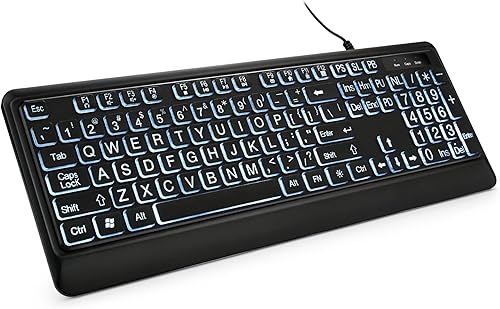 Best for large white-on-black keys
KOPJIPPOM Large Print Backlit Keyboard
9.5/10 our score
See it on Amazon -
3
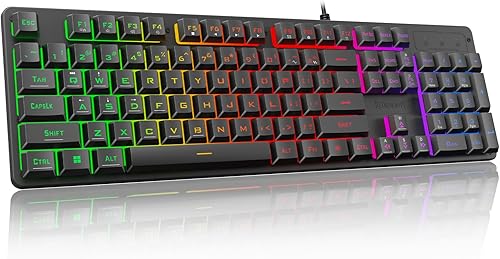 Best for entry-level gaming features
Redragon K521 Upgrade Rainbow LED Gaming Keyboard
9.4/10 our score
See it on Amazon
- 4
 Check it
X9 Large Print Backlit Keyboard
Best for large print and color choice - 5
 Check it
KOPJIPPOM Large Print Keyboard
Best for large print with color lighting - 6
 Check it
Perixx PERIBOARD-317 Wired Backlit USB Keyboard
Best for white light and low-profile keys - 7
 Check it
Logitech G213 Prodigy Wired RGB Gaming Keyboard
Best for customizable RGB zones - 8
 Check it
SABLUTE Wired Large Print Backlit Keyboard
Best for a wrist rest and device slot - 9
 Check it
SEUNKWANG Wired Keyboard with White Backlit
Best for white light and quiet typing
The best backlit wired keyboards for different desks
The Arteck is the most balanced everyday pick here, while large-print and gaming models fit more specific priorities. Compare the lighting, layout and useful extras before choosing.
Arteck Backlit USB Wired Full Size Keyboard: Best for everyday office typing
- 7 backlight colors
- 3 brightness levels
- Full-size keys and number pad
- USB wired connection
A slim full-size layout, colored backlight and media hotkeys make this a flexible everyday pick for a desk that needs a wired connection.
Pros
- 7 backlight colors
- Media hotkeys
- Full-size layout with number pad
Cons
- Color options may be more than a simple white-light setup needs
- Check the keyboard layout before buying
The Arteck combines a full-size layout with 7 backlight colors and media hotkeys. Its low-profile scissor-style keys are described as quiet, and the compact body still includes arrow keys and a number pad.
The lighting has adjustable brightness, so you can reduce the glow in a dark room. The USB connection is plug-and-play, which keeps setup simple on a compatible computer.
This is the strongest general choice if you want one keyboard for documents, number entry and media controls. Check the layout before ordering, since the keyboard's listed layout is QWERTZ.
KOPJIPPOM Large Print Backlit Keyboard: Best for large white-on-black keys
- Large-print key fonts
- White LED backlight
- Adjustable brightness
- USB wired connection
Large-print legends and adjustable white lighting suit readers who want more visible keys without colored backlighting.
Pros
- Large-print key legends
- White light can be switched off or dimmed
- Full-size layout
Cons
- Single-color backlight
- Some multimedia keys may not fully work with Mac
The KOPJIPPOM large-print keyboard prioritizes large, clear legends and a white backlight. The 104-key QWERTY layout includes a number pad, so it keeps a familiar full-size arrangement while making the lettering more visible.
You can switch the white light off or adjust its brightness. Its USB connection avoids battery changes, and the maker describes a spill-resistant design.
Choose this version if you want large print and a restrained lighting color. Mac users should note that some multimedia keys may not fully work with that operating system.
Redragon K521 Upgrade Rainbow LED Gaming Keyboard: Best for entry-level gaming features
- Rainbow LED backlight
- 19-key anti-ghosting
- 12 multimedia combination keys
- Mechanical-feeling keys
Rainbow lighting, anti-ghosting and multimedia shortcuts give this wired keyboard a gaming focus while keeping a familiar full-size layout.
Pros
- 19-key anti-ghosting
- One-touch lighting control
- 12 multimedia combination keys
Cons
- Mechanical-feeling describes the key feel, not a confirmed switch type
- Rainbow lighting may not suit a subdued desk
The Redragon K521 adds gaming features to a full-size wired keyboard. Its 19-key anti-ghosting feature is aimed at combinations of keys pressed together, while 12 multimedia combination keys offer quick controls.
The rainbow LED lighting has a one-touch control, adjustable brightness and breathing modes. Its keys are described as having a mechanical feel, so consider it if you want that style without choosing a keyboard solely for office typing.
Choose the K521 for a gaming-leaning setup with plug-and-play USB connection. Its rainbow lighting is less flexible in color than a keyboard with individually customizable RGB zones.
X9 Large Print Backlit Keyboard: Best for large print and color choice
- Large bold print
- 7 backlight colors
- 4 brightness levels
- 107-key layout with number pad
Large key legends pair with several color and brightness settings for dim rooms where both visibility and lighting choice matter.
Pros
- 7 colors and 4 brightness levels
- Large bold key legends
- 12 shortcut keys
Cons
- Windows compatibility is specified
- Larger legends may not be needed by every typist
The X9 pairs large bold print with 7 backlight colors and 4 brightness levels. Its 107-key layout includes a number pad and 12 shortcut keys, giving it a little more than a standard 104-key arrangement.
The USB-A connection is designed for plug-and-play use, and the stated compatibility is for Windows computers. This is a useful fit if large legends matter but you also want to adjust the lighting color for your workspace.
Check your available desk space and the keyboard's Windows compatibility before choosing it. Its large-print layout may be more than you need if standard key legends are easy for you to read.
KOPJIPPOM Large Print Keyboard: Best for large print with color lighting
- Large-print fonts
- 7 interchangeable backlight colors
- 3 brightness levels
- 104-key full-size layout
This large-print KOPJIPPOM adds colored lighting and adjustable brightness to its full-size layout for users who want readable keys and lighting choice.
Pros
- 7 color choices
- Large-print keys
- Foldable stands
Cons
- Multimedia keys may not fully work with Mac
- Colorful lighting is less restrained than white-only backlighting
This KOPJIPPOM model combines 4-times-larger fonts with 7 interchangeable backlight colors. Three brightness levels let you tune the lighting, while foldable stands can raise the rear of the keyboard.
The 104-key QWERTY layout includes a number pad. It connects through USB-A and doesn't require a driver, making it a practical option for a full-size computer desk.
Pick it if you want large print and more lighting colors than the white-only KOPJIPPOM option. As with that model, the maker notes that multimedia keys may not fully work with Mac.
Perixx PERIBOARD-317 Wired Backlit USB Keyboard: Best for white light and low-profile keys
- Large-print keys
- Adjustable white LED backlight
- Low-profile membrane keys
- 5.25 ft USB-A cable
Large-print keys and adjustable white illumination suit buyers who want straightforward low-light visibility and a full-size US layout.
Pros
- White backlight can be adjusted or switched off
- Large-print key legends
- Long USB-A cable
Cons
- Backlight disables Scroll Lock while on
- Windows compatibility is specified
The Perixx PERIBOARD-317 offers large-print keys with adjustable white LED lighting. Its low-profile membrane keys and full-size US English layout suit typing and number entry, and the 5.25 ft USB-A cable allows some flexibility in desk placement.
The backlight can be turned off or adjusted. One detail to know: Scroll Lock is disabled while the backlight is on, then enabled when the light is off.
Choose this model if you want readable large legends, white light and a long wired connection. Its stated compatibility is Windows, so verify support for your setup if you use another operating system.
Logitech G213 Prodigy Wired RGB Gaming Keyboard: Best for customizable RGB zones
- 5 customizable lighting zones
- LIGHTSYNC RGB
- Dedicated media controls
- Integrated palm rest
Five customizable lighting zones, media controls and a palm rest make the G213 a fit for gaming and productivity desks that want RGB control.
Pros
- 5 customizable lighting zones
- Dedicated media controls
- Integrated palm rest
Cons
- Lighting and macro programming use Logitech G HUB
- Designed with gaming features that basic typing may not need
The Logitech G213 suits a desk that needs customizable RGB lighting zones alongside gaming and productivity controls. It has 5 lighting zones, dedicated media controls, adjustable feet and an integrated palm rest.
Logitech G HUB handles lighting, game mode and macro programming. The keyboard also has a gaming matrix designed to register multiple key presses, plus a spill-resistant body.
Choose it if you want to customize lighting and use dedicated media controls. For simpler typing without software setup or gaming features, one of the other picks may be a closer fit.
SABLUTE Wired Large Print Backlit Keyboard: Best for a wrist rest and device slot
- 3-times-larger key legends
- 7 backlight colors
- Integrated wrist rest
- Top slot for phones and tablets under 11.5 in
The built-in wrist rest and device slot add desk-focused features to a large-print keyboard with 7 lighting colors.
Pros
- Integrated wrist rest
- Phone and tablet slot
- Lighting remembers the last mode after reboot
Cons
- Multimedia shortcuts may not fully work with Mac
- Wrist rest and device slot increase the keyboard's footprint
The SABLUTE K31PRO brings together large-print keys, a wrist rest and a device slot. The slot holds phones or tablets under 11.5 in, and the full-size 104-key layout includes a number pad.
Its backlight has 7 colors and 3 brightness levels, and it remembers the lighting mode after a reboot. The maker notes that standard typing keys support Windows and Mac, while some multimedia shortcuts may not fully work with Mac.
Consider it if you want the built-in wrist rest and a place to prop up a phone or small tablet. Measure your desk first, since those features add to the space it occupies.
SEUNKWANG Wired Keyboard with White Backlit: Best for white light and quiet typing
- White backlight with adjustable brightness
- Full-size 104-key layout
- Pudding keycaps
- USB-A wired connection
A white backlight and pudding keycaps give this full-size keyboard a distinct look, while its wired USB connection avoids battery charging.
Pros
- White light instead of RGB
- Full-size layout with number pad
- Plug-and-play connection
Cons
- Purple color may not suit every desk
- Some shortcuts may vary on Mac
The SEUNKWANG keyboard uses a white backlight with pudding-style keycaps that let more light through. Its full-size 104-key layout has a number pad, and the maker describes the typing as quiet.
The USB-A connection is plug-and-play. The keyboard is purple, so the color is a key part of the desk setup to consider along with its light and layout.
Choose it if you prefer white illumination to a rainbow or RGB effect. Mac users should check whether the specific shortcuts they need are supported.
How we chose wired keyboards with backlights
We compared the stated connection type, lighting controls, keyboard layout and features that match common desk needs. We gave more weight to USB wired models that offer useful light adjustment and a clear reason to choose them, such as large-print legends or gaming controls.
Our score weighs specs, features and buyer feedback against what you're shopping for.
How do wired keyboard backlights compare?
A wired keyboard with backlight may use one light color, several colors or separate RGB zones. Start with the type of illumination you want, then compare key size, layout and shortcuts.
| Product | Best for | Connection | Lighting | Layout | Our score |
|---|---|---|---|---|---|
| Arteck Backlit USB Wired Full Size Keyboard | everyday office typing | USB wired | 7 colors, adjustable brightness | Full size with number pad | 9.7 |
| KOPJIPPOM Large Print Backlit Keyboard | large white-on-black keys | USB wired | Adjustable white LED | 104-key QWERTY with number pad | 9.5 |
| Redragon K521 Upgrade Rainbow LED Gaming Keyboard | entry-level gaming features | Wired USB-A | Rainbow LED with brightness modes | 104-key QWERTY | 9.4 |
| X9 Large Print Backlit Keyboard | large print and color choice | USB-A wired | 7 colors, 4 brightness levels | 107 keys with number pad | 9.3 |
| KOPJIPPOM Large Print Keyboard | large print with color lighting | USB-A wired | 7 colors, 3 brightness levels | 104-key QWERTY with number pad | 9.2 |
| Perixx PERIBOARD-317 Wired Backlit USB Keyboard | white light and low-profile keys | USB-A wired | Adjustable white LED | 104-key US English | 9.2 |
| Logitech G213 Prodigy Wired RGB Gaming Keyboard | customizable RGB zones | Wired USB | RGB across 5 zones | Full size | 9.2 |
| SABLUTE Wired Large Print Backlit Keyboard | a wrist rest and device slot | USB-A wired | 7 colors, 3 brightness levels | 104-key QWERTY with number pad | 9.1 |
| SEUNKWANG Wired Keyboard with White Backlit | white light and quiet typing | USB-A wired | Adjustable white backlight | 104-key QWERTY | 8.3 |
White backlighting is the simplest choice for visibility in a dim workspace. The KOPJIPPOM and Perixx models use white LEDs, while the SEUNKWANG also offers white illumination with pudding keycaps.
Multi-color lighting gives you more choice in appearance. Arteck and the KOPJIPPOM color model have 7 colors, the X9 has 7 colors and 4 brightness levels, and the Redragon uses rainbow LED lighting.
Large-print legends can matter as much as the lighting itself. The KOPJIPPOM, X9, Perixx and SABLUTE models pair larger lettering with illumination, while the Arteck and gaming picks focus more on general typing or game controls.
What should you check before buying a wired keyboard with backlight?
Check the connection, lighting controls, layout and operating system notes before picking a keyboard. These details decide whether the backlit keyboard wired setup fits your computer and daily work.
First, confirm that a USB-A port is available or that you have a compatible adapter. Then check the keyboard layout, especially if you rely on a particular key arrangement.
Next, decide how much lighting control you need. A white backlight is simple, while multiple colors, brightness settings or zones give you more ways to adjust the look.
If larger lettering is your priority, compare the large-print models rather than assuming every illuminated keyboard has oversized legends. Our best backlit large print keyboard guide focuses on that need.
For a mechanical-style build with backlighting, see our best keyboard mechanical backlit picks. If you use a Mac, our best backlit keyboard for Mac guide can help you compare operating system fit and shortcut notes.
Do you need a wired or wireless backlit keyboard?
Choose wired if you want a direct USB connection and don't want to manage keyboard batteries. Wired models also avoid needing a wireless pairing step, though the cable affects where you can place the keyboard.
Choose wireless if keeping the desk clear or moving the keyboard around matters more. Compare the options in our best wireless backlit keyboard guide.
Verdict: which backlit wired keyboard should you choose?
Choose the Arteck for a full-size everyday keyboard with multiple colors and media hotkeys. Pick the KOPJIPPOM or Perixx for large print with white light, the X9 for large print and more color settings, or Redragon and Logitech G for gaming controls.
A backlit wired keyboard is most useful when its lighting and layout match your workspace. If the keyboard itself is on a laptop, first check the instructions for a backlit keyboard on an HP laptop or a Dell keyboard backlight.
Sources:
- Arteck product information: https://www.amazon.com/dp/B09STTTKBK
- KOPJIPPOM product information: https://www.amazon.com/dp/B09LH4KF5H
- Perixx product information: https://www.amazon.com/dp/B06XW8QXVG
Our top 3 picks at a glance
-
1
Best for everyday office typing
Arteck Backlit USB Wired Full Size Keyboard
9.7/10 our score
See it on Amazon -
2
Best for large white-on-black keys
KOPJIPPOM Large Print Backlit Keyboard
9.5/10 our score
See it on Amazon -
3
Best for entry-level gaming features
Redragon K521 Upgrade Rainbow LED Gaming Keyboard
9.4/10 our score
See it on Amazon
Frequently asked questions
Are wired backlit keyboards better than wireless models?
A wired keyboard connects directly to the computer and doesn't need battery charging. A wireless model gives you more freedom to place it away from the computer.
Choose wired if a cable is fine at your desk, and compare wireless options if a clear desktop matters more.
See our best wireless backlit keyboard picks.
Can a wired keyboard backlight work when the computer is off?
Usually, the backlight needs power from the USB connection, so it may turn off when the computer shuts down or sleeps. Behavior depends on the computer's USB power settings.
If you need lighting while the computer is off, check whether its ports supply standby power.
Do backlit wired keyboards work with Mac?
Some wired keyboards support basic Mac typing, but shortcut keys can vary by model. The KOPJIPPOM large-print models note that multimedia keys may not fully work with Mac, and SABLUTE gives a similar note for its top-row shortcuts.
Confirm the layout and the features you need.
How do I choose between white and RGB backlighting?
Choose white lighting if you want a simple glow that helps you see keys in a dim room. RGB or multi-color lighting gives you more color choices or zones, which can suit a gaming setup.
Also check whether brightness can be adjusted and whether the light can be turned off.


