7 Best Wireless Backlit Keyboards (November 2026)
The best wireless backlit keyboards include the Arteck Universal Backlit 7-Colors Bluetooth Touch TV for couch typing, the Soueto Wireless Keyboard with RGB Backlit for a tidy desk, and the AULA F75 Pro Wireless Mechanical Keyboard for compact mechanical typing.
On this page (7 sections)
- How we chose wireless backlit keyboards
- Wireless backlit keyboards for different setups
- How do you choose between Bluetooth and a receiver?
- Which lighting controls matter most?
- Do you need a full-size or compact keyboard?
- Does a backlit keyboard help with a laptop setup?
- Which wireless backlit keyboard should you choose?
The best wireless backlit keyboard for most desks is the Soueto Wireless Keyboard with RGB Backlit, with 7 colors, 4 lighting modes and a built-in phone or tablet holder. For Bluetooth, choose Arteck; for a compact mechanical board, consider AULA; for large key labels, look at KOPJIPPOM.
Wireless backlit keyboards differ in how they connect, how their lighting works and what they add to your desk. This roundup compares Bluetooth and 2.4 GHz receiver models, along with a tri-mode mechanical option.
Use the connection method as your first filter. A keyboard with a USB receiver needs an available port or an adapter, while Bluetooth models need a device with built-in Bluetooth.
Our picks at a glance
-
1
 Best for couch typing
Arteck Universal Backlit 7-Colors Bluetooth Touch TV
9.6/10 our score
See it on Amazon -
2

-
3
 Best for compact mechanical typing
AULA F75 Pro Wireless Mechanical Keyboard
9.6/10 our score
See it on Amazon
- 4
 Check it
Trueque Wireless Keyboard and Mouse Combo
Best for a matching desk set - 5
 Check it
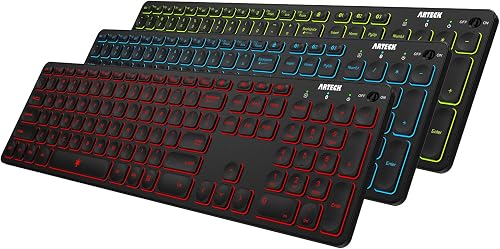
Arteck Universal Backlit 7-Colors & Adjustable Brightness
Best for switching between devices - 6
 Check it
KOPJIPPOM Large Print Backlit Wireless Keyboard
Best for large, easy-to-read letters - 7
 Check it
AOC KB600 Wireless Keyboard with 7-Color RGB
Best for a built-in device stand
How we chose wireless backlit keyboards
The best wireless backlit keyboard depends on the device you plan to connect and the way you type. We compared connection options, lighting controls, layout and features that solve a clear desk need.
A receiver-based keyboard may suit a computer with open USB-A ports. Bluetooth can make more sense if you want to keep ports free or switch among devices, and a tri-mode model gives you more ways to connect.
Lighting controls also matter. Some models offer several colors, modes and brightness levels, while others focus on fewer controls or a particular use such as a TV-connected computer.
Our score weighs specs, features and buyer feedback against what you're shopping for. Products are ordered by their scores, with ties kept together.
| Product | Best for | Connection | Lighting | Extra | Our score |
|---|---|---|---|---|---|
| Arteck Universal Backlit 7-Colors Bluetooth Touch TV | couch typing | Bluetooth | 7 colors, 2 brightness levels | Touchpad and media hot keys | 9.6 |
| Soueto Wireless Keyboard with RGB Backlit | a tidy desk | 2.4 GHz USB receiver | 7 colors, 4 modes, adjustable brightness | 8.7 in phone or tablet holder | 9.6 |
| AULA F75 Pro Wireless Mechanical Keyboard | compact mechanical typing | Bluetooth 5.0, 2.4 GHz, USB-C | Hot-swappable switches and control knob | 9.6 | |
| Trueque Wireless Keyboard and Mouse Combo | a matching desk set | 2.4 GHz USB receiver | RGB keyboard backlight, 3 brightness levels | Wireless mouse included | 9.5 |
| Arteck Universal Backlit 7-Colors & Adjustable Brightness | switching between devices | Bluetooth | 7 colors, 2 brightness levels | Switches between 3 paired devices | 9.2 |
| KOPJIPPOM Large Print Backlit Wireless Keyboard | large, easy-to-read letters | 2.4 GHz USB receiver | 7 colors, 3 brightness levels | Large-print keys | 9.0 |
| AOC KB600 Wireless Keyboard with 7-Color RGB | a built-in device stand | 2.4 GHz USB receiver | 7 colors, 4 modes, adjustable brightness | 8.7 in phone or tablet holder | 8.5 |
Wireless backlit keyboards for different setups
The right pick depends on how you connect, the layout you prefer and whether a particular extra will make everyday use easier. Compare each keyboard's connection and layout with your computer before choosing.
Arteck Universal Backlit 7-Colors Bluetooth Touch TV: Best for couch typing
- Bluetooth connection
- 7 backlight colors
- 2 brightness levels
- Touchpad and media hot keys
A Bluetooth keyboard with a built-in touchpad and media keys for a TV-connected computer or HTPC. It has 7 backlight colors and a stated wireless range of up to 10 meters.
Pros
- Built-in touchpad
- Works with Bluetooth devices across several operating systems
- 7 backlight colors
Cons
- Requires built-in Bluetooth
- Only 2 brightness levels
The Arteck Universal Backlit 7-Colors Bluetooth Touch TV Keyboard is built around couch use with a TV-connected computer or HTPC. Its built-in touchpad and media hot keys let you control a computer without keeping a separate mouse on the sofa.
It connects over Bluetooth and is compatible with several operating systems, including Windows, Mac, Android, iPad OS, iOS and Chrome OS. The keyboard does not include a USB dongle, so the computer or other device needs built-in Bluetooth.
The backlight has 7 colors and 2 brightness levels, with an auto-sleep feature. Arteck gives a wireless range of up to 10 meters, though the wireless environment can affect range.
Choose this model when you want a compact way to enter text and control media from a seat away from the computer. If you need a standard desktop keyboard, compare it with our best backlit wired keyboard guide.
Soueto Wireless Keyboard with RGB Backlit: Best for a tidy desk
- 2.4 GHz USB receiver
- 7 colors and 4 lighting modes
- Built-in 8.7 in device holder
- Rechargeable 1500 mAh battery
The integrated holder keeps a phone or tablet within view, while 7 colors and 4 modes give you lighting choices. It connects through a USB-A receiver and has a rechargeable battery.
Pros
- Built-in phone or tablet holder
- 4 lighting modes
- Rechargeable
Cons
- Needs a USB-A port or adapter
- Backlight turns off after inactivity
The Soueto suits a desk where a phone or tablet needs to stay visible while you type. Its 8.7 in device holder is built into the keyboard, and the 7-color backlight offers 4 modes with adjustable brightness.
It connects through a 2.4 GHz USB-A receiver. If your computer only has USB-C ports, you’ll need a USB-A to USB-C adapter.
The keyboard has a built-in 1500 mAh rechargeable battery and quiet, responsive keys. Its backlight turns off after 120 seconds of inactivity, which is useful to know if you expect the keys to stay lit while you pause.
Choose Soueto if the holder, lighting choices and receiver connection fit your workspace. If a separate number pad matters, this full-size keyboard may be a more natural fit than a compact board.
AULA F75 Pro Wireless Mechanical Keyboard: Best for compact mechanical typing
- Bluetooth 5.0, 2.4 GHz, and USB-C
- 75% layout with 81 keys
- RGB lighting with 16 preset effects
- Hot-swappable switches
This compact mechanical keyboard offers three connection modes, RGB lighting and hot-swappable switches. Its 75% layout keeps arrow keys while taking less desk space than a full-size board.
Pros
- Three connection options
- Hot-swappable 3-pin or 5-pin switches
- Adjustable lighting and media knob
Cons
- Smaller layout omits a separate number pad
- QWERTZ layout
The AULA F75 Pro suits people who want a compact mechanical keyboard with backlighting and more than one way to connect. It has Bluetooth 5.0, 2.4 GHz wireless and USB-C wired modes, with up to 5 devices supported.
Its 75% layout has 81 keys, including arrow keys, while leaving out a separate number pad. That smaller layout can free desk space, but it may feel limiting if you regularly enter numbers.
The RGB backlight offers 16 preset lighting effects, and the control knob adjusts lighting or media functions depending on the selected mode. Hot-swappable sockets support 3-pin or 5-pin switches, giving you the option to change switches without soldering.
The stated layout is QWERTZ, so check that it matches your typing preference before ordering. For a wider selection of mechanical models, see our best keyboard mechanical backlit guide.
Trueque Wireless Keyboard and Mouse Combo: Best for a matching desk set
- Keyboard and mouse share one 2.4 GHz receiver
- Rechargeable keyboard and mouse
- 3 keyboard brightness levels
- Mac and Windows layout switch
One USB receiver connects both the keyboard and mouse, and the set recharges by USB-C. The keyboard has 3 brightness levels and a switch for Mac and Windows layouts.
Pros
- Keyboard and mouse share one receiver
- Both recharge by USB-C
- Mac and Windows layout switch
Cons
- Some multimedia keys may not fully work with Mac OS
- Mouse lighting effects are separate from keyboard lighting
The Trueque Wireless Keyboard and Mouse Combo makes sense if you need both input devices and want to reserve fewer ports. One 2.4 GHz USB receiver connects the keyboard and mouse, and the keyboard has 3 brightness levels for its RGB backlight.
Both devices recharge with the included USB-C cable and can be used while charging. The keyboard and mouse also have separate power switches and auto-sleep, which can help manage power when you step away.
A one-touch switch changes between Mac and Windows keyboard layouts. For more choices, see backlit keyboards for Mac.
The combo is listed as compatible with Mac, Windows, Linux and Chrome, though some multimedia keys may not fully work with Mac OS.
Choose this set when a matching mouse is useful and you want both devices on one receiver. If you only need a keyboard, compare the other picks before using desk space for an extra device.
Arteck Universal Backlit 7-Colors & Adjustable Brightness: Best for switching between devices
- Bluetooth connection to 3 devices
- 7 backlight colors
- 2 brightness levels
- Full-size layout
Pair up to 3 devices and switch between them with a key press. Its full-size layout, 7 colors and Bluetooth connection suit desks shared by a computer, tablet and phone.
Pros
- Pairs with 3 devices
- Full-size layout
- Compatible with Windows, Mac, iOS, iPad OS and Android
Cons
- Backlight has 2 brightness levels
- Bluetooth is required
The Arteck Universal Backlit 7-Colors & Adjustable Brightness keyboard stands out for pairing with up to 3 Bluetooth devices. A single key press switches between paired computers, tablets or phones.
It has a full-size layout and 7 backlight colors with 2 brightness levels. The backlight turns off while idle to conserve power, and the rechargeable battery is described as lasting up to 6 months with the backlight off and 2 hours of use per day.
The keyboard lists support for Windows, iOS, iPad OS, Android and Mac OS. Check that your intended device supports Bluetooth before choosing it, since this model does not use a USB receiver.
Choose it for a desk where you move between several Bluetooth devices. For Windows-specific options, see our best backlit keyboard for Windows PCs guide.
KOPJIPPOM Large Print Backlit Wireless Keyboard: Best for large, easy-to-read letters
- Large-print keys
- 2.4 GHz USB receiver
- 7 colors and 3 brightness levels
- Rechargeable with USB-C
Large letters and adjustable backlighting make this a useful pick when standard key labels are hard to see. It has a full-size layout and rechargeable power.
Pros
- Large-print key labels
- 3 brightness levels
- Rechargeable
Cons
- Uses a USB-A receiver
- Some multimedia keys may not fully work with Mac OS
The KOPJIPPOM Large Print Backlit Wireless Keyboard is a clear fit if standard key labels are hard to read. Its large-print letters and 7 backlight colors pair with 3 brightness levels, so you can choose the lighting that suits the room.
It uses a 2.4 GHz USB receiver and has a full-size layout with a number pad. The low-profile keys are described as quiet, and the keyboard recharges through USB-C.
The backlight switches off after 120 seconds without use, and the keyboard has separate power and backlight switches. It is compatible with Windows and Mac OS, though some multimedia keys may not fully work with Mac OS.
Choose this model for its larger labels and full-size layout. If you need a Chromebook keyboard, review our best backlit keyboard for Chromebook guide and check the connection options for your device.
AOC KB600 Wireless Keyboard with 7-Color RGB: Best for a built-in device stand
- 2.4 GHz USB receiver
- 7 colors and 4 lighting modes
- Built-in 8.7 in device holder
- Rechargeable 1500 mAh battery
A full-size wireless keyboard with a device holder, dedicated hot keys and adjustable RGB lighting. It connects through a USB-A receiver and recharges through its built-in battery.
Pros
- Built-in phone or tablet holder
- 4 lighting modes
- Rechargeable
Cons
- Needs a USB-A port or adapter for USB-C devices
- Backlight turns off after idle time
The AOC KB600 combines a full-size layout with a built-in phone or tablet holder. Its 8.7 in stand, 7 backlight colors and 4 lighting modes make it a direct alternative to the Soueto for a desk where a device needs to stay within view.
It connects through a 2.4 GHz USB-A receiver and has a rechargeable 1500 mAh battery. A USB-A to USB-C adapter is needed to use it with a USB-C device, and that adapter is not included.
The keyboard also has dedicated hot keys and adjustable lighting brightness. The backlight turns off after 2 minutes of idle time, and the receiver needs to be connected to a powered-on computer when checking the backlight.
Choose AOC if its device holder and receiver fit your setup. For laptop backlight basics, read what a backlit laptop keyboard is.
How do you choose between Bluetooth and a receiver?
Choose Bluetooth if your computer has built-in Bluetooth and you want to save a USB port or pair several devices. The Arteck models use Bluetooth, and one can pair with 3 devices.
Choose a USB receiver if you prefer a dedicated connection and have a compatible port available. Soueto, Trueque, KOPJIPPOM and AOC use receivers, while the AULA adds Bluetooth and USB-C wired connection as alternatives.
Check the physical ports before you buy. Some receiver models need an adapter for USB-C-only devices, and the Arteck Bluetooth Touch TV model does not include a receiver for devices without built-in Bluetooth.
Which lighting controls matter most?
Look at the number of colors, modes and brightness steps you’ll actually use. Soueto and AOC have 7 colors and 4 modes, while KOPJIPPOM offers 7 colors and 3 brightness levels.
The AULA has RGB lighting with 16 preset effects, and the Trueque keyboard has 3 brightness levels. Arteck’s models focus on 7 colors with 2 brightness levels.
Check how each model handles idle time. Several keyboards automatically turn off their backlight after a period without activity, so a pause in typing may leave the keys dark until you resume.
Do you need a full-size or compact keyboard?
Choose a full-size layout if you use a separate number pad for data entry or prefer standard spacing. Soueto, Trueque, Arteck’s multi-device keyboard, KOPJIPPOM and AOC offer full-size layouts.
A compact layout can save desk space if you rarely use a number pad. The AULA F75 Pro keeps arrow keys in its 75% layout, but its listed QWERTZ layout is an important detail to check.
If you’re still comparing keyboard types and layouts, start with our best keyboard for computer buying guide.
Does a backlit keyboard help with a laptop setup?
A wireless backlit keyboard can give you a separate typing surface when a laptop screen or stand makes the built-in keyboard awkward to reach. Check whether you want a receiver or Bluetooth, and leave room for the laptop and keyboard on your desk.
If you’re troubleshooting the light on a built-in laptop keyboard, the steps depend on the computer brand and model. Our guides cover how to turn on a Dell keyboard backlight and how to turn on an HP laptop keyboard backlight.
Which wireless backlit keyboard should you choose?
Choose the Soueto for a holder and flexible RGB lighting, the Arteck Touch TV for Bluetooth couch control, or the AULA for a compact mechanical layout and three connection modes. Pick KOPJIPPOM if larger key labels matter most, and choose Trueque if you need a keyboard and mouse set.
Before you decide, confirm the layout, connection method and ports on your computer. For a wired setup, compare our best backlit wired keyboard picks.
Our top 3 picks at a glance
-
1
Best for couch typing
Arteck Universal Backlit 7-Colors Bluetooth Touch TV
9.6/10 our score
See it on Amazon -
2
-
3
Best for compact mechanical typing
AULA F75 Pro Wireless Mechanical Keyboard
9.6/10 our score
See it on Amazon
Frequently asked questions
Is Bluetooth or a USB receiver better for a wireless backlit keyboard?
Bluetooth is useful when your computer or tablet has built-in Bluetooth and you want to save a USB port. A USB receiver can be simpler on a desktop, but check its connector: several picks use USB-A.
Choose by the ports and wireless options on the device you plan to use.
Do wireless backlit keyboards need charging?
Some use rechargeable batteries, while the power setup depends on the model. The Soueto, AULA, Trueque, KOPJIPPOM and AOC picks are described as rechargeable.
Backlight auto-off features can conserve power during idle periods.
Check the model's charging connection and expected use before buying.
Will a wireless backlit keyboard work with a Mac?
Some picks support Mac, but connection and key behavior vary. The Arteck Bluetooth models list Mac compatibility, while the Trueque combo notes that some multimedia keys may not fully work with Mac OS.
For a Mac-specific shortlist, see our best backlit keyboard for Mac guide.
Can I use a wireless keyboard with a TV-connected computer?
Yes. The Arteck Bluetooth model includes a touchpad and media hot keys for controlling a TV-connected computer or HTPC from a couch.
Confirm that the computer has built-in Bluetooth, because this keyboard does not include a USB receiver.


