9 Best Backlit Large Print Keyboards (November 2026)
The best backlit large print keyboards include the KOPJIPPOM Large Print Backlit Keyboard for adjustable white lighting, the HeengYanson Large Print Backlit Computer Keyboard for a wrist rest and color choices, and the X9 Large Print Backlit Computer Keyboard for brightness range.
On this page (5 sections)
The best backlit large print keyboard for most people is the KOPJIPPOM Large Print Backlit Keyboard, with 4X larger letters, adjustable white LED lighting and a full-size layout. Choose the X9 for seven colors and four brightness levels, or the SABLUTE K31PRO if you want a built-in wrist rest and phone holder.
A backlit keyboard with large print combines two visibility features: bigger legends and illumination around the keys. For broader layout and comfort guidance, see keyboards for seniors.
For a broader look at layout, connection and ergonomics, start with our best keyboard for computer buying guide.
Our picks at a glance
-
1
 Best for adjustable white lighting
KOPJIPPOM Large Print Backlit Keyboard
9.5/10 our score
See it on Amazon -
2
 Best for a wrist rest and color choices
HeengYanson Large Print Backlit Computer Keyboard
9.4/10 our score
See it on Amazon -
3
 Best for brightness range
X9 Large Print Backlit Computer Keyboard
9.3/10 our score
See it on Amazon
- 4
 Check it
KOPJIPPOM Large Print Keyboard
Best for seven lighting colors - 5
 Check it
Perixx PERIBOARD-317 Wired Backlit USB Keyboard
Best for low-profile keys - 6
 Check it
SABLUTE Wired Large Print Backlit Keyboard
Best for a phone or tablet holder - 7
 Check it
MIKUSO Large Print Backlit Keyboard
Best for a dust cover - 8
 Check it
SABLUTE Wired Large Print Backlit Computer Keyboard
Best for lighting modes - 9
 Check it
Hamile Large Print Light Up Keyboard
Best for quiet typing
How we chose these backlit large print keyboards
We compared the stated print size, lighting controls, layout, connection and useful desk features. Our score weighs specs, features and buyer feedback against what you're shopping for.
This roundup focuses on wired USB models with oversized legends and built-in backlighting. We gave higher scores to picks that pair clearly stated large print with useful light controls, then considered additions such as wrist rests, stands and shortcut keys.
Compare backlit large print keyboards
These keyboards differ most in lighting color, brightness control and added desk features. Check those details against how and where you type.
| Product | Best for | Print and lighting | Layout | Connection | Our score |
|---|---|---|---|---|---|
| KOPJIPPOM Large Print Backlit Keyboard | adjustable white lighting | 4X larger letters, adjustable white LED | 104 keys with numeric keypad | Wired USB | 9.5 |
| HeengYanson Large Print Backlit Computer Keyboard | a wrist rest and color choices | 4X larger letters, 7 colors, 3 brightness levels | 104 keys with numeric keypad | Wired USB-A | 9.4 |
| X9 Large Print Backlit Computer Keyboard | brightness range | Large print, 7 colors, 4 brightness levels | 107 keys with numeric keypad | Wired USB-A | 9.3 |
| KOPJIPPOM Large Print Keyboard | seven lighting colors | 4X larger letters, 7 colors, 3 brightness levels | 104 keys with numeric keypad | Wired USB-A | 9.2 |
| Perixx PERIBOARD-317 Wired Backlit USB Keyboard | low-profile keys | 4X larger letters, adjustable white LED | 104 keys | Wired USB | 9.2 |
| SABLUTE Wired Large Print Backlit Keyboard | a phone or tablet holder | 3X larger letters, 7 colors, 3 brightness levels | 104-key US QWERTY with numeric keypad | Wired USB-A | 9.1 |
| MIKUSO Large Print Backlit Keyboard | a dust cover | 4X larger letters, white LED | 104 keys with numeric keypad | Wired USB-A | 8.6 |
| SABLUTE Wired Large Print Backlit Computer Keyboard | lighting modes | 3X larger letters, 7 colors, 8 brightness levels | 104 keys with numeric keypad | Wired USB-A | 8.3 |
| Hamile Large Print Light Up Keyboard | quiet typing | 4X larger letters, 7 colors, 3 brightness levels | 108 keys with numeric keypad | Wired USB-A | 8.0 |
The best backlit large print keyboards
These picks combine enlarged legends with illumination, but their layouts and controls vary. Match the backlight and desk features to your needs.
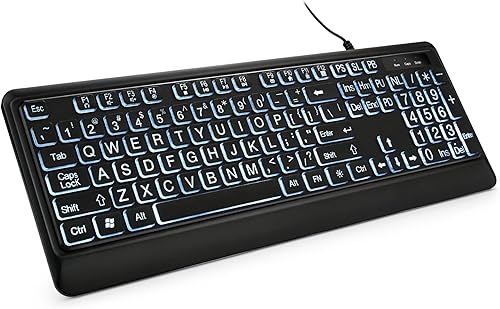
KOPJIPPOM Large Print Backlit Keyboard: Best for adjustable white lighting
- 4X larger print
- White LED backlight with adjustable brightness
- 104 keys with numeric keypad
- Wired USB connection
Large letters and adjustable white light address both key visibility and dim-room typing. Its full-size 104-key layout includes a numeric keypad.
Pros
- 4X larger print
- Backlight turns on or off and adjusts in brightness
- No batteries or drivers required
Cons
- White backlight only
- Some multimedia keys may not fully work with Mac OS
The KOPJIPPOM Large Print Backlit Keyboard is the best fit if you want oversized legends and a straightforward white backlight. Its letters are 4X larger than standard keyboard fonts, and the light can be switched off or adjusted in brightness.
The full-size US QWERTY layout has 104 keys, including a numeric keypad. Its wired USB connection needs no drivers or battery changes, which keeps setup simple at a desktop or laptop.
Fold-out feet raise the back of the keyboard, and the design includes multimedia and function keys. KOPJIPPOM says the keys are spill-resistant; the backlight is single-color, so choose another pick if you want color options.
Mac users should note that some multimedia keys may not fully work with Mac OS. Standard typing is the main draw here, with adjustable white illumination and large legends.
HeengYanson Large Print Backlit Computer Keyboard: Best for a wrist rest and color choices
- 4X larger print
- 7 backlight colors and 3 brightness levels
- Built-in wrist rest
- 104 keys
The built-in wrist rest and seven lighting colors give this model a useful mix of typing support and adjustable illumination. It uses a wired USB connection.
Pros
- 7 color options
- 3 brightness levels
- Wrist rest and soft-touch keys
Cons
- Wired model
- Multimedia keys may not fully work with Mac OS
The HeengYanson suits buyers who want a wrist rest and multiple light colors in one wired keyboard. It offers seven color choices and three brightness levels, alongside large legends described as four times standard size.
Its 104-key layout includes a numeric keypad and multimedia or function keys. The keyboard connects over USB-A and requires no driver installation, so it works as a corded desk option for a laptop or PC.
The soft-touch keys are described as quiet, and the design has a stated 7-degree typing angle. The wrist rest adds depth, so measure your desk space if the keyboard will sit near a monitor stand or wall.
The manufacturer notes that some multimedia keys may not fully work with Mac OS. Choose it for the rest and color selection, while checking the wired connection and desk footprint before buying.
X9 Large Print Backlit Computer Keyboard: Best for brightness range
- Large bold print
- 7 backlight colors and 4 brightness levels
- 107 keys with numeric keypad
- 12 shortcut keys
Four brightness levels offer more adjustment steps than the other color-lighted picks here. The 107-key layout includes a numeric keypad and 12 shortcut keys.
Pros
- 7 colors and 4 brightness levels
- 107-key layout
- No software required
Cons
- Windows compatible according to its stated system support
- Wired USB connection
The X9 is a good match if you want more brightness steps than most color backlit picks here. It offers seven colors and four brightness levels, paired with large bold print.
Its 107-key layout has a numeric keypad and 12 shortcut keys. The wired USB-A connection is plug and play, with no software required, and the stated compatibility includes PC, Chromebook and laptop use.
The feature set focuses on visibility and navigation, rather than add-ons like a wrist rest. The maker describes the keyboard as designed for daily use, but that does not give a specific service life.
Its stated operating system support is Windows, so Mac users should check compatibility before choosing it. Pick the X9 when lighting adjustment and shortcut keys matter more than a wrist rest.
KOPJIPPOM Large Print Keyboard: Best for seven lighting colors
- 4X larger print
- 7 backlight colors and 3 brightness levels
- 104 keys with numeric keypad
- Foldable stands
This full-size KOPJIPPOM adds seven color choices and three brightness levels to the large-print layout. Foldable feet let you raise the typing angle.
Pros
- 4X larger print
- 7 color options
- No batteries or drivers required
Cons
- Wired model
- Some multimedia keys may not fully work with Mac OS
This KOPJIPPOM model fits buyers who prefer color choices over a single white backlight. Its 4X larger print is paired with seven lighting colors and three brightness levels.
The 104-key US QWERTY layout includes a numeric keypad and foldable feet. It uses a wired USB-A connection and needs no batteries or drivers, making it a simple option for a fixed workstation.
The model supports Windows and Mac OS, though some multimedia keys may not fully work with Mac. Its spill-resistant design is a practical consideration for a desk near drinks, but it should not be treated as waterproof.
Choose this model if you want a full-size large print keyboard with color lighting and an adjustable typing angle. For a Mac-specific comparison, see our best large print keyboard for Mac guide.
Perixx PERIBOARD-317 Wired Backlit USB Keyboard: Best for low-profile keys
- 4X larger print
- Adjustable white LED backlight
- Low-profile keys
- 104-key layout
Low-profile keys and adjustable white illumination suit buyers who want large print in a slim, full-size layout. Its 5.25 ft USB cable allows flexible desk placement.
Pros
- 4X larger key fonts
- Backlight can be turned off or adjusted
- Low-profile keys
Cons
- White backlight only
- Scroll Lock is disabled while the backlight is on
The Perixx PERIBOARD-317 is suited to buyers who want low-profile keys with large legends. Its 4X larger print sits on a slim full-size layout, and the white LED backlight can be switched off or adjusted.
The 104-key keyboard uses a wired USB connection with a 5.25 ft cable, giving some flexibility in desk placement. Perixx describes the keys as quiet and low-profile, with larger surfaces for daily typing.
One control detail matters: Scroll Lock is disabled while the backlight is on. It is compatible with Windows 7, 8, 10 and 11, so check your system before choosing it for another platform.
The white-only lighting keeps the controls simple. Choose it for a slim profile, large print and adjustable illumination rather than color customization.
SABLUTE Wired Large Print Backlit Keyboard: Best for a phone or tablet holder
- 3X larger print
- 7 backlight colors and 3 brightness levels
- Wrist rest
- Top slot holds phones and tablets under 11.5 in
A built-in top slot holds a phone or tablet under 11.5 in, while the integrated wrist rest adds support at the desk. Its lighting offers seven colors and three brightness levels.
Pros
- Built-in phone and tablet holder
- Integrated wrist rest
- Backlight mode returns after reboot
Cons
- Letters are 3X larger, smaller than several alternatives here
- Multimedia shortcuts may not fully work with Mac OS
The SABLUTE K31PRO stands out for its built-in phone and tablet holder. The top slot is designed for devices under 11.5 in, and the keyboard also has an integrated wrist rest.
Its 104-key US QWERTY layout includes a numeric keypad. The 3X larger block letters are smaller than the 4X print on several alternatives, but seven lighting colors and three brightness levels give you room to adjust the glow.
A dedicated control key changes the backlight, and the maker says the keyboard remembers its lighting mode after reboot. It uses wired USB power, so it doesn't need batteries.
Standard typing keys support Windows and Mac OS, though some multimedia shortcuts may not fully work on Mac. Choose it if you plan to keep a phone or small tablet in view while typing.
MIKUSO Large Print Backlit Keyboard: Best for a dust cover
- 4X larger print
- White LED backlight
- Integrated wrist rest
- Included keyboard cover
The included cover helps keep dust and splashes off the keyboard between sessions. The fixed-brightness white backlight switches on or off with one key.
Pros
- 4X larger print
- Integrated wrist rest
- Cover included
Cons
- Backlight brightness is fixed
- White light only
The MIKUSO is a practical choice if you want a cover and integrated wrist rest with large illuminated keys. Its print is 4X larger than standard keyboard fonts, and the full-size layout includes a numeric keypad.
The white LED backlight switches on or off with one key, but brightness is fixed. The wired USB keyboard needs no drivers, and it includes 12 FN key combinations for controls such as volume, media playback and email.
The keyboard cover helps keep dust and splashes off the keys when not in use. Its wrist rest is integrated into the design, so it isn't removable.
Some multimedia keys may not fully work with Mac OS. Choose this model if the cover and wrist rest are more useful to you than color options or brightness adjustment.
SABLUTE Wired Large Print Backlit Computer Keyboard: Best for lighting modes
- 3X larger print
- 7 colors, 4 static or breathing modes
- 8 brightness levels
- Foldable tilt stand
Multiple lighting modes and eight brightness levels offer fine control over the keyboard's appearance. The 104-key layout includes a numeric keypad and foldable tilt stand.
Pros
- 8 brightness levels
- 4 static or breathing modes
- Foldable tilt stand
Cons
- Letters are 3X larger
- Multimedia shortcuts are designed for Windows
The SABLUTE K11PRO suits buyers who want several lighting modes and many brightness steps. It has seven colors, four static or breathing modes, and eight brightness levels.
Its 104-key US layout includes a numeric keypad and foldable tilt stand. The print is three times larger than standard, so compare it with 4X options if letter size is your main priority.
The keyboard connects over wired USB-A and has FN shortcuts for volume and Windows desktop functions. Standard typing may work on macOS or Chrome depending on the operating system version, but its multimedia shortcuts are designed for Windows.
SABLUTE notes that the lighting settings reset on restart. Pick it for lighting control and a tilt stand, keeping that reset behavior in mind.
Hamile Large Print Light Up Keyboard: Best for quiet typing
- 4X larger print
- 7 backlight colors and 3 brightness levels
- 108-key layout
- Quiet membrane switches
Quiet membrane switches make this a candidate for shared rooms, offices or libraries. The full-size layout has 108 keys and a foldable stand.
Pros
- 4X larger print
- 7 colors and 3 brightness levels
- Spill-resistant design
Cons
- Wired model
- Windows compatibility stated
The Hamile is a sensible option if quiet typing matters in a shared room. It uses membrane switches described as quiet and has large print keys with seven backlight colors and three brightness levels.
The full-size layout has 108 keys, including a numeric keypad and function keys. A foldable stand raises the keyboard, and the wired USB connection needs no drivers or software.
Hamile describes the design as spill-resistant. The stated compatibility is Windows, so check your computer's support before choosing it for another operating system.
This model has fewer details about its light controls than some alternatives, but it combines large legends, color choices and quiet membrane keys. Choose it for a shared workspace where a wired keyboard is fine.
How to choose a backlit large print keyboard
Choose by legend size, backlight controls, layout and connection. A clear fit across those four points matters more than extra shortcuts you may not use.
How large should the print be on a backlit large print keyboard?
The listed print size varies: several keyboards describe letters as 4X standard size, while the SABLUTE models here state 3X. Those multipliers are manufacturer descriptions, so compare the actual key legends and photos when choosing.
Large print helps you identify characters, while illumination helps when the room is dim. If both matter, look for a model that clearly states oversized legends and adjustable lighting.
Which backlight controls are useful?
A single-color light is enough if you only need the legends visible in a dim room. Adjustable brightness, like the controls on the KOPJIPPOM and Perixx, lets you tune the light level.
Color options add choice, while brightness steps determine how finely you can adjust intensity. X9 offers four levels, and the SABLUTE K11PRO lists eight, along with several lighting modes.
Do you need a numeric keypad or wrist rest?
A numeric keypad helps if you regularly enter numbers, and most picks here include one. The Perixx has 104 keys, while the X9, MIKUSO and Hamile state different total key counts.
A wrist rest can add support but also takes up desk depth. HeengYanson, SABLUTE K31PRO and MIKUSO include one, so measure your workspace if it is tight.
Is wired USB the right connection?
All nine picks in this roundup are wired USB keyboards. That means no keyboard battery charging, but you will need to route a cable to your computer.
If you want less cable clutter, compare our best large print wireless keyboard options. For Bluetooth specifically, see the best large print keyboard with Bluetooth.
Verdict: which backlit large print keyboard should you choose?
Choose the KOPJIPPOM Large Print Backlit Keyboard for 4X larger legends, adjustable white light and a straightforward full-size layout. Pick the X9 if you want seven lighting colors with four brightness levels, or the SABLUTE K31PRO for its wrist rest and device holder.
If you want white illumination and low-profile keys, consider the Perixx. For a focused view of backlit options for Apple computers, see our best backlit keyboard for Mac guide, or compare models with an integrated pointer in the best backlit keyboard with touchpad roundup.
Our top 3 picks at a glance
-
1
Best for adjustable white lighting
KOPJIPPOM Large Print Backlit Keyboard
9.5/10 our score
See it on Amazon -
2
Best for a wrist rest and color choices
HeengYanson Large Print Backlit Computer Keyboard
9.4/10 our score
See it on Amazon -
3
Best for brightness range
X9 Large Print Backlit Computer Keyboard
9.3/10 our score
See it on Amazon
Frequently asked questions
What makes a backlit large print keyboard easier to see?
Large legends make the characters on each key easier to identify, while backlighting adds visibility when the room is dim. The two features address different needs, so compare print size and light control separately.
A bright backlight cannot make small legends larger.
Are backlit large print keyboards wireless?
Most picks here use a wired USB connection, so they draw power from the computer and don't need batteries. If you need to move freely around the room, choose a wireless model and check whether its backlight needs separate batteries or charging.
See our large print wireless keyboard guide for cordless options.
Should I choose white or multicolor backlighting?
Choose white lighting if you want a simple, single-color glow and adjustable brightness. Multicolor models let you choose a shade and may offer several brightness steps or lighting modes.
Check the specific controls, since the number of colors and brightness levels varies by keyboard.
Will a large print backlit keyboard work with a Mac?
Several keyboards in this guide state Mac compatibility, but some multimedia shortcut keys may not fully work with Mac OS. Basic typing support and shortcut support can differ.
If you use a Mac, compare the compatibility notes and see our large print keyboards for Mac guide.