5 Best Backlit Keyboards for Mac (November 2026)
The best backlit keyboards for Mac include the Macally Backlit Mac Keyboard for dependable wired Mac typing, the ProtoArc KM100-A Backlit Bluetooth Keyboard and Mouse for a Mac keyboard and mouse set, and the Macally Wired Keyboard for Mac for large-print Mac keys.
On this page (6 sections)
- Which backlit keyboard for Mac is best for your setup?
- Wired or wireless backlit keyboard for Mac?
- How many brightness levels do Mac backlit keyboards need?
- Do full-size Mac keyboards need a numeric keypad?
- How to set up and care for a backlit Mac keyboard
- What is the best backlit keyboard for Mac to buy?
The Macally Backlit Mac Keyboard is the best backlit keyboard for Mac for most desk setups because it combines a full 107-key Mac layout, numeric keypad, 3 brightness levels and a 5 ft USB-A cable. Choose ProtoArc for Bluetooth switching, or OMOTON if you want 2.4G, dual Bluetooth and 7-color lighting.
The right choice depends on how you connect, whether you need a number pad and how much control you want over the backlight. A wired keyboard keeps the connection simple, while a wireless keyboard for Mac gives you more freedom to move between devices.
If you need help comparing layouts before choosing, see our best keyboard for computer guide. For more wireless options, compare these picks with our best wireless keyboard for Mac guide.
Our picks at a glance
-
1

-
2
 Best for a Mac keyboard and mouse set
ProtoArc KM100-A Backlit Bluetooth Keyboard and Mouse
9.6/10 our score
See it on Amazon -
3

- 4
 Check it
ProtoArc K100-A Backlit Wireless Bluetooth Keyboard
Best for quiet wireless Mac typing - 5
 Check it
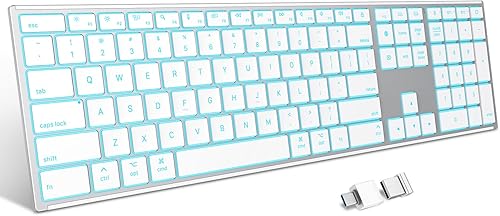
OMOTON 2.4G & Dual Bluetooth Wireless Keyboard
Best for three connection modes and color
Which backlit keyboard for Mac is best for your setup?
The best backlit keyboard for Mac depends on your connection needs first. Macally offers the simplest wired choices, ProtoArc focuses on Bluetooth, and OMOTON adds a 2.4G receiver alongside Bluetooth.
We compared the Mac layout, connection type, backlight controls, device switching, power details and included equipment. Our score weighs specs, features and buyer feedback against what you're shopping for.
Macally Backlit Mac Keyboard: Best for dependable wired Mac typing
- 107-key Mac layout
- 3 brightness levels
- 5 ft USB-A cable
- Numeric keypad
This full-size Mac keyboard keeps setup simple with a 5 ft USB-A cable and no pairing or charging. Its 107-key layout, numeric keypad and 16 macOS shortcuts suit desk-based work.
Pros
- Always-connected wired setup
- 3 brightness levels
- Full Mac layout with numeric keypad
Cons
- Needs USB-A or a USB-C adapter
- No wireless connection
The Macally Backlit Mac Keyboard is the strongest choice when you want a full-size wired Mac keyboard that stays connected. Its 107 keys include a numeric keypad and 16 macOS shortcut keys for functions such as Mission Control, Launchpad, brightness and volume.
The 3 brightness levels help keep the keys visible as room lighting changes. The backlight uses a single color, so this is a practical illumination feature rather than a color-customization pick.
Setup is direct: connect the 5 ft USB-A cable and start typing without Bluetooth pairing, battery charging or a setup wizard. It works with Macs that have a USB-A port, and a USB-C adapter can connect it to a compatible USB-C setup.
The space gray and black low-profile design fits an iMac, MacBook, Mac mini or Mac Studio desk. Choose it for a fixed workstation, spreadsheet work or anyone who prefers a constant wired connection.
The trade-off is cable dependence. If you want to move between a MacBook, iPad and iPhone, a Bluetooth model will be more flexible.
ProtoArc KM100-A Backlit Bluetooth Keyboard and Mouse: Best for a Mac keyboard and mouse set
- Full-size Mac layout
- 3 brightness levels
- Triple Bluetooth channels
- Rechargeable keyboard and mouse
The KM100-A combines a full-size Mac keyboard with a mouse and connects through 3 Bluetooth channels. Rechargeable batteries and soft white backlighting fit a wireless desktop setup.
Pros
- Keyboard and mouse together
- Switches between up to 3 devices
- Rechargeable batteries
Cons
- Bluetooth only
- Not compatible with Windows, Linux or Macs before 2013
The ProtoArc KM100-A is the best fit when you want a backlit Mac keyboard and mouse together. The keyboard has a full-size Mac layout with a numeric keypad, while the mouse provides 3 adjustable sensitivity levels.
Its soft white backlight has 3 brightness settings for dim rooms. The scissor switches and low-profile keys are designed for quiet typing, and the flat shape keeps your wrists level with your fingers.
Bluetooth provides 3 channels, so you can connect up to 3 devices and switch between them with the mode button. The connection is Bluetooth only, and no USB dongle is included.
The built-in rechargeable batteries have a 1200mAh capacity for the keyboard and 300mAh capacity for the mouse. After 60 minutes of inactivity, both enter sleep mode.
When you wake the keyboard, its backlight needs to be turned on again.
Compatibility is focused on newer Apple devices: macOS 10.12 or later, iOS and iPadOS 13.0 or later, MacBook, MacBook Pro, MacBook Air, Mac Pro, Mac mini, iPad and iPhone. It isn't compatible with Windows, Linux or Macs made before 2013.
Macally Wired Keyboard for Mac: Best for large-print Mac keys
- 4x larger key print
- USB-A and USB-C plugs
- 3 brightness levels
- 107-key Mac layout
Large print and 3-level backlighting make this wired Mac keyboard easier to read in changing light. Its dual USB-A and USB-C connection avoids choosing an adapter before setup.
Pros
- Large key print
- USB-A and USB-C connectivity
- Full-size Mac layout
Cons
- Wired desk setup
- Single-color backlighting
The Macally Wired Keyboard for Mac is the best choice if large key print matters as much as backlighting. Its print is 4 times larger than traditional keyboard print, which can make individual keys easier to locate while you work.
The 107-key Mac layout includes 16 shortcuts and a numeric keypad. Three brightness levels add illumination in changing light, while the scissor-switch design keeps the keyboard profile familiar for Mac users.
Its main advantage over the other wired Macally model is connection flexibility. The cable has both USB-A and USB-C plugs, so you can connect to a compatible port without choosing a separate adapter for the keyboard.
This is a full-size keyboard measuring 16.85 in by 4.61 in by 0.87 in. Leave enough desk depth for the number pad and the cable route behind the keyboard.
Choose it for a Mac desk where large print and direct USB connection are priorities. If you want wireless use or multiple device switching, choose ProtoArc or OMOTON instead.
ProtoArc K100-A Backlit Wireless Bluetooth Keyboard: Best for quiet wireless Mac typing
- Full-size Mac layout
- 3 brightness levels
- 3-device Bluetooth
- Rechargeable battery
The K100-A gives you a full-size wireless Mac layout with quiet scissor switches and 3-device Bluetooth switching. It is a keyboard-only alternative to the KM100-A set.
Pros
- Quiet scissor switches
- Switches between 3 devices
- Rechargeable and low-profile
Cons
- No USB connection
- Backlight must be turned on again after sleep
The ProtoArc K100-A is the best keyboard-only option for quiet wireless Mac typing. It uses low-profile scissor switches, soft-touch keys and a flat shape designed for a level wrist position.
Its full-size Mac layout includes a numeric keypad, media keys and 3 brightness levels. The single-color white backlight is suited to dim work areas, but it does not offer the color choices found on OMOTON.
You can connect the K100-A to up to 3 devices through Bluetooth and switch between them with the mode button. It does not use a USB dongle, so your Mac or other device needs compatible Bluetooth.
The rechargeable keyboard supports macOS 10.12 or later, iOS and iPadOS 13.0 or later, along with MacBook, MacBook Pro, MacBook Air, Mac Pro, Mac mini, iPad and iPhone. Devices made before 2013 and Windows, Android and Linux systems are not supported.
The keyboard enters sleep mode after 60 minutes of inactivity. Press a key to wake it, then turn the backlight on again if you need illumination.
OMOTON 2.4G & Dual Bluetooth Wireless Keyboard: Best for three connection modes and color
- 2.4G receiver and dual Bluetooth
- 7 backlight colors
- 3 brightness levels
- 1000mAh rechargeable battery
OMOTON gives Mac users 2.4G and dual Bluetooth connections, plus 7 backlight colors. Its metal frame and rechargeable 1000mAh battery suit users who want connection flexibility.
Pros
- Three-device connection modes
- 7 backlight colors
- USB-A and USB-C receiver plugs
Cons
- Maximum backlight runtime is 6 hours
- Requires a specific receiver connection step for USB-C
The OMOTON 2.4G & Dual Bluetooth Wireless Keyboard is the most flexible pick for connection choices and backlight color. It supports a 2.4G receiver, Bluetooth 1 and Bluetooth 2, allowing up to 3 connected devices.
The 104-key Mac layout includes a numeric keypad. You can choose among 7 backlight colors and 3 brightness levels, so it offers more visual control than the single-color models here.
The 1000mAh battery takes 2 hours to charge. OMOTON states up to 300 hours with the backlight off and up to 6 hours with the backlight at maximum, so frequent backlight use means more regular charging.
The receiver has both USB-A and USB-C plugs. If you use the USB-C interface, plug the USB-A port into the USB-C port first, as specified for this keyboard's setup.
A forged metal frame adds a stable, weighted feel to the white keyboard. Choose OMOTON when a 2.4G option matters or when you want color lighting.
Choose a simpler model if you prefer fewer connection settings.
Wired or wireless backlit keyboard for Mac?
A wired backlit keyboard for Mac is better for a permanent desk, while a wireless model is better for multi-device use and a cleaner cable layout. Your choice comes down to connection reliability, charging and how often you move the keyboard.
The Macally Backlit Mac Keyboard uses USB-A and needs no battery or Bluetooth pairing. The Macally Wired Keyboard for Mac adds both USB-A and USB-C plugs, which helps when your Mac setup uses different port types.
For a wireless keyboard backlit for Mac, the ProtoArc K100-A uses Bluetooth only and switches between 3 devices. The KM100-A adds a mouse, while OMOTON gives you 2.4G plus dual Bluetooth.
Bluetooth is convenient when your Mac supports it, but the ProtoArc models do not include a USB receiver. If you specifically want receiver-based connectivity, OMOTON is the only pick here with that option.
For a wider comparison of wireless models, read our guide to the best wireless backlit keyboard. If you prefer a cable, see the best backlit wired keyboard picks.
How many brightness levels do Mac backlit keyboards need?
Three brightness levels are enough for most Mac desks because they let you reduce glare in a dark room or increase visibility in brighter surroundings. Macally and ProtoArc use 3 levels, while OMOTON adds 7 colors with 3 brightness levels.
Single-color lighting is easier to keep neutral in a work setup. The Macally and ProtoArc models use single-color backlighting, so they focus on key visibility rather than changing the keyboard's appearance.
OMOTON is the better fit if color choice matters. Its 7 hues can suit different work, gaming or relaxing settings, but its maximum backlight runtime is 6 hours per charge.
Backlighting also affects charging habits. The wired Macally models do not need charging, while the ProtoArc and OMOTON models use rechargeable batteries.
Do full-size Mac keyboards need a numeric keypad?
A full-size Mac keyboard with a numeric keypad is useful for spreadsheets, accounting, data entry and frequent number work. All 5 keyboards in this roundup use full-size layouts with number pads.
The trade-off is desk space. Full-size keyboards extend farther to the right than compact models, so measure the available desk width before buying.
The Macally options measure about 16.8 in wide. The product data does not give full dimensions for every model, so check the available space around your monitor, mouse and desk edge before choosing a full-size layout.
For a different switch style, compare our guide to the best keyboard mechanical backlit options. Mechanical keyboards can feel different from the scissor-switch models in this roundup.
How to set up and care for a backlit Mac keyboard
Start by checking the connection your Mac supports. Use USB-A for the Macally Backlit Mac Keyboard, choose either USB-A or USB-C for the Macally dual-port model, pair Bluetooth for ProtoArc, or select the 2.4G receiver and Bluetooth mode on OMOTON.
For Bluetooth models, pair one device at a time and use the device switch control after each connection is saved. If a device stops responding, remove its Bluetooth connection and pair it again.
Keep the keyboard surface free of dust and crumbs, and disconnect wired models before cleaning around the cable. For rechargeable models, turn the backlight off when you do not need it to reduce charging frequency.
Full-size keyboards are not the only backlit layout option. If you use a Chromebook as well as a Mac, our best backlit keyboard Chromebook guide covers that separate compatibility need.
What is the best backlit keyboard for Mac to buy?
Pick the Macally Backlit Mac Keyboard if you want the simplest full-size wired setup, 3 brightness levels and a 5 ft USB-A cable. Pick the Macally Wired Keyboard for Mac if large print and USB-A or USB-C connectivity are more useful.
Choose the ProtoArc K100-A for a wireless keyboard-only layout, or the KM100-A if you also need a mouse. Choose OMOTON when 2.4G, dual Bluetooth and 7-color backlighting matter more than the shortest setup.
If you need a built-in pointing surface, compare the best backlit keyboard with touchpad options. For a brand-specific comparison, our best Jelly Comb wireless keyboard guide may also help.
Our top 3 picks at a glance
-
1
-
2
Best for a Mac keyboard and mouse set
ProtoArc KM100-A Backlit Bluetooth Keyboard and Mouse
9.6/10 our score
See it on Amazon -
3
Frequently asked questions
What is the best backlit keyboard for Mac?
The Macally Backlit Mac Keyboard is the best backlit keyboard for Mac in this group if you want a full-size wired layout, 3 brightness levels and a 5 ft USB-A cable. Choose the ProtoArc K100-A for wireless keyboard-only use, or OMOTON for 2.4G, dual Bluetooth and 7-color lighting.
Are backlit keyboards compatible with Mac computers?
Compatibility depends on the keyboard connection and macOS support. The Macally wired models work with the listed Mac computers through USB-A or USB-C, while the ProtoArc models require macOS 10.12 or later.
Check your Mac's ports and operating system before buying.
Is a wireless keyboard backlit for Mac better than a wired model?
A wireless keyboard backlit for Mac gives you more freedom to place the keyboard, while a wired model avoids Bluetooth pairing and battery charging. Choose wired for a fixed desk and constant connection.
Choose wireless when you switch between devices or want fewer cables.
Do these backlit Mac keyboards have numeric keypads?
Yes. The Macally Backlit Mac Keyboard, Macally Wired Keyboard for Mac, ProtoArc KM100-A, ProtoArc K100-A and OMOTON models all use full-size layouts with numeric keypads.
That makes them useful for spreadsheets, data entry and number-heavy work, but they need more desk space than compact keyboards.
How many devices can these Mac keyboards connect to?
The ProtoArc KM100-A and K100-A can switch between up to 3 Bluetooth devices. OMOTON supports 3 devices through 2.4G, Bluetooth 1 and Bluetooth 2.
The Macally models are wired, so they connect through their USB cable rather than device switching.


