6 Best Backlit Keyboards with Touchpads (November 2026)
The best backlit keyboards with touchpads include the Fosmon Mini Keyboard with Touchpad Mouse for flexible device control, the Arteck Universal Backlit 7-Colors Bluetooth Touch TV for couch-based typing, and the Rii Mini 2.4G Bluetooth Keyboard with Backlit for portable media control.
On this page (11 sections)
- The best backlit keyboard with touchpad picks
- Fosmon Mini Keyboard with Touchpad Mouse
- Arteck Universal Backlit 7-Colors Bluetooth Touch TV Keyboard
- Rii Mini 2.4G Bluetooth Keyboard with Backlit
- Samsers Full-Size Backlit Foldable Bluetooth Keyboard
- LAMA Backlit Bluetooth Touchpad Keyboard for iPad
- Perixx PERIBOARD-425 US Wired Mini USB Keyboard
- How do backlit keyboard touchpad connections differ?
- Is a mini or full-size backlit keyboard with trackpad better?
- How should you set up and care for a backlit keyboard with touchpad?
- Which backlit keyboard with touchpad should you choose?
The best backlit keyboard with touchpad for most users is the Fosmon Mini Keyboard with Touchpad Mouse. It combines a backlit QWERTY layout, touchpad control, Bluetooth 5.2 and a 2.4G USB receiver in a compact 75 g design.
Choose the Arteck if you want a wider 78-key keyboard for couch use. The Samsers is the better fit for full-size typing that folds for travel, while the Perixx makes more sense for a fixed Windows desk with a wired connection.
A touchpad keyboard replaces two separate controls with one device. The backlight helps in dim rooms, and the touchpad lets you move a pointer without reaching for a mouse.
For a wider look at layouts and connection types, read our best keyboard for computer buying guide. If your main screen is a television, our guide to the best bluetooth keyboard for tv covers more TV-focused choices.
Our picks at a glance
-
1
 Best for flexible device control
Fosmon Mini Keyboard with Touchpad Mouse
9.7/10 our score
See it on Amazon -
2
 Best for couch-based typing
Arteck Universal Backlit 7-Colors Bluetooth Touch TV
9.6/10 our score
See it on Amazon -
3
 Best for portable media control
Rii Mini 2.4G Bluetooth Keyboard with Backlit
9.4/10 our score
See it on Amazon
- 4
 Check it
Samsers Full-Size Backlit Foldable Bluetooth Keyboard
Best for full-size travel typing - 5
 Check it
LAMA Backlit Bluetooth Touchpad Keyboard for iPad
Best for iPad-focused setups - 6
 Check it
Perixx PERIBOARD-425 US Wired Mini USB Keyboard
Best for wired Windows desks
The best backlit keyboard with touchpad picks
These keyboards cover different jobs, from compact streaming control to full-size travel typing. We compared their connection methods, layouts, touchpad designs, backlighting and battery details against the needs of this search.
Our score weighs specs, features and buyer feedback against what you're shopping for. Product order follows the score, with the strongest overall fit first.
| Product | Best for | Connectivity | Size | Battery | Our score |
|---|---|---|---|---|---|
| Fosmon Mini Keyboard with Touchpad Mouse | flexible device control | Bluetooth 5.2 and USB-A 2.4GHz receiver | 6.38 x 2.72 x 0.49 in | Up to 10 days continuous use; up to 50 days standby | 9.7 |
| Arteck Universal Backlit 7-Colors Bluetooth Touch TV | couch-based typing | Bluetooth | 14.3 x 4.6 x 0.24 in | 9.6 | |
| Rii Mini 2.4G Bluetooth Keyboard with Backlit | portable media control | 2.4G and Bluetooth | 500 mAh; over 30 days on one charge | 9.4 | |
| Samsers Full-Size Backlit Foldable Bluetooth Keyboard | full-size travel typing | 500 mAh; up to 110 hours without backlight | 9.2 | ||
| LAMA Backlit Bluetooth Touchpad Keyboard for iPad | iPad-focused setups | 9.84 x 5.9 x 0.24 in | Over 20 days at 2 hours per day; 480-hour standby | 8.8 | |
| Perixx PERIBOARD-425 US Wired Mini USB Keyboard | wired Windows desks | 11.18 x 7.17 x 1.1 in | 8.5 |
Fosmon Mini Keyboard with Touchpad Mouse
Fosmon Mini Keyboard with Touchpad Mouse: Best for flexible device control
- 2.4G wireless and Bluetooth 5.2
- Backlit QWERTY keyboard
- Built-in rechargeable battery
- Touchpad mouse control
A compact controller with both Bluetooth and 2.4G receiver modes. Its touchpad and backlit QWERTY layout suit TV, streaming and portable device control.
Pros
- Two connection modes
- Rechargeable battery
- Compact 75 g design
Cons
- Mini layout takes adjustment
- Xbox Series compatibility is not supported
The Fosmon is the most flexible choice here because it supports both Bluetooth 5.2 and a 2.4G USB-A receiver. That gives you a wireless option for devices with Bluetooth and another option for compatible devices with a USB port.
Its compact QWERTY keyboard measures 6.38 x 2.72 x 0.49 in and weighs 75 g. The small format is easy to hold for media control, but it gives you less room for long typing than the larger keyboards in this roundup.
The built-in touchpad lets you control a pointer with your thumb. A single-color backlight helps make the keys easier to see in a dark room.
The rechargeable lithium-ion battery provides up to 10 days of continuous working time and up to 50 days of standby time. Fosmon includes a USB-C charging cable, and LED indicators show low and full charge status.
Choose it for mixed TV, streaming, computer and portable-device use. Check your device's wireless support first, and remember that Xbox Series compatibility is not supported.
Arteck Universal Backlit 7-Colors Bluetooth Touch TV Keyboard
Arteck Universal Backlit 7-Colors Bluetooth Touch TV: Best for couch-based typing
- 78-key QWERTY layout
- 7 backlight colors
- Two brightness levels
- Built-in touchpad and media keys
The long, low-profile design gives you more room than a mini keyboard while keeping touchpad and media controls in one wireless unit.
Pros
- Larger 78-key layout
- Seven backlight colors
- 10 m wireless range
Cons
- Requires built-in Bluetooth
- Does not include a USB dongle
The Arteck is the best fit when you want a more usable typing area for a TV-connected computer or HTPC. Its 14.3 x 4.6 x 0.24 in body has 78 low-profile scissor-switch keys, a built-in touchpad and media hot keys.
Seven backlight colors and two brightness levels make it easier to adjust the keyboard for a dark room. The backlight also has an auto-sleep feature that turns it off when idle to help conserve power.
Bluetooth gives it a stated range of up to 10 m or 33 ft. That distance works well for couch use when the keyboard and computer have a clear enough wireless environment.
The main trade-off is the connection method. Arteck uses Bluetooth and does not include a USB dongle, so your device needs built-in Bluetooth rather than relying on a third-party adapter.
Pick it for a larger wireless keyboard with touchpad and media controls. It works across Windows, Mac, Android, iPadOS, iOS and Chrome OS devices listed for this model.
Rii Mini 2.4G Bluetooth Keyboard with Backlit
Rii Mini 2.4G Bluetooth Keyboard with Backlit: Best for portable media control
- 2.4G and Bluetooth modes
- White LED backlight
- Built-in touchpad
- USB-C rechargeable battery
This compact remote-style keyboard combines touchpad control with two connection methods. Its small size works well for travel, streaming devices and presentations.
Pros
- Very compact design
- Two connection modes
- USB-C charging
Cons
- Mini keys are less suited to long typing
- White backlight only
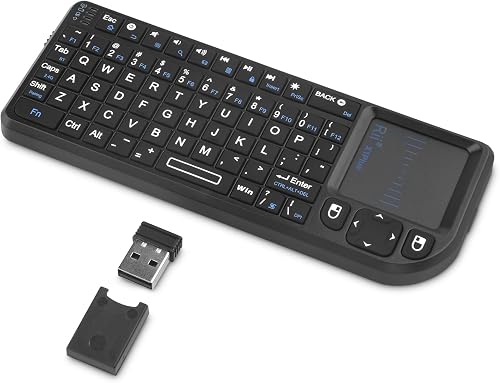
The Rii Mini suits travel, streaming and short control tasks where a full keyboard would take up too much space. Its compact body is roughly the size of an iPhone, with a QWERTY layout, touchpad and white LED backlight.
Like the Fosmon, it supports 2.4G and Bluetooth connections. Bluetooth works with devices such as smart TVs, tablets, projectors and Android boxes, while the 2.4G mode uses the USB receiver for compatible non-Bluetooth devices.
The touchpad gives you pointer control for media interfaces, slides and small computers. A stated 33 ft range makes it useful when you are sitting away from the screen.
Its built-in 500 mAh battery uses USB-C charging and can stay powered for over 30 days on one charge. That long stated runtime favors occasional use, though the small keys are not the best match for writing long documents.
Choose the Rii when portability matters more than a wide typing area. It is a strong mini backlit keyboard with touchpad for a TV bag, travel kit or compact media setup.
Samsers Full-Size Backlit Foldable Bluetooth Keyboard
Samsers Full-Size Backlit Foldable Bluetooth Keyboard: Best for full-size travel typing
- Full-size foldable layout
- Multi-touch trackpad
- Seven backlight colors
- Connects to up to 3 devices
A full-size keyboard that folds for travel and adds a multi-touch trackpad. It suits users who want standard-size keys without carrying a fixed desktop board.
Pros
- Full-size typing area
- Folds for storage
- Phone holder and storage bag included
Cons
- Larger when unfolded
- Backlight reduces the stated battery runtime
The Samsers is the right pick when you want standard-size typing and a keyboard that folds for travel. Unfolded, it measures 13.5 x 4.5 in and uses 0.63 in standard keys with quiet scissor switches.
Its multi-touch trackpad supports scrolling, swiping and clicking, so you do not need a separate mouse for basic pointer control. The keyboard can connect to up to 3 devices through Bluetooth 5.1 and supports Windows, Mac OS, iOS and Android.
Seven backlight colors and four brightness settings give you more control in dim spaces. The backlight can be turned off when battery life matters more than visibility.
The built-in 500 mAh battery provides up to 110 hours without backlight or up to 300 days of standby after a 2 to 3 hour charge. Samsers includes a phone holder, Type-C charging cable, velvet storage bag and user manual.
Choose it for mobile work, business travel or tablet typing where mini keys would slow you down. Its full-size layout takes more room when open, so measure your travel surface before packing it.
LAMA Backlit Bluetooth Touchpad Keyboard for iPad
LAMA Backlit Bluetooth Touchpad Keyboard for iPad: Best for iPad-focused setups
- Bluetooth-only connection
- Backlit QWERTY layout
- Rechargeable battery
- Scissor-switch keys
A slim Bluetooth keyboard with touchpad control for iPad, iPhone, Android, Windows and Mac devices. Its small footprint fits tablet bags and compact desks.
Pros
- Slim and lightweight
- Rechargeable battery
- Scissor-switch keys
Cons
- Bluetooth only
- iPadOS 13 or newer is required
The LAMA is aimed at compact tablet and phone setups. Its 9.84 x 5.9 x 0.24 in body weighs 189 g and uses a QWERTY layout with scissor-switch keys.
It connects through Bluetooth only, with a stated working range of up to 10 m. The compatibility list includes iPad models, iPhone, Samsung devices, Windows, Mac and Android, but iPad use requires iPadOS 13 or newer.
The built-in touchpad adds pointer control to a small keyboard, while media hot keys cover functions such as volume, previous and next. Its backlight helps with low-light typing without adding a separate lamp.
The rechargeable battery offers more than 20 days of use when used for 2 hours a day, plus up to 480 hours of standby. Sleep mode starts after more than 30 minutes without use, and pressing a key wakes the keyboard.
Choose it for an iPad-focused bag or a small desk. Skip it if you need a 2.4G receiver, because this model supports Bluetooth only.
Perixx PERIBOARD-425 US Wired Mini USB Keyboard
Perixx PERIBOARD-425 US Wired Mini USB Keyboard: Best for wired Windows desks
- 78 X-type scissor keys
- White backlight
- Built-in touchpad
- Two USB 2.0 hubs
This wired Windows keyboard keeps the touchpad, backlight and two USB hubs in one compact board. It is a practical choice when wireless pairing is not needed.
Pros
- No battery charging
- Two USB 2.0 hubs
- Quiet X-type scissor keys
Cons
- Wired only
- Windows-focused compatibility
The Perixx is the clearest choice for a fixed Windows setup where a cable is acceptable. It uses a USB-A wired connection and supports Windows 7, 8, 10 and 11.
Its 78 X-type scissor keys provide a wider typing area than the mini wireless remotes here. The built-in 2.48 x 1.85 in touchpad handles pointing, scrolling and zooming, while the white backlight helps in dim workspaces.
Two integrated USB 2.0 hubs give you extra ports for compatible peripherals such as a mouse or USB drive. Because the keyboard is wired, you do not need to manage Bluetooth pairing or recharge a battery.
The 11.18 x 7.17 x 1.1 in body is compact for a keyboard with a touchpad and hubs, but it is less flexible than a wireless model. The connection also keeps it tied to a nearby USB-A port.
Pick it for a Windows desk, office workstation or home setup where stable wired input matters. Choose another model for a TV couch, tablet bag or device that lacks a nearby USB-A port.
How do backlit keyboard touchpad connections differ?
The right connection depends on the devices you plan to control. Bluetooth keeps the desk clear, 2.4G receivers help with devices that lack Bluetooth, and USB-A wired models suit permanent workstations.
The Fosmon and Rii give you both Bluetooth and 2.4G modes. That makes them more adaptable across TVs, computers and streaming hardware, but you still need to check whether the target device supports the touchpad and keyboard functions you need.
The Arteck, Samsers and LAMA use Bluetooth. Their best use is with a device that already has built-in Bluetooth, especially when you want to avoid a receiver occupying a USB port.
The Perixx uses a USB-A cable. It is the simplest setup for a nearby Windows PC, but cable length and port location become part of the desk layout.
Before buying, check the operating system, available ports and wireless support. A keyboard can pair successfully while some shortcuts or touchpad functions remain limited by the device or app.
Is a mini or full-size backlit keyboard with trackpad better?
A mini keyboard is better for holding, travel and short media tasks, while a full-size layout is better for regular writing. The Fosmon and Rii favor portability, while the Samsers gives you standard-size typing when unfolded.
Mini designs keep the touchpad close to your thumbs and reduce the space needed on a couch or coffee table. They are useful for entering search terms, controlling a streaming box or moving through menus.
Full-size boards give your hands more familiar spacing. The Samsers folds for storage, but its unfolded 13.5 x 4.5 in layout still needs a stable surface for comfortable use.
The Arteck sits between these uses with a longer 78-key body and a touchpad. It is easier to place on a lap or desk than a tiny remote-style keyboard, but it is less compact for travel.
Choose the smallest layout that still matches how much you type. If you write long messages or work from a tablet often, standard-size keys are usually worth the extra space.
How should you set up and care for a backlit keyboard with touchpad?
Start by charging a rechargeable model, then pair it with the correct mode for your device. Keep the keyboard within its stated range, turn off the backlight when you do not need it, and store foldable models closed during travel.
For Bluetooth models, open the device's Bluetooth settings and select the keyboard during pairing. The Fosmon and Rii also provide 2.4G modes that use a USB receiver, while the Perixx connects directly through USB-A.
If the touchpad does not respond, check the keyboard's mode, battery level and device settings. Some operating systems may require an accessibility setting for touchpad input, and some apps may not support every shortcut.
Keep the touchpad surface dry and free of debris. Use a soft, dry cloth for the keys and avoid placing pressure on a foldable keyboard hinge when opening or closing it.
Backlight brightness affects power use. On a rechargeable keyboard, lower brightness or no backlight gives you more time between charges.
Which backlit keyboard with touchpad should you choose?
Pick the Fosmon for the broadest wireless flexibility, the Arteck for a larger couch keyboard, or the Rii when the smallest portable design matters most. Choose the Samsers for full-size folding travel typing, the LAMA for a slim iPad-centered setup, and the Perixx for a wired Windows desk.
For another wireless comparison, see our guide to the best bluetooth keyboard with touchpad. Your final choice should match the device's connection support, your typing habits and the space where you will use the keyboard.
Our top 3 picks at a glance
-
1
Best for flexible device control
Fosmon Mini Keyboard with Touchpad Mouse
9.7/10 our score
See it on Amazon -
2
Best for couch-based typing
Arteck Universal Backlit 7-Colors Bluetooth Touch TV
9.6/10 our score
See it on Amazon -
3
Best for portable media control
Rii Mini 2.4G Bluetooth Keyboard with Backlit
9.4/10 our score
See it on Amazon
Frequently asked questions
What is the best backlit keyboard with touchpad for a TV?
The Arteck is the strongest choice for a TV-connected computer or HTPC when the device has built-in Bluetooth. It has a 78-key layout, touchpad, media keys, seven backlight colors and a stated wireless range of up to 10 m.
The Fosmon is more flexible if you need both Bluetooth and a 2.4G USB receiver.
Are backlit keyboards with touchpads good for typing?
Full-size or near-full-size models are better for extended typing than mini keyboards. The Samsers has a full-size layout when unfolded, while the Arteck has 78 keys in a longer design.
Mini models such as the Fosmon and Rii are easier to hold and carry, but their smaller layouts suit short messages and media control.
Do backlit keyboards with touchpads need Bluetooth?
No. Some models use both Bluetooth and a 2.4G USB receiver, while others are Bluetooth-only or wired.
The Fosmon and Rii offer two wireless modes, the Arteck and LAMA use Bluetooth, and the Perixx connects through USB-A.
Check your device ports and built-in wireless support before choosing.
How do I choose a backlit keyboard with a touchpad?
Choose by connection type, keyboard size and battery needs first. Pick a dual-mode model for mixed devices, a full-size foldable model for regular typing, or a wired model for a fixed Windows desk.
Also check whether you need a single-color backlight or several colors, and leave room for the touchpad position in your setup.


