Wireless Mouse vs USB Mouse: What Is the Difference? (November 2026)
A wired USB mouse connects to your computer with a cable; a wireless mouse sends input over the air and may use a small USB receiver. USB names the connection or port, so a wireless mouse can still use USB through its receiver.
On this page (7 sections)
- Wireless mouse vs USB mouse: what is the difference?
- What are the tradeoffs between wired and wireless?
- How do wireless mouse receivers work?
- Which wireless mouse connection fits your computer?
- Which mouse should you choose for work or gaming?
- What should you check before buying?
- Is a wireless mouse with a USB receiver right for you?
A wireless mouse vs USB mouse comparison can be confusing because “USB” describes a port or connection, while “wireless” describes how the mouse sends input. A wired USB mouse uses a cable; a wireless mouse may still connect to your computer through a USB receiver.
The key choice is whether you want a cable-free desk or a mouse that plugs directly into a port. Wireless models add a battery and may use a receiver, while a wired model gets its connection through the cable.
 Best for everyday wireless use
Logitech M185 Compact Ambidextrous Wireless Mouse
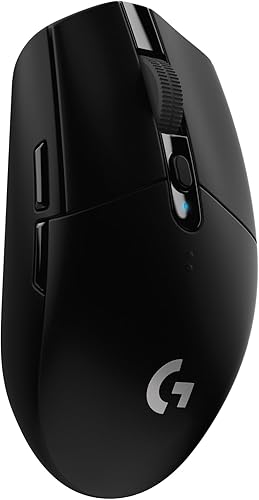 Best for wireless gaming
Logitech G305 Lightspeed Wireless Gaming Mouse
Wireless mouse vs USB mouse: what is the difference?
A wired USB mouse sends input over its cable, while a wireless mouse sends input over the air. Some wireless mice use a USB receiver, so “USB mouse” and “wireless mouse” are not always opposite categories.
A wired mouse has a cable that plugs into a USB port. The cable carries input to the computer and supplies the mouse’s connection without a separate wireless receiver.
A wireless mouse communicates without a cable running to the computer. It may use a small USB receiver, or it may pair over Bluetooth.
Either way, the mouse needs power, usually from a battery.
What does “USB mouse” mean?
“USB mouse” often means a wired mouse with a USB plug, but people also use the phrase for wireless mice that have a USB receiver. Look at the connection details to tell which one it is.
For a wired model, the cable remains attached while you use the mouse. For a receiver model, only the receiver stays in the computer’s USB port.
The mouse itself moves freely.
What does “wireless USB mouse” mean?
A “wireless USB mouse” usually means the mouse communicates with a USB receiver plugged into the computer. The receiver and mouse communicate wirelessly, even though the computer connection uses USB.
That’s the setup used by the Logitech M185 and Amazon Basics 2.4 GHz mouse below. Both use a nano USB receiver, while the Amazon Basics mouse stores its receiver inside the mouse when not in use.
What are the tradeoffs between wired and wireless?
Choose wired USB for a direct cable connection; choose wireless for freedom from a cable across your desk. The right fit depends on your ports, desk layout, and comfort with batteries or charging.
A cable avoids having to keep a mouse battery charged or replaced. It also avoids setting aside a USB port for a wireless receiver, though the cable can add clutter or limit how far you can move the mouse.
Wireless keeps the mouse untethered, which can help on a small desk or when you move between work areas. A receiver-based model still occupies a USB port and needs a battery, so check those requirements first.
For more options by connection type, compare our guides to the best wireless mouse for computer and the best keyboard for computer.
How do wireless mouse receivers work?
A wireless receiver plugs into a USB port and links the mouse to the computer. It handles the computer-side connection, while the mouse communicates with the receiver over radio.
Many receivers are small enough to stay in the port during normal use. Some mice have a storage slot for the receiver, which can help keep it with the mouse when you pack up.
The plug shape matters. A USB-A receiver may not fit directly into a computer that has only USB-C ports.
You can check our guide to USB-C wireless mice or learn how a USB hub and adapters can add ports.
Is a USB receiver the same as Bluetooth?
No, a USB receiver and Bluetooth are different ways to connect a wireless mouse. A receiver uses its own adapter in a USB port, while Bluetooth pairs through the computer’s Bluetooth hardware.
A receiver can be convenient when you want a dedicated connection and your computer has the right port. Bluetooth can save a USB port, but the computer must support Bluetooth and pair with the mouse.
Don’t assume a mouse has Bluetooth because it is wireless. The Amazon Basics 2.4 GHz mouse, for example, is described as wireless and explicitly not Bluetooth.
Which wireless mouse connection fits your computer?
Choose a receiver that matches a port you can spare, or Bluetooth if both the mouse and computer support it. Confirm the connection method before buying so you don’t need an adapter unexpectedly.
A USB-A receiver is a simple fit for many desktop PCs and laptops with USB-A ports. If your computer has only USB-C, check for a USB-C receiver or plan for an adapter.
Our guides to the best wireless mouse with USB receiver and the best wireless mouse with USB-C receiver cover those receiver options. You can also compare Logitech wireless mice if you want to narrow your search by brand.
Which mouse should you choose for work or gaming?
Pick the connection that matches how you use the computer and what ports you have. For everyday desk work, both wired USB and receiver-based wireless can work well; gaming choices depend on the exact mouse and its stated performance.
A wired USB mouse can suit a fixed desk where you prefer a direct connection and don’t want to manage a mouse battery. Keep enough cable slack for comfortable movement.
A receiver-based wireless mouse can suit a laptop bag or a desk where you want fewer cables. The Logitech M185 is compact, ambidextrous, and includes a nano receiver and AA battery.
For gaming, check the model’s response and sensor details rather than assuming every wireless mouse behaves the same. The Logitech G305 is described with LIGHTSPEED wireless and a 1 ms report rate, plus storage for its nano receiver.
What should you check before buying?
Check the connection type, receiver plug, port availability, and power needs. Those details determine whether the mouse will fit your setup and how you’ll use it day to day.
Confirm whether the mouse is wired, receiver-based wireless, or Bluetooth. Then check whether the computer has the needed port or Bluetooth support.
For a receiver model, note whether it uses USB-A or USB-C and whether an adapter is needed. Also check if the receiver stores inside the mouse, especially if you plan to carry it in a laptop bag.
Finally, check the battery type and whether batteries are included. For instance, the Amazon Basics mouse includes 2 AAA batteries and stores its USB nano receiver inside the mouse.
Is a wireless mouse with a USB receiver right for you?
Choose a wireless mouse with a USB receiver if you want cable-free movement and have a matching port available. Choose a wired USB model if you prefer a direct cable connection and don’t want a separate mouse battery.
The grey Logitech M185 is another compact receiver-based option, with an ambidextrous shape and a nano USB receiver. It uses an AA battery.
Pick a receiver-based model if its port fits your computer and you’re comfortable keeping the mouse powered. Pick wired USB for a fixed setup where a cable is practical, or Bluetooth when you want to save a USB port and your devices support it.
Frequently asked questions
Is a USB mouse wired or wireless?
A USB mouse can be wired or wireless. A wired USB mouse connects directly through a cable, while a wireless USB mouse uses a separate receiver plugged into a USB port.
Check whether the mouse includes a receiver or uses Bluetooth, since both connection types can be described as USB compatible.
Does a wireless mouse need a USB port?
A wireless mouse with a USB receiver needs a compatible USB port for that receiver. A Bluetooth mouse can connect without a mouse receiver if your computer supports Bluetooth.
Check the receiver plug and available ports before choosing, especially if your computer has only USB-C ports.
Is a USB receiver the same as a USB mouse?
No. A USB receiver is a small adapter that plugs into the computer and communicates wirelessly with the mouse.
The mouse itself has no cable to the computer.
A wired USB mouse sends its input through a cable that stays connected to the computer.
Which is better for gaming, wired or wireless?
Either can suit gaming, depending on the exact mouse and your preferences. A wired model avoids a mouse battery and receiver, while a wireless gaming model can offer a low reported response time.
Compare the connection method, battery needs, shape, and stated performance for the specific model.
Can I use a wireless mouse with a USB-C port?
Yes, if the receiver plugs into USB-C or you use a compatible adapter or hub. Many wireless mice come with a USB-A receiver, so check the plug before buying.
A Bluetooth mouse may avoid a receiver, provided your computer supports Bluetooth.


