6 Best Windows 11 All-in-One Computers (November 2026)
The best Windows 11 all-in-one computers include the HP 21.5" FHD All-in-One Desktop Computer for compact everyday use, the HP OmniStudio 27 inch All-in-One Desktop Next for a large screen and multitasking, and the Lenovo 24" FHD All-in-One Desktop Computer for office basics with wireless input.
On this page (6 sections)
The best Windows 11 all-in-one computer for most everyday tasks is the HP OmniStudio 27 inch All-in-One Desktop Next, with a 27-inch FHD display, 16GB RAM and a Ryzen AI 7 processor. The Lenovo IdeaCentre 27-inch is the higher-core-count choice, while the HP 21.5-inch model is a smaller option with an included docking hub.
These desktop PCs put the computer components behind or within the display, reducing the number of separate pieces on your desk. If you want to understand the layout before choosing, read how an all-in-one computer works.
Our picks at a glance
-
1
 Best for compact everyday use
HP 21.5" FHD All-in-One Desktop Computer
9.7/10 our score
See it on Amazon -
2
 Best for a large screen and multitasking
HP OmniStudio 27 inch All-in-One Desktop Next
9.6/10 our score
See it on Amazon -
3
 Best for office basics with wireless input
Lenovo 24" FHD All-in-One Desktop Computer
9.5/10 our score
See it on Amazon
- 4
 Best for video calls and screen comfortCheck it
- 5
 Check it
Lenovo IdeaCentre 27" All-in-One Desktop Computer
Best for processor-heavy work - 6
 Check it
HP 24“ FHD OmniStudio All-in-One Desktop
Best for a quiet shared room
Which Windows 11 all-in-one computer fits your desk and workload?
The HP OmniStudio 27-inch is the strongest match for a larger display and multitasking, while the HP 21.5-inch model suits a smaller workspace. Your screen size, applications and call needs can narrow the choices quickly.
HP 21.5" FHD All-in-One Desktop Computer: Best for compact everyday use
- 21.5-inch FHD anti-glare VA display
- Intel N100 quad-core processor
- 8GB RAM and 384GB storage
- 8-in-1 docking hub included
A smaller FHD screen, Windows 11 Home and an included docking hub suit everyday browsing, documents and study. The adjustable stand tilts from -6 to 21 degrees.
Pros
- Docking hub, keyboard and mouse included
- Anti-glare FHD display
- Wi-Fi 6 and Ethernet
Cons
- 21.5-inch screen is the smallest here
- Intel N100 is aimed at everyday tasks
At 21.5 inches, this HP takes less screen space than the 23.8-inch and 27-inch choices below. Its FHD anti-glare VA panel and adjustable tilt give you a way to set the viewing angle around your desk.
The Intel N100 has 4 cores and 4 threads, with a maximum boost clock of up to 3.4GHz. That makes this a fit for everyday browsing, documents and study rather than a system to choose for demanding graphics work.
If gaming is a priority, compare all-in-one computers for gaming before choosing a graphics setup.
The included 8-in-1 docking hub adds storage capacity through an SD card when connected to the computer. The package also includes a keyboard and mouse, and the computer has Wi-Fi 6, Ethernet and HDMI.
Choose it if you want a smaller display and the convenience of the included hub. If you want to compare more brand options, see our best HP all-in-one computer picks.
HP OmniStudio 27 inch All-in-One Desktop Next: Best for a large screen and multitasking
- 27-inch FHD IPS display
- AMD Ryzen AI 7 445 processor
- 16GB DDR5 RAM and 512GB SSD
- FHD IR camera with HDR auto switch
The 27-inch screen gives you more viewing area, while 16GB RAM and a Ryzen AI 7 445 processor suit heavier multitasking than entry-level N-series systems. Windows Hello facial recognition is supported by the IR camera.
Pros
- Largest display in this roundup
- 16GB DDR5 memory
- Noise reduction for calls
Cons
- 27-inch footprint needs more desk space
- FHD resolution is shared across a larger screen
The 27-inch FHD IPS screen gives this HP more viewing area than the 21.5-inch and 23.8-inch systems. Its adjustable stand helps you set the screen position for your desk.
The Ryzen AI 7 445 processor, 16GB DDR5 RAM and 512GB SSD give it a stronger multitasking profile than the N100 picks. Windows 11 Home includes Microsoft Copilot, and the FHD IR camera supports Windows Hello facial recognition.
For calls, the computer has AI noise reduction and an FHD camera with HDR auto switch. The feature set also includes HP Eye Ease and DTS Sound Unbound, alongside a wired keyboard and mouse.
Choose this model if screen area and multitasking matter more than compact desk placement. For a different brand's all-in-one lineup, compare our best Dell all-in-one computer guide.
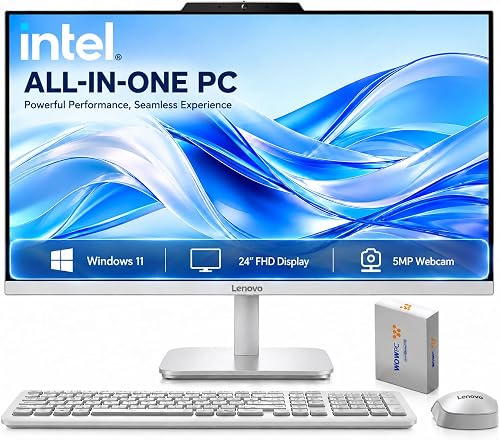
Lenovo 24" FHD All-in-One Desktop Computer: Best for office basics with wireless input
- 23.8-inch FHD IPS anti-glare display
- Intel N100 processor
- 16GB RAM and 256GB SSD
- Wireless keyboard and mouse included
This Lenovo pairs an N100 processor with 16GB RAM and an IPS display, making it a practical fit for office work, school and everyday home use. Wireless keyboard and mouse are included.
Pros
- 16GB RAM
- IPS anti-glare display
- Wi-Fi 6 and Bluetooth 5.2
Cons
- Non-touch display
- The 512GB storage is external
This Lenovo uses a 23.8-inch FHD IPS anti-glare screen and an Intel N100 processor. It has 16GB DDR4 RAM, a 256GB SSD and 512GB of external storage, so check which files you plan to keep on each drive.
A wireless keyboard and mouse come with the computer. Wi-Fi 6, Bluetooth 5.2, Ethernet and HDMI provide options for connecting to a network and accessories.
The display is non-touch, and the Intel N100 is a four-core processor. That makes this a sensible office and study configuration if you want more memory than the HP N100 pick while staying with a mid-size FHD screen.
Choose it for ordinary home or office work where included wireless input and 16GB RAM are useful. If you are comparing processors across compact desktops, our guide to laptop and desktop processors in all-in-ones explains the distinction.
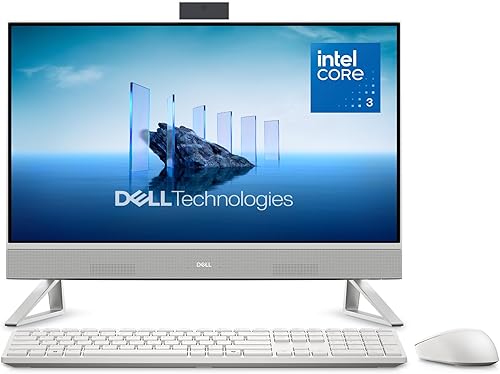
Dell 23.8" All-in-One Desktop: Best for video calls and screen comfort
- 23.8-inch FHD IPS display
- Intel Core 3 100U processor
- 5MP+IR camera with HDR
- Dual Bluetooth speakers
The Dell combines a Core 3 100U processor with an FHD IPS display and a 5MP+IR camera. ComfortView Plus and dual Bluetooth speakers add features for long screen sessions and calls.
Pros
- 5MP+IR camera with HDR
- ComfortView Plus reduces blue light emissions
- Dual Bluetooth speakers
Cons
- Memory and storage capacities aren't specified here
- Display size is 23.8 inches
The Dell stands out for its 5MP+IR camera with HDR and eye comfort features. Its 23.8-inch FHD IPS display has 99% sRGB coverage, and Dell ComfortView Plus is designed to reduce blue light emissions.
The Intel Core 3 100U gives this model a different processor class from the N100 systems. Dell also includes dual Bluetooth speakers with Dolby Atmos spatial sound, plus a tilt range from 0 to 20 degrees.
The camera and speaker setup make it a natural choice for frequent video calls, work and streaming. Dell specifies a 1-year onsite service for issues covered by its limited hardware warranty that cannot be resolved remotely.
Choose the Dell when calls and display comfort are priorities. Its memory and storage capacities are not specified here, so confirm the configuration you need before choosing.
Lenovo IdeaCentre 27" All-in-One Desktop Computer: Best for processor-heavy work
- 10-core Intel Core i7-13620H processor
- 27-inch FHD IPS display with 100Hz refresh rate
- 16GB DDR5 RAM and 512GB SSD
- Windows 11 Pro
A 10-core Core i7-13620H and 16GB DDR5 make this a strong fit for demanding everyday multitasking. The 27-inch FHD IPS screen has a stated 100Hz refresh rate.
Pros
- 10-core Core i7 processor
- 100Hz display
- HDMI-in and HDMI-out
Cons
- 27-inch display needs desk space
- Integrated graphics
This Lenovo combines a 10-core Intel Core i7-13620H processor with 16GB DDR5 RAM and a 512GB SSD. Its 27-inch FHD IPS display has a 100Hz refresh rate, 99% sRGB color gamut and 300-nit brightness.
Windows 11 Pro and both HDMI-in and HDMI-out add useful flexibility. The HDMI-in port lets you connect an external source to the display, while HDMI-out supports an external display connection.
The system uses integrated Intel UHD Graphics, so the processor is the main reason to choose it for heavier everyday workloads. It also includes a wired keyboard and mouse.
Choose this Lenovo if you want a Core i7 and a larger display with a high refresh rate. Its 27-inch size needs more desk room than a 23.8-inch model.
HP 24“ FHD OmniStudio All-in-One Desktop: Best for a quiet shared room
- 23.8-inch FHD IPS display
- 8GB DDR5 RAM
- Pop-up privacy camera
- Fanless design
The fanless design suits a bedroom or shared room where fan noise is a concern. It also pairs an FHD IPS screen with a pop-up privacy camera.
Pros
- Fanless design
- Pop-up privacy camera
- Wi-Fi 6
Cons
- 8GB RAM
- Some of the stated storage is external
The HP OmniStudio has a 23.8-inch FHD IPS screen, 8GB DDR5 RAM and an Intel N150 quad-core processor. Its fanless design makes it a candidate for bedrooms and shared rooms where fan noise can be distracting.
A pop-up privacy camera can be tucked away when it's not in use, and dual microphones with noise reduction support calls. The listed storage configuration combines 128GB UFS with 512GB external storage.
This model also has Wi-Fi 6 and HP Eye Ease. The smaller memory capacity makes it best suited to lighter everyday work, web browsing and video calls rather than large multitasking loads.
Choose it when a quieter design and camera privacy are high on your list. For another way to improve sound at a desk, see our guide to best Bluetooth computer speakers.
What matters when choosing a Windows 11 all-in-one computer?
A good match depends on your daily applications, available desk space and the connections you need. Compare the processor, memory and storage alongside screen size instead of treating any one specification as the whole story.
How much processor power do everyday tasks need?
Browsing, documents and video calls can work well on an entry-level processor such as the Intel N100 in the HP and Lenovo systems here. Heavier multitasking may call for a higher-tier choice such as the Core i7-13620H or Ryzen AI 7 445.
Processor model names don't guarantee the same performance across every system. Match the processor to the apps you use, and consider whether you also need integrated graphics for your usual work.
Is 8GB or 16GB of RAM a better fit?
For a computer that runs several apps and browser tabs at once, 16GB gives you more memory headroom than 8GB. The HP 21.5-inch and HP OmniStudio 24-inch models have 8GB, while the other four choices have 16GB.
Memory is separate from storage: RAM helps keep active tasks running, while an SSD or other drive stores files. Check both capacities against your workload and the number of applications you keep open.
How much screen space do you need?
A 23.8-inch display can be a middle ground for a desk that needs more room than a compact 21.5-inch panel provides. A 27-inch screen offers a broader working area, but the models here still use FHD resolution.
Measure your desk and viewing distance before buying. Also check whether you need a touch display, since the products here are non-touch or don't state touch support.
Which ports and accessories should you check?
Check for the ports you expect to use, such as USB-A, USB-C, HDMI, Ethernet and a headphone or microphone jack. The models differ, and an HDMI-in port is useful for connecting another video source to a compatible display.
A keyboard and mouse are included with several of these computers, but input type varies between wireless and wired sets. If you want a quieter desk setup, compare our best quiet full-size keyboard options and best backlit keyboard and mouse combo picks.
How do these Windows 11 all-in-one computers compare?
The main differences are display size, processor tier, memory and call features. Use the table to shortlist a model, then verify the exact configuration and ports that matter for your desk.
| Product | Best for | Display | Processor | Memory and storage | Our score |
|---|---|---|---|---|---|
| HP 21.5" FHD All-in-One Desktop Computer | compact everyday use | 21.5 in, 1920 x 1080 | Intel N100, 4 cores | 8GB RAM, 384GB storage | 9.7 |
| HP OmniStudio 27 inch All-in-One Desktop Next | a large screen and multitasking | 27 in, 1920 x 1080 | AMD Ryzen AI 7 445 | 16GB RAM, 512GB SSD | 9.6 |
| Lenovo 24" FHD All-in-One Desktop Computer | office basics with wireless input | 23.8 in, 1920 x 1080 | Intel N100, 4 cores | 16GB RAM, 256GB SSD plus 512GB external storage | 9.5 |
| Dell 23.8" All-in-One Desktop | video calls and screen comfort | 23.8 in, FHD IPS | Intel Core 3 100U | 9.4 | |
| Lenovo IdeaCentre 27" All-in-One Desktop Computer | processor-heavy work | 27 in, FHD IPS, 100Hz | Intel Core i7-13620H, 10 cores | 16GB RAM, 512GB SSD | 9.3 |
| HP 24“ FHD OmniStudio All-in-One Desktop | a quiet shared room | 23.8 in, 1920 x 1080 | Intel N150, quad-core | 8GB RAM, 128GB UFS plus 512GB external storage | 9.1 |
How we chose these Windows 11 all-in-one computers
We compared the processor, display, memory, storage, ports and included accessories against common home and office needs. Our score weighs specs, features and buyer feedback against what you're shopping for.
A higher score reflects a closer fit for this roundup's everyday computing needs. We did not test these computers directly, so the recommendations rely on the stated configurations and features.
More guides on this topic
Which Windows 11 all-in-one should you choose?
Choose the HP OmniStudio 27-inch if you want a 27-inch screen, 16GB RAM and a Ryzen AI 7 processor. Choose the Lenovo IdeaCentre if you prefer its 10-core Core i7, and pick the HP 21.5-inch model when a smaller screen and included docking hub fit your space.
For ordinary office tasks with wireless input, consider the Lenovo 24-inch. If video calls matter most, compare the Dell's 5MP+IR camera and speakers with the HP OmniStudio 24-inch privacy camera and fanless design.
Our top 3 picks at a glance
-
1
Best for compact everyday use
HP 21.5" FHD All-in-One Desktop Computer
9.7/10 our score
See it on Amazon -
2
Best for a large screen and multitasking
HP OmniStudio 27 inch All-in-One Desktop Next
9.6/10 our score
See it on Amazon -
3
Best for office basics with wireless input
Lenovo 24" FHD All-in-One Desktop Computer
9.5/10 our score
See it on Amazon
Frequently asked questions
What should you look for in a Windows 11 all-in-one computer?
Match the processor and memory to your everyday work, then check screen size, storage and ports. An N100 system can suit browsing, documents and school tasks, while a Core i7 or Ryzen AI 7 option gives you a higher-tier processor.
Also check whether storage is internal or external and whether the keyboard and mouse are included.
Is a 24-inch or 27-inch all-in-one better?
A 24-inch all-in-one takes less desk space, while a 27-inch screen gives you more viewing area for side-by-side windows. Both sizes in this roundup use FHD resolution, so text and images are spread across a larger panel on the 27-inch models.
Measure your desk and viewing distance before choosing.
Are all-in-one computers good for home offices?
Yes. An all-in-one can simplify a home office by combining the computer and display in one unit.
Several picks here include a keyboard and mouse.
Camera quality, screen size and connection ports matter if you join calls or connect extra devices.
See our best all-in-one computers for home office for options focused on that setup.
Do Windows 11 all-in-one computers have touchscreens?
Some do, but the models in this roundup have screens described as non-touch or without a stated touch feature. If tapping and swiping on the display matters to you, compare models made specifically for touch in our best all-in-one touchscreen computer guide.
Can you add more storage to an all-in-one computer?
You can add external storage to a computer with a compatible USB connection, and some models also support internal upgrades. Check the available ports and upgrade options for the exact configuration you want.
For a separate drive for large files and backups, see our best 2TB external SSD picks.