5 Best Lenovo All-in-One Computers (November 2026)
The best Lenovo all-in-one desktop computers include the Lenovo IdeaCentre All-in-One Desktop Computer for everyday home and office work, the Lenovo 24" FHD All-in-One Desktop Computer for extra memory and wireless accessories, and the Lenovo IdeaCentre 27" All-in-One Desktop Computer for a larger screen and demanding multitasking.
On this page (4 sections)
The best Lenovo all-in-one computers for most buyers are the 23.8-inch IdeaCentre and 24-inch models, with the 27-inch IdeaCentre standing out for its larger screen and Core i7 processor. Compare memory, internal storage, included accessories and ports before choosing one for home, school or office work.
Lenovo's range includes compact N100 configurations for everyday tasks and a larger-screen IdeaCentre with a 10-core Core i7. All-in-one PCs keep the computer components behind the display, which can reduce desk clutter compared with a separate desktop tower.
For an Apple comparison of a compact desktop and an all-in-one, see Mac mini vs iMac.
If you’re new to the form factor, start with how an all-in-one computer works and whether an all-in-one computer needs a separate tower.
Our picks at a glance
-
1
 Best for everyday home and office work
Lenovo IdeaCentre All-in-One Desktop Computer
9.5/10 our score
See it on Amazon -
2
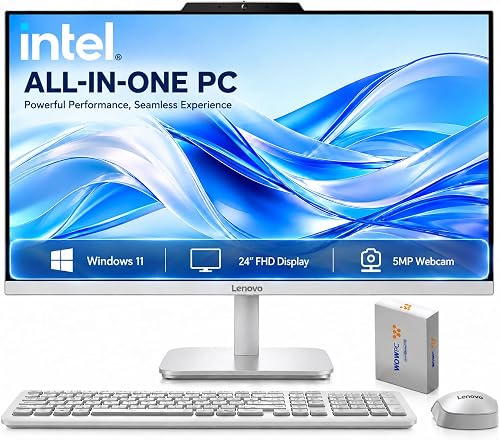 Best for extra memory and wireless accessories
Lenovo 24" FHD All-in-One Desktop Computer
9.5/10 our score
See it on Amazon -
3
 Best for a larger screen and demanding multitasking
Lenovo IdeaCentre 27" All-in-One Desktop Computer
9.3/10 our score
See it on Amazon
- 4
 Check it
Lenovo 23.8" Intel 4-Core 8GB 256GB SSD
Best for a basic study or home-office setup - 5
 Check it
Lenovo 24" FHD All-in-One Desktop Computer
Best for a wired Windows 11 Pro workstation
Which Lenovo all-in-one computer fits your needs?
The 23.8-inch IdeaCentre with a 512GB SSD is a balanced everyday choice, while the 27-inch model offers the strongest processor and largest screen in this group. Choose one of the 16GB configurations if you want more memory for switching among apps.
We compared screen size, processor, memory, storage and connections to match each pick to a clear use. Our score weighs specs and features against what you're shopping for.
| Product | Best for | Display | Memory | Storage | Our score |
|---|---|---|---|---|---|
| Lenovo IdeaCentre All-in-One Desktop Computer | everyday home and office work | 23.8 in, 1920 x 1080 IPS | 8GB DDR4-3200 | 512GB PCIe SSD | 9.5 |
| Lenovo 24" FHD All-in-One Desktop Computer | extra memory and wireless accessories | 23.8 in, 1920 x 1080 IPS | 16GB DDR4 | 256GB SSD plus 512GB external storage | 9.5 |
| Lenovo IdeaCentre 27" All-in-One Desktop Computer | a larger screen and demanding multitasking | 27 in, 1920 x 1080 IPS, 100Hz | 9.3 | ||
| Lenovo 23.8" Intel 4-Core 8GB 256GB SSD | a basic study or home-office setup | 23.8 in, 1920 x 1080 IPS | 8GB DDR4-3200 | 256GB NVMe SSD | 9.1 |
| Lenovo 24" FHD All-in-One Desktop Computer | a wired Windows 11 Pro workstation | 23.8 in, 1920 x 1080 IPS | 16GB DDR4 | 512GB PCIe SSD | 8.8 |
Lenovo all-in-one computers compared
The main differences are screen size, RAM and storage configuration. All five models use Full HD displays, but their included peripherals and operating system versions vary.
Best Lenovo all-in-one computer for everyday use
The Lenovo IdeaCentre All-in-One Desktop Computer is the best fit for common home and office tasks, with an Intel N100, 8GB RAM and a 512GB SSD. Its 23.8-inch IPS display is anti-glare and has a 1920 x 1080 resolution.
Lenovo IdeaCentre All-in-One Desktop Computer: Best for everyday home and office work
- 23.8-inch Full HD IPS anti-glare screen
- Intel N100, 8GB DDR4 RAM
- 512GB PCIe SSD
- Wi-Fi 6 and HDMI-out
A 23.8-inch screen, 512GB SSD and everyday-use Intel N100 setup make this a balanced pick for browsing, office tasks and study.
Pros
- 512GB SSD
- Anti-glare IPS display
- Four USB-A ports and HDMI-out
Cons
- 8GB RAM
- No card reader
This configuration balances storage and desk size for everyday work. The 512GB PCIe SSD gives you more internal storage than the 256GB options here, while the Intel N100 is aimed at daily productivity, browsing and school tasks.
The display is non-touch, with 250 nits brightness and 99% sRGB color coverage. An HD camera, mono microphone and dual 2W speakers support video calls, while HDMI-out lets you connect another display.
Connectivity includes Wi-Fi 6, Bluetooth 5.2, Gigabit Ethernet, USB-C and four USB-A ports. The included wired keyboard and mouse keep setup simple, though the computer has no SD card reader.
Choose it if you want a familiar 23.8-inch setup with 512GB of internal storage. If you regularly move photos from a camera, pair it with a separate reader and see our guide to external hard drives for more storage options.
Best Lenovo 24-inch all-in-one for added memory
The 24-inch Lenovo FHD All-in-One is a good fit if you want 16GB RAM and wireless keyboard and mouse accessories. It has a 23.8-inch Full HD IPS display and Intel N100 processor.
Lenovo 24" FHD All-in-One Desktop Computer: Best for extra memory and wireless accessories
- 23.8-inch Full HD IPS anti-glare screen
- Intel N100, 16GB DDR4 RAM
- 256GB SSD plus 512GB external storage
- Wireless keyboard and mouse
Its 16GB memory and included wireless keyboard and mouse suit a desk where you want more RAM and fewer accessory cables.
Pros
- 16GB RAM
- Wireless keyboard and mouse included
- Wi-Fi 6 and Bluetooth 5.2
Cons
- 256GB SSD
- UK keyboard layout
This model combines 16GB DDR4 memory with a 256GB PCIe SSD and 512GB external storage. That split matters: the internal SSD is smaller than the 512GB SSD in the first pick, so think about which files and apps need to stay on the computer.
The included white wireless keyboard and mouse suit a tidier desk. They use a UK keyboard layout, so check that layout against your typing needs before choosing this configuration.
It also includes Wi-Fi 6, Bluetooth 5.2, HDMI-out, Ethernet and four USB-A ports. The 23.8-inch non-touch screen is anti-glare, with Full HD resolution and 250 nits brightness.
Pick this model when RAM and wireless accessories matter more than having a larger internal SSD. For a quieter desk setup, our guide to the best quiet full-size keyboards can help if you plan to replace the included keyboard.
Best Lenovo 27-inch all-in-one for multitasking
The 27-inch IdeaCentre is the strongest choice for a larger display and more demanding multitasking, with a 10-core Intel Core i7-13620H and 16GB DDR5 RAM. Its screen is Full HD rather than a higher resolution.
Lenovo IdeaCentre 27" All-in-One Desktop Computer: Best for a larger screen and demanding multitasking
- 27-inch Full HD IPS screen
- 10-core Intel Core i7-13620H
- 16GB DDR5 RAM
- HDMI-in and HDMI-out
A 27-inch screen and 10-core Core i7 make this the most capable pick here for multitasking and a larger viewing area.
Pros
- Largest screen in this group
- 16GB DDR5 RAM
- HDMI-in and HDMI-out
Cons
- Full HD resolution on a 27-inch screen
- USB-C is for data transfer
The 27-inch IPS display runs at 100Hz and has anti-glare treatment, 300 nits brightness and 99% sRGB color coverage. The larger panel can make documents and side-by-side windows easier to view, though Full HD pixels are spread across more screen area than on the 23.8-inch models.
The processor has 10 cores and 16 threads, and the system includes 16GB DDR5 RAM plus a 512GB SSD. It runs Windows 11 Pro and includes a wired keyboard and mouse.
Ports include USB-C for data transfer, HDMI-in, HDMI-out, Ethernet and USB-A. HDMI-in can let the display serve as a screen for another device, while HDMI-out supports an additional monitor.
Choose this IdeaCentre if screen size and processor headroom matter more than keeping the footprint small. For a comfortable desk setup, consider pairing it with a wireless trackball mouse if you prefer a pointing device that stays in one place.
Best Lenovo all-in-one for a simple study setup
The Lenovo 23.8-inch Intel 4-Core model suits basic study and home-office tasks, with an Intel N100, 8GB RAM and a 256GB NVMe SSD. It includes a wired keyboard and mouse.
Lenovo 23.8" Intel 4-Core 8GB 256GB SSD: Best for a basic study or home-office setup
- 23.8-inch Full HD IPS anti-glare screen
- Intel N100, 8GB DDR4 RAM
- 256GB NVMe SSD
- Wired keyboard and mouse included
This straightforward configuration pairs a Full HD screen with an Intel N100, 8GB RAM and a 256GB SSD for everyday computing.
Pros
- Anti-glare IPS display
- Wi-Fi 6 and Bluetooth 5.2
- Wired keyboard and mouse included
Cons
- 8GB RAM
- 256GB SSD
Its 23.8-inch Full HD IPS screen is anti-glare and has 99% sRGB color coverage. The combination of an HD camera, dual speakers and a mono microphone covers common video-call needs without adding separate audio gear.
The 256GB SSD is the key tradeoff. It can be enough for documents and apps, but a large photo, video or game library may call for external storage.
You get Wi-Fi 6, Bluetooth 5.2, Gigabit Ethernet, HDMI-out and four USB-A ports. Choose it if your work is mostly browser-based or document-focused and you want a basic all-in-one kit.
For printed assignments or home-office documents, compare it with an Epson EcoTank ET-4800 printer review. Choose another computer in this group if you need more memory or internal storage.
Best Lenovo 24-inch all-in-one with Windows 11 Pro
This Lenovo 24-inch FHD model is a fit for buyers who want 16GB RAM, a 512GB SSD and Windows 11 Pro in a 23.8-inch setup. It uses an Intel N100 processor and includes wired keyboard and mouse accessories.
Lenovo 24" FHD All-in-One Desktop Computer: Best for a wired Windows 11 Pro workstation
- 23.8-inch Full HD IPS anti-glare screen
- Intel N100, 16GB DDR4 RAM
- 512GB PCIe SSD
- Windows 11 Pro
Its 16GB RAM and 512GB SSD provide more memory and internal storage than the 8GB and 256GB configurations, with Windows 11 Pro.
Pros
- 16GB RAM and 512GB SSD
- Windows 11 Pro
- Wired keyboard and mouse included
Cons
- Intel N100 processor
- Wired peripherals
The 16GB RAM and 512GB PCIe SSD give it a stronger memory and storage configuration than the 8GB and 256GB picks. Its Full HD IPS anti-glare display has 250 nits brightness and 99% sRGB color coverage.
The computer includes Wi-Fi 6, Bluetooth 5.2, Gigabit Ethernet, HDMI-out and four USB-A ports. It also has an HD camera, mono microphone and dual 2W speakers for video calls.
This configuration stands out for Windows 11 Pro and wired accessories. The Intel N100 remains an everyday processor, so choose the Core i7 model if your work needs more processor headroom.
Pick it if you prefer more RAM and SSD capacity in a standard 23.8-inch size. Choose the wireless-accessory model above if a cable-free keyboard and mouse matter more.
What should you compare before buying a Lenovo all-in-one?
Compare processor, RAM, storage and display size against the tasks you do most. A larger screen or more memory can be useful, but neither replaces checking the type and amount of storage you need.
Is an Intel N100 Lenovo all-in-one enough?
An Intel N100 model can suit browsing, document work, video calls and common school tasks. The 27-inch IdeaCentre uses a 10-core Intel Core i7-13620H, making it the stronger fit for heavier multitasking.
Think about the apps you keep open at once. If you use mostly a browser, email and office tools, the N100 models may meet your needs; if you run more demanding apps, compare the Core i7 system.
How much RAM and storage do you need?
The models here have either 8GB or 16GB RAM, and SSD capacities from 256GB to 512GB. More RAM can help when you switch among several apps, while SSD space determines how much can stay on the computer.
One configuration pairs a 256GB SSD with 512GB of external storage. If you already keep photos and files on another drive, that split may work; otherwise, an internal 512GB SSD offers a simpler starting point.
Is a 23.8-inch or 27-inch screen better?
Choose 23.8 inches when desk space is limited or you sit close to the screen. The 27-inch IdeaCentre gives you a larger Full HD display, which can help when viewing multiple windows but takes up more room.
Measure the desk depth and width before buying. Also consider whether Full HD at 27 inches matches your usual viewing distance and text-size preferences.
Which ports and accessories matter?
Check for the connections you use every day, especially USB-A, USB-C, HDMI and Ethernet. The models here include HDMI-out, while the 27-inch IdeaCentre also has HDMI-in and USB-C.
Included keyboard and mouse styles vary. The 16GB model with external storage has wireless accessories and a UK keyboard layout, while other configurations include wired accessories.
An all-in-one reduces the need for a separate tower, but your desk may still need space for cables, a printer or an external drive. If printing is part of your setup, you can compare the Epson EcoTank ET-4800 review before choosing a printer.
Which Lenovo all-in-one should you choose?
Choose the Lenovo IdeaCentre All-in-One Desktop Computer for a balanced everyday setup with a 512GB SSD. Pick the 27-inch IdeaCentre for its Core i7 processor and larger screen, or the 16GB 24-inch model with wireless accessories if that fits your desk better.
If your choice depends on how the computer fits into your workspace, revisit how an all-in-one works and whether it replaces a tower. For SD-card transfers, check our guide to what an SD card reader does.
Our top 3 picks at a glance
-
1
Best for everyday home and office work
Lenovo IdeaCentre All-in-One Desktop Computer
9.5/10 our score
See it on Amazon -
2
Best for extra memory and wireless accessories
Lenovo 24" FHD All-in-One Desktop Computer
9.5/10 our score
See it on Amazon -
3
Best for a larger screen and demanding multitasking
Lenovo IdeaCentre 27" All-in-One Desktop Computer
9.3/10 our score
See it on Amazon
Frequently asked questions
Are Lenovo all-in-one computers good for everyday work?
Yes, Lenovo all-in-one computers can suit everyday office tasks, browsing, schoolwork and video calls. The models here pair a screen and computer in one unit and include Intel N100 or Core i7 processors, depending on the model.
Choose memory and storage based on your apps and files.
What is the difference between Lenovo's 24-inch and 27-inch all-in-ones?
The 24-inch options here have 23.8-inch Full HD displays and Intel N100 processors. The 27-inch IdeaCentre has a 27-inch Full HD display and a 10-core Intel Core i7-13620H.
Pick by desk space and workload, and consider how Full HD resolution looks at your usual viewing distance.
Do these Lenovo all-in-one computers have a card reader?
The IdeaCentre model with 8GB RAM and a 512GB SSD and the 16GB model with external storage are described without a card reader. If you move photos from SD cards, plan on a separate reader.
Our guide explains what an SD card reader is.
Can I connect another monitor to a Lenovo all-in-one?
Some models here include HDMI-out, which can connect an external display. The 27-inch IdeaCentre also has HDMI-in, so check the exact port setup for the computer you choose.
A second screen adds workspace but also needs room and a suitable cable.