6 Best All-in-One Computers for Gaming (November 2026)
The best all-in-one computers for casual gaming include the HP OmniStudio 27 inch All-in-One Desktop Next for casual gaming on a large screen, the Lenovo ThinkCentre All-in-One Desktop Computer for gaming between work tasks, and the Dell 23.8" All-in-One Desktop for light games and streaming.
On this page (7 sections)
- The best all-in-one computers for gaming and casual play
- How we compared all-in-one PCs for gaming
- What should you expect from integrated graphics?
- Which specs matter most in an all-in-one gaming PC?
- How does an all-in-one compare with a mini PC and monitor?
- Should you use the built-in speakers for games?
- Which all-in-one should you choose for gaming?
The HP OmniStudio 27 is the best all-in-one computer for casual gaming in this group, with Radeon 840M integrated graphics, 16 GB DDR5 memory and a 27-inch FHD screen. These all-in-ones can suit lighter games, but demanding new titles call for a PC with a separate graphics card.
If your priority is gaming, focus first on graphics hardware, then check the game's requirements against the processor and memory. Integrated graphics share system memory, so realistic expectations matter more than a high-resolution screen or a big processor name.
The picks below are best viewed as everyday desktops that can also play some games. For more context, see what integrated graphics mean in an all-in-one computer and how all-in-one computers work.
Our picks at a glance
-
1
 Best for casual gaming on a large screen
HP OmniStudio 27 inch All-in-One Desktop Next
9.6/10 our score
See it on Amazon -
2
 Best for gaming between work tasks
Lenovo ThinkCentre All-in-One Desktop Computer
9.2/10 our score
See it on Amazon -
3
- 4
 Check it
MECHAZER 27 inch All-in-One Desktop Computer Curved
Best for a large curved gaming screen - 5
 Check it
Lenovo IdeaCentre All-in-One Desktop Computer
Best for occasional simple games - 6
 Check it
HP 21.5" FHD All-in-One Desktop Computer
Best for compact casual gaming
The best all-in-one computers for gaming and casual play
The HP OmniStudio 27 is the best equipped for casual gaming, while the other models fit simpler play or prioritize a different screen and processor mix. None of these models lists a dedicated graphics card.
HP OmniStudio 27 inch All-in-One Desktop Next: Best for casual gaming on a large screen
- AMD Ryzen AI 7 445
- Integrated AMD Radeon 840M graphics
- 16 GB DDR5 RAM
- 27-inch FHD display
Its Radeon 840M graphics and 16 GB of DDR5 memory make it the best equipped pick here for casual gaming. The 27-inch FHD screen gives games room to fill the desk.
Pros
- Radeon 840M integrated graphics
- 16 GB DDR5 memory
- 27-inch FHD IPS display
Cons
- Integrated graphics limit demanding game settings
- FHD resolution is not 4K
The HP OmniStudio 27 is the clearest choice for casual gaming among these all-in-ones. Its AMD Radeon 840M integrated graphics are paired with an AMD Ryzen AI 7 445 processor and 16 GB of DDR5 memory.
The 27-inch FHD IPS display gives games a large viewing area, while the 512 GB SSD provides space for apps and game files. If touch input matters, compare touchscreen all-in-one computers for models built around that feature.
The 16 GB memory also leaves room for everyday apps alongside a game, though the graphics remain integrated.
HP describes the Radeon graphics as built for work and play. That wording does not guarantee a particular frame rate, so check the specific game's system requirements and look for independent benchmarks for the games you play.
Choose it for lighter games and general use on a roomy screen. If you want high settings in demanding releases, an all-in-one without a dedicated GPU is the wrong class of PC.
Lenovo ThinkCentre All-in-One Desktop Computer: Best for gaming between work tasks
- Intel Core i5-13420H
- Integrated Intel UHD Graphics
- 16 GB DDR5 RAM
- 27-inch FHD IPS display with 100 Hz refresh rate
The Core i5-13420H and 16 GB DDR5 memory suit everyday multitasking, while the 27-inch 100 Hz display supports a smoother screen experience. Integrated Intel UHD graphics make this a choice for lighter games.
Pros
- Core i5-13420H processor
- 100 Hz FHD IPS display
- 16 GB DDR5 memory
Cons
- Integrated graphics are not aimed at demanding games
- 27-inch display is FHD
The Lenovo ThinkCentre gives you a 27-inch FHD IPS panel with a 100 Hz refresh rate, a Core i5-13420H processor and 16 GB DDR5 memory. Its Intel UHD Graphics are integrated, so the screen's refresh rate alone does not mean games will reach high frame rates.
This configuration suits lighter games, older titles and daily work on the same computer. The 27-inch 1920 x 1080 screen also has an anti-glare finish and 99% sRGB coverage.
The computer includes HDMI-in and HDMI-out ports, plus USB-C, USB-A and Ethernet. Learn when you can use an all-in-one as a monitor.
Those connections help with peripherals or another display, but they don't add graphics power.
Pick it if you value the large 100 Hz screen for mixed work and casual play. Compare the graphics chip and system requirements before expecting it to run demanding games well.
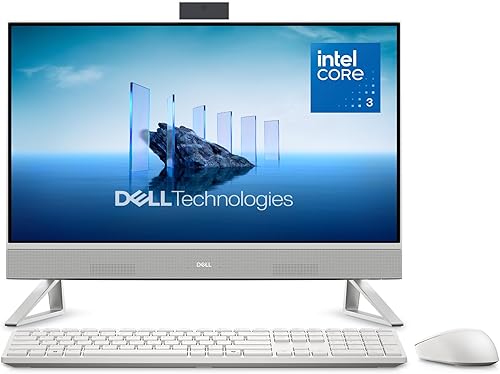
Dell 23.8" All-in-One Desktop: Best for light games and streaming
- Intel Core 3 100U
- Integrated Intel Graphics
- 23.8-inch FHD IPS display
- 5MP+IR camera
A 23.8-inch FHD screen and integrated Intel Graphics fit casual play alongside streaming and everyday tasks. Keep expectations to lighter games because it has no separate graphics card.
Pros
- 23.8-inch FHD IPS display
- Integrated Bluetooth speakers
- HDR 5MP+IR camera
Cons
- Integrated graphics constrain game choice and settings
- No dedicated graphics card
The Dell 23.8-inch all-in-one is a sensible fit for casual games mixed with streaming, browsing and video calls. For a broader look at Dell models, compare Dell all-in-one computers.
Its Intel Core 3 100U processor and integrated Intel Graphics are aimed at everyday use, not graphics-heavy gaming.
The 23.8-inch FHD IPS screen has 99% sRGB coverage, and the 5MP+IR camera includes HDR. Dell also includes dual Bluetooth speakers with Dolby Atmos spatial sound, which can make the setup convenient for games and video without separate desktop speakers.
Dell ComfortView Plus is designed to reduce blue light emissions. The display tilts from 0 to 20 degrees, so you can adjust its viewing angle at your desk.
Choose this model if the all-in-one will spend more time on everyday tasks and media than games. For a larger display with stronger integrated graphics, the HP OmniStudio 27 is a better fit.
MECHAZER 27 inch All-in-One Desktop Computer Curved: Best for a large curved gaming screen
- Intel Core i7-7700HQ
- Integrated UHD Graphics
- 16 GB DDR3 RAM
- 27-inch curved FHD display
The 27-inch curved FHD display is its main draw for a larger desk setup. Its integrated UHD graphics point to lighter games, and the older Core i7-7700HQ platform makes it less compelling than the newer top picks.
Pros
- 27-inch curved FHD screen
- 16 GB DDR3 memory
- Includes keyboard and mouse
Cons
- Integrated graphics limit game performance
- Older Core i7-7700HQ processor
The MECHAZER stands out for its 27-inch curved FHD screen and 16 GB of DDR3 memory. Its Core i7-7700HQ has 4 cores and 8 threads, but the integrated UHD Graphics still make it a light-gaming option.
The included keyboard and mouse, Wi-Fi and Bluetooth help create a ready-to-use desk setup. The listed ports include USB-A, USB-C, VGA, HDMI and Ethernet, giving you several ways to connect accessories and other equipment.
The processor's Core i7 label doesn't make it a modern gaming system by itself. Processor generations and graphics capabilities matter, so compare the full model numbers and graphics hardware rather than relying on the tier name alone.
Consider it if the curved 27-inch display matters more to you than gaming performance. Check that the games you want to play can run on integrated UHD Graphics.
Lenovo IdeaCentre All-in-One Desktop Computer: Best for occasional simple games
- Intel N100 processor
- Integrated Intel UHD Graphics
- 8 GB DDR4 RAM
- 23.8-inch FHD IPS display
The 23.8-inch FHD IPS screen works well for everyday computing and simple games. An Intel N100 processor, integrated graphics and 8 GB RAM make this a basic pick, not a gaming-focused PC.
Pros
- 23.8-inch FHD IPS anti-glare display
- 512 GB PCIe SSD
- Can connect a second display
Cons
- Intel N100 and integrated graphics suit only light gaming
- 8 GB RAM
The Lenovo IdeaCentre pairs an Intel N100 processor with integrated Intel UHD Graphics and 8 GB DDR4 memory. That combination can suit simple games, but it isn't intended for current graphics-heavy titles.
Its 23.8-inch FHD IPS display has an anti-glare finish and 250-nit brightness. The 512 GB PCIe SSD gives you storage for everyday files and lighter game installs, while HDMI-out can connect a second display.
The computer's 8 GB of memory is a modest starting point for gaming and multitasking. Lenovo says the system supports up to 32 GB total memory, but adding RAM won't change the graphics hardware.
Choose this model when study, web use and simple games share a desk. If gaming is your main goal, compare it with systems that have more capable graphics.
HP 21.5" FHD All-in-One Desktop Computer: Best for compact casual gaming
- Intel N100 processor
- Integrated Intel UHD Graphics
- 21.5-inch FHD display
- 8 GB RAM
This smaller HP keeps a compact desk setup simple, but its Intel N100 and integrated graphics are best reserved for very light games. The 21.5-inch FHD display also takes less space than the larger screens here.
Pros
- Compact 21.5-inch FHD display
- Includes keyboard and mouse
- Windows 11 Home
Cons
- Intel N100 and integrated graphics are entry-level
- Not suited to demanding games
The HP 21.5-inch all-in-one is the smallest screen option here, with an Intel N100 processor and integrated Intel UHD Graphics. Its 8 GB RAM and FHD display fit basic computer use and very light games.
The screen measures 21.5 inches and has a 1920 x 1080 resolution with an anti-glare VA panel. The package includes a keyboard and mouse, and the adjustable stand tilts from -6 to 21 degrees.
HP describes the computer as a work or study desktop. Treat gaming as an occasional extra, and check whether each game supports the N100's graphics before installing it.
Pick it if desk space and everyday use matter more than newer games. It is not the right choice for demanding 3D titles.
How we compared all-in-one PCs for gaming
We compared processor, graphics, memory and display details against the needs of casual gaming. All six picks use integrated graphics, so none has the separate GPU that gives gaming desktops more room for demanding visual effects.
A faster processor can help with game logic and general responsiveness, but it cannot replace a capable graphics chip. For background on processor types, read whether all-in-one computers use laptop or desktop processors and what processor model numbers tell you about an all-in-one PC.
Our score weighs specs, features and buyer feedback against what you're shopping for. We did not test these computers in games, so treat game performance claims as a reason to verify requirements or find benchmarks for the exact model.
What should you expect from integrated graphics?
Integrated graphics are built into the processor or system platform and use shared system memory. They generally suit everyday visuals and lighter games better than large new games with detailed 3D graphics.
Game settings can make a difference. Lower resolution and detail may help a compatible game run more smoothly, but the outcome varies by game, drivers, cooling and the computer's memory setup.
Compare the game's minimum and recommended requirements with the exact processor and graphics model. A general label such as Intel UHD Graphics covers different generations, so the model name and independent game benchmarks are more useful than the label alone.
Which specs matter most in an all-in-one gaming PC?
Graphics capability should be your first check, followed by the processor and memory. A large screen can improve viewing comfort, but it doesn't raise frame rates.
Does a gaming all-in-one need a dedicated graphics card?
A dedicated graphics card is the better choice for demanding games, higher settings and newer releases. None of the all-in-ones here lists one, so choose based on lighter games and check benchmarks for the specific titles you play.
How much memory is enough for casual gaming?
Memory needs depend on the game and what else is open. The 16 GB systems here give more room for multitasking than the 8 GB options, but memory capacity does not guarantee smooth gaming when graphics are the limit.
Do screen size and refresh rate improve gaming?
A larger screen can make a game easier to see, and a higher refresh rate can display more frames when the computer can produce them. The Lenovo ThinkCentre's 100 Hz panel cannot create frames that its integrated graphics aren't rendering.
How does an all-in-one compare with a mini PC and monitor?
An all-in-one combines the computer and display in one case, which keeps the desk setup compact. A mini PC with a separate monitor gives you more choice in screen size and may make later display changes easier.
Neither design automatically improves gaming. Compare their processor and graphics hardware first, then weigh the desk space and upgrade options that matter to you.
See how an all-in-one differs from a mini PC with a monitor.
Should you use the built-in speakers for games?
Built-in audio is convenient for casual play, but headphones or separate speakers can make game sound easier to hear in a shared room. The HP OmniStudio includes DTS Sound Unbound, and the Dell has dual Bluetooth speakers with Dolby Atmos spatial sound.
If you want a separate setup, compare our picks for Bluetooth computer speakers. Pairing is usually a short settings step; this guide explains how to pair a Bluetooth speaker with a computer.
Which all-in-one should you choose for gaming?
Choose the HP OmniStudio 27 for the strongest casual-gaming combination here, including Radeon 840M graphics, 16 GB DDR5 memory and a 27-inch FHD display. Choose the Lenovo ThinkCentre if its 100 Hz screen and work-focused setup matter more, while the Dell and Lenovo IdeaCentre suit everyday computing with lighter games.
For newer, demanding games, choose a desktop with a dedicated graphics card and upgrade options. Before buying any all-in-one computer for gaming, check requirements and benchmarks for the exact games you plan to play.
Our top 3 picks at a glance
-
1
Best for casual gaming on a large screen
HP OmniStudio 27 inch All-in-One Desktop Next
9.6/10 our score
See it on Amazon -
2
Best for gaming between work tasks
Lenovo ThinkCentre All-in-One Desktop Computer
9.2/10 our score
See it on Amazon -
3
Frequently asked questions
Can you game on an all-in-one computer?
Yes, an all-in-one can run casual games, especially older titles, simple indie games and games with modest graphics needs. Most models in this group use integrated graphics, which share system memory and have less gaming power than a separate graphics card.
Check each game's requirements before you buy.
Are integrated graphics good enough for gaming?
Integrated graphics can handle lighter games, but performance depends on the graphics chip, processor, memory and cooling. They are a poor match for demanding new games at high settings.
Read our guide to integrated graphics in an all-in-one computer to understand what shared graphics memory means.
Which all-in-one here is best for gaming?
The HP OmniStudio 27 is the strongest gaming pick in this group because it pairs AMD Radeon 840M integrated graphics with a Ryzen AI 7 445 processor and 16 GB DDR5 memory.
That still makes it a casual gaming PC, not a replacement for a desktop with a dedicated graphics card.
Can you upgrade an all-in-one for better gaming?
Often, the graphics hardware in an all-in-one is built into the system and can't be replaced like a desktop graphics card. Some models support memory or storage changes, but those upgrades won't turn integrated graphics into a dedicated gaming GPU.
Check the exact model's upgrade options before buying.