5 Best Dell All-in-One Computers (November 2026)
The best Dell all-in-one computers include the Dell 27" All-in-One Desktop for a larger everyday display, the Dell 23.8" All-in-One Desktop for a compact everyday setup, and the Dell Inspiron 5420 All In One desktop for a listed 1TB SSD.
On this page (5 sections)
The Dell 27-inch All-in-One Desktop is the best Dell all-in-one computer for most people who want a large screen for work, learning and streaming. Its FHD IPS display, pop-up camera, dual Bluetooth speakers and keyboard-stowing stand make it a balanced everyday desktop.
Choose the Inspiron 5420 if you want its listed Core i5, 16GB RAM and 1TB SSD configuration. For touch and pen input, consider the 23.8-inch touchscreen model.
If you are comparing form factors, how an all-in-one computer works explains what is built into the display, and whether all-in-one computers use laptop or desktop processors can help set expectations.
Our picks at a glance
-
1

-
2
-
3

- 4
 Check it
Dell 24'' Touchcreen All‑in‑One Desktop
Best for touchscreen and pen input - 5
 Best for 32GB memoryCheck it
Which Dell all-in-one computer fits each buyer?
The 27-inch Core 5 model is the best general-purpose pick, while the smaller models and touchscreen configurations suit more specific needs. For another brand’s lineup, compare Lenovo all-in-one computers.
We compared the available configurations by screen size, processor, memory, storage and features tied to daily use.
Dell 27" All-in-One Desktop: Best for a larger everyday display
- 27-inch FHD IPS display
- 99% sRGB
- Intel Core 5 120U
- Pop-up 5MP+IR camera
The 27-inch screen gives you more viewing area for everyday work, learning and streaming. Its stand leaves room to tuck the keyboard underneath.
Pros
- Larger screen among these picks
- Camera can be hidden by pushing it down
- Dual Bluetooth speakers with Dolby Atmos
Cons
- FHD resolution may be less detailed than a higher-resolution display
- No fingerprint reader
The Dell 27-inch All-in-One Desktop is the strongest fit for a shared family desk or a home office where you want more screen area. Its 27-inch FHD IPS display has 99% sRGB, and the stand leaves space beneath the display for the included keyboard.
The Intel Core 5 120U configuration pairs that screen with a pop-up 5MP+IR camera. Dell describes the camera as HDR capable, and it can be pushed down when you want it hidden.
The display tilts from 0 to 20 degrees.
Dual Bluetooth speakers with Dolby Atmos spatial sound are built in, so you can listen without adding desktop speakers right away. If you prefer dedicated audio, see our computer speakers for PC guide.
Choose it for a larger everyday screen and a tidier desk. The display is FHD, so buyers prioritizing more pixels should compare resolution options before choosing.
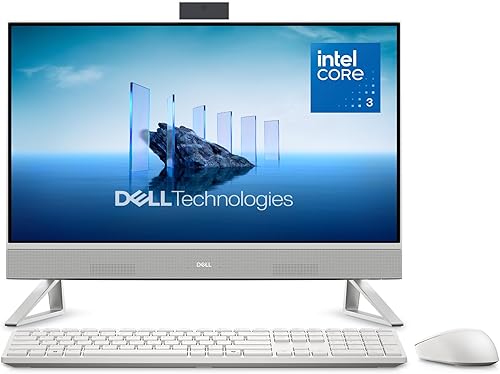
Dell 23.8" All-in-One Desktop: Best for a compact everyday setup
- 23.8-inch FHD IPS display
- Intel Core 3 100U
- HDR 5MP+IR camera
- Dual Bluetooth speakers
This smaller Dell all-in-one pairs a 23.8-inch FHD IPS display with a Core 3 100U processor. It fits buyers who want the main screen and computer in one unit.
Pros
- Smaller screen footprint than the 27-inch picks
- Tilt adjusts from 0 to 20 degrees
- Includes keyboard and mouse
Cons
- Core 3 is the entry-level processor in this group
- No fingerprint reader
This 23.8-inch model keeps the same basic all-in-one idea in a smaller screen size. Its FHD IPS panel has 99% sRGB, while the Intel Core 3 100U configuration targets typical home tasks such as browsing, document work and video calls.
The 5MP+IR camera has HDR, and the display tilts between 0 and 20 degrees. Dell also includes dual Bluetooth speakers with Dolby Atmos spatial sound, keyboard and mouse, so it arrives as a more complete basic desktop setup.
This pick makes sense when a 27-inch screen would dominate the desk or when you sit close to the display. Its Core 3 processor is the least powerful listed configuration in this group, so consider a higher-tier option if your workload regularly involves demanding apps.
Choose it for a compact, straightforward Dell all-in-one. If you also want to compare other brands, our best HP all-in-one computers roundup covers that alternative.
Dell Inspiron 5420 All In One desktop: Best for a listed 1TB SSD
- 23.8-inch FHD display
- Core i5-1335U
- 16GB DDR4 RAM
- 1TB SSD
The Inspiron 5420 has a specific configuration with Core i5-1335U, 16GB DDR4 RAM and a 1TB SSD. Its pop-up FHD camera and Wi-Fi 6 suit video calls and wireless networking.
Pros
- 1TB SSD and 16GB RAM
- Wi-Fi 6
- Pop-up FHD camera with tilt
Cons
- 60 Hz display
- Keyboard and mouse are not listed among the included items
The Inspiron 5420 stands out for its Core i5-1335U, 16GB DDR4 RAM and 1TB SSD configuration. That gives you a clearly specified storage and memory setup for a household PC with many documents, photos or installed programs.
Its 23.8-inch FHD 60 Hz display has narrow borders on all four sides. The pop-up FHD camera tilts for video calls, and Wi-Fi 6 provides a newer wireless option than basic Wi-Fi configurations.
This model differs from the newer Dell all-in-ones with Core 3 or Core 5 processors by offering the Core i5-1335U. Compare the processor generation and the precise configuration you are considering, since names such as Inspiron 5420 can cover different setups across sellers.
Choose it when 1TB of SSD storage and 16GB of RAM are priorities. The supplied configuration does not name a keyboard and mouse in the included items, so plan your peripherals separately.
Dell 24'' Touchcreen All‑in‑One Desktop: Best for touchscreen and pen input
- 23.8-inch FHD touchscreen
- Pen support
- Intel Core Ultra 7 355
- 16GB DDR5 RAM
Touch input and pen support make this model the pick for manual navigation or notes on screen. It also includes 16GB DDR5 RAM and a 1TB SSD.
Pros
- Touchscreen with pen support
- Wi-Fi 7 and Bluetooth 6
- Keyboard and mouse included
Cons
- FHD resolution
- The title's total storage figure includes external storage
The Dell 23.8-inch touchscreen all-in-one is the pick for people who want to tap the display or write with a compatible pen. It lists pen support, 16GB DDR5 RAM and a 1TB SSD, plus Wi-Fi 7 and Bluetooth 6.
The FHD touchscreen pairs with an Intel Core Ultra 7 355 processor. A keyboard and mouse are included, and the connection options include HDMI input and output, which can help if you have another device to connect.
There is a storage detail to check: the product name describes 1.5TB total storage as a 1TB SSD plus a 512GB external drive. Treat the SSD and external drive as separate parts of that setup when deciding where files and apps will live.
Choose it for touch, pen support and newer wireless standards. Read our best touchscreen all-in-one computers roundup if you want to compare touch models beyond Dell.
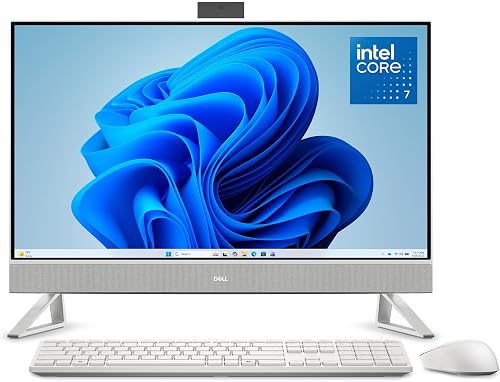
Dell 27 All-in-One Desktop: Best for 32GB memory
- 27-inch FHD IPS display
- Intel Core 7 150U
- 32GB RAM
- Touchscreen
This 27-inch configuration pairs a Core 7 150U with 32GB RAM and a touchscreen. It suits buyers who want more memory and touch input in a large-screen Dell setup.
Pros
- 32GB RAM
- 27-inch FHD IPS touchscreen
- Keyboard and mouse included
Cons
- No storage capacity is specified
- No fingerprint reader
This 27-inch configuration adds a touchscreen and 32GB RAM to the larger Dell all-in-one design. Its Core 7 150U processor places it above the Core 5 and Core 3 configurations in this group by processor tier.
The FHD IPS screen has 99% sRGB, and the camera can be pushed down for privacy. Dell also describes dual Bluetooth speakers with Dolby Atmos spatial sound and a stand that leaves room for the keyboard.
Choose it if a larger touch display and higher listed memory are more useful to you than a specified storage capacity. The configuration does not state an SSD size, so confirm storage before buying if you plan to keep a large photo, video or game library on the computer.
Choose it for a 27-inch touchscreen and 32GB RAM. The other 27-inch pick is a simpler fit if you do not need touch and want the listed Core 5 configuration.
How did we compare Dell all-in-one computers?
We compared the listed configurations by screen size, processor, memory, storage, camera and connection features. Our score weighs specs, features and buyer feedback against what you’re shopping for.
An all-in-one saves the separate desktop tower, but the display and computer are tied together. That makes screen size and built-in features especially important, since changing the display later may mean replacing the whole computer.
You can compare these points with our best Windows 11 all-in-one computers overview.
| Product | Best for | Display | Processor | Camera | Our score |
|---|---|---|---|---|---|
| Dell 27" All-in-One Desktop | a larger everyday display | 27-inch FHD IPS | Intel Core 5 120U | Pop-up 5MP+IR with HDR | 9.7 |
| Dell 23.8" All-in-One Desktop | a compact everyday setup | 23.8-inch FHD IPS | Intel Core 3 100U | 5MP+IR with HDR | 9.4 |
| Dell Inspiron 5420 All In One desktop | a listed 1TB SSD | 23.8-inch FHD, 60 Hz | Core i5-1335U | 9.3 | |
| Dell 24'' Touchcreen All‑in‑One Desktop | touchscreen and pen input | 23.8-inch FHD touchscreen | Intel Core Ultra 7 355 | 9.0 | |
| Dell 27 All-in-One Desktop | 32GB memory | 27-inch FHD IPS | Intel Core 7 150U | 8.7 |
What should you check before choosing a Dell all-in-one desktop?
Start with screen size, the work you do and the parts you need included. These checks help distinguish Dell’s similar-looking all-in-one desktops.
Is a 23.8-inch or 27-inch display better?
A 23.8-inch display fits a smaller desk and can feel comfortable when you sit close to the screen. A 27-inch display gives you more room for side-by-side windows, spreadsheets or video while you work.
All five picks here use FHD resolution. If you often view detailed images or keep several windows open, consider whether screen space or pixel detail matters more to you.
Which processor tier should you pick?
The options range from Core 3 100U and Core 5 120U to Core 7 150U, Core i5-1335U and Core Ultra 7 355. Those names represent different processor families and generations, so compare the exact configuration rather than assuming every “Core 7” or “Core i5” performs the same.
For browsing, video calls and office documents, screen size and memory may matter more to your daily comfort than choosing the highest processor tier. For heavier work, look up the software’s requirements and compare the specific chip.
How much memory and storage do you need?
The named configurations include 16GB DDR4 RAM in the Inspiron 5420, 16GB DDR5 RAM in the touchscreen model and 32GB RAM in the 27-inch Core 7 model. More memory can help when you keep many apps or browser tabs open, but match it to your workload.
Storage varies in how clearly it is specified. The Inspiron includes a 1TB SSD, and the touchscreen model pairs a 1TB SSD with a separate 512GB external drive.
The 27-inch Core 7 configuration does not specify storage capacity, so check that point before choosing it.
Do you need touch input?
Touch is useful if you naturally reach for the screen, want pen input or share the computer with someone who prefers tapping. The 23.8-inch touchscreen model lists pen support, and the 27-inch Core 7 configuration lists a touchscreen.
If you mainly type and use a mouse, you may get more value from the non-touch Core 5 or Core 3 option. For touch-focused alternatives across brands, see our touchscreen roundup linked above.
What ports and peripherals should you plan for?
The newer Dell 27-inch models list HDMI, Ethernet, SD card and USB 3.2 connections. The Inspiron 5420 and touchscreen configuration also list HDMI input, which is a distinct feature from HDMI output.
Learn when you can use an all-in-one as a monitor.
Check the exact port layout if you plan to attach external drives, printers, headphones or a second display. Also verify whether a keyboard and mouse are included with the configuration you plan to buy.
Is a Dell all-in-one right for a home office?
A Dell all-in-one can suit a home office if you want a single screen unit with a built-in computer, webcam and speakers. If you are comparing an integrated desktop with a portable Apple computer, see iMac vs laptop options.
The 27-inch models give you more display area, while the 23.8-inch options take up less visual space on a desk.
Think about video calls, too. The 27-inch Core 5 model has a pop-up 5MP+IR camera, while the Inspiron 5420 has a pop-up FHD camera; both let you adjust the camera position or hide it when not needed.
For desk planning, compare this group with our guide to best all-in-one computers for home office.
A built-in display is convenient, but a separate monitor may give you more flexibility if you expect to change computers later. Dell’s S3425DW monitor review covers a wide external display option.
Which Dell all-in-one computer should you choose?
Choose the Dell 27-inch Core 5 model for a large everyday screen, integrated speakers and a camera that tucks away. Pick the 23.8-inch Core 3 model for a smaller setup, or the Inspiron 5420 if its 16GB RAM and 1TB SSD fit your storage needs.
For touch input, choose between the 23.8-inch pen-support model and the 27-inch option with 32GB RAM. The best Dell all-in-one computer is the one whose screen size, processor and storage configuration match your desk and daily tasks.
Our top 3 picks at a glance
-
1
-
2
-
3
Frequently asked questions
Which Dell all-in-one computer is best for most people?
The Dell 27-inch All-in-One Desktop is a strong everyday choice if you want a larger FHD screen, an adjustable pop-up camera and dual Bluetooth speakers. Its stand also provides space to tuck a keyboard underneath.
Choose a smaller 23.8-inch model if desk space matters more.
Are Dell all-in-one computers good for home office use?
They can suit a home office if you want the computer and display combined in one unit. The picks here include webcams, and some have adjustable or pop-up cameras for video calls.
Check the screen size, available ports and included keyboard and mouse for your desk setup.
Should you choose a Dell touchscreen all-in-one?
Choose a touchscreen if you expect to tap or use a pen on the display. The 23.8-inch touchscreen pick supports a pen, while the 27-inch Core 7 configuration also lists a touchscreen.
If you mostly type and use a mouse, a non-touch model may fit just as well.
Can a Dell all-in-one replace a separate monitor?
An all-in-one combines the computer and its main display, so it can replace a separate monitor for normal desktop use. The Inspiron 5420 and touchscreen configuration list HDMI input, which can accept video from another device.
Check the specific model's ports before planning to use it as a display.