Apple Mini vs iMac: Which Should You Choose? (November 2026)
Choose the iMac for a ready-made desktop with a built-in display, or the Mac mini if you want to choose your own monitor. Your total setup cost and workspace flexibility matter as much as the computer.
On this page (8 sections)
- Apple mini vs iMac: what changes in the setup?
- Which one costs less after you add a display?
- Which desktop fits a small desk?
- Which is easier to customize?
- What do you get for video calls and everyday audio?
- Which configuration should you choose?
- Is the iMac or Mac mini easier to set up?
- Which Apple desktop should you choose?
Choose the iMac for a desktop with a built-in display, or the Mac mini if you want to pick your own monitor. In an Apple mini vs iMac comparison, the key trade-off is an integrated setup versus more choice over your desk equipment.
The iMac puts its 24-inch display, camera and speakers in the computer setup. The Mac mini is a small desktop computer that connects to a separate monitor, so you can shape the rest of the workspace around your needs.
A display is part of the iMac purchase, while a Mac mini setup needs a separate screen. Compare the complete setup you want, including any camera, speakers and accessories, before deciding.

 Best for a simple desk setup
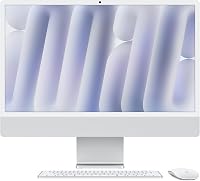
Apple 2024 iMac All-in-One Desktop Computer
Apple mini vs iMac: what changes in the setup?
The iMac combines the computer and display; the Mac mini is a computer you pair with a display. That difference affects what you need to buy, connect and make room for.
The iMac has a 24-inch 4.5K Retina display, a 12MP Center Stage camera, three mics and six speakers. The Mac mini measures 5 x 5 x 2 inches and has Thunderbolt, HDMI, Gigabit Ethernet, front-facing USB-C ports and a headphone jack.
The Mac mini needs a separate monitor and may need separate camera and speakers. If you want to understand the integrated design, read how an all-in-one computer works.
| Setup factor | iMac | Mac mini |
|---|---|---|
| Display | Built-in 24-inch 4.5K Retina display | Separate monitor required |
| Camera and audio | 12MP Center Stage camera, three mics, six speakers | Choose equipment to pair with it |
| Computer footprint | All-in-one desktop design | 5 x 5 x 2 in computer |
| Connections | Up to four Thunderbolt 4 ports; supports up to 2 external 6K displays | Thunderbolt, HDMI, Gigabit Ethernet, front USB-C, headphone jack |
| Main choice | One integrated display and computer | Monitor and accessory flexibility |
Which one costs less after you add a display?
Compare the full setup cost, because the Mac mini's computer price doesn't include a monitor. The iMac includes a display, while the mini's final cost depends on the screen and other gear you choose.
Start with the monitor you would actually use. A basic screen may suit documents and browsing, while a larger or higher-resolution display can raise the total and take more desk space.
Then consider what the iMac bundles into its design. The camera, microphones and speakers are already part of the iMac configuration, but you may want different external equipment for either setup.
Don't compare computer prices alone. Make a list of the monitor, webcam, speakers, keyboard, mouse and cables you need, then compare the full systems.
For some people, reuse of existing equipment makes the Mac mini the simpler value; for others, buying fewer separate parts makes the iMac easier to budget.
Which desktop fits a small desk?
The Mac mini gives you more freedom to arrange separate components, while the iMac keeps the computer and display together. Think about usable desk area, cable placement and where you prefer your screen.
The mini computer can sit beside a monitor, as its 5-inch by 5-inch footprint suggests. The display itself still takes space, and the stand, keyboard, mouse and any speakers add to the layout.
The iMac reduces the number of separate pieces on the desk, but its display size and position are part of the computer choice. You can connect external displays, though the built-in screen remains in the setup.
A compact workspace may favor either system depending on its shape. Measure the usable width and depth, then mark the monitor position before choosing.
Which is easier to customize?
The Mac mini is the more flexible choice for selecting a monitor and external accessories. The iMac makes more decisions for you by including its screen, camera and sound system.
With a Mac mini, you can choose a monitor size and placement that fits your desk. Its HDMI and Thunderbolt connections provide display options, and its front USB-C ports and headphone jack make some connections accessible from the front.
The iMac's display is fixed at 24 inches, though it can support up to 2 external 6K displays. This suits people who want an integrated starting point and may add screens later.
The same choice applies to a laptop buyer considering a desktop. Our guide to Apple iMac vs laptop compares a fixed desk setup with a portable computer.
What do you get for video calls and everyday audio?
The iMac has a built-in camera, microphones and speakers, while a Mac mini setup depends on what you connect. If calls are part of your workday, include those accessories in your mini plan.
Both iMac configurations listed here include a 12MP Center Stage camera, three studio-quality mics and six speakers with Spatial Audio. This keeps the call setup within the all-in-one computer.
The Mac mini can work with external devices, but the configuration details do not specify a built-in camera or speakers. Choose a webcam and audio setup that fit your calls, room and preferred placement.
The iMac versus laptop comparison can also help if you want to compare desktop call equipment with a portable setup.
Which configuration should you choose?
Choose an iMac configuration around the memory and storage you need; choose the Mac mini when your display choice matters more. The configurations here differ in memory and SSD storage as well as form.
The first iMac configuration has 16GB unified memory and 256GB SSD storage. The second has 24GB unified memory and 512GB SSD storage, while retaining a 24-inch 4.5K Retina display.
The Mac mini configuration has 16GB unified memory and 512GB SSD storage. Its M4 chip has a 10-core CPU and 10-core GPU, while the 16GB iMac has an M4 with an 8-core CPU and 8-core GPU.
These configurations aren't a controlled performance comparison. Pick based on the tasks you expect to do, the memory and storage configuration you want, and whether you prefer an integrated or separate display.
Is the iMac or Mac mini easier to set up?
The iMac takes fewer display decisions, while the Mac mini setup requires you to connect a monitor and any other gear. Either way, plan the desk before unpacking.
An all-in-one computer combines the main system and display in one desktop design. Learn more about how an all-in-one differs from a mini PC with a monitor if you're weighing the convenience of one integrated unit against separate components.
The Mac mini's front and rear ports give you places to connect equipment, including USB-C, Thunderbolt and HDMI. Check the ports on your monitor and accessories so you can plan suitable connections.
Neither desktop is a laptop. For more context on power and portability, see whether all-in-one computers have built-in batteries.
Which Apple desktop should you choose?
Pick the iMac if you want a 24-inch display, camera and speakers as part of one desktop; pick the Mac mini if you want to choose your monitor and arrange separate equipment. For the Apple mini vs iMac decision, compare total setup cost, desk space and how much flexibility you want.
The 16GB iMac configuration suits a straightforward integrated desk setup. Choose the 24GB and 512GB iMac configuration if those memory and storage amounts better match your needs.
The Mac mini is a fit when you already have a suitable display or want to select one. Count the monitor and other equipment in your budget before you compare systems.
Frequently asked questions
Is the Mac mini or iMac better for a home office?
The iMac suits a home office where you want a computer and 24-inch display in one unit. The Mac mini suits a desk where you already have a monitor or want to select one yourself.
Include the monitor, camera, speakers and input devices in the Mac mini setup plan.
Does a Mac mini include a monitor?
No, the Mac mini is a compact desktop computer designed to sit next to a monitor, so plan for a display and the cables or accessories it needs. That gives you more choice over screen size and layout, but adds parts to select and connect.
Does an iMac have a built-in camera and speakers?
The listed 2024 iMac configurations include a 12MP Center Stage camera, three studio-quality mics and six speakers with Spatial Audio. The Mac mini configuration here doesn't include a display, camera or speakers, so those depend on the equipment you pair with it.
Can you connect an external display to an iMac?
Yes, these iMac configurations can connect up to 2 external 6K displays. That lets you add screen space while keeping the built-in 24-inch Retina display as part of the setup.
Is the Mac mini easier to move than an iMac?
The Mac mini computer itself is smaller and lighter, measuring 5 x 5 x 2 inches and weighing 1.5 pounds. A complete setup still includes a display and other accessories, so moving everything depends on the equipment you choose.