9 Best Left-Handed Vertical Mice (November 2026)
The best left handed vertical mice include the Logitech Left Handed Lift Vertical Ergonomic Wireless for small to medium left hands, the Anker 2.4G Wireless Ergonomic Mouse for a familiar upright shape, and the Logitech Lift Vertical Ergonomic Wireless Mouse for small to medium right hands.
On this page (8 sections)
- How we chose a left handed vertical mouse
- Compare left handed vertical mice
- The best left handed vertical mice
- How do you choose a vertical mouse for the left hand?
- Should you choose wired or wireless?
- What should you expect when switching to a vertical mouse?
- Can you use a vertical mouse for gaming?
- Which left handed vertical mouse should you choose?
The Logitech Left Handed Lift is the best left handed vertical mouse for most people, with a left-hand shape, thumb rest and Bluetooth or Logi Bolt connection. Choose the wired Perixx Perimice-513L if you want to avoid batteries, or Evoluent if you want customizable buttons on Windows.
A vertical mouse keeps your hand in a more upright position than a flat mouse. For left-handed use, the buttons, thumb rest and body shape also need to fit the left hand.
A right-handed model turned around won't provide the same fit.
Our picks at a glance
-
1
 Best for small to medium left hands
Logitech Left Handed Lift Vertical Ergonomic Wireless
9.7/10 our score
See it on Amazon -
2
 Best for a familiar upright shape
Anker 2.4G Wireless Ergonomic Mouse
9.7/10 our score
See it on Amazon -
3
 Best for small to medium right hands
Logitech Lift Vertical Ergonomic Wireless Mouse
9.5/10 our score
See it on Amazon
- 4
 Check it
Perixx Perimice-513L Wired Vertical Ergonomic Mouse
Best for wired plug-and-play use - 5
 Best for quiet primary clicksCheck it
- 6
 Best for medium and large handsCheck it
- 7
 Best for customizable Windows buttonsCheck it
- 8
 Check it
MEETION Left-Handed Wireless Ergonomic Vertical Mouse
Best for rechargeable multi-device use - 9
 Best for simple wireless sensitivity choicesCheck it
How we chose a left handed vertical mouse
The best left handed vertical mouse has a shape and controls made for the left hand, with a connection and features that fit your desk. We compared the available specifications, hand orientation, button layout and everyday-use details.
We prioritized models identified as left-handed. We also noted connection type, DPI choices, battery needs, button functions and any stated hand-size guidance.
Scores reflect how well each set of features fits the searcher's needs.
Our score weighs specs, features and buyer feedback against what you're shopping for. Comfort is personal, and a vertical shape can take time to feel natural if you're used to a flat mouse.
Compare left handed vertical mice
These mice differ most in hand orientation, connection and controls. Check those details first, especially since two of the products in this group are right-handed models.
| Product | Best for | Hand orientation | Connection | Buttons | Our score |
|---|---|---|---|---|---|
| Logitech Left Handed Lift Vertical Ergonomic Wireless | small to medium left hands | Left | Bluetooth Low Energy or Logi Bolt USB | 6 | 9.7 |
| Anker 2.4G Wireless Ergonomic Mouse | a familiar upright shape | Right | 2.4 GHz USB receiver | 9.7 | |
| Logitech Lift Vertical Ergonomic Wireless Mouse | small to medium right hands | Right | Bluetooth Low Energy or USB | 6 | 9.5 |
| Perixx Perimice-513L Wired Vertical Ergonomic Mouse | wired plug-and-play use | Left | Wired USB | 9.0 | |
| Perixx PERIMICE-713L | quiet primary clicks | Left | 2.4 GHz wireless | 8.9 | |
| Lekvey Left Handed Mouse | medium and large hands | Left | 2.4 GHz USB receiver | 8.6 | |
| Evoluent | customizable Windows buttons | Left | Wired USB | 6 | 8.5 |
| MEETION Left-Handed Wireless Ergonomic Vertical Mouse | rechargeable multi-device use | Left | Bluetooth or 2.4 GHz wireless | 8.2 | |
| KUNSI Left Handed Mouse | simple wireless sensitivity choices | Left | 2.4 GHz USB receiver | 7.9 |
The best left handed vertical mice
The Logitech Left Handed Lift is the strongest overall fit, while the other left-hand models suit different connection, hand-size and control preferences. Check the hand orientation before choosing, since the Anker and standard Logitech Lift are right-handed.
Logitech Left Handed Lift: Best for small to medium left hands
Logitech Left Handed Lift Vertical Ergonomic Wireless: Best for small to medium left hands
- Left-hand shape and thumb rest
- 57-degree upright angle
- Bluetooth Low Energy or Logi Bolt USB
- Up to 2 years of battery life
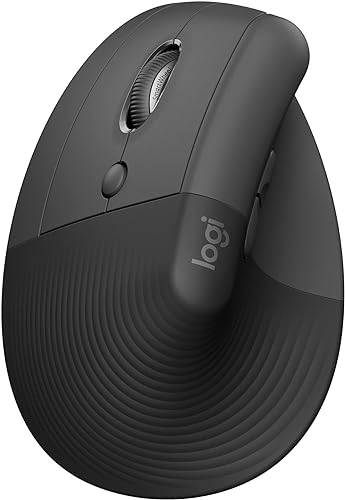
A left-hand-specific shape, softly textured grip and snug thumb rest make this the clearest fit for small to medium left hands. It supports Bluetooth Low Energy or Logi Bolt USB.
Pros
- Left-hand design
- Bluetooth and Logi Bolt USB connection
- Quiet clicks and SmartWheel
Cons
- Designed for small to medium hands
- Requires an AA battery
The Logitech Left Handed Lift is the clearest match for a left-handed buyer who wants a wireless vertical mouse. Its left-hand-specific shape, softly textured grip and snug thumb rest are designed for small to medium left hands.
The 57-degree angle supports an upright hand position. Logitech also includes customizable buttons, quiet clicks and a SmartWheel for scrolling.
You can connect it by Bluetooth Low Energy or the Logi Bolt USB receiver. It uses one AA battery, and Logitech states battery life can reach two years.
The included components list an AA battery and Logi Bolt receiver.
This is the best fit in the group when hand orientation and a compact hand-size range matter most. If you need a larger shape, compare it with the best large left handed mouse.
Anker 2.4G Wireless Ergonomic Mouse: Best for a familiar upright shape
Anker 2.4G Wireless Ergonomic Mouse: Best for a familiar upright shape
- 2.4 GHz wireless USB receiver
- 800, 1200 and 1600 DPI
- Next and previous buttons
- Right-hand orientation
This upright wireless mouse includes adjustable sensitivity and browsing buttons, but its controls are shaped for the right hand. Left-handed buyers should choose one of the left-hand models instead.
Pros
- Three DPI settings
- Next and previous buttons
- Wireless receiver stores in the mouse
Cons
- Designed for right-handed use
- Requires 2 AAA batteries
Anker offers a wireless vertical shape with three sensitivity settings and next and previous buttons. Its 2.4 GHz USB receiver is stored in the bottom of the mouse, and it requires two AAA batteries.
The key limitation is hand orientation: Anker identifies this model as right-handed. It may be useful to compare the upright shape and feature set, but left-handed users should favor a model built for their hand.
This mouse has 800, 1200 and 1600 DPI settings. Anker also notes that its key click sounds are unavoidable, so it may not suit a quiet shared workspace.
For a left-hand-specific wireless option, see our best left handed mouse wireless guide. If you want a broader comparison of non-vertical designs, start with the best left handed mouse.
Logitech Lift Vertical Ergonomic Wireless Mouse: Best for small to medium right hands
Logitech Lift Vertical Ergonomic Wireless Mouse: Best for small to medium right hands
- 57-degree upright angle
- Bluetooth Low Energy or USB
- Quiet clicks and SmartWheel
- Up to 2 years of battery life
The right-hand Lift shares the left-hand model's upright angle and wireless options. Its right-hand thumb rest and shape make it unsuitable as a left-handed vertical mouse.
Pros
- Bluetooth and USB connectivity
- Quiet clicks and SmartWheel
- Up to 2 years of battery life
Cons
- Designed for right-handed use
- Made for small to medium hands
The standard Logitech Lift has a similar upright design, quiet clicks and SmartWheel, but it is made for small to medium right hands. Its 57-degree angle and wireless connectivity can be useful features, though the hand orientation makes it a poor match for left-handed control.
It connects over Bluetooth Low Energy or USB and uses one AA battery. Logitech states battery life can reach two years.
The mouse has six buttons, including easy-to-reach customizable controls.
Consider this model only if you use your right hand. Left-handed buyers should choose the dedicated left-hand Lift or another mouse marked for left-hand use.
Perixx Perimice-513L: Best for wired plug-and-play use
Perixx Perimice-513L Wired Vertical Ergonomic Mouse: Best for wired plug-and-play use
- Left-hand design
- Wired USB connection
- 1000 or 1600 DPI
- Six buttons
The wired Perimice-513L gives left-handed users a direct USB connection and two sensitivity settings. Its rubber-coated surface and six-button layout add practical details for desk use.
Pros
- No batteries or wireless receiver
- Two DPI settings
- Left-hand shape
Cons
- Wired cable limits placement
- Compatibility details focus on Windows
The Perimice-513L is a wired USB vertical mouse for left-handed users. It gives you two DPI options, 1000 and 1600, along with six buttons and a rubber-coated surface.
A wired connection avoids battery changes and wireless setup. The tradeoff is the cable, which can limit how freely you position the mouse around a crowded desk.
Perixx describes its shape as suitable for different hand sizes. Its stated operating system compatibility focuses on Windows, so check your computer's requirements if you use another system.
This is a practical pick if you prefer a direct USB connection and don't need wireless placement. For a different kind of left-hand pointing device, see our best left handed trackball mouse guide.
Perixx PERIMICE-713L: Best for quiet primary clicks
Perixx PERIMICE-713L: Best for quiet primary clicks
- Left-hand design
- 2.4 GHz wireless receiver
- Quiet left and right clicks
- 1000 or 1600 DPI
This left-hand wireless mouse has quiet primary clicks, back and forward buttons, and a rubber-coated grip. Its scroll wheel and browsing buttons are not silent.
Pros
- Quiet left and right clicks
- 2.4 GHz wireless connection
- Six-button layout
Cons
- Requires 2 AAA batteries
- Back and forward buttons do not work on macOS
The PERIMICE-713L is a left-handed wireless vertical mouse with quiet left and right clicks. Its 2.4 GHz receiver connects over USB, and the mouse includes back and forward buttons for browsing.
The primary clicks are quiet, but the scroll wheel and back and forward buttons are not silent. Its DPI settings are 1000 and 1600, and it requires two AAA batteries.
Perixx says first-time vertical-mouse users may need an adjustment period. The back and forward buttons are not supported on macOS, so consider that limitation if you use a Mac.
Choose this model if you want wireless use and quieter main clicks without needing Bluetooth. For other control layouts, compare the best left handed mouse with side buttons.
Lekvey Left Handed Mouse: Best for medium and large hands
Lekvey Left Handed Mouse: Best for medium and large hands
- 2.4 GHz USB wireless receiver
- 1000, 1200 and 1600 DPI
- Quiet primary clicks
- Recommended for medium and large hands
The Lekvey is designed for left-handed users and recommended for medium and large hands. It uses a USB receiver, has three DPI settings and requires 2 AAA batteries.
Pros
- Three DPI settings
- Quiet left and right clicks
- Receiver stores in the mouse
Cons
- Bluetooth and USB-C are not supported
- Requires 2 AAA batteries
Lekvey recommends this left-hand model for medium and large hands. It uses a 2.4 GHz USB receiver and offers three DPI settings: 1000, 1200 and 1600.
The mouse has forward and back buttons, quiet left and right clicks, and a receiver stored in the bottom. It runs on two AAA batteries, which are not included, and Bluetooth and USB-C are not supported.
The stated compatibility includes Windows, Mac OS and Linux. Since hand fit varies, use the recommendation as a starting point and compare the mouse dimensions with your preferred grip.
Evoluent: Best for customizable Windows buttons
Evoluent: Best for customizable Windows buttons
- Left-hand shape
- Wired USB connection
- Six customizable buttons with Windows software
- Four pointer speeds
Evoluent's wired VM4L has a sculpted left-hand shape, four pointer speeds and six buttons that can be customized with its Windows software. Basic button and wheel functions work over USB.
Pros
- Wired connection needs no battery
- Four pointer speeds on the mouse
- Six customizable buttons with Windows software
Cons
- Button customization requires Windows software
- Wired cable limits placement
Evoluent's VM4L is a wired vertical mouse shaped for the left hand. It has six buttons, four pointer-speed settings and a lower lip that gives the little finger a resting place.
The basic button and wheel functions work over USB. Evoluent Mouse Manager for Windows lets you customize the buttons, including assigning different functions in different applications.
This model suits buyers who want wired operation and more control over button assignments. The customization software is for Windows, so Mac and Linux users should not expect the same button setup options.
MEETION Left-Handed Wireless Ergonomic Vertical Mouse: Best for rechargeable multi-device use
MEETION Left-Handed Wireless Ergonomic Vertical Mouse: Best for rechargeable multi-device use
- Bluetooth 5.0, Bluetooth 3.0 and 2.4 GHz
- Rechargeable battery
- Four DPI settings from 1200 to 3200
- RGB lighting
MEETION combines a left-hand vertical shape with Bluetooth and 2.4 GHz connections, plus a rechargeable battery. Its stated hand-length recommendation is 6.7 to 7.1 inches.
Pros
- Rechargeable battery
- Bluetooth and 2.4 GHz options
- Four DPI settings
Cons
- Not compatible with Android TV or older Linux systems
- RGB lighting may not suit a plain desk setup
MEETION offers Bluetooth 5.0, Bluetooth 3.0 and 2.4 GHz wireless connections, as well as a rechargeable battery. The mouse has four DPI settings, from 1200 to 3200, and forward and backward buttons.
Its stated hand-length recommendation is 6.7 to 7.1 inches. That specific range can help you judge fit before choosing, though your grip style also affects comfort.
The mouse includes RGB lighting and a USB-A receiver. Compatibility includes Windows 10 and 11 and macOS 10.15 or later, but not Android TV or older Linux systems.
KUNSI Left Handed Mouse: Best for simple wireless sensitivity choices
KUNSI Left Handed Mouse: Best for simple wireless sensitivity choices
- 2.4 GHz wireless USB receiver
- 800, 1200 and 1600 DPI
- Six buttons
- Next and previous buttons
KUNSI offers a left-hand vertical shape, three DPI settings and a 2.4 GHz receiver. Its forward and back buttons are unavailable on Mac OS.
Pros
- Three DPI settings
- 2.4 GHz wireless connection
- Next and previous buttons
Cons
- Requires 2 AAA batteries
- Forward and back buttons do not work on Mac OS
KUNSI is a left-hand wireless vertical mouse with a 2.4 GHz USB receiver and three DPI settings: 800, 1200 and 1600. It also has six buttons, including next and previous controls for browsing.
It needs two AAA batteries, which aren't included. The forward and back buttons are unavailable on Mac OS, so check whether you rely on those shortcuts before choosing it.
KUNSI's simple wireless setup and sensitivity options suit everyday computer use. If gaming is the main use, compare dedicated best left handed mouse gaming picks and check whether their button layouts suit your games.
How do you choose a vertical mouse for the left hand?
Choose a left-hand-specific shape first, then compare size, connection and buttons. A vertical mouse designed for the right hand may put its thumb rest and controls in the wrong places for your left hand.
Check any stated hand-size guidance against your own measurements and grip. Logitech describes its Lift as a fit for small to medium left hands, while Lekvey recommends its model for medium and large hands.
MEETION gives a hand-length range of 6.7 to 7.1 inches.
If you type often, check that the mouse can sit close to your keyboard without forcing your arm outward. Our best keyboard for computer guide covers keyboard choices that can help you plan a more comfortable desk layout.
Should you choose wired or wireless?
Choose wired if you want a direct USB connection without batteries, and wireless if you want more freedom to place the mouse. The Perixx 513L and Evoluent use wired USB, while the other left-hand picks connect wirelessly.
Wireless models vary in how they connect. Logitech Lift offers Bluetooth Low Energy or Logi Bolt USB, while Perixx, Lekvey and KUNSI use a 2.4 GHz USB receiver.
MEETION adds Bluetooth connections and a rechargeable battery.
Check your computer's available ports before choosing a receiver-based model. Some computers may need a compatible adapter if they lack USB-A ports.
What should you expect when switching to a vertical mouse?
Expect an adjustment period as your hand gets used to a more upright position and different movement. Perixx says first-time users of the PERIMICE-713L may need a short adjustment period, with many adapting within one to two weeks.
Keep the mouse close to your keyboard and use a relaxed grip. Comfort depends on your hand size, desk setup and how you move the mouse, so a vertical shape isn't a guarantee of relief.
Try shorter work sessions at first if the new grip feels unfamiliar. If the mouse doesn't feel comfortable after you adjust your position, a standard left-handed shape or a trackball may suit you better.
Can you use a vertical mouse for gaming?
Yes, a vertical mouse can work for some games, but its shape and button layout may take adjustment. Check whether the games you play need quick repeated movements, extra programmable buttons or a particular sensor response.
Some picks here include browsing buttons, but that doesn't mean they're designed for every game. Our guide to a vertical MMO mouse explains which features to consider for MMO controls.
For gaming, also check that your preferred hand can reach the controls without shifting its grip. A mouse designed for the opposite hand can make that harder.
Which left handed vertical mouse should you choose?
Choose the Logitech Left Handed Lift for a left-hand-specific wireless shape with Bluetooth and Logi Bolt options. Pick the Perixx 513L for wired USB, the PERIMICE-713L for quiet primary clicks, or Evoluent for customizable Windows buttons.
Check hand orientation and size guidance before you buy, then choose the connection that suits your computer and desk. If a vertical grip isn't right for you, compare standard models in our best left handed mouse guide.
Our top 3 picks at a glance
-
1
Best for small to medium left hands
Logitech Left Handed Lift Vertical Ergonomic Wireless
9.7/10 our score
See it on Amazon -
2
Best for a familiar upright shape
Anker 2.4G Wireless Ergonomic Mouse
9.7/10 our score
See it on Amazon -
3
Best for small to medium right hands
Logitech Lift Vertical Ergonomic Wireless Mouse
9.5/10 our score
See it on Amazon