What Is a Flatbed Scanner on a Printer?
A flatbed scanner on a printer is the glass scanning area under a hinged lid. Place a flat original on the glass, close the lid, and the scanner captures it as a digital file or copy.
On this page (9 sections)
- How does a flatbed scanner and printer work?
- What can you scan on a flatbed scanner on a printer?
- Which originals should use a flatbed scanner?
- Is a flatbed scanner better than a sheet-fed scanner?
- How do you use a flatbed scanner on a printer?
- What is the best flatbed scanner for many photos?
- How should you care for the scanner glass?
- Should you choose a flatbed printer or a separate scanner?
- What is a flatbed scanner on a printer best for?
A flatbed scanner on a printer is the glass scanning area under a hinged lid. You place a flat original face down on the glass, close the lid, and the scanner captures it for a copy, PDF, image, or other digital file.
This design is common in all-in-one printers. It can scan loose pages, photos, book pages, receipts, cards, and other flat originals without pulling them through a paper path.
If you're comparing printer types, our home printer buying guide explains how scanning fits with printing, copying, ink, and laser features.
How does a flatbed scanner and printer work?
A flatbed scanner and printer uses a moving light and sensor beneath the glass. The light travels across the original while the sensor reads lines of text, color, or detail and sends the image to the printer's software.
The scanner does not need to move the original. This is why a flatbed scanner can handle pages that are too delicate, thick, small, or unusual for a sheet feeder.
After scanning, the printer may:
- Make a paper copy
- Save the scan as a PDF
- Save a photo as an image file
- Send the file to a computer, phone, cloud service, or email
- Use optical character recognition to turn printed words into searchable text
The exact options depend on the printer, scanner software, computer, and connection method. A flatbed unit may use USB, Wi-Fi, or both.
What can you scan on a flatbed scanner on a printer?
A flatbed scanner on a printer can safely capture most clean, flat originals that fit between the glass guides and the lid. Common examples include letter-size documents, photographs, receipts, ID cards, book pages, artwork, and signed forms.
Place the original face down and line up its edge with the guide mark. Close the lid without pressing on it, then select the scan type and resolution.
A flatbed is especially useful for:
- Photos that could crease in a feeder
- Pages from books and magazines
- Receipts and small cards
- Thin documents with tears or folds
- Artwork and printed images
- Originals that need to stay in one place
For photo work, see our guide to the best flatbed scanner for photos and documents. A flat surface helps keep the original aligned while the scanner reads it.
Can you scan a book on a flatbed scanner?
Yes, you can scan a book page if the page fits on the glass and the lid can close safely. Place one page or a small open section against the glass, keeping the spine and cover from forcing the lid upward.
Do not press heavily on the book. Pressure can damage the binding, the lid, or the scanner glass.
Book pages near the spine may show shadows or curved text. A flatbed scanner can still capture them, but you may need to adjust the page position, crop the scan, or use software that corrects the shape.
Can a flatbed scanner scan negatives and slides?
Some flatbed scanners can scan negatives and slides, but only models with the right transparency hardware or accessories can do so properly. A normal flatbed scanner is designed for reflected light from paper and photos.
Check for film holders, transparency units, or a stated film-scanning function before placing negatives or slides on the glass. Our guide to a flatbed scanner for negatives and slides covers the features that matter.
Do not tape film to the glass or expose delicate negatives to dust. Clean the glass with a soft, suitable cloth and follow the scanner's care instructions.
Which originals should use a flatbed scanner?
Use a flatbed scanner for originals that are fragile, thick, small, or difficult to feed. The glass supports the entire item and avoids rollers pulling it through the machine.
The Canon CanoScan LiDE 400 suits people who want a dedicated flatbed for documents and photos. It has a 4800 x 4800 dpi resolution, USB connection, a single-sheet glass surface, and a 7.7 x 14.5 x 0.4 in body.
Its USB Type-C cable carries both data and power, and its built-in buttons support scanning and multi-page PDF tasks. The included vertical stand gives you another placement option, but scan delicate originals flat on the glass.
For more options, compare the best large flatbed scanners if your originals or workspace need a larger scanning area.
Is a flatbed scanner better than a sheet-fed scanner?
A flatbed scanner is better for delicate or irregular originals, while a sheet-fed scanner is better for repeated loose pages. A sheet-fed model pulls each page through rollers, which can speed up a stack but gives you less flexibility for fragile items.
The Epson WorkForce ES-50 is a compact single-sheet-fed document scanner. It scans one sheet at a time, supports documents up to 8.5 x 72 in, handles receipts and ID cards, and connects by USB without batteries or an external power supply.
Its Epson ScanSmart software includes automatic feeding mode for combining multi-page scans, and Nuance OCR can create searchable PDFs and editable Word and Excel files. It is better for loose documents than for photos, books, or originals that should remain flat.
If you scan many pages at once, an automatic document feeder scanner may save more time than placing each sheet on a glass surface.
How do you use a flatbed scanner on a printer?
Clean the glass, place the original face down, align it, close the lid, and choose the scan setting. A simple process helps prevent crooked images, dark edges, dust marks, and unnecessary large files.
- Remove dust from the glass with a soft, dry or approved cloth.
- Open the lid and place the original face down.
- Align the original with the corner or edge guide.
- Close the lid gently without pressing down.
- Select color, grayscale, document, or photo mode.
- Choose a resolution that matches the final use.
- Preview the scan if the software offers that option.
- Crop empty space and save the file in the format you need.
Use a lower resolution for documents intended for email or basic records. Use more resolution when you need to preserve fine photo detail or plan to enlarge the image.
What is the best flatbed scanner for many photos?
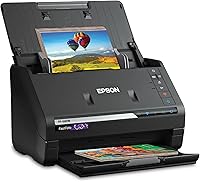
A photo-focused scanner is the better choice when you need to digitize a large collection quickly. The Epson FastFoto FF-680W is designed for photos and documents, with batch scanning for up to 36 photos at a time and a stated speed of up to 1 photo per second at 300 dpi.
It can scan Polaroid photos, panoramas, postcards, and photos up to 8 x 10 in. Its software includes auto enhancement, color restoration, red-eye reduction, de-skew, crop, rotate, OCR, and backup options through Dropbox and Google Drive.
The FF-680W is not the same as placing one photo at a time on a printer's glass. Its batch workflow suits a large photo collection, while a regular flatbed is often simpler for one photo, a book page, or a fragile original.
How should you care for the scanner glass?
Keep the glass clean, dry, and free of grit. Dust and fingerprints can appear as marks in every scan until the surface is cleaned.
Turn off the printer or scanner as directed before cleaning. Use a soft cloth and an approved cleaner on the cloth rather than pouring liquid near the glass, buttons, hinges, or paper path.
Do not use rough paper towels, abrasive cleaners, knives, or sharp tools. Store loose originals away from the scanner until they are ready, especially if they carry sand, staples, paper clips, or other material that could scratch the surface.
Should you choose a flatbed printer or a separate scanner?
Choose a printer with a flatbed scanner when you want one machine for printing, copying, and occasional scanning. Choose a separate scanner when scanning quality, photo work, book pages, or a high-volume workflow matters more than having one compact device.
A flatbed printer saves space and keeps common home tasks together. A separate model can give you a larger glass area, a more focused photo workflow, or a dedicated sheet feeder.
For pages that need to be scanned in batches, compare a flatbed model with the best flatbed scanners with ADF. For printing text documents, our guide to the best Brother monochrome laser printer covers a different setup built around black-and-white output.
If your main goal is printing photos from a camera, see the best photo printers for digital cameras before choosing an all-in-one printer.
What is a flatbed scanner on a printer best for?
A flatbed scanner on a printer is best for photos, book pages, cards, receipts, fragile documents, and occasional home copying. It supports the original on glass, so you do not need to feed every item through rollers.
Pick a regular all-in-one flatbed if you need printing and scanning in one device. Pick a dedicated flatbed for higher-resolution photo work, choose a sheet-fed model for portable single-page scanning, and choose a flatbed with an ADF when you need both glass scanning and faster stacks.
Frequently asked questions
What is a flatbed scanner on a printer?
A flatbed scanner on a printer is a glass scanning surface under a hinged lid. You place a page, photo, book page, or other flat original on the glass, close the lid, and the scanner moves beneath it to capture the image for a copy or digital file.
Can a flatbed scanner scan photos?
Yes. A flatbed scanner is well suited to photos because the original rests flat on the glass instead of moving through rollers.
Place the photo face down, align it with the guide marks, close the lid gently, and choose a resolution that matches your goal.
What should not go on a flatbed scanner?
Do not place wet, dirty, sharp, very thick, or loose objects on the glass unless the scanner instructions specifically allow them. Avoid pressing hard on the lid, and use a carrier sheet or another approved method for delicate originals.
Is a flatbed scanner better than an automatic document feeder?
A flatbed scanner is better for photos, books, cards, fragile pages, and single originals that cannot pass through rollers. An automatic document feeder is faster for stacks of loose pages, so the better choice depends on the originals and the amount you scan.