Does Logitech Make a Wired Trackball Mouse?
Logitech’s current trackball options are wireless, not wired. A USB receiver is a wireless connection, while a charging cable does not make a mouse wired during use.
On this page (7 sections)
- Does Logitech make a wired trackball mouse?
- What is the difference between a cable and a wireless receiver?
- What Logitech mouse could work if you want a trackball alternative?
- How can you tell whether a mouse is truly wired?
- Is a wired trackball better for gaming or comfort?
- What if you want a wired setup for a different device?
- Should you buy a Logitech wired trackball mouse?
Logitech’s current trackball options are wireless, not wired. A USB receiver plugs into your computer but still uses a wireless link, and a charging cable does not mean the mouse sends cursor input by wire.
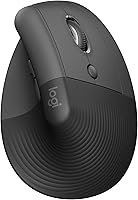
If you need a true wired trackball, check the exact model’s connection details before buying. Logitech’s Lift is a wireless vertical mouse, not a trackball, and it connects by Bluetooth Low Energy or a Logi Bolt USB receiver.
Does Logitech make a wired trackball mouse?
Logitech’s trackball mice are wireless models. The key detail is how the mouse sends cursor input, not whether a small adapter or cable connects to the computer.
The Logitech Lift is also wireless. It has a vertical shape and a Logi Bolt USB receiver option, but it is not a trackball and the receiver does not turn it into a wired mouse.
If you specifically need a wired trackball, look for a model that explicitly says it uses a wired USB connection during operation. Product names and photos can be unclear, so verify the connection type for the exact model.
What is the difference between a cable and a wireless receiver?
A wired mouse sends its input through a cable; a wireless receiver relays input without a cable running to the mouse. Both can occupy a USB port, but only one is wired.
A USB receiver is a small adapter that plugs into the computer. The mouse communicates with that receiver wirelessly, such as over a 2.4 GHz connection.
A charging cable is different again. Some rechargeable wireless mice need a cable for charging, while still using Bluetooth or a receiver to control the cursor.
Is a Logitech USB receiver a wired connection?
No, a receiver is still wireless. Logitech Lift can connect through Bluetooth Low Energy or its Logi Bolt USB receiver, and both options send input without a cable attached to the mouse.
This distinction matters if your reason for wanting a wired model is to avoid wireless pairing or keep a permanent cable connection. A receiver-based mouse still uses a wireless link, even though the receiver itself plugs into USB.
For another type of mouse connection, compare the best wireless trackball mouse. That guide can help if you’re open to wireless but want a trackball shape.
What Logitech mouse could work if you want a trackball alternative?
The Logitech Lift is an option if you want a vertical mouse instead of a trackball. Its 57-degree shape, thumb rest, and wireless Bluetooth or Logi Bolt connections make it a different kind of pointing device.
The Lift is designed for small to medium right hands, with a left-hand configuration also described by Logitech. It has customizable buttons and a SmartWheel, but it is neither wired nor a trackball.
If you want to compare Logitech’s option with a thumb-controlled trackball, the Nulea M501 uses a trackball and can connect by Bluetooth or USB dongle. Its USB receiver is stored on the mouse, and its buttons are not programmable.
For a conventional shape that emphasizes wrist posture, the Anker vertical mouse uses a 2.4 GHz USB receiver. It is not a trackball, and its connection is wireless rather than wired.
How can you tell whether a mouse is truly wired?
Look for “wired USB” as the connection method and confirm that the cable stays attached during use. Terms like “USB receiver,” “2.4 GHz,” and “Bluetooth” describe wireless connections.
Check these details before choosing:
- Wired USB: the mouse connects to the computer by cable while in use.
- USB receiver or dongle: the mouse communicates wirelessly with a small USB adapter.
- Bluetooth: the mouse pairs wirelessly with a computer that supports Bluetooth.
- Charging cable: the cable may charge the battery without carrying cursor input.
A detachable cable can serve different purposes, including charging or wired data. If the distinction affects your setup, confirm that the mouse can control the cursor through the cable, not just charge from it.
Is a wired trackball better for gaming or comfort?
A wired connection alone does not determine whether a trackball suits gaming or everyday comfort. Shape, cursor control, hand position, and your preference for a cable or wireless connection matter too.
A trackball keeps the device in one spot while you move the ball with your fingers or thumb. A regular mouse moves across the desk, and a vertical mouse changes the angle of your hand.
For gaming, consider how the trackball’s control style fits the games you play. Our guide to whether a trackball mouse is good for gaming covers the tradeoffs.
For comfort, compare how a trackball and vertical mouse position your hand. The article on trackball vs vertical mouse explains the main differences, while whether a trackball mouse is ergonomic looks at the fit and posture factors.
What if you want a wired setup for a different device?
Choose a device that supports a cable connection for its own input, rather than assuming an adapter makes any wireless device wired. For example, a Bluetooth adapter can add wireless capability to a compatible wired keyboard, but it does not change a mouse’s connection method.
If you’re planning a desk setup with a wired keyboard, see how to make a wired keyboard Bluetooth. For quiet clicking in a separate mouse search, read whether Razer makes a silent mouse and whether Razer makes a trackball mouse.
Should you buy a Logitech wired trackball mouse?
Don’t buy a Logitech trackball expecting a wired connection; Logitech’s current trackball options are wireless. If you require a cable, confirm that the exact model supports wired cursor input over USB.
Choose the Logitech Lift if a vertical wireless mouse fits your needs, or consider the Nulea M501 if you want a wireless thumb trackball. If neither wireless option fits, keep searching for a wired USB trackball and verify the connection before ordering.
Frequently asked questions
Does Logitech make a wired trackball mouse?
Logitech’s current trackball options are wireless. If you need a wired model, check the connection type for the exact model before buying, since a USB receiver is wireless even though it plugs into a USB port.
Is a Logitech USB receiver the same as a wired connection?
No. A USB receiver plugs into the computer but connects to the mouse wirelessly, often over a 2.4 GHz link.
A wired mouse stays connected by cable during use; the receiver is a separate wireless adapter.
Does a charging cable make a trackball mouse wired?
No. A charging cable supplies power to a rechargeable mouse, but the mouse may still send cursor input over Bluetooth or a USB receiver.
Check whether the mouse supports data over the cable if you need a true wired connection.
What should I choose if I want a wired pointing device?
Choose a mouse or trackball that explicitly states wired USB connectivity and uses a cable while you control the cursor. If wireless is acceptable, compare Bluetooth and receiver-based models, then confirm the connection type and charging needs.