Anker A7582 Wireless Vertical Mouse Review: Worth It? (November 2026)
The Anker A7582 is a budget right-handed vertical mouse for basic wireless desk use, with a USB receiver, 3 DPI settings and next/previous buttons. It uses AAA batteries and has audible clicks, so consider a quieter or rechargeable option if those details matter.
On this page (8 sections)
- The Anker vertical mouse at a glance
- How does the Anker A7582 connect?
- Are the A7582's tracking and buttons enough?
- Is the Anker A7582 comfortable for desk use?
- How does it compare with the Logitech Lift and MX Vertical?
- Will the Anker work with your computer?
- Are the clicks and power setup right for you?
- Should you buy the Anker A7582?
The Anker A7582 is a budget right-handed vertical mouse for basic wireless desk use. It connects through a 2.4 GHz USB receiver, offers 800, 1200 and 1600 DPI settings, and has next and previous buttons; its clicks are audible and it needs 2 AAA batteries.
Choose it if you want a simple receiver-based mouse and its shape suits your hand. If you need quiet clicks, Bluetooth or a rechargeable battery, compare the Logitech alternatives below.
The Anker vertical mouse at a glance
The Anker A7582 centers on a right-handed vertical grip and simple controls. Its optical sensor has 3 DPI settings, and two side buttons move forward or back through webpages.
Anker 2.4G Wireless Ergonomic Mouse: Best for affordable everyday use

- Right-handed vertical shape
- 2.4 GHz USB receiver
- 800, 1200 and 1600 DPI settings
- Next and previous buttons
A straightforward vertical mouse for right-handed users who want a receiver connection, adjustable tracking and browser buttons. Its clicks are audible, and it requires separate AAA batteries.
Pros
- Three DPI settings
- Next and previous buttons
- USB receiver stores in the mouse
- 18-month warranty
Cons
- Right-hand use only
- AAA batteries not included
- Key click sounds are unavoidable
Anker describes the shape as promoting a neutral handshake position. That design may feel different from a flat mouse, but comfort varies by person, so consider whether the upright grip suits your hand and desk habits.
Who should choose the Anker A7582?
Choose it if you want an affordable, uncomplicated vertical mouse for everyday browsing and office tasks. The receiver connection works for computers with an available USB port, and the mouse does not depend on Bluetooth pairing.
The A7582 is made for right-handed use. Left-handed users should choose a mouse designed for their hand instead of trying to adapt to this shape.
What are the main trade-offs?
The A7582 keeps its feature set straightforward, but it lacks some conveniences of more advanced vertical mice. It uses replaceable AAA batteries, and its clicks are not quiet.
Its 3 DPI settings cover basic cursor-speed adjustments. If you need a finer sensor or a dedicated cursor speed switch, the Logitech MX Vertical has a 4000 DPI sensor and a switch for changing cursor speed.
How does the Anker A7582 connect?
The Anker connects by 2.4 GHz wireless through a USB receiver, which is stored in the mouse's bottom. It is not a Bluetooth mouse.
That receiver setup is simple when your computer has an open USB port. If your laptop has few ports, plan where the receiver will go before you buy, especially if you already use a hub or other USB devices.
Anker notes that USB 3.0 devices or ports can interfere with wireless devices. It recommends using a host port, a USB 2.0 connection or a USB 2.0 extension cord to move the mouse receiver away from USB 3.0 devices.
For a different balance of shape and connections, our guide to the best wireless vertical mouse compares other options. If you want a mouse that can pair without a receiver, the Logitech Lift supports Bluetooth Low Energy as well as Logi Bolt USB.
Are the A7582's tracking and buttons enough?
The Anker's 800, 1200 and 1600 DPI settings offer three cursor-speed choices for general desktop work. Its next and previous buttons can help with webpage browsing.
A higher DPI setting moves the pointer farther for the same hand movement. Start with the middle setting, then adjust if the pointer feels too fast or slow for your screen and desk space.
The mouse has 5 buttons in total. The product details identify the side buttons for next and previous browsing, but don't describe custom button software or extra shortcuts.
For horizontal page movement, see vertical mice with side scrolling.
If you play games that depend on quick, repeated movements, consider the limits of a vertical shape and simple controls. For MMO play, see vertical mice for MMO games.
Our guide on whether a vertical mouse is good for gaming explains which gaming needs may call for another style.
Is the Anker A7582 comfortable for desk use?
The A7582's upright right-hand shape is designed to place the hand in a handshake-like position. Anker says this posture can reduce strain, but that is a design claim rather than a guarantee of comfort for every user.
Hand size, grip and desk setup all affect how a mouse feels. A vertical shape can take time to get used to, so give yourself a gradual transition if you move from a flat mouse.
The Logitech Lift is described as a fit for small to medium right hands and has a softly textured grip with a thumb rest. The larger MX Vertical has a textured rubber surface and a 57-degree angle; compare their shapes with your hand before choosing.
How does it compare with the Logitech Lift and MX Vertical?
The Anker is the simpler receiver-based option, while the Logitech Lift adds quiet clicks and Bluetooth, and the MX Vertical adds a higher DPI sensor and cursor speed switch. Pick by connection, noise, power and controls rather than shape alone.
| Mouse | Connection | Tracking | Power | Notable feature |
|---|---|---|---|---|
| Anker 2.4G Wireless Ergonomic Mouse | 2.4 GHz USB receiver | 800/1200/1600 DPI | 2 AAA batteries | Next and previous buttons |
| Logitech Lift Vertical Ergonomic Wireless Mouse | Bluetooth Low Energy or Logi Bolt USB | Not stated here | 1 AA battery | Whisper-quiet clicks and SmartWheel |
| Logitech MX Vertical Wireless Mouse Ergonomic Design | Bluetooth or USB receiver | 4000 DPI | Rechargeable, up to 4 months per charge | Cursor speed switch |
Logitech Lift Vertical Ergonomic Wireless Mouse: Best for small to medium hands
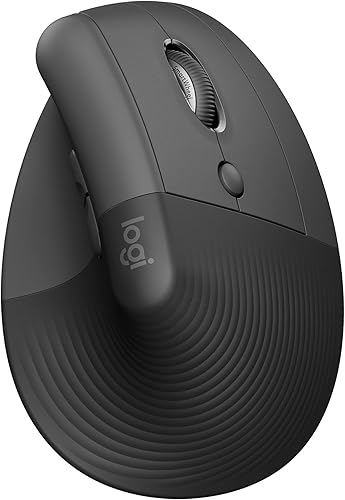
- 57-degree vertical shape
- Bluetooth or Logi Bolt USB receiver
- Whisper-quiet clicks
- SmartWheel scrolling
The Lift adds quiet clicks, a thumb rest and Bluetooth or receiver connectivity. Logitech describes it as a fit for small to medium right hands.
Pros
- Whisper-quiet clicks
- Bluetooth and Logi Bolt options
- Customizable buttons and SmartWheel
- Ergonomist-certified
Cons
- Designed for small to medium right hands
- Uses an AA battery
The Lift is the better match if you want quiet clicks, a thumb rest and a choice of Bluetooth or Logi Bolt USB. Logitech describes it as a fit for small to medium right hands, so compare that guidance with your own hand size.
Logitech MX Vertical Wireless Mouse Ergonomic Design: Best for adjustable cursor speed
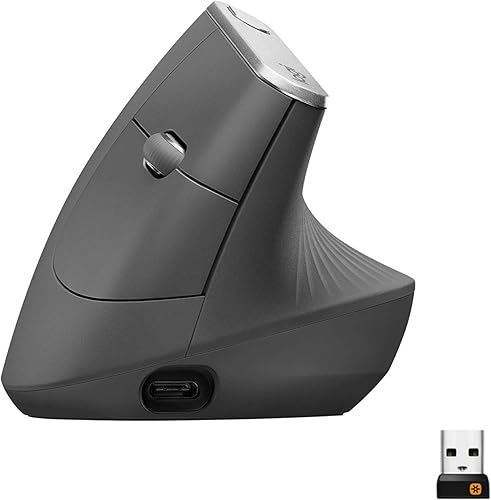
- 57-degree vertical angle
- 4000 DPI sensor
- Cursor speed switch
- Bluetooth or USB receiver
The MX Vertical offers a cursor speed switch, a textured grip and rechargeable power. It suits shoppers who want more tracking options and are comfortable with a larger, more feature-rich mouse.
Pros
- Cursor speed switch
- Bluetooth or USB receiver
- Rechargeable battery
- Textured rubber grip
Cons
- Right-hand use only
- More features than a basic office setup may need
The MX Vertical suits shoppers who want more control over cursor speed and rechargeable power. Its textured surface and 57-degree angle are distinct from the Anker's simpler setup.
Will the Anker work with your computer?
The Anker should fit a setup that has an available USB port and uses a right-handed mouse. It uses a receiver rather than Bluetooth, so check your computer's ports before deciding.
The product details name laptops as compatible devices and list Linux and Windows 10 among supported operating systems. If you use a different setup, confirm compatibility with Anker before you buy.
For a Mac setup, consider connection and hand fit together. Our guide to the best vertical mouse for Mac covers options for Apple computers, while a computer keyboard buying guide can help if you're choosing desk input devices as a set.
Are the clicks and power setup right for you?
The A7582 has audible clicks and runs on 2 AAA batteries, so it suits you best when quiet operation and built-in recharging are not priorities. Anker says the mouse goes into power-saving mode after 8 minutes of inactivity.
A button press wakes it from that mode. The batteries are not included, so have 2 AAA batteries ready for setup.
If noise matters in a shared room, the Lift's whisper-quiet clicks are a more relevant feature. See our guide to the best silent vertical mouse for other quiet options.
Should you buy the Anker A7582?
Buy the Anker A7582 if you want an affordable, right-handed vertical mouse with a USB receiver, 3 DPI settings and browser buttons. It is a practical fit for straightforward desk work when audible clicks and replaceable batteries are acceptable.
Choose the Logitech Lift if you want quiet clicks, Bluetooth or a shape made for small to medium right hands. Choose the MX Vertical if a 4000 DPI sensor, cursor speed switch and rechargeable power matter more.
For browsing and basic office tasks, the Anker gives you the core features without a more complex connection setup. Review your USB ports, battery needs and preferred hand position before you decide.
Frequently asked questions
Is the Anker A7582 a Bluetooth mouse?
No. The Anker A7582 connects over 2.4 GHz wireless through its USB receiver, rather than Bluetooth.
The receiver is stored in the bottom of the mouse.
If your computer has limited USB ports, check whether you have a free port or a suitable hub before choosing it.
What batteries does the Anker vertical mouse use?
The Anker uses 2 AAA batteries, which are not included. It enters a power-saving mode after 8 minutes without activity, and pressing either the left or right button wakes it.
Keep spare batteries nearby if you depend on the mouse throughout the workday.
Can left-handed users use the Anker A7582?
The Anker A7582 is a right-handed mouse, so its shape is made for a right-hand grip. Left-handed users should look for a mouse sold in a left-handed configuration or a shape that works comfortably with either hand.
Is the Anker A7582 quiet?
No. Anker says key click sounds are unavoidable, so this is not the pick for a quiet office or late-night work near someone who is sleeping.
The Logitech Lift has whisper-quiet clicks and is a better fit if sound matters more than the Anker's simpler setup.


