Trackball vs Vertical Mouse: Which Should You Choose? (November 2026)
Choose a trackball if you want to move the cursor without moving the mouse; choose a vertical mouse if you prefer moving a mouse with an upright grip. The right fit depends on your desk space, hand comfort and which control style feels natural.
On this page (6 sections)
Choose a trackball if you want to move the cursor without moving the mouse; choose a vertical mouse if you prefer moving a mouse with an upright grip. The trackball vs vertical mouse choice comes down to how you want to control the pointer and how much room you have.
A trackball uses a ball under your thumb or fingers to move the cursor while its base stays put. A vertical mouse uses optical tracking as you move the mouse, with your hand resting in a more upright position.
Neither shape guarantees comfort for every hand. Compare the control motion, grip, desk layout and connection needs before picking one.
 Best for compact desks
Nulea M501 Wireless Trackball Mouse Ergonomic Thumb

Trackball vs vertical mouse: how does the control differ?
A trackball moves the cursor with a ball; a vertical mouse moves the pointer as you move the whole mouse. That difference affects how much desk space each style needs.
With a thumb trackball, the base remains on the desk and your thumb rolls the ball. You can steer without making room for a full mouse glide.
A vertical mouse still moves across the work surface. Its grip is upright, but the pointer control remains familiar if you already steer a standard mouse.
Which is easier to learn, a trackball or vertical mouse?
A vertical mouse may feel more familiar if you already use a regular mouse. A trackball asks you to learn thumb or finger control instead of moving the device.
Give a trackball time if you have only used standard mice. Small, precise pointer adjustments can feel different at first, and your thumb needs practice to guide the ball consistently.
A vertical mouse also changes the hand position, so it may take a short adjustment. Its movement pattern, however, stays closer to what standard mouse users know.
Which mouse needs less desk space?
A trackball needs less room for pointer movement because its base stays stationary. A vertical mouse still needs a clear patch of surface to move across.
That can make a trackball useful on a crowded desk, a narrow writing board or a couch setup. The Nulea M501 is designed for use on small surfaces and connects to up to 3 devices by Bluetooth or its USB receiver.
A vertical mouse needs enough room to glide without bumping into a keyboard, monitor stand or cup. Move your usual mouse area around with your hand before buying to see whether it stays clear.
For more trackball options, see our guide to best trackball mouse wireless. If you want to use a keyboard and pointing device together in one unit, read about a trackball mouse with keyboard.
Which grip feels more natural?
A trackball keeps your hand on the mouse while your thumb or fingers steer; a vertical mouse places your hand in an upright grip. The best fit depends on which position you can hold comfortably.
The Nulea M501 uses thumb control and an ergonomic curved shape. Logitech describes its ERGO M575S as a sculpted shape with thumb control, a hand-supporting design and quiet clicks.
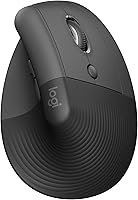
A vertical mouse changes the angle of your hand while keeping the regular mouse movement. Anker describes its ergonomic mouse as supporting a neutral handshake position, while Logitech gives the Lift a 57-degree vertical shape and thumb rest.
People can prefer very different hand positions, even at the same desk. If you're considering a hybrid design, our guide to a vertical mouse with ball explains what to look for in that combination.
How do you choose between thumb control and mouse movement?
Choose thumb control if you want to keep the mouse base still; choose mouse movement if you prefer steering with your whole hand. Try to match the control style to the work you do most often.
Trackballs can suit detailed office tasks, browsing and work on compact surfaces. They can also make pointer movement possible without a large mouse pad.
A vertical mouse suits people who want an upright grip but prefer the familiar act of moving a mouse. The Anker has 800, 1200 and 1600 DPI settings, while the Logitech Lift offers customizable buttons and a SmartWheel.
If gaming is part of your decision, consider the game and the type of cursor control you prefer. Our guide on is a trackball mouse good for gaming discusses where a trackball may fit and where it may not.
What should you check before buying?
Check hand orientation, connection type, buttons and power before choosing either style. Those details can rule out a model even when its shape looks right.
All 4 products here are right-handed. The Logitech Lift is described for small to medium right hands, while the Nulea M501 and Logitech ERGO M575S use thumb-operated trackballs.
Connection options vary. The Nulea M501 and Logitech ERGO M575S support Bluetooth, the Lift supports Bluetooth Low Energy, and the Anker uses a 2.4 GHz USB receiver rather than Bluetooth.
Also check how each mouse gets power. The M501 is rechargeable, the Anker needs 2 AAA batteries that aren't included, and the ERGO M575S and Lift include an AA battery.
Button functions matter if you rely on shortcuts. The M501's buttons aren't programmable, and its back and forward buttons aren't compatible with macOS; Logitech's ERGO M575S has 3 customizable buttons that require the Logi Options+ app.
You may also want to coordinate your mouse with a keyboard that fits your hand position and desk. Our best keyboard for computer guide can help you compare keyboard layouts and features.
Which mouse should you choose?
Pick a trackball for stationary cursor control and a vertical mouse for an upright grip with familiar mouse movement. Think about desk space first, then decide which motion feels easier to repeat through your workday.
Choose the Nulea M501 if a rechargeable thumb trackball and compact workspace are your priorities. Choose the Logitech ERGO M575S if you also want customizable buttons and Bluetooth or Logi Bolt USB.
Pick the Anker if you want a straightforward vertical grip and 2.4 GHz receiver. Choose the Logitech Lift if its 57-degree shape, thumb rest and connection options match your hand and setup.
For another upright option, see our best ergonomic vertical mouse guide and Anker vertical mouse review. If a stationary trackball suits your desk better, start with the best wireless trackball mice.
Frequently asked questions
Is a trackball or vertical mouse better for a small desk?
A trackball is usually easier to fit on a small desk because the mouse stays in place while your thumb moves the ball. A vertical mouse still needs room to glide.
Leave space for your keyboard, hand and any mouse movement you prefer.
Does a trackball mouse or vertical mouse move the wrist less?
A trackball moves the cursor without moving the mouse, while a vertical mouse uses the usual mouse movement with an upright grip. Your wrist and arm movement depends on how you control each device and how you position your hand.
Can you use a trackball and vertical mouse on any surface?
A trackball does not need a surface for the mouse to glide across, so it can suit a crowded desk or a small writing surface. A vertical mouse relies on optical tracking as you move it, so check the work surface and the model's tracking guidance.
Is a vertical mouse easier to learn than a trackball?
A vertical mouse may feel more familiar if you already use a standard mouse, since you still move it to steer the pointer. A trackball changes that motion to thumb control, which can take practice.
Try each control style if you can before choosing.
Can left-handed users choose either style?
The 4 products here are right-handed models, so they may not suit a left-handed grip. Check the hand orientation before buying, and see our guide to a left handed MMO mouse if you want to explore another mouse style.