Does Razer Make a Silent Mouse?
Yes, Razer makes or has made mice with quieter click switches, but not every Razer mouse is silent. Check the exact model for quiet-switch wording before you buy.
On this page (8 sections)
- Is every Razer mouse a silent mouse?
- What should you check before buying a Razer silent mouse?
- Which quiet mouse is a good alternative?
- Is Bluetooth better than a USB receiver for a quiet mouse?
- What if you want more tracking control?
- Can a silent mouse work for gaming?
- How should you choose between Razer and these alternatives?
- Final answer: does Razer make a silent mouse?
Yes, Razer makes or has made mice with quieter click switches, but the feature belongs to specific models rather than the whole brand. A regular Razer mouse may still have audible clicks, so check the exact model description for silent switches or quiet-click wording before buying.
That distinction matters most in a shared office, a library, or a home desk where other people can hear every click. The same brand can include loud switch models and quiet switch models, so the product name alone is not enough.
Razer's current PC gaming mice cover several shapes and connection types. The key question is not only whether the mouse is from Razer, but whether its buttons use the quieter design you want.
Look for that wording in the main description and spec list, not just a short marketing tag. Terms include silent switches, quiet clicks, reduced click sound, and lower noise buttons.
If you do not see that language, treat the mouse as standard audible until the listing proves otherwise. That check saves you from a quiet looking option that still sounds sharp in a low noise room.
Also check shape and connection, because a quiet switch does not fix a poor fit. A mouse that is too small, too large, or built for the wrong hand will tire you all day even if clicks are softer.
For many buyers, the practical choice is a verified Razer quiet switch model or a non Razer office mouse that states click reduction up front. This guide explains how to make that check and when an alternative is safer.
Is every Razer mouse a silent mouse?
No, not every Razer mouse is silent. Gaming mice can use different mechanical or optical switches, and those designs can produce different sounds and click feels.
A mechanical switch usually gives a crisp contact point and a clear snap, while an optical switch can feel lighter and sound different under the same pressure. Neither type is automatically quiet, and the shell, spring, and button travel also shape what you hear.
Look for clear wording about silent switches, quiet clicks, or reduced click noise. If a listing only highlights speed, sensor performance, or gaming controls, do not assume the buttons will be quiet.
The word silent can also describe a marketing position rather than total silence. Wheel scrolling, button rebound, movement across a desk, and the surface beneath the mouse can still create sound.
That is why a quiet mouse in a silent room can still be heard when you scroll fast or slide it across a hard desk. Clicks may be softer, but wheel ratchet and plastic feet remain part of the total noise.
If you share a room with someone who sleeps, studies, or takes calls, judge the mouse by its stated click reduction and your habits. Pressing lightly, using a desk mat, and keeping the surface clean can help a low noise mouse stay low noise.
What should you check before buying a Razer silent mouse?
Check the switch type, connection, hand shape, button layout, and operating system support for the exact model. These details affect whether a quiet mouse works well at your desk.
A mouse with quiet switches can still be a poor fit if it feels too small, uses a connection you don't need, or places buttons where your hand does not rest naturally. A silent office mouse may also feel different from a gaming mouse built for fast repeated clicks.
For the rest of your desk, our guide to the best keyboard for computer can help you match a quiet mouse with a lower-noise keyboard.
Does “silent” mean completely quiet?
No. Silent usually means reduced click sound, not zero sound.
The left and right buttons are the main focus, but the scroll wheel and movement can still be heard in a quiet room.
If you share a room, work near other people, or use a mouse during late hours, focus on the click reduction first. You should also consider desk materials, mouse feet, and how much pressure you use when clicking.
Our guide to the best silent mouse for computer compares the features that matter when low click noise is the main goal.
Which quiet mouse is a good alternative?
The Logitech M330 Silent Plus Full Size 2.4 GHz Wireless Mouse is a strong alternative for a right-handed user who wants a full-size shape, a USB-A receiver, and quiet clicks. Logitech says its SilentTouch technology reduces more than 90% of clicking sounds, and the mouse has an 18-month battery life with 1 AA battery included.
The M330 supports PCs, Macs, laptops, and Chromebooks through its USB connection. Its wireless range is up to 33 ft, and its optical tracking reaches 1000 DPI.
It weighs 3.2 oz and measures 4.13 in long by 2.68 in wide.
Choose it when you want a familiar receiver-based setup and a larger right-handed shape. Skip it if your laptop has no available USB-A port or if you need an ambidextrous mouse.
For a closer look at another quiet option, read our hp 280 silent mouse review.
Is Bluetooth better than a USB receiver for a quiet mouse?
Bluetooth is useful when you want to avoid a USB receiver, especially on a laptop with limited ports. It does not make the clicks quieter by itself, so switch design still matters.
The Logitech M240 Compact Silent Bluetooth Wireless Mouse has Bluetooth connectivity and no dongle requirement. Its compact, ambidextrous shape suits either hand and makes it easier to carry in a bag.
The M240 works with Windows, macOS, Linux, ChromeOS, iPadOS, and Android. It has a 10 m wireless range, weighs 73.8 g, and uses an included AAA battery.
Its compact dimensions are 1.54 in long by 2.36 in wide.
Pick it when you want a small mouse for a laptop or a desk without a receiver. A compact body may feel less natural if you prefer a full-size palm rest.
Mac users can also compare our guide to the best silent mouse for Mac.
What if you want more tracking control?
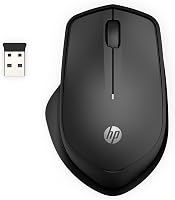
The HP 280 Silent Wireless Mouse suits a right-handed user who wants quiet clicks plus a 1600 DPI optical sensor. It uses a 2.4 GHz USB-A connection and includes a USB nano receiver that stores inside the mouse.
The HP 280 has a 3-button design with an integrated scroll wheel and supports Windows, Chrome, and Mac OS. Its multi-surface technology is designed for movement across virtually any surface, while its wireless range reaches up to 32.8 ft.
It measures 4.4 in long by 3.2 in wide and weighs 3.36 oz. Choose it if the larger ergonomic shape and higher 1600 DPI sensor fit your work style.
For switch details across different mouse types, see our guide to the best silent switches for mouse.
Can a silent mouse work for gaming?
Yes, a silent mouse can work for gaming, but quiet clicks are only one part of the choice. Check the sensor, connection, shape, button count, and any controls you need for your games.
The HP 280 has a 3-button layout and 1600 DPI optical tracking. The Logitech M330 focuses on a right-handed full-size shape, while the M240 emphasizes compact Bluetooth use and ambidextrous handling.
These options fit general work, browsing, and quieter shared spaces. If you want a mouse designed around gaming needs, compare our guide to the best silent mouse for gaming.
How should you choose between Razer and these alternatives?
Choose a Razer silent mouse if the exact model clearly names quiet or silent switches and its shape, connection, and controls suit your setup. Do not treat the Razer brand name alone as proof that every click will be quiet.
Choose the M330 for a full-size right-handed USB receiver mouse. Choose the M240 for compact Bluetooth use and ambidextrous handling.
Choose the HP 280 for a right-handed USB mouse with 1600 DPI tracking and a stored nano receiver.
The main buying rule is simple: confirm the switch wording first, then check the connection and hand fit. A quiet mouse that is awkward to use will not be a good upgrade.
Final answer: does Razer make a silent mouse?
Yes, Razer has offered mice with quieter click switches, but you need to verify the exact model. If you want a clearly stated alternative, the Logitech M330, Logitech M240, and HP 280 each describe reduced click noise.
For a Razer pick, confirm silent or quiet switch wording on that exact listing before you buy. Then check hand shape, button layout, and connection, because those details decide long term comfort at your desk.
Pick the M330 for full size right handed use with a USB-A receiver and over 90 percent click sound reduction. It suits desktop users who want a larger contoured grip, 18 month battery life from one included AA battery, and plug and play use on Windows, macOS, ChromeOS, and Linux.
Pick the M240 for compact Bluetooth use and ambidextrous handling when you want to free a USB port. It suits laptop users and travelers who need a small mouse that pairs without a dongle, works across Windows, macOS, Linux, ChromeOS, iPadOS, and Android, and uses 18 month battery life from one included AAA battery.
Pick the HP 280 for 1600 DPI tracking and a right handed USB design when you want more cursor speed control. It suits users who want quieter left and right buttons, multi surface tracking without a pad, and a nano receiver that stores inside the mouse.
All three reduce click sound rather than removing every sound a mouse can make. The wheel, shell, and movement across a desk can still be heard, especially on a hard surface in a quiet room.
For a deeper comparison, start with the best silent mouse for computer.
Frequently asked questions
Does Razer make a silent mouse?
Yes, Razer makes or has made mice with quieter click switches, but silent operation is model-specific. Check the exact Razer model for terms such as silent switches or quiet clicks before buying.
A standard Razer gaming mouse may still use audible switches.
Are silent mice completely silent?
No. Silent mice reduce the sound of button clicks, but the wheel, shell, feet, and movement can still make noise.
The surface and how firmly you press also affect the sound.
Quiet switches are best understood as lower-noise clicks, not total silence.
Is a silent mouse good for gaming?
A silent mouse can suit gaming if you value lower click noise, but check the model's sensor, button layout, connection, and software before choosing it. A quiet office mouse may not offer the controls or shape you want for fast games.
What is the best alternative to a Razer silent mouse?
The Logitech M330 Silent Plus suits right-handed users who want a full-size USB receiver mouse, while the Logitech M240 suits people who want a compact Bluetooth mouse. The HP 280 adds a right-handed shape, 1600 DPI tracking, and a USB receiver.