8 Best Wireless Keyboards for PC (November 2026)
The best wireless keyboards for PC include the Arteck 2.4G USB Wireless Keyboard Full Size for rechargeable office typing, the Logitech MK270 Full Size Wireless Keyboard for a keyboard and mouse set, and the Soueto Wireless Keyboard with RGB Backlit for a lit desk setup.
On this page (6 sections)
The Arteck 2.4G USB Wireless Keyboard Full Size is the best wireless keyboard for PC use at a typical office desk, with a number pad, quiet low-profile keys, and a rechargeable battery. Choose the Logitech MK270 if you also need a mouse, or the HP 230 for quiet keys and shortcut access.
Wireless keyboards for PC connect either through Bluetooth or a USB receiver. Match that connection to your computer, then choose between a full-size layout for everyday office work and a compact one that leaves more desk space.
For broader layout and switch advice, start with our best keyboard for computer guide. If you prefer a cable and don't need wireless placement, compare these picks with our best wired keyboard for PC.
Our picks at a glance
-
1
 Best for rechargeable office typing
Arteck 2.4G USB Wireless Keyboard Full Size
9.7/10 our score
See it on Amazon -
2
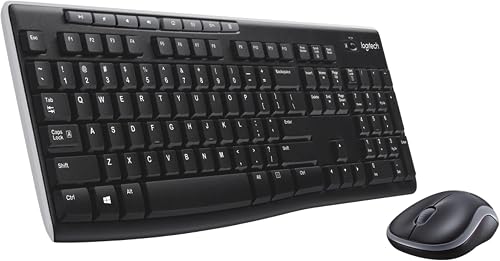 Best for a keyboard and mouse set
Logitech MK270 Full Size Wireless Keyboard
9.6/10 our score
See it on Amazon -
3
 Best for a lit desk setup
Soueto Wireless Keyboard with RGB Backlit
9.6/10 our score
See it on Amazon
- 4
 Check it
AULA F75 Pro Wireless Mechanical Keyboard
Best for compact mechanical typing - 5
 Check it
Logitech K400 Plus Wireless Touch TV Keyboard
Best for a PC-connected TV - 6
 Best for quiet full-size workCheck it
- 7
 Check it
Harburfine USB Silent Wireless Keyboard for Laptop
Best for quiet typing on a budget - 8
 Check it
TECKNET 2.4G Wireless Keyboard
Best for a compact office desk
How we chose these wireless keyboards for PC
The best wireless keyboard for PC use should match your desk, connection options, and daily typing needs. We compared the stated layouts, connection methods, power choices, and practical features for office and home computer work.
A USB receiver is a simple fit when your PC has an available USB-A port. Models with Bluetooth or more than one connection mode offer more flexibility, while a receiver-based keyboard can be easier to set up if you want a dedicated connection.
We gave more weight to usable layouts and routine typing features than to lighting or gaming extras. That puts full-size boards with number pads near the top, while compact and TV-focused models serve more specific spaces.
Our score weighs specs, features, and buyer feedback against what you're shopping for. We did not test these keyboards in person.
Compare the wireless keyboards for PC
The main differences are connection type, layout, and whether you need a mouse or touchpad included. Use this table to narrow the options before reading each model's details.
| Product | Best for | Connection | Layout | Power | Our score |
|---|---|---|---|---|---|
| Arteck 2.4G USB Wireless Keyboard Full Size | rechargeable office typing | 2.4G USB receiver | Full size with number pad | Rechargeable battery | 9.7 |
| Logitech MK270 Full Size Wireless Keyboard | a keyboard and mouse set | USB receiver | Full size with number pad | 9.6 | |
| Soueto Wireless Keyboard with RGB Backlit | a lit desk setup | 2.4G USB receiver | Full size | 9.6 | |
| AULA F75 Pro Wireless Mechanical Keyboard | compact mechanical typing | Bluetooth, 2.4GHz, or USB-C | 75% with 81 keys | 9.6 | |
| Logitech K400 Plus Wireless Touch TV Keyboard | a PC-connected TV | USB Unifying receiver | Compact with built-in touchpad | Two pre-installed AA batteries | 9.4 |
| HP 230 Wireless Keyboard | quiet full-size work | Wireless USB-A receiver | Full size with number pad | Two AAA batteries | 9.1 |
| Harburfine USB Silent Wireless Keyboard for Laptop | quiet typing on a budget | 2.4G USB receiver | Full size with number pad | One AAA battery, not included | 9.0 |
| TECKNET 2.4G Wireless Keyboard | a compact office desk | 2.4GHz USB receiver | Compact with a different Enter key layout | Two AAA batteries, not included | 8.6 |
Which wireless keyboard fits your desk?
The Arteck is the straightforward pick for routine office typing, while the Logitech MK270 is convenient when you want a matching mouse in the box. Consider how your desk is used before choosing extra features.
Is a full-size wireless keyboard better for office use?
A full-size wireless keyboard is a practical choice for office use if you enter numbers often or rely on dedicated function and arrow keys. The Arteck, Logitech MK270, HP 230, and Harburfine all include a number pad.
Arteck 2.4G USB Wireless Keyboard Full Size: Best for rechargeable office typing
Arteck 2.4G USB Wireless Keyboard Full Size: Best for rechargeable office typing
- Full-size layout with number pad
- 2.4G USB receiver
- Rechargeable battery
- Quiet low-profile keys
A full-size layout, quiet low-profile keys, and a rechargeable battery suit everyday PC work. Its nano USB receiver plugs into a USB port for setup.
Pros
- Full-size keys, arrows, and number pad
- Rechargeable battery
- Quiet low-profile keys
Cons
- Uses a USB receiver rather than Bluetooth
- May not work with some external USB hubs
The Arteck suits a work desk where you want full-size keys without a cable across the surface. Its low-profile keys are described as quiet, and the layout includes arrow keys, shortcuts, and a number pad.
Setup uses a nano USB receiver, which you plug into the PC. Arteck says the rechargeable battery can last up to 6 months based on 2 hours of use per day, so it avoids disposable battery swaps.
The USB cable is for charging, not connecting the keyboard to the computer. Arteck also notes that some external USB hubs may not work with the keyboard, so plug the receiver directly into the PC if needed.
Choose this model if a familiar full-size layout and rechargeable power matter more than Bluetooth. For another color option, see our guide to the best wireless keyboard in yellow.
Logitech MK270 Full Size Wireless Keyboard: Best for a keyboard and mouse set
Logitech MK270 Full Size Wireless Keyboard: Best for a keyboard and mouse set
- Full-size keyboard and compact mouse
- Single USB receiver
- Eight multimedia hotkeys
- Spill-resistant keyboard design
The MK270 pairs a full-size keyboard with a compact mouse through one USB receiver. Its low-profile quiet keys and multimedia hotkeys fit routine home or office computing.
Pros
- Keyboard and mouse use one receiver
- Full-size layout with F-keys and number pad
- On/off switches
Cons
- The combo includes a mouse you may not need
- Uses a USB receiver rather than Bluetooth
The MK270 is a good match when you need both a keyboard and a mouse for a home or office PC. The standard layout includes full-size F-keys, arrows, and a number pad, while 8 multimedia hotkeys give quick access to common controls.
One USB receiver connects the wireless set, and Logitech gives a range of up to 33 ft, which can help when the computer sits under or beside a desk. The keyboard has a spill-resistant design and adjustable tilt legs.
Logitech states up to 36 months of keyboard battery life and 12 months for the mouse, with use and conditions affecting actual life. Choose it if you want a complete desk setup in one box; if you already own a mouse, the Arteck or HP 230 may be a better fit.
HP 230 Wireless Keyboard: Best for quiet full-size work
HP 230 Wireless Keyboard: Best for quiet full-size work
- Low-profile chiclet keys
- Integrated number pad
- Shortcuts for 12 functions
- Two included AAA batteries
The HP 230 combines low-profile keys and a number pad with shortcuts for common functions. Its full-size layout suits desktop tasks that include data entry.
Pros
- Quiet low-profile keys
- Shortcuts for 12 functions
- Batteries included
Cons
- Uses a USB-A receiver
- No separate mouse included
The HP 230 suits office typing when you want a full-size board with a low-profile chiclet design. It includes a number pad and shortcuts for 12 functions, so common actions can be reached from the keyboard.
The keyboard uses a wireless receiver and comes with two AAA batteries. HP states up to 16 months of use, with actual battery life depending on use and conditions.
Its full-size dimensions are 17.32 x 5.76 in, so check that your desk has enough front-to-back room. Pick it for a quiet, familiar layout with shortcut keys, or consider the Harburfine if quiet typing is your main priority.
Should you choose a compact wireless keyboard for office use?
A compact keyboard is useful when desk width is limited or you carry your keyboard between workspaces. Check the key layout carefully, since smaller boards may change the position or shape of familiar keys.
TECKNET 2.4G Wireless Keyboard: Best for a compact office desk
TECKNET 2.4G Wireless Keyboard: Best for a compact office desk
- Compact 11.5 x 4.9 in size
- Quiet keys
- 2.4GHz USB receiver
- Media hotkeys
The compact shape leaves more room on a crowded desk and is easier to carry between workspaces. Its Enter key layout differs from a standard full-size keyboard, so allow time to adjust.
Pros
- Compact and lightweight
- Quiet key design
- Works with Windows, Mac, Chrome OS, and Linux
Cons
- Does not support Bluetooth
- Different Enter key layout may take adjustment
The TECKNET takes up less space than a full-size keyboard, measuring 11.5 x 4.9 in. Its quiet key design and media hotkeys suit basic office tasks, while the receiver-based connection works with Windows, Mac, Chrome OS, and Linux computers.
This model does not support Bluetooth and needs two AAA batteries, which are not included. The Enter key layout differs from a standard full-size keyboard, so it may take an adjustment period if you switch back and forth between boards.
Choose it when desk space and portability matter more than a number pad. If a compact layout feels too limiting, compare it with our best Bluetooth keyboard for PC guide.
Which wireless keyboard works best for a home entertainment PC?
A keyboard with a built-in touchpad can be easier to use from a couch than a separate keyboard and mouse. It also takes up less room on a lap or side table.
Logitech K400 Plus Wireless Touch TV Keyboard: Best for a PC-connected TV
Logitech K400 Plus Wireless Touch TV Keyboard: Best for a PC-connected TV
- Built-in touchpad
- Quiet keys
- USB Unifying receiver
- Up to 18 months battery life
The K400 Plus combines a keyboard and touchpad for controlling a PC-connected TV from the couch. Its compact layout removes the need for a separate mouse in that setup.
Pros
- Built-in touchpad
- Quiet keys
- On/off button
Cons
- Not a full-size office layout
- Uses a USB receiver rather than Bluetooth
The K400 Plus is designed for controlling a PC connected to a television. Its integrated touchpad handles pointer movement, while quiet keys support browsing, chatting, and media control.
The keyboard connects through a USB Unifying receiver and has a stated wireless range of up to 33 ft. Logitech gives battery life of up to 18 months, and the keyboard includes an on/off button to help conserve power.
This is a specialized choice for a living-room setup, rather than a full-size office typing board. If you use an all-in-one PC as your main computer, our guide on how an all-in-one differs from a mini PC with a monitor explains the setup tradeoffs.
Do backlighting and mechanical keys matter for office work?
Backlighting can help you see keys in a dim room, while mechanical switches offer a different typing feel and sound. These features are useful when they match your workspace, but they are not necessary for routine office tasks.
Soueto Wireless Keyboard with RGB Backlit: Best for a lit desk setup
Soueto Wireless Keyboard with RGB Backlit: Best for a lit desk setup
- Seven backlight colors and four modes
- Adjustable brightness
- Phone or tablet holder
- Rechargeable battery
RGB backlighting and an integrated device holder add visual and desk organization features to a wireless PC keyboard. The backlight turns off after 120 seconds of inactivity to save battery.
Pros
- Seven colors and four lighting modes
- Phone or tablet holder
- Rechargeable battery
Cons
- Backlight needs a receiver connection to stay on
- Uses a USB-A receiver
The Soueto adds seven backlight colors, four modes, and adjustable brightness to a full-size wireless keyboard. Its built-in holder can support a phone or tablet, which may keep a second screen upright on the desk.
It uses a 2.4G USB receiver and has a rechargeable battery. The backlight turns off after 120 seconds of inactivity to save power, and the receiver needs to be connected for the keyboard to maintain its lighting during use.
Choose it if lighting and a device holder are useful at your desk. The USB-A receiver may need an adapter for a computer that only has USB-C ports.
AULA F75 Pro Wireless Mechanical Keyboard: Best for compact mechanical typing
AULA F75 Pro Wireless Mechanical Keyboard: Best for compact mechanical typing
- 75% layout with 81 keys
- Bluetooth, 2.4GHz, and USB-C modes
- Hot-swappable switches
- Multi-function knob
The compact 75% layout keeps arrow keys while taking less desk space than a full-size board. Its multi-mode connection and hot-swappable switches suit people who want more setup choices.
Pros
- Three connection modes
- Hot-swappable 3-pin or 5-pin switches
- Multi-function knob
Cons
- No number pad in the 75% layout
- Its mechanical sound may not suit a quiet shared office
The AULA F75 Pro gives you a compact 75% layout with 81 keys, including arrow keys but without a number pad. Its knob can adjust lighting or media controls depending on the selected mode.
This keyboard supports Bluetooth, 2.4GHz wireless, and USB-C wired connections, and it can connect to up to five devices. Its switches are hot-swappable, so compatible 3-pin or 5-pin switches can be changed without soldering.
Choose it if you want a compact mechanical board with multiple connection modes and customization options. Its mechanical switches may be less suited to a quiet shared office than low-profile office keyboards.
What should you check before buying a wireless keyboard for PC?
Check the connection, layout, and power requirements before ordering a wireless keyboard for PC use. These details determine whether it fits your computer and desk without extra adapters or a change in typing habits.
- Connection: Confirm whether the keyboard uses Bluetooth, a USB-A receiver, or both. A USB receiver needs an available port, and some models do not support Bluetooth.
- Layout: Choose a number pad for frequent data entry. A compact keyboard saves space, but can omit keys or change their arrangement.
- Power: Rechargeable models avoid disposable batteries, while battery-powered models may include or require batteries.
- Noise and lighting: Quiet keys suit shared work areas. Backlighting helps in low light but may affect battery use.
- Placement: For a television setup, a built-in touchpad can be more useful than a standard full-size layout.
If you're moving files from an older desktop while changing your workspace, our guide explains how to transfer files from an old desktop to an all-in-one PC. For a brighter gaming-focused setup, see the best white gaming keyboard options.
Which wireless keyboard should you choose for PC use?
Choose the Arteck for a rechargeable full-size office keyboard, the MK270 when you also need a mouse, or the TECKNET when desk space is tight. For a quiet layout with shortcut keys, the HP 230 is another practical fit.
The K400 Plus suits PC-to-TV control, while Soueto adds backlighting and the AULA offers mechanical switches and multiple connection modes. If choosing a keyboard for an older family member, our best keyboard for seniors guide covers other layout considerations.
Our top 3 picks at a glance
-
1
Best for rechargeable office typing
Arteck 2.4G USB Wireless Keyboard Full Size
9.7/10 our score
See it on Amazon -
2
Best for a keyboard and mouse set
Logitech MK270 Full Size Wireless Keyboard
9.6/10 our score
See it on Amazon -
3
Best for a lit desk setup
Soueto Wireless Keyboard with RGB Backlit
9.6/10 our score
See it on Amazon
Frequently asked questions
Do wireless keyboards for PC need Bluetooth?
No. Several wireless keyboards connect through a small USB receiver instead of Bluetooth.
Check which connection your PC supports and whether you have an open USB-A port before choosing a model.
The AULA F75 Pro offers Bluetooth, 2.4GHz wireless, and USB-C modes.
Is a full-size wireless keyboard better for office work?
A full-size keyboard is useful if you regularly enter numbers or rely on arrow keys and function keys. Models such as the Arteck, HP 230, and Logitech MK270 include a number pad.
A compact model can leave more desk space if you rarely use those keys.
Can I use a wireless keyboard with a PC-connected TV?
Yes. The Logitech K400 Plus is designed for PC-to-TV use and has an integrated touchpad, so you can control the pointer without a separate mouse.
Check the distance and receiver placement for your room before setting up a couch-side keyboard.
Are wireless keyboards suitable for a shared office?
They can be, especially models with quiet or low-profile keys. The Arteck and HP 230 describe their keys as quiet, while the Harburfine is built around quiet typing.
Mechanical keyboards can sound more noticeable, so consider the AULA's mechanical switches in the context of your workspace.


