9 Best White Gaming Keyboards (November 2026)
The best white gaming keyboards include the SteelSeries Apex 3 TKL Gaming Keyboard for quiet white gaming setups, the AULA F75 Pro Wireless Mechanical Keyboard for wireless customization, and the GravaStar Mercury K1 75% Wireless Mechanical Gaming for premium white desk style.
On this page (3 sections)
The best white gaming keyboard for most setups is the SteelSeries Apex 3 TKL, thanks to its compact 84-key layout, quiet switches, RGB lighting and water and dust resistance.
White keyboards suit clean gaming desks, but color is only the first filter.
Layout determines mouse room, switch type changes feel and sound, and connection affects setup.
A white finish makes a desk look brighter and more open, yet it shows dust and marks more clearly than a darker board.
That means practical choice matters as much as looks, especially on a shared work and play desk.
For most people, a tenkeyless board is the easiest starting point.
It removes the number pad but keeps the function row and main navigation area in familiar places.
That trade off frees mouse space without forcing a move to a very small layout.
Quiet switches suit a shared room, while a livelier board may suit playing alone.
RGB lighting helps in a dim room and can tie a white desk together visually.
Water and dust resistance adds protection, though it is not permission to spill drinks on it.
The AULA and GravaStar offer wireless options and rechargeable batteries for more freedom.
The MageGee K1 and RedThunder K10 keep a full-size layout with a number pad.
The TMKB, Razer Huntsman Mini and MageGee Mini use a 60% layout for maximum mouse space.
That layout works best when games mainly use movement and action keys on the main section.
Check if you need dedicated arrow keys, function keys or a number pad for work tasks.
Measure your desk first, as even a compact board needs stable space for mouse and cable.
Clean white keycaps with a dry or lightly damp microfiber cloth, and keep liquids away from the connection point.
If you are comparing general layouts, start with our guide to the best keyboard for computer.
For broader gaming advice, see our picks for the best keyboard for gaming.
Our picks at a glance
-
1
 Best for quiet white gaming setups
SteelSeries Apex 3 TKL Gaming Keyboard
9.6/10 our score
See it on Amazon -
2
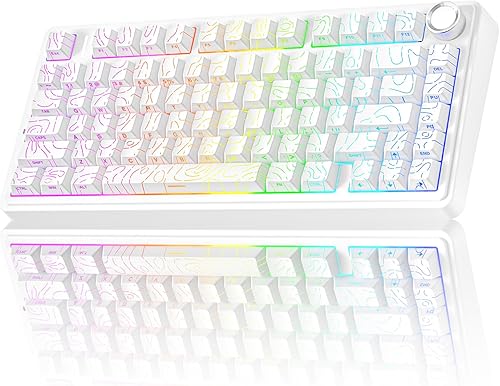 Best for wireless customization
AULA F75 Pro Wireless Mechanical Keyboard
9.5/10 our score
See it on Amazon -
3
 Best for premium white desk style
GravaStar Mercury K1 75% Wireless Mechanical Gaming
9.3/10 our score
See it on Amazon
- 4
 Check it
MageGee Gaming Keyboard and Mouse Combo
Best for a full-size starter setup - 5
 Check it
TMKB 60% Mechanical Gaming Keyboard
Best for a compact budget build - 6
 Check it
RedThunder K10 Wired Gaming Keyboard and Mouse
Best for a complete full-size bundle - 7
 Check it
Razer Huntsman Mini 60% Gaming Keyboard
Best for fast compact gaming - 8
 Check it
MageGee Mini 60% Gaming Keyboard
Best for a simple small desk - 9
 Check it
Redragon K512 RGB Membrane Gaming Keyboard
Best for macros and media controls
The best white gaming keyboards for different setups
The right white gaming keyboard depends on the space you have and the keys you use most.
TKL and 75% boards preserve more navigation keys, while 60% boards give you more room for a mouse.
Start by measuring the width of your desk from the edge of your monitor to the space where your mouse will sit.
If that space is tight, a compact layout will help more than any lighting feature.
Think about your normal work as well as your games, since spreadsheets, editing and typing may need keys that gaming alone does not.
A full-size board is still the simplest choice when you use a number pad every day.
A TKL board is a good middle ground for players who want more mouse room without losing the function row.
A 75% board goes a little further, keeping arrow keys while removing more of the surrounding sections.
A 60% layout gives the most mouse room, but it asks you to use shortcuts for several keys.
Choose the layout you can use without thinking too much, because a board that slows you down will not feel like an upgrade.
Also consider switch sound and connection type, as those affect shared rooms, cable management and how you move between devices.
SteelSeries Apex 3 TKL Gaming Keyboard: Best for quiet white gaming setups
- 84-key TKL layout
- Whisper-quiet gaming switches
- 8-zone RGB illumination
- Water and dust resistant
The compact TKL layout leaves more mouse room while keeping a familiar function-row layout. Quiet switches and water and dust resistance make it a strong everyday choice.
Pros
- Compact TKL layout
- Quiet switches
- Water and dust resistant
Cons
- No number pad
- Wired connection
The SteelSeries Apex 3 TKL is the strongest all-around pick for a white gaming setup. Its tenkeyless 84-key layout removes the number pad but keeps the function row, so the change from a full-size board is easier than moving straight to a 60% design.
Its whisper-quiet gaming switches suit shared rooms and late sessions where loud key presses are distracting. SteelSeries also gives the keyboard anti-ghosting keys, 8-zone RGB illumination and a USB-A connection.
The white polymer enclosure keeps the design simple, while water and dust resistance adds useful protection around a gaming desk. That does not make the keyboard safe to submerge, so keep drinks away and clean spills promptly.
Choose this model if you want a familiar layout with more mouse space. If quiet use is your main concern, compare it with our guide to the best quiet keyboard for gaming.
AULA F75 Pro Wireless Mechanical Keyboard: Best for wireless customization
- 75% 80-key layout
- Bluetooth 5.0, 2.4GHz and USB-C
- 4000mAh rechargeable battery
- Hot-swappable 3-pin and 5-pin support
This compact mechanical keyboard keeps arrow keys while adding tri-mode connection and hot-swap support. Its knob controls lighting or media after you switch between gaming and office modes.
Pros
- Three connection modes
- Hot-swappable switches
- 4000mAh battery
Cons
- No number pad
- Smaller layout needs shortcut learning
The AULA F75 Pro is the most flexible wireless mechanical choice in this group.
Its 80-key 75% layout keeps arrow keys while trimming the number pad and other full-size sections.
That layout suits players who want a smaller desk footprint without giving up arrow keys used in many games.
You can connect through Bluetooth 5.0, 2.4GHz wireless or USB-C.
The 4000mAh rechargeable battery supports a cleaner desk when you do not want a cable running to the computer.
Tri-mode connection helps if you use more than one device, since you can switch without moving a cable.
Hot-swap support works with 3-pin or 5-pin switches, so you can change switch type without soldering.
That matters if you are new to custom keyboards, because you can learn the basics without a complex build.
The keyboard comes with linear switches, pre-lubricated stabilizers, RGB backlighting and side-printed PBT keycaps.
PBT keycaps suit daily use for durability and textured feel, and side printing lets light show through differently from top-only legends.
A multi-function knob controls lighting in gaming mode and media in office mode.
Rotate it to adjust brightness or volume and click it to switch effects or play and pause.
Pick the AULA if you want wireless flexibility and room to customize later.
It is less direct if you want a full-size number pad or the simplest plug-in setup.
GravaStar Mercury K1 75% Wireless Mechanical Gaming: Best for premium white desk style
- 79-key 75% layout
- Aluminum alloy exoskeleton
- 8000mAh battery
- Bluetooth 5.0, 2.4GHz and USB-C
The Mercury K1 combines a white aluminum build with a compact layout and three connection options. Its large battery and RGB controls suit a wireless gaming station where appearance matters.
Pros
- Aluminum construction
- Large 8000mAh battery
- Hot-swappable linear switches
Cons
- No number pad
- Wider feature set may be more than simple setups need
The GravaStar Mercury K1 is the style-focused wireless mechanical pick.
Its 79-key 75% layout combines a Moonlight White design with an aluminum enclosure and dual-layer PBT keycaps.
That suits a desk where the keyboard is a visible centerpiece.
It supports Bluetooth 5.0, 2.4GHz wireless and USB-C, so it fits a multi-device desk.
Use it wired for a direct connection or wireless to move between devices.
The 8000mAh battery is the largest in this group, and the linear switches use a 5-layer sound-dampening system for a smoother, quieter sound.
That dampening reduces hollow or sharp tones, which helps in a shared room.
Hot-swappable switches, per-key programming and 8-layer profiles let you set different lighting or key behavior for games or tasks.
It also includes a Type-A 2.4GHz receiver, keycap puller, cleaning brush, cleaning cloth, extra switches and user manual.
Choose it if the keyboard is a major part of your white setup.
It is overkill if you only need simple plug-in gaming.
MageGee Gaming Keyboard and Mouse Combo: Best for a full-size starter setup
- 104-key full-size keyboard
- RGB backlight
- Wired keyboard and mouse
- Mouse with 6 speed levels
This white K1 bundle gives you a full-size keyboard with a number pad plus a matching mouse. It suits a first gaming station where you want both core peripherals together.
Pros
- Full-size layout
- Includes mouse
- No driver or software needed
Cons
- Uses more desk space
- Wired setup
The MageGee K1 is the best fit when you need a full-size white keyboard and mouse together.
Its 104-key layout includes the function row and number pad for gaming, work or number entry.
That full layout is familiar, so there is little to relearn from an older office keyboard.
It connects by USB and works without extra drivers or software.
Plug and play setup suits a first station or shared computer.
Its RGB backlight has 8 light colors, 5 light modes, multiple brightness levels and adjustable light speeds.
You can turn it off or use a breathing mode in a dim room.
Double-shot legends stay readable, which helps at night.
The included mouse has 6 speed levels from 600 to 3200, plus a 7-color breathing light.
Those levels adjust sensitivity for aiming, browsing or desktop work.
The keyboard uses an ergonomic high-and-low keycap layout, non-slip pads and ABS engineering plastic to fit hands naturally and stay put during fast play.
Choose this bundle when a full-size layout matters and you want the mouse included.
Its wired design and larger footprint need more cable and desk space than compact picks.
TMKB 60% Mechanical Gaming Keyboard: Best for a compact budget build
- 61-key 60% layout
- Red linear switches
- Detachable USB-C cable
- 15 lighting modes
The TMKB leaves substantial desk space for a mouse by removing the number pad and dedicated navigation cluster. Its red linear switches, anti-ghosting and detachable USB-C cable fit a simple wired gaming setup.
Pros
- Very compact layout
- Detachable USB-C
- 61-key rollover
Cons
- No arrow-key cluster
- Single-color backlighting
The TMKB T61SE is the best compact budget-style mechanical option here.
Its 61-key 60% layout removes the number pad, function row and dedicated navigation cluster to leave more room for sweeping mouse movement.
That extra room is the main reason to choose a 60% board, especially for games that need wide mouse movements.
Red linear switches use 45g actuation, and the keyboard supports anti-ghosting with 61-key rollover.
Linear switches feel smooth through the press, with no click or bump in the middle.
A 45g actuation force suits quick repeated presses, though you should avoid resting fingers hard on the keys.
The detachable USB-C cable makes storage and replacement easier than a permanently attached cable.
You can unplug it for travel or swap it if the cable gets damaged.
The white board has 15 dynamic lighting modes with adjustable brightness and speed.
Choose a steady light or moving effect, and lower brightness if the glow distracts you.
Double-shot keycaps keep backlight visible, while plug-and-play support covers Windows, Linux and macOS.
Foldable feet give a tilt option for comfort, and the compact body is easy to carry.
Choose it when your games use common movement and action keys and you want a small wired board.
If you rely on dedicated arrows or function keys, a TKL or 75% model will be easier to use.
RedThunder K10 Wired Gaming Keyboard and Mouse: Best for a complete full-size bundle
- 104-key full-size keyboard
- 26 anti-ghosting keys
- 7200 DPI mouse
- Soft leather wrist rest
The K10 adds a mouse and soft leather wrist rest to a white full-size keyboard. It is a practical choice when you want a complete desk bundle with RGB lighting and a numeric keypad.
Pros
- Keyboard, mouse and wrist rest
- Full-size layout
- 26 anti-ghosting keys
Cons
- Needs more desk space
- Limited Mac keyboard support
The RedThunder K10 is a complete full-size accessory bundle with a keyboard, mouse and wrist rest.
Its 104-key layout includes a number pad, function keys and 26 anti-ghosting keys for simultaneous inputs.
That layout suits a desk used for gaming and everyday tasks, since the number pad remains available for data entry.
The keyboard uses RGB lighting and a built-in steel plate.
The steel plate adds structure to the base, which can help the board feel more stable on the desk.
RGB lighting covers the keys and a light bar along the bottom edge, so the glow is visible from the side as well.
The mouse has a 7200 DPI optical sensor, while the soft leather wrist rest uses memory foam for support during longer sessions.
A wrist rest can reduce strain when you keep your hands in the same position for long periods.
The mouse shape gives a firm grip, which helps during fast movements in games.
This setup works with Windows 11, Windows 10, Windows 8, Windows 7, Windows Vista and Windows XP.
Mac keyboard support is limited, so Mac users should confirm needed keys work before choosing it.
The keyboard also offers lighting modes changed with key combinations, including brightness and breathing speed controls.
Pick the K10 if you want several desk accessories in one white package.
Its full-size footprint and wired setup suit a fixed station more than a small portable desk.
Razer Huntsman Mini 60% Gaming Keyboard: Best for fast compact gaming
- 60% layout
- Linear optical switches
- Aluminum top frame
- Doubleshot PBT keycaps
The Huntsman Mini is built for a clean, compact desk where mouse room matters. Its linear optical switches, aluminum top frame and PBT keycaps give this 60% keyboard a focused gaming layout.
Pros
- Compact 60% design
- Linear optical switches
- Aluminum top frame
Cons
- No dedicated arrow keys
- Windows compatibility
The Razer Huntsman Mini is the compact pick for gamers who want a focused 60% board and linear optical switches.
Its 11.55 x 4.07 x 1.45 in size leaves substantial room for a mouse.
That small footprint suits a clean desk where the mouse needs travel room.
The Mercury White keyboard has an aluminum top frame, oil-resistant doubleshot PBT keycaps and individually backlit RGB keys.
The aluminum frame feels firmer than a plastic-only design.
PBT keycaps resist shine and grime on frequently used keys.
Razer's optical switches use 1.0 mm actuation and support programmable combinations through Hypershift.
A short press registers the key, which some players prefer for fast inputs.
Individual RGB lets each key use its own color, so you can highlight movement keys.
It connects with a detachable Type-C to Type-A cable and is designed for Windows.
A detachable cable is easier to store, replace or move between computers.
The small layout requires function-layer shortcuts for navigation, media and other secondary functions.
Choose it when fast compact play matters more than dedicated navigation keys.
It is less suited to heavy spreadsheet or office use.
MageGee Mini 60% Gaming Keyboard: Best for a simple small desk
- 61-key 60% layout
- RGB backlight
- Waterproof circuit board
- Membrane mechanical-feeling design
This white TS91 keeps the compact 60% shape while using a membrane design with mechanical feeling. RGB modes, a wired connection and a waterproof circuit board suit small desks and basic gaming needs.
Pros
- Compact footprint
- RGB lighting
- Waterproof circuit board
Cons
- No dedicated arrow keys
- Mechanical feeling rather than mechanical switches
The MageGee Mini is a simple white 60% keyboard for small desks and mixed home use.
Its 61-key layout removes the number pad and gives you more room for a mouse without moving to a mechanical switch design.
That compact shape makes it easy to fit beside a monitor on a narrow desk or a small shelf.
This TS91 uses a membrane design with mechanical feeling.
Membrane boards are often simpler and lower in cost, and this design aims to give a firmer press than a basic flat keyboard.
It has RGB backlighting with changeable colors and modes, adjustable brightness and breathing speed, plus a waterproof circuit board.
The lighting controls let you choose a steady glow or a breathing effect, and you can lower the brightness for night use.
A waterproof circuit board helps with small spills, though it does not make the whole keyboard safe to wash.
The wired keyboard works with Windows and macOS and is listed for gaming consoles.
A wired connection keeps setup simple, since there is no battery to charge and no pairing step to repeat.
The interface is not waterproof, so keep the cable connection away from liquid even though the circuit board has water resistance.
You should still wipe spills quickly and let the board dry before using it again.
Choose it if you want the look and footprint of a compact gaming keyboard at a simple feature level.
If actual mechanical switches or wireless connection matter, the TMKB or AULA is a better match.
Redragon K512 RGB Membrane Gaming Keyboard: Best for macros and media controls
- 104-key wired layout
- 6 onboard macro keys
- 26 anti-ghosting keys
- 13 RGB lighting modes
The K512 combines a full-size layout with 6 onboard macro keys, dedicated media controls and a detachable wrist rest. It fits players who want extra shortcuts without relying on software for basic macro setup.
Pros
- 6 onboard macro keys
- Dedicated media controls
- Detachable wrist rest
Cons
- Membrane switches
- Large 18.3 x 8.4 in footprint
The Redragon K512 is the full-size white pick for macros and media controls.
Its 104-key membrane layout includes 6 onboard macro keys, dedicated media controls and an easy media wheel.
That full layout keeps the number pad and function row, so it suits mixed work and gaming use.
You can record and reassign G1 through G6 without software for basic macro setup.
Onboard recording means you can set a shortcut at the desk and use it without keeping a program open in the background.
The keyboard also supports 26 anti-ghosting keys and 13 RGB lighting modes, including customizable slots and adjustable brightness.
Anti-ghosting helps when you press several keys at once, which can happen during complex in-game actions.
The lighting can be set to a preset or adjusted to a custom color, and it can be turned down or off.
A detachable wrist rest adds support, and double-shot injection-molded keycaps resist fading.
A wrist rest is useful for long sessions, and a detachable one can be removed if you prefer more desk space.
Optional software is available for deeper macro configuration and custom lighting effects, while everyday use does not require software.
That split suits beginners who want simple setup now and more control later.
Choose the K512 if shortcut keys and media control are more valuable than mechanical switches.
Its 18.3 x 8.4 in dimensions make it one of the larger choices here, so measure your desk before ordering.
How to choose a white gaming keyboard
Choose the layout before you choose the lighting. A full-size board gives you 104 keys and a number pad, TKL keeps the function row while removing the number pad, 75% keeps arrow keys in a smaller body, and 60% removes more dedicated keys.
Which layout is best for a white gaming setup?
A TKL keyboard is the safest middle ground for most players. The SteelSeries Apex 3 TKL keeps 84 keys and gives you more mouse space, while the AULA and GravaStar use 75% layouts for an even smaller footprint with arrow keys.
A 60% board is best when you want maximum mouse room. The TMKB and Razer Huntsman Mini suit compact gaming desks, but you need to use shortcuts for function, navigation and arrow keys.
Should you choose mechanical or membrane switches?
Mechanical switches are the better match if you want a defined switch type and more control over feel. The AULA, GravaStar, TMKB and Razer use mechanical or optical mechanical designs, with linear options across the group.
Membrane keyboards can be a simpler choice for quieter, less complex setups. The MageGee Mini uses a membrane design with mechanical feeling, while the RedThunder K10 and Redragon K512 use membrane keyboard designs.
For more low-noise options, compare these picks with the best quiet keyboard for gaming.
Is wireless worth it for a white gaming keyboard?
Wireless is useful when you want fewer cables across a clean desk or need to switch between devices.
The AULA and GravaStar support Bluetooth, 2.4GHz wireless and USB-C, while the wired models keep setup simple and avoid charging.
A wired board is often the easier choice for a fixed computer station, since it connects as soon as you plug it in.
Wireless gives you freedom to move the board between a laptop, tablet or another computer without swapping cables.
That flexibility can help on a multi-device desk, but it also means you need to manage battery charge.
Check the connection you plan to use before buying.
Make sure your computer supports the type of wireless you intend to use, and test the range from your normal seating position.
A wireless keyboard may offer more flexibility, but a wired keyboard can be the better fit for a fixed computer station.
Wired models also avoid the risk of a low battery during a long session.
Consider how you arrange your cables, since a clean desk can still have a single well-routed wired connection.
For a white setup, cable color and routing can affect the look as much as the keyboard itself.
Our guide to the best white wireless gaming keyboard compares more white wireless options.
You can also see the broader best wireless keyboard for gaming guide.
What should you check before setting up a white keyboard?
Measure the available width and depth, including room for your mouse and cable. Full-size boards such as the MageGee K1, RedThunder K10 and Redragon K512 need more room than the 60% and 75% models.
Place the keyboard on a stable, level surface and keep the USB connection dry. Set the lighting to a brightness that does not distract you, then learn the function-layer shortcuts if you choose a compact layout.
For fast-response comparisons, see our guide to the best fastest gaming keyboards. It can help if actuation and response are more important to you than the white finish.
Which white gaming keyboard should you choose?
Pick the SteelSeries Apex 3 TKL if you want the strongest balance of compact size, quiet use and everyday features.
Its 84-key layout frees mouse space while keeping a familiar function row, and its quiet switches suit shared rooms.
Choose the AULA F75 Pro for hot-swap customization and three connection modes.
That board suits players who want to switch between devices and later change switch types without soldering.
Choose the GravaStar Mercury K1 for an aluminum wireless centerpiece.
Its white aluminum design, large battery and enthusiast controls suit a desk where appearance and customization both matter.
Choose the MageGee K1 or RedThunder K10 when you need a full-size keyboard and matching accessories.
Both keep a number pad and function row, which helps for work, number entry and everyday tasks.
The MageGee K1 pairs its board with a mouse, while the RedThunder K10 adds a mouse and wrist rest.
For maximum mouse room, pick the TMKB, Razer Huntsman Mini or MageGee Mini.
Those 60% layouts free the most space, but you should confirm you are comfortable using shortcuts for missing keys.
The TMKB and Razer use mechanical or optical switches, while the MageGee Mini uses a membrane design with mechanical feeling.
If you need dedicated arrow keys, a TKL or 75% board will be easier to learn.
Measure your desk, check your system compatibility, and clean white keycaps regularly to keep the finish looking fresh.
Our top 3 picks at a glance
-
1
Best for quiet white gaming setups
SteelSeries Apex 3 TKL Gaming Keyboard
9.6/10 our score
See it on Amazon -
2
Best for wireless customization
AULA F75 Pro Wireless Mechanical Keyboard
9.5/10 our score
See it on Amazon -
3
Best for premium white desk style
GravaStar Mercury K1 75% Wireless Mechanical Gaming
9.3/10 our score
See it on Amazon
Frequently asked questions
What is the best white gaming keyboard for most people?
The SteelSeries Apex 3 TKL is the best white gaming keyboard for most people in this group because it keeps a familiar 84-key layout while saving desk space. Its whisper-quiet switches, 8-zone RGB illumination and water and dust resistance suit everyday gaming and work.
Are white gaming keyboards hard to keep clean?
White gaming keyboards show dust and marks more clearly, so wipe the keycaps and case with a dry or lightly damp microfiber cloth. Disconnect a wired keyboard before cleaning, keep liquid away from the interface, and follow the care instructions for the exact model.
Is a 60% keyboard good for gaming?
A 60% keyboard can be good for gaming when you value mouse space and a small footprint. It removes the number pad, function row and dedicated arrow-key cluster, so check the required shortcuts before choosing the TMKB, Razer or MageGee Mini.
What is the best white wireless gaming keyboard?
The AULA F75 Pro is the best white wireless gaming keyboard here for most feature-focused buyers. It supports Bluetooth 5.0, 2.4GHz wireless and USB-C, includes an 80-key 75% layout, and has a 4000mAh rechargeable battery.


