6 Best USB-C Hubs (November 2026)
The best USB-C hubs for laptops and desktop peripherals include the Anker Laptop Docking Station Dual Monitor for dual-monitor desks, the Anker USB C Hub for compact 4K laptop setups, and the Acer USB C Hub for broad device support.
On this page (4 sections)
The best USB-C hub for most laptop users is the Anker Laptop Docking Station Dual Monitor. For more models with display outputs, compare USB-C hubs with HDMI.
It offers the widest mix of desk connections here, including dual HDMI, Ethernet, USB data ports, SD and microSD readers, and up to 85W pass-through charging.
That mix suits a laptop that stays on a desk most days, where monitors, wired networking, storage and memory cards all need a home. It is less suited to a bag if you only carry a laptop and one screen.
A smaller hub can be a better fit if you only need HDMI and a few USB ports. Start with the USB hubs and adapters buying guide if you need help matching port types to your laptop, desktop computer or peripherals.
Check the ports on your laptop first, since video, charging and data all depend on what the USB-C port supports. Count the devices you use daily and note which ones truly need a cable at the desk.
That simple list helps separate a full dock from a compact hub before you spend money. It also shows whether card readers or Ethernet are daily needs or occasional extras.
Think about where the hub will live, because a fixed desk dock and a travel adapter serve different habits. A desk dock can stay wired to monitors and network cables, so you only connect the laptop when you sit down.
A travel adapter needs to be light enough to carry daily and simple enough to set up in a new place. Look at the cable length and port layout too, because awkward spacing can make a desk feel cluttered.
Choose breadth when many devices stay plugged in, and choose compactness when you carry everything with you. Set the hub up once, label the cables, and keep it in a fixed spot for a smooth routine.
Our picks at a glance
-
1
 Best for dual-monitor desks
Anker Laptop Docking Station Dual Monitor
9.7/10 our score
See it on Amazon -
2
-
3

- 4
 Best for 10Gbps file transfersCheck it
- 5
 Best for smooth 4K videoCheck it
- 6
 Check it
Belkin 100W 10Gbps Multiport USB-C Hub Adapter
Best for USB-C-only accessories
The best USB-C hub picks for laptops and desktops
The best USB-C hub depends on your main connection problem.
If your need is a single connector change, compare a USB-C to USB-A adapter or hub.
An adapter can be enough when one older accessory is the only issue.
A hub makes more sense when several devices need to connect at once.
Anker leads for a full desk, UGREEN leads for 10Gbps transfers, and Belkin suits a setup built around USB-C accessories.
Those three choices cover very different daily habits.
A full desk needs breadth, a file-heavy user needs speed, and a modern desk needs more USB-C sockets.
Choosing the problem first keeps the port layout honest.
It also stops you paying for video, Ethernet or card slots you never use.
Anker Laptop Docking Station Dual Monitor: Best for dual-monitor desks
- 8-in-1 design
- Two HDMI ports
- Up to 85W pass-through charging
- Ethernet and SD/TF card readers
This is the most complete desk setup here, with two HDMI ports, Ethernet, card readers, USB-A data ports and USB-C Power Delivery input.
Pros
- Dual HDMI output
- Ethernet included
- SD and microSD card readers
Cons
- macOS mirrors both external displays
- Not compatible with Linux
The Anker Laptop Docking Station Dual Monitor is the strongest all-purpose choice for a desk that needs several connections from one USB-C port. It has 8 ports, including a USB-C PD input, two USB-A data ports, two HDMI ports, Ethernet, and SD and microSD card readers.
One display can run at 4K@60Hz through HDMI. Two displays can connect at 4K@30Hz through the two HDMI ports.
On macOS, both external monitors show the same image, so this is not the right pick if you need two separate extended desktop views on a Mac.
The hub supports up to 85W pass-through charging, but the setup needs a 100W PD wall charger and USB-C to USB-C cable. It supports USB-C, USB4 and Thunderbolt connections, along with Windows 10 and 11 and ChromeOS.
It is not compatible with Linux.
Choose it for a Windows laptop desk with monitors, wired networking and memory cards. For a wireless network connection, compare USB Wi-Fi adapters for PCs.
For more port combinations, compare our best USB 3.0 hub with USB-C options before deciding.
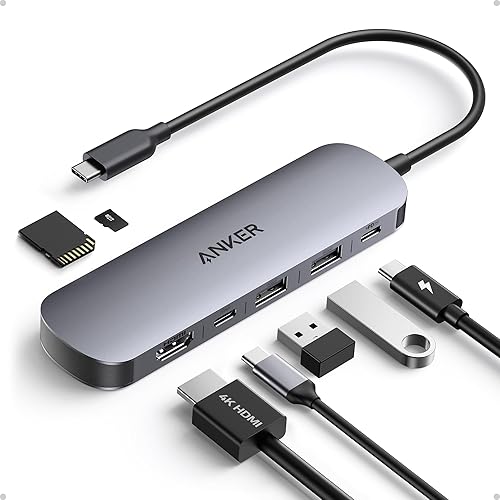
Anker USB C Hub: Best for compact 4K laptop setups
- 7-in-1 design
- 4K@60Hz HDMI
- Three 5Gbps data ports
- Up to 85W laptop charging
This Anker hub keeps a laptop setup compact while adding HDMI, USB-A, USB-C data, SD, TF and charging connections.
Pros
- 4K@60Hz HDMI
- SD and TF slots
- Metal enclosure
Cons
- USB-C port is for data, not video
- Charger not included
The Anker USB C Hub is a compact 7-in-1 option for laptop users who want one HDMI display and several everyday connections. It includes two USB-A 3.0 ports, one USB-C data port, SD and TF card slots, HDMI, and USB-C PD input.
Its HDMI port supports 4K@60Hz, which is useful when a smoother desktop or presentation matters. The USB-C port is for data transfer only, so it does not provide a second video connection.
The three data ports support up to 5Gbps. Its charging input can provide up to 85W to a laptop, and the hub works with Windows and MacBook computers that support USB-C with DisplayPort Alt Mode and Power Delivery.
The metal enclosure and compact shape suit a laptop bag or a small home office. Choose it when one 4K display is enough and you want card slots without moving to a larger dock.
Acer USB C Hub: Best for broad device support
- 7-in-1 design
- 100W Power Delivery input
- 4K@30Hz HDMI
- Aluminum housing
Acer covers common laptop, desktop, tablet and smartphone expansion needs with HDMI, USB data, card readers and 100W Power Delivery input.
Pros
- Works with Windows, ChromeOS, Linux and Mac OS
- Aluminum housing
- 100W PD input
Cons
- HDMI is limited to 4K@30Hz
- USB-C data port does not carry video
The Acer USB C Hub is a practical 7-in-1 choice for users who need broad operating system and device support. Its aluminum body adds HDMI, two USB 3.1 ports, one USB-C data port, USB-C PD input, microSD and SD card slots.
The HDMI output supports up to 4K@30Hz. That works for a standard external monitor or projector, but it does not provide the smoother 4K@60Hz output available from several other picks here.
Acer states that its PD port accepts up to 100W, with a 65W or higher charger recommended for best performance. The USB-A and USB-C data connections reach up to 5Gbps, while the USB-C data port does not carry video.
This is a good fit for mixed Windows, ChromeOS, Linux and Mac OS environments. If card readers matter but you want to compare more USB-C layouts, see our best USB-C hubs with USB-C ports.
UGREEN Revodok Pro USB-C Hub: Best for 10Gbps file transfers
- Six-port design
- Four 10Gbps USB ports
- 4K@60Hz HDMI
- Up to 85W pass-through charging
UGREEN is the speed-focused option, pairing four 10Gbps USB ports with 4K@60Hz HDMI and 100W Power Delivery input.
Pros
- Four 10Gbps USB ports
- 4K@60Hz HDMI
- Aluminum alloy design
Cons
- No card reader or Ethernet port
- Heavier than the other compact hubs
The UGREEN Revodok Pro is the best USB-C hub here for moving large files quickly. It has four 10Gbps USB ports, made up of two USB-C 3.2 Gen 2 ports and two USB-A 3.2 Gen 2 ports.
Its HDMI port supports 4K@60Hz, giving you fast data and smooth video in the same six-port hub. It also accepts up to 100W through USB-C Power Delivery and provides up to 85W of pass-through power to a laptop.
The trade-off is a focused port layout. There is no Ethernet connection, SD slot or microSD slot, so it is better for USB storage, cameras with USB cables and other peripherals than for a full workstation with wired networking.
The aluminum and plastic enclosure weighs 180 g, making it heavier than the small Acer 5-in-1 and Belkin models. Choose it for a laptop or MacBook setup where transfer speed matters more than card readers.
Acer USB C Hub: Best for smooth 4K video
- 5-in-1 design
- 4K@60Hz HDMI
- Up to 90W laptop output
- USB 2.0 and USB 3.0 ports
This Acer model keeps the port count low while adding smooth 4K@60Hz HDMI, charging input, USB-C data and two USB-A connections.
Pros
- 4K@60Hz HDMI
- Up to 90W laptop output
- Aluminum shell
Cons
- No card reader
- Ultrawide monitors are not supported
The Acer USB C Hub is the best compact pick for a single 4K@60Hz display and laptop charging. Its 5-in-1 layout includes HDMI, USB-C 3.0, USB-A 3.0, USB-A 2.0 and USB-C Power Delivery.
Acer states that the hub accepts up to 100W and provides up to 90W output to the laptop. A 100W power adapter and cable are recommended for that output, and they are not included.
The USB-C and USB-A 3.0 ports support up to 5Gbps. The USB-A 2.0 port is suited to lower-speed accessories such as wireless mice and keyboards, while HDMI supports 4K@60Hz.
This layout helps you reserve the faster port for storage and leave everyday peripherals on the slower port.
It suits travel, office hot desks and a small home setup with one screen.
This hub has no card reader and does not support ultrawide monitors. Choose it for a clean travel or office setup where one smooth 4K screen and a small number of peripherals are enough.
Keep the cable tied to the bag so charging and video travel together.
Check your laptop supports DisplayPort Alt Mode before relying on the HDMI port.
Belkin 100W 10Gbps Multiport USB-C Hub Adapter: Best for USB-C-only accessories
- Four USB-C ports
- 10Gbps data on each port
- Up to 100W pass-through charging
- Audio support
Belkin is built for a modern USB-C desk with four USB-C ports, 10Gbps transfer speeds, audio support and pass-through charging.
Pros
- Four USB-C ports
- 10Gbps transfer on each port
- Compact 2.95 x 1.65 x 0.55 in body
Cons
- No HDMI output
- No USB-A ports or card reader
The Belkin 100W 10Gbps Multiport USB-C Hub Adapter is the right choice when your accessories are already USB-C. It provides four USB-C 3.2 Gen 2 ports, and each port supports up to 10Gbps data transfer.
This hub does not add HDMI, Ethernet, USB-A or card-reader ports. Instead, it gives a USB-C laptop, Mac, iPad or Chrome device more USB-C connections for webcams, capture cards, storage, keyboards, mice, microphones, headphones and audio interfaces.
Belkin also supports pass-through charging up to 100W and audio connections. The 2.95 x 1.65 x 0.55 in plastic body is compact for travel or a desk where USB-C is the common connector.
Choose Belkin when port count and USB-C speed matter more than video output. For a wider range of brands and layouts, compare our best Anker USB-C hubs and best UGREEN USB-C hubs.
How to choose the best USB-C hub for a laptop
The best USB-C hub for a laptop starts with the ports you use every day. Count the devices first, then check whether your laptop's USB-C port supports data, DisplayPort Alt Mode and Power Delivery.
For a single external monitor, HDMI resolution and refresh rate are the key checks. The Anker 7-in-1, UGREEN Revodok Pro and Acer 5-in-1 support 4K@60Hz.
The Acer 7-in-1 supports 4K@30Hz, while the Anker docking station can run one 4K@60Hz display or two 4K@30Hz displays.
For more comparison help, see the best 7-port USB-C hubs when you need card slots and several data connections in one adapter.
How many USB ports do you need?
Choose a 5-in-1 hub when you need HDMI, charging and two or three peripherals. Acer's 5-in-1 includes both USB 3.0 and USB 2.0 connections, which lets you reserve the faster port for storage and the slower port for a mouse or keyboard.
A 7-in-1 hub gives you more flexibility through card readers or extra data ports. The Anker 7-in-1 and Acer 7-in-1 both add SD and microSD slots, while their HDMI and Power Delivery features differ.
Choose an 8-in-1 dock when Ethernet, two HDMI ports and memory cards all matter. The Anker Laptop Docking Station is the only option here with Ethernet.
What does USB-C Power Delivery mean?
USB-C Power Delivery lets a compatible hub pass power from a wall charger to a laptop through the hub. The maximum input number does not equal the laptop's final charging output, so check both values.
Anker's two hubs provide up to 85W pass-through. Acer's 7-in-1 accepts up to 100W, Acer's 5-in-1 states up to 90W output from 100W input, UGREEN provides up to 85W pass-through, and Belkin supports up to 100W pass-through.
The charger and cable also matter. A hub cannot create more power than the wall charger supplies, and the laptop must support USB-C charging.
Use a charger that meets the laptop's demand if you work while plugged in.
A lower power charger may still charge slowly, or it may not keep up under load.
Check the laptop maker guidance for the wattage it asks for.
Also confirm the cable is rated for Power Delivery, not data only.
For a PC hub with its own power adapter, compare powered USB hubs for PCs.
A powered hub suits devices that need more power than a laptop port can give.
Do not assume pass-through charging powers every connected accessory as well.
Look at the hub's stated output and the charger you plan to use together.
That pairing tells you what the laptop will actually receive.
It is the safest way to avoid a setup that looks connected but runs low.
Should you choose 5Gbps or 10Gbps data?
Choose 10Gbps if you often move large files through a compatible drive or capture device. UGREEN and Belkin provide 10Gbps connections, while the Anker and Acer data ports here reach up to 5Gbps.
The device, cable and computer port all affect the final transfer rate. A 10Gbps hub will not make a slower peripheral transfer at 10Gbps.
More guides on this topic
USB-C Hub vs Thunderbolt Hub: Which Should You Choose? Use this guide if you are unsure whether your laptop and peripherals need Thunderbolt features or standard USB-C expansion. It helps you check what your laptop port actually supports before you pay for speed or features you cannot use. Read it when you see Thunderbolt on a spec sheet and want to know if it matters for HDMI, charging, or data transfer. It also clarifies why two hubs with similar port counts can behave very differently on the same laptop. Work through the port list in your bag and match each device to a function, then use the guide to decide if standard USB-C expansion is enough. That saves you from buying a higher tier hub when your monitors, drives, and peripherals do not need it. It is also useful when you plan to keep the hub for several years and want room for newer accessories.
Best USB-C Hubs with Power Delivery Use this guide if laptop charging through the hub is a priority and you want to compare input and output wattage. It explains why a 100W input hub may deliver less power to your laptop, and why your wall charger and cable matter as much as the hub. Read it if you work while plugged in, because a weak charger can leave a busy laptop short of power. It helps you match the hub to the wattage your laptop asks for, rather than guessing from the headline number. Compare the stated laptop output, not just the input, and check that your charger can supply the full amount. That pairing is what keeps charging steady during long sessions. Use the guide to plan a desk setup where one cable carries video, data, and power together.
Best USB-C hub verdict
The best USB-C hub for a full laptop desk is the Anker Laptop Docking Station Dual Monitor, especially when you need Ethernet, two HDMI ports, card readers and USB data from one connection. Choose Anker's 7-in-1 model for a smaller 4K@60Hz setup.
Pick UGREEN for four 10Gbps USB ports, Acer's 5-in-1 for compact 4K@60Hz video with up to 90W laptop output, or Belkin when all your accessories use USB-C. Before ordering, confirm your computer's USB-C functions and choose the hub's ports around the devices you actually connect.
The Anker dock fits a desk that rarely moves and uses many connections each day. The smaller Anker hub fits a laptop bag where one display and card access matter most.
UGREEN fits a user who moves large files and wants speed on every USB port. Acer's 5-in-1 fits travel and office work with a single smooth screen and charging, and Belkin fits a desk where USB-C cables are already the standard.
The right pick is the one whose ports match your daily devices without spare clutter. List your monitor, storage, network and charging needs before you decide, then buy the hub that covers those needs.
For a fixed desk, the Anker dock replaces several single purpose adapters. You can leave monitors, Ethernet, and card readers connected, then dock the laptop with one cable each morning.
For travel, a smaller hub is easier to carry and quicker to set up in a shared workspace. You give up some breadth, but you keep the essentials of video, data, and charging in a compact form.
Check the size and weight against your bag, because a hub you carry daily needs to fit without crowding out chargers or cables. Match the video output to your monitor, since resolution and refresh rate change how scrolling and playback feel.
Match the data speed to your storage, because faster ports only help when your drives and peripherals can use them. Match the charging output to your laptop, and use a wall charger that meets the hub requirement.
Keep the hub in a ventilated spot and avoid stacking it under other gear while it runs. Treat the cable with care, since it carries power, data, and often video in one link.
Revisit your list after a few weeks, because daily habits often change once a new desk routine settles in. A hub that felt complete at first may show a missing port, or a spare port you never use.
Our top 3 picks at a glance
-
1
Best for dual-monitor desks
Anker Laptop Docking Station Dual Monitor
9.7/10 our score
See it on Amazon -
2
-
3
Frequently asked questions
What is the best USB-C hub for a laptop?
The best USB-C hub for a laptop depends on the ports you need. Anker's Laptop Docking Station Dual Monitor is the broadest choice here because it adds HDMI, Ethernet, USB ports, card readers and Power Delivery.
For 10Gbps storage, choose UGREEN.
For four USB-C accessories, choose Belkin.
Can a USB-C hub charge a laptop?
Yes, a hub can charge a laptop when it has a USB-C Power Delivery input and your laptop supports charging through USB-C. The models here accept up to 100W input, but their stated laptop output differs.
Check the required wall charger and cable before connecting a high-power laptop.
Is 4K@60Hz better than 4K@30Hz for a USB-C hub?
4K@60Hz gives smoother movement than 4K@30Hz, so it suits scrolling, presentations and video playback better. The Acer 7-in-1 hub is limited to 4K@30Hz, while the Anker 7-in-1, UGREEN and Acer 5-in-1 models support 4K@60Hz HDMI.
Do USB-C hubs work with desktop computers?
USB-C hubs can work with desktop computers that have a compatible USB-C port. Data, charging and video depend on the port's functions.
Before buying, confirm that the computer supports the needed data speed, DisplayPort Alt Mode for HDMI, or USB-C Power Delivery.
Should I choose a USB-C hub or a Thunderbolt hub?
Choose a USB-C hub when you need common expansion such as USB, HDMI, card readers or Ethernet at a lower level of complexity. Choose Thunderbolt when your computer and peripherals need Thunderbolt bandwidth or features.
Our USB-C hub vs Thunderbolt hub guide explains the difference.